
Most survey tools can't run a proper ranking survey for free. Google Forms has no ranking question at all, SurveyMonkey locks ranking behind a paid plan, and Typeform, Slido and Mentimeter only handle short lists or a handful of responses. Qualtrics can rank on its free tier but is built for trained researchers.
“OpinionX is the only free ranking tool on this list built specifically for the job. Every ranking format is unlocked on its free tier, including Pair Rank and Image Rank that no other tool offers, along with unlimited surveys, unlimited questions and its analysis tools. The free tier is capped at 25 participants per survey, but you can run as many surveys as you like, which makes it ideal for ranking research before you scale up.”
The best free ranking survey tools let you quickly measure people's priorities and the relative importance of a set of options. Most survey tools have some sort of ranking question, but picking the wrong one can leave you with a pile of useless data and none of the analysis features you need. This post covers the pros and cons of each, with a focus on what they offer for free. Here's how they compare at a glance:
| Tool | Ranking on the free tier? | Free-tier limit | Ranking analysis |
|---|---|---|---|
| OpinionX | Yes, every ranking format | 25 participants per survey, unlimited surveys | Full (segmentation, clustering, exports) |
| Google Forms | No ranking question type | — | None |
| SurveyMonkey | Paid plans only | — | None, even on paid |
| Typeform | Basic only | 10 responses per month | Minimal |
| Qualtrics | Yes (Rank Order) | 500 participants lifetime | Advanced, but complex to use |
| Slido | Short lists only | 100 participants per event | Basic |
| Mentimeter | Short lists only | 2 questions per presentation | Basic |
Some common questions before we start
Which free survey tools can actually run ranking surveys? Fewer than you'd expect. Several tools on this list either have no ranking question at all or lock it behind a paid plan, and the ones that do offer free ranking usually cap you at a small number of responses. OpinionX is the exception built specifically for ranking.
Is a paid survey tool worth it? Paid tiers add features that are genuinely useful for ranking research, like higher participant limits, team collaboration, survey branching and participant segmentation. Most tools offer a free version that lets you check quickly whether the tool meets your needs before you pay.
Which survey tool is right for me? The right platform always depends on your project's requirements. This list focuses on ranking research to help you find the tool that fits.
The 7 best free ranking survey tools
OpinionX
Google Forms
SurveyMonkey
Typeform
Qualtrics
Slido
Mentimeter
A quick intro to each tool
OpinionX: Every ranking format unlocked on the free tier, unlimited surveys and questions, and up to 25 participants per survey. Built specifically for ranking, with more formats than any other tool here.
Google Forms: Has no ranking questions at all.
SurveyMonkey: Ranking questions only for paying customers.
Typeform: Free tier allows 10 responses per month across all surveys.
Qualtrics: Drag-and-drop ranking is free, but it's a very complicated tool and gives free users a lifetime limit of 500 participants.
Slido: Drag-and-drop ranking polls, only for a small list of options. Free tier allows 3 questions and 100 participants per event.
Mentimeter: Aimed at live classroom engagement with students, not surveys. Its free tier has a low question limit, and it has the weakest design and usability of all the tools here.
1. OpinionX
OpinionX is a free research tool built specifically for creating ranking surveys. It's used by thousands of teams (including Google, Amazon and Shopify), and every one of its ranking formats is available on the free version.
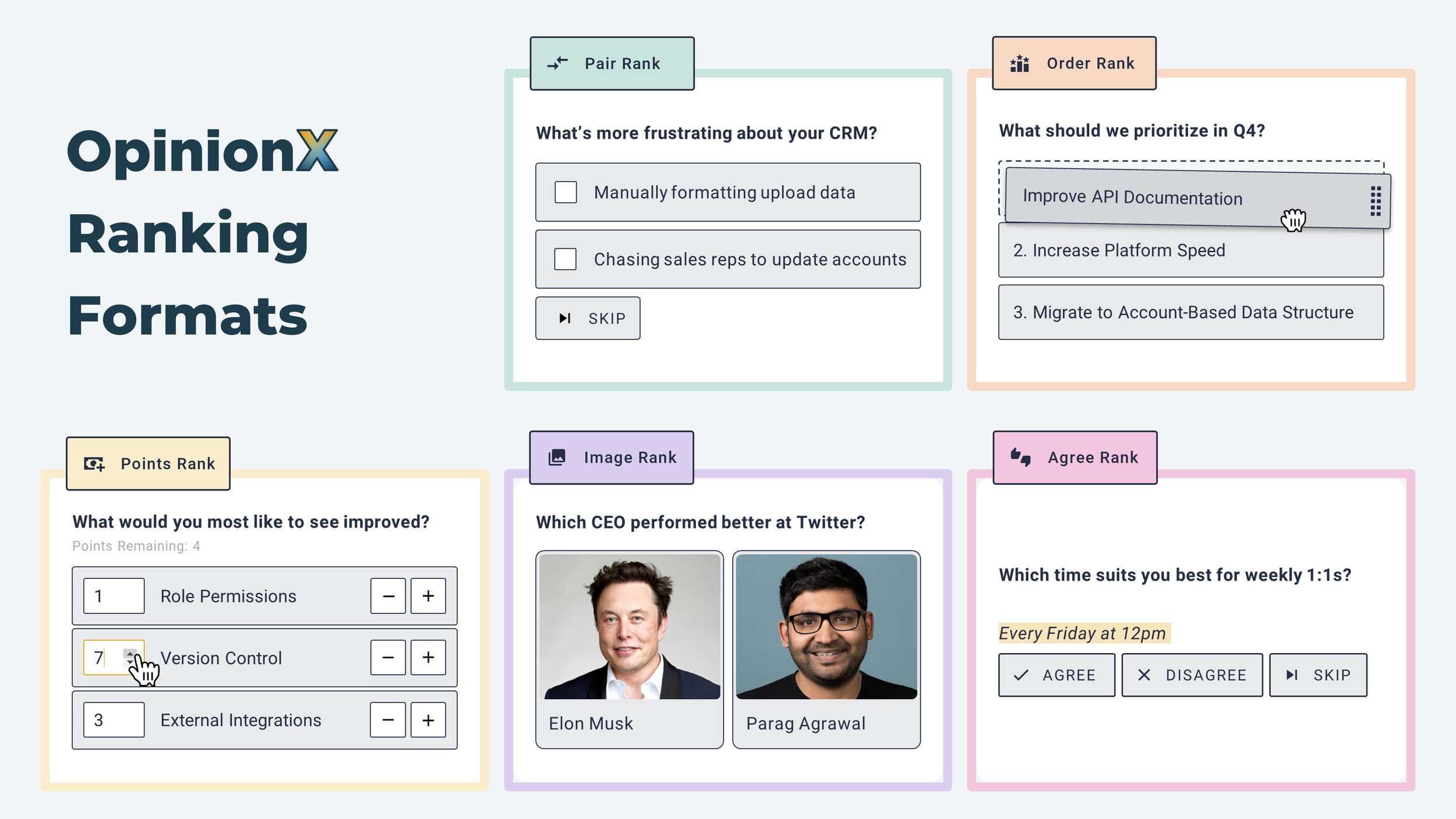
Because OpinionX was built for ranking, it has a bunch of features the others lack: recalculating your results to see how subgroups of participants voted against your overall numbers, survey branches that show different participants a personalised list of options based on their answers, and collecting new ranking options from participants mid-survey to fill gaps you missed.
Free version: The free tier gives you unlimited surveys with unlimited questions and unlimited ranking options, and every ranking format is unlocked, including Pair Rank and Image Rank that no other tool offers. It's capped at 25 participants per survey, but since you can run unlimited surveys, it's ideal for designing and validating your ranking research before you scale up.
Premium tiers: OpinionX's premium plans come in two models: a pay-per-survey option for upgrading a single survey with no subscription tie-in, or a yearly subscription that gives you a team workspace with unlimited researcher seats so colleagues can create surveys too. The premium plans lift the participant limit and add setup options (branching logic, forced response, voting requirements) and analysis tools (segmentation, clustering, exporting). See the full OpinionX pricing breakdown for more.
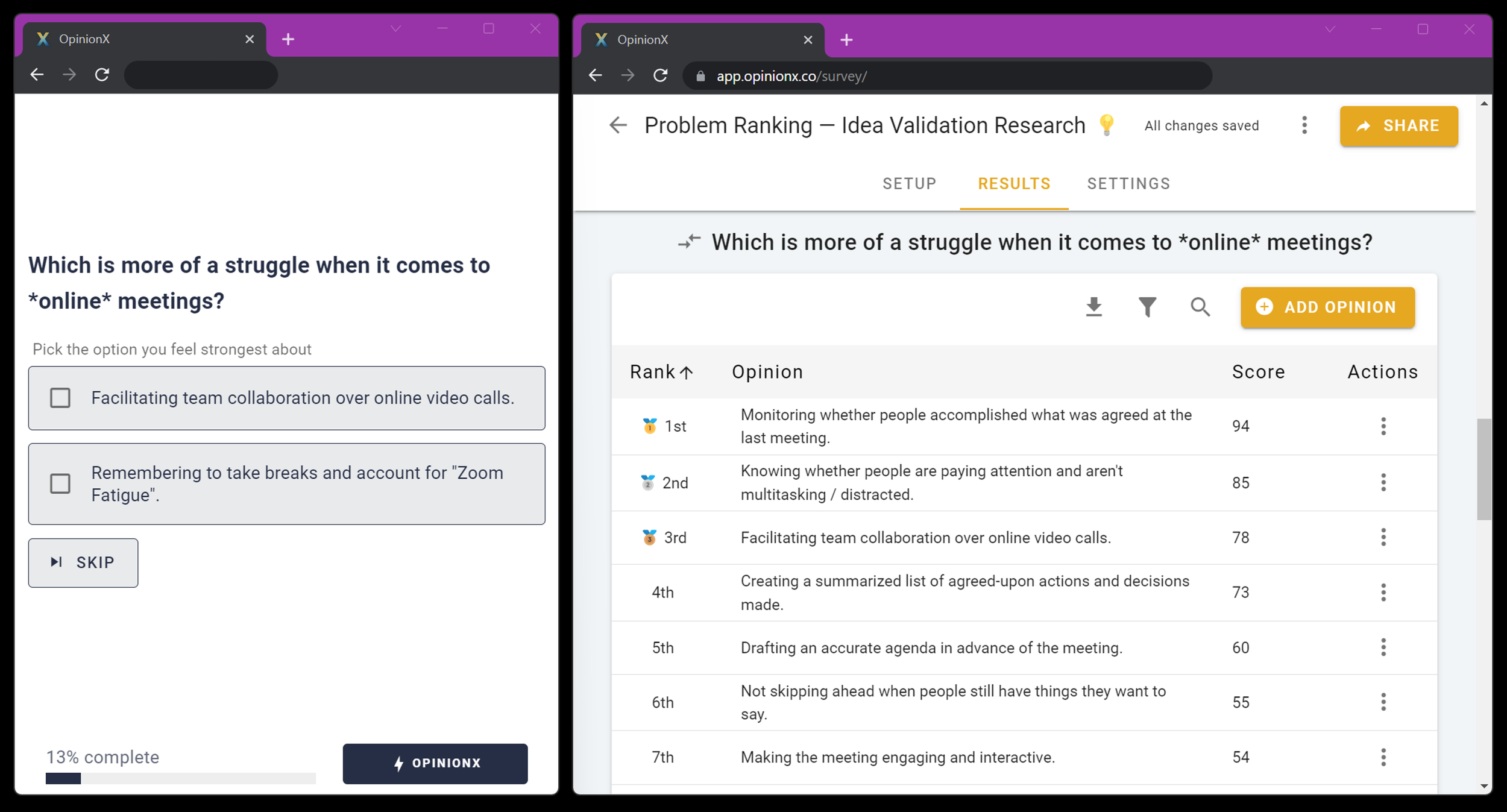
^ Pairwise Comparison voting and results on OpinionX
OpinionX has unique ranking methods that no other tool offers
Pairwise Comparison is a ranking method OpinionX offers that no other survey tool has. It's built for ranking longer lists that don't suit a huge drag-and-drop rank order. Instead, its "Pair Rank" method breaks the list into a series of head-to-head pair votes, far easier for participants (especially on mobile). It then works out which options win the most pairs and ranks them from 1st to last. OpinionX uses Pairwise Comparison for its Pair Rank and Image Rank question types.
What kind of ranking surveys do people build on OpinionX?
Professional research: validating ideas for new products or features (link), letting customers rank their highest-priority problems (link), prioritising a product roadmap (link), identifying which customers are the best candidates for user interviews, collectively setting team priorities, needs-based segmentation, and more.
Personal projects: asking book club members to vote on which book to read next, voting on baby names, ranking group away-day activities, picking between a list of potential brand names, figuring out which logo idea is most popular, finding team meeting times that suit the highest percentage of people, and loads of other creative uses of the OpinionX free tier. 🙂
👆 A real story about how we used ranking surveys to find product/market fit faster at our startup.
👆 The best insights in any ranking survey are found by comparing different segments of respondents.
OpinionX has been cited in US Federal Government research and featured in top technology publications like TechCrunch and First Round Review. It has the simplicity of Google Forms with the depth of an advanced research tool like Qualtrics. And it's free to run as many surveys as you want, with a whole range of ranking formats to fit your needs. Create your ranking survey right now in less than 5 minutes on OpinionX.
2. Google Forms
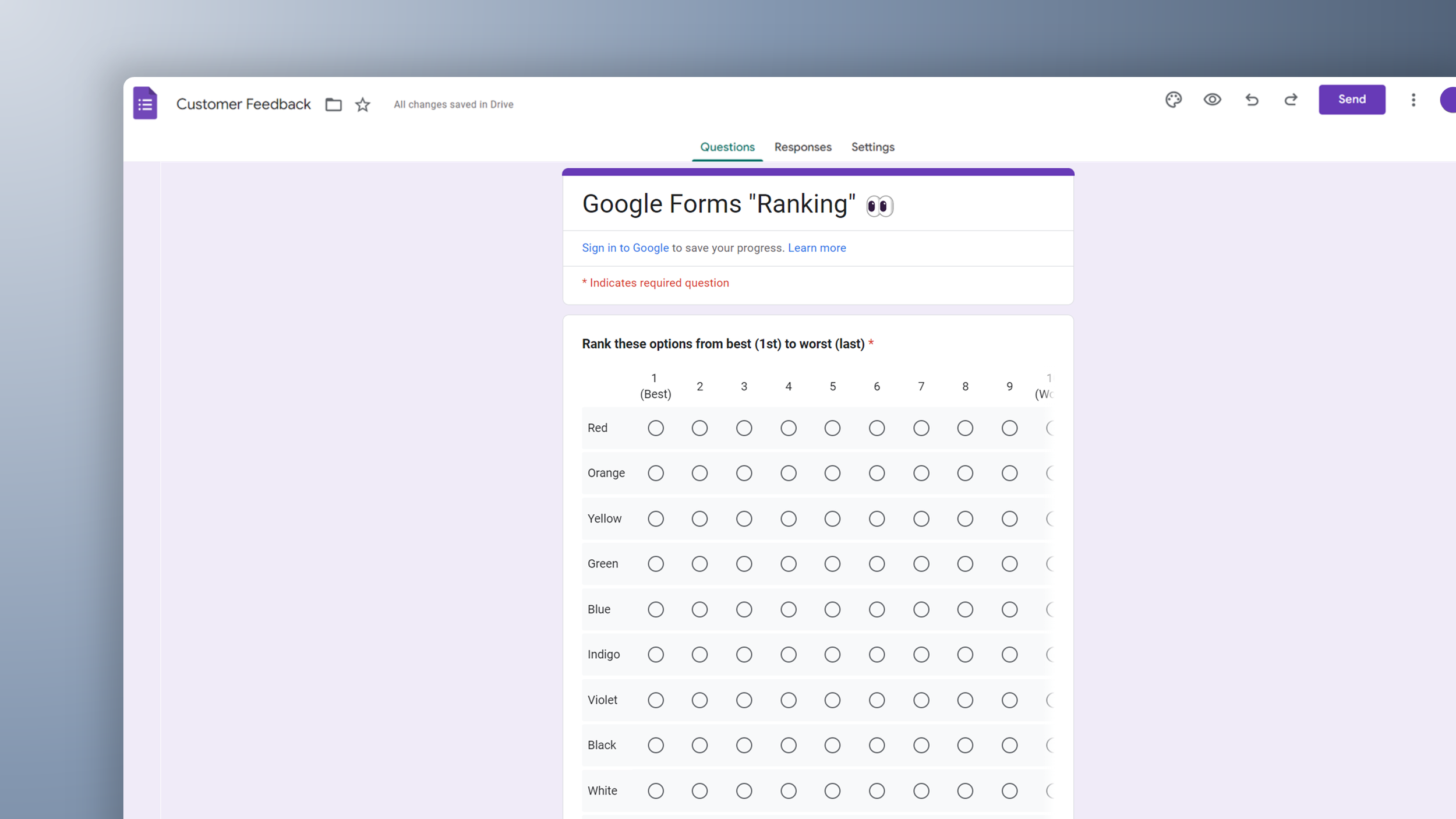
Google Forms doesn't have a ranking question type. You can try to rig one up with their "Matrix Choice Grid" format, but it doesn't even fit on a desktop monitor, never mind a phone screen.
3. SurveyMonkey
Drag-and-drop rank order questions are only available for premium customers on SurveyMonkey and, even on premium tiers, SurveyMonkey doesn't offer any ranked data analysis features. Their cheapest individual plan is the Advantage plan at $39/month billed annually, which allows up to 1,000 responses per month in total across all surveys.

4. Typeform
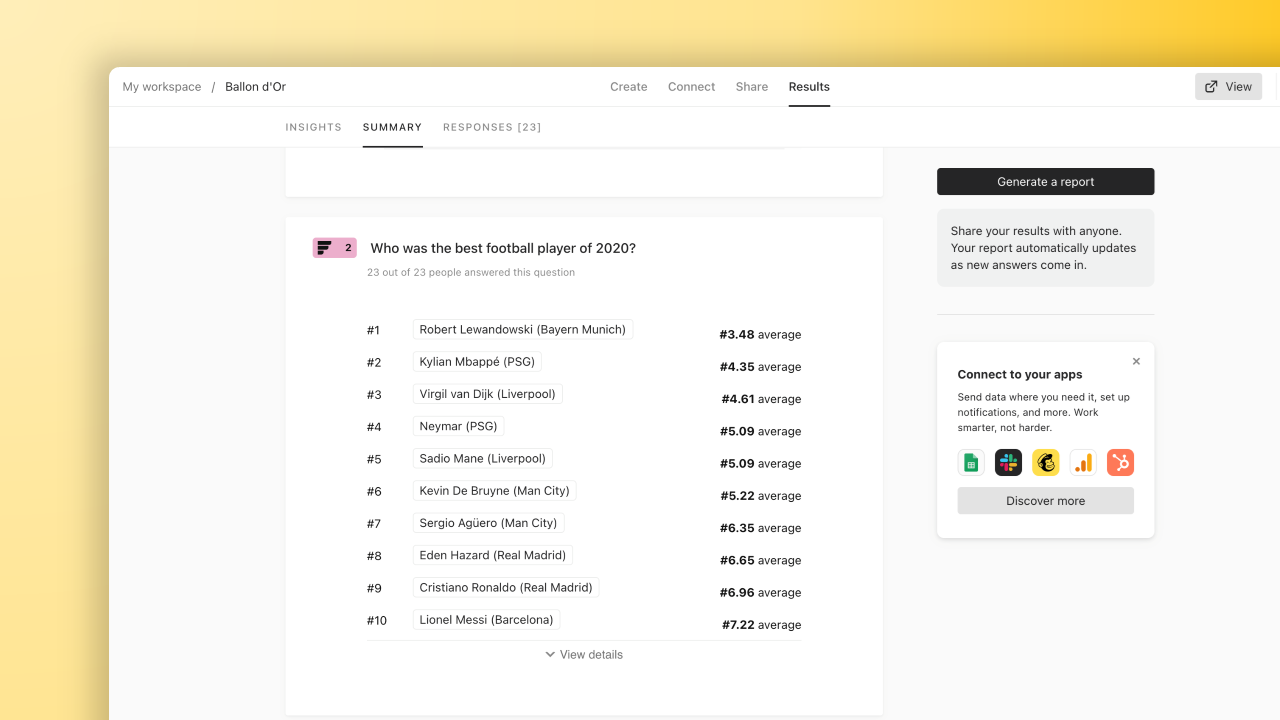
Typeform's free version is extremely limiting: you can only collect 10 responses per month in total across all surveys. It has even fewer graph and analysis features for ranking questions than SurveyMonkey (as seen in the screenshot). Typeform, as the name suggests, is designed for simple forms and not real research.
5. Qualtrics
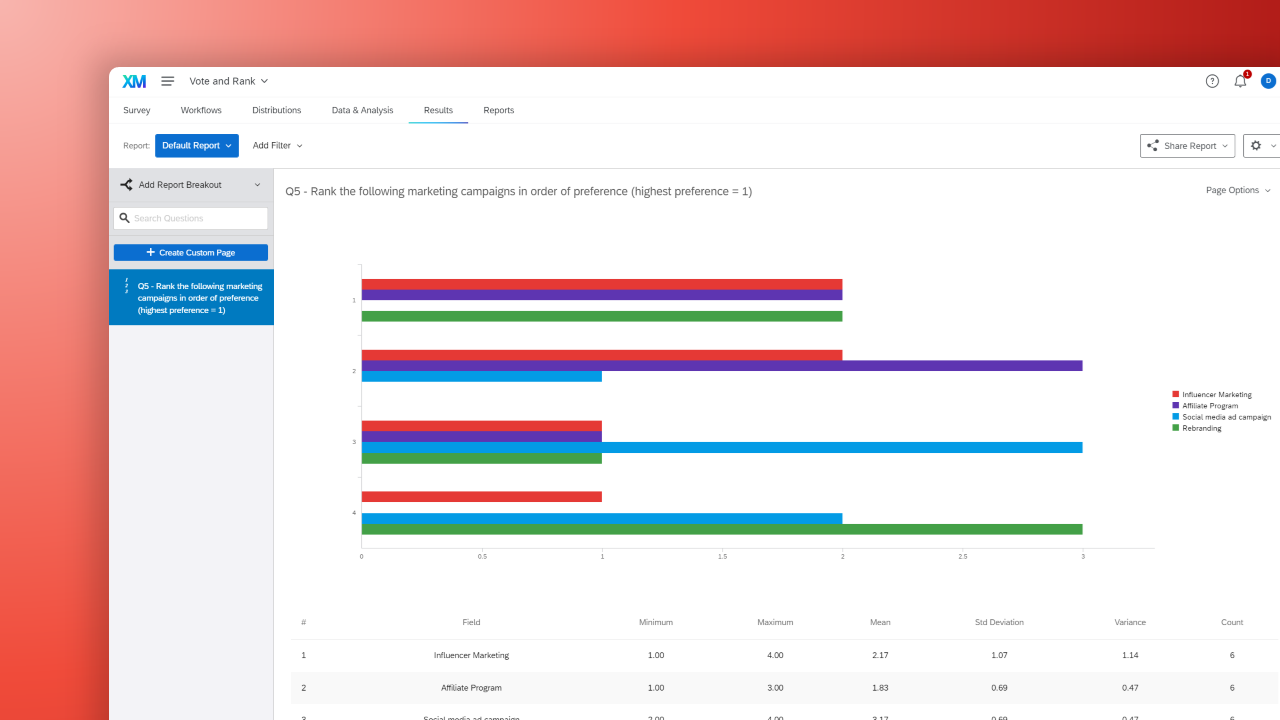
Qualtrics' free tier initially seems ideal (it includes Rank Order questions and allows up to 500 responses per survey on a free account, with up to 3 active surveys at a time), however it's extremely complicated to actually use. My simple ranking test on Qualtrics with 6 options and 4 participants gave me the unintuitive graph below (while offering 30+ different alternative data visualisations if I wasn't happy with that one). If you've already been trained on how to use Qualtrics, fire ahead. Otherwise you should consider it an advanced tool made for professional researchers.
6. Slido
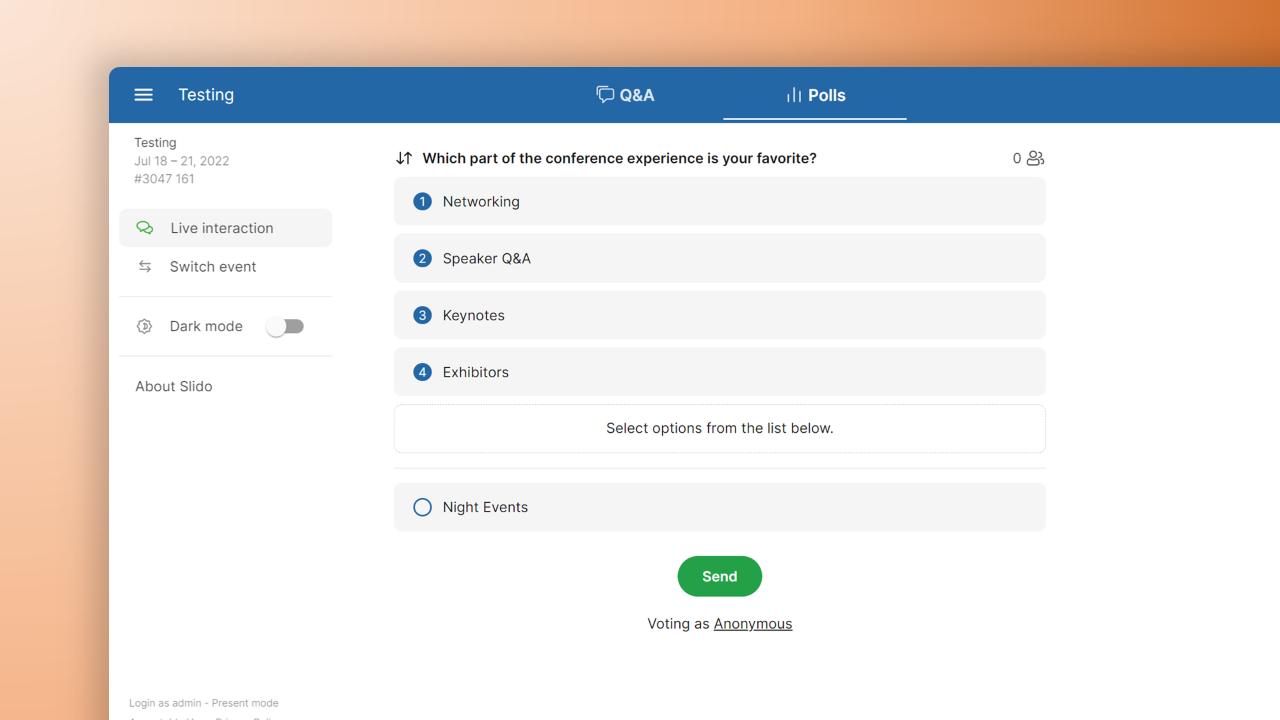
Slido is an audience engagement tool for live events. It has a drag-and-drop "ranking poll" feature that even Slido themselves recommend only for very small lists. The free tier allows up to 100 participants per project, after which Slido offers only per-year or per-event pricing (no monthly option).
7. Mentimeter
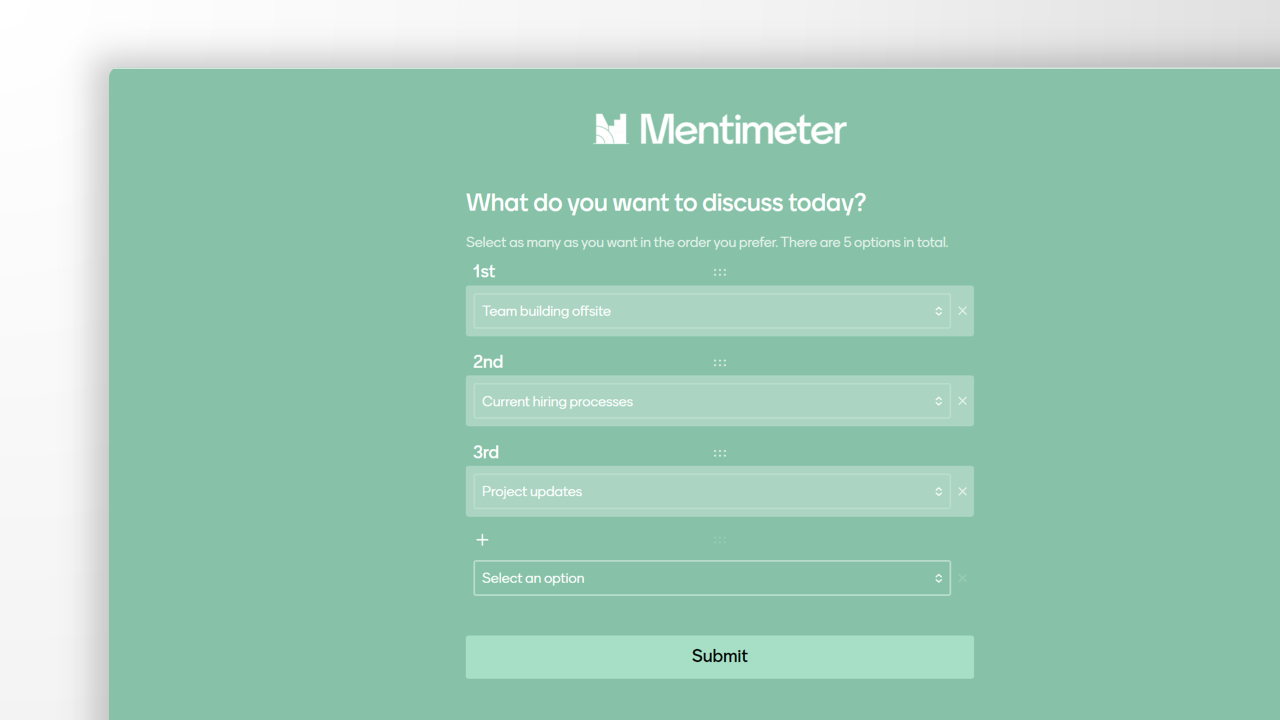
Mentimeter is very similar to Slido but focuses on classrooms instead of conferences. Its free version caps you at 50 participants per month across all sessions, and premium plans are charged per year only. It also wins the award for "most clicks required to rank stuff", arguably the weakest survey design for ranking out of all 7 tools in this post.
Summary
Of the seven most commonly used free survey tools, I'd only recommend the following three for any ranking exercises or research:
OpinionX is the best suited to ranking surveys and has the most generous free tier on this list: it's the only tool with every ranking format and its analysis tools available for free. It has the simplicity of Google Forms for quick ranking polls, plus analysis features for advanced projects.
If you've had the training, Qualtrics can handle advanced research with its 100+ question types and 30+ visualisation formats. Even with that giant library, it has a limited feature set for ranking (for example, no pairwise or image ranking).
For live events that want a simple audience engagement exercise ranking 3-6 options, Slido is a slick tool your attendees will enjoy. It isn't built for research.
When planning any research project, think ahead about the questions your results will raise. For ranking surveys those include: did I have gaps in my list of options? Do the results change depending on which participants I focus on? Now that I know what people care about, who can I interview who represents my overall results?
To answer those best, pick a free ranking tool built for the job. Whether you're running a simple no-fuss ranking survey or an advanced research project, OpinionX comes with everything you need.
Create a ranking survey in under 5 minutes on OpinionX. It's trusted by thousands of the world's leading teams for their ranking surveys.
Frequently asked questions
Can you help me design my free ranking survey? We offer a free onboarding video call to every new OpinionX user. Our paying customers get ongoing research support through every stage of their project, from survey design to participant recruitment and results analysis.
Can I use OpinionX alongside another survey tool? Of course. We've seen many research projects where researchers redirect participants from a tool like Google Forms over to OpinionX for the ranking-specific stage of the survey. This setup is possible on the free tier of OpinionX.
Which is the best free ranking survey tool? For ranking specifically, OpinionX is the best of the free ranking survey tools here: it's the only one built for ranking, with every ranking format and its analysis tools on the free tier. Qualtrics is a capable free option if you're already trained on it, and Slido works for very short ranking polls at live events.
Can you rank a list for free without a participant limit? Not on any of these tools. Every free tier here has some limit. OpinionX caps the free tier at 25 participants per survey but lets you run unlimited surveys with every ranking format unlocked, which is the most generous setup for ranking research.