
Qualtrics vs OpinionX: advanced surveys (Conjoint, MaxDiff)
If your product or UX team runs conjoint analysis and MaxDiff analysis more than once or twice a year, OpinionX is the better buy, while Qualtrics wins when procurement needs a SOC 2 report or you need significant testing, weighting and TURF.
This post compares OpinionX vs Qualtrics for conjoint analysis, MaxDiff and pricing research (Van Westendorp and Gabor Granger): what a year of studies costs on each, which methods you can mix in one survey, what the results include, how segmentation works, and where Qualtrics is the better buy.
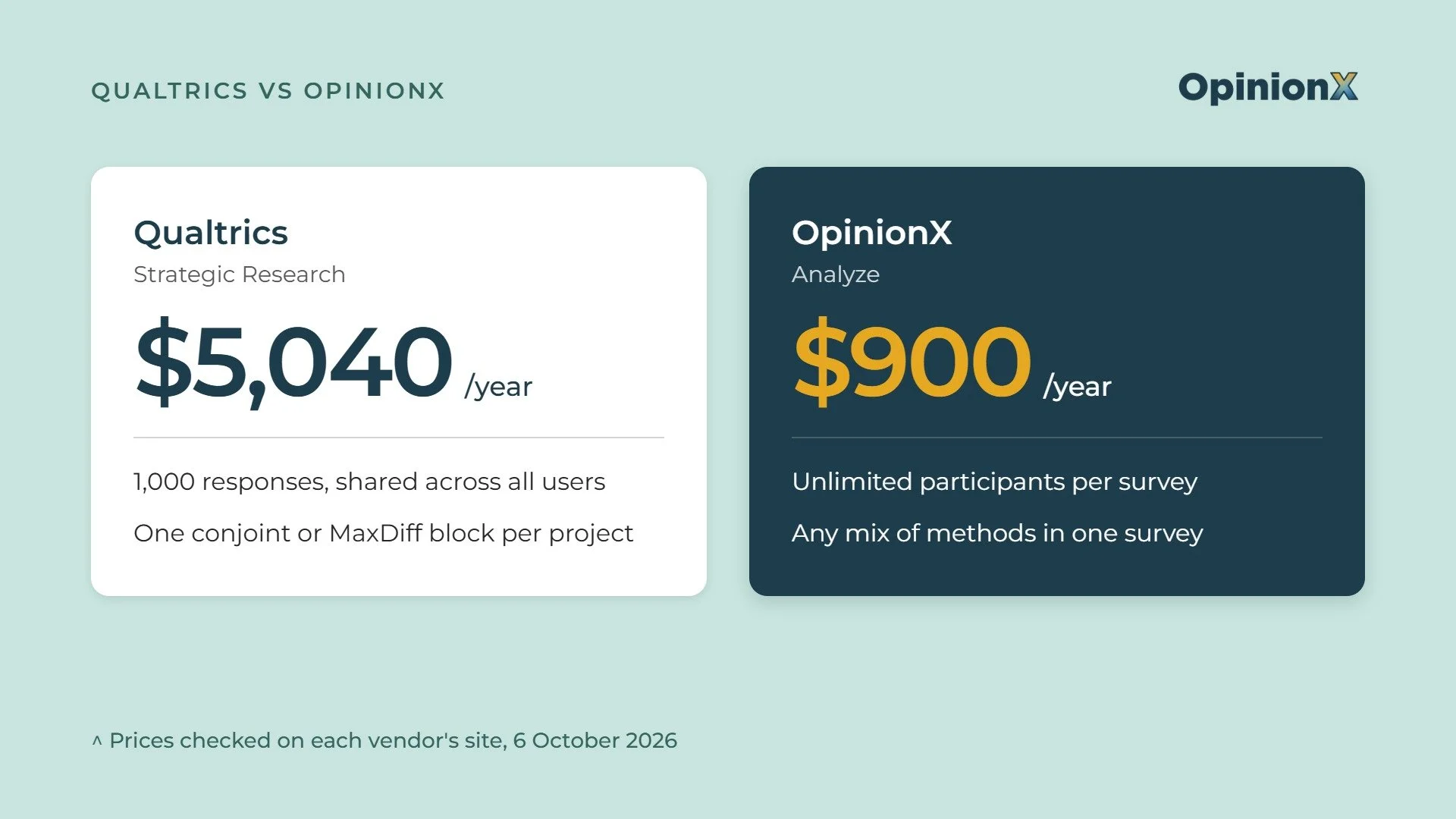
What does Qualtrics conjoint analysis cost on the $5,040 plan?
Qualtrics conjoint analysis sits on the Strategic Research plan, which Qualtrics now sells self-serve for $5,040 a year, paid upfront. Qualtrics advertises it as $420 a month, but there’s no monthly option. Here's what the plan page lists:
Unlimited users, surveys and questions per survey.
23 question types, including video and audio answers.
20+ pre-built guided studies, including Conjoint and MaxDiff.
Response weighting.
1,000 responses in total, shared across all users.
There’s a catch in the small print, though. The plan page lists Conjoint and MaxDiff as part of the plan, but Qualtrics' help docs for both project types still call them an additional purchase. So it’s not clear the $5,040 plan lets you run either one without paying more.
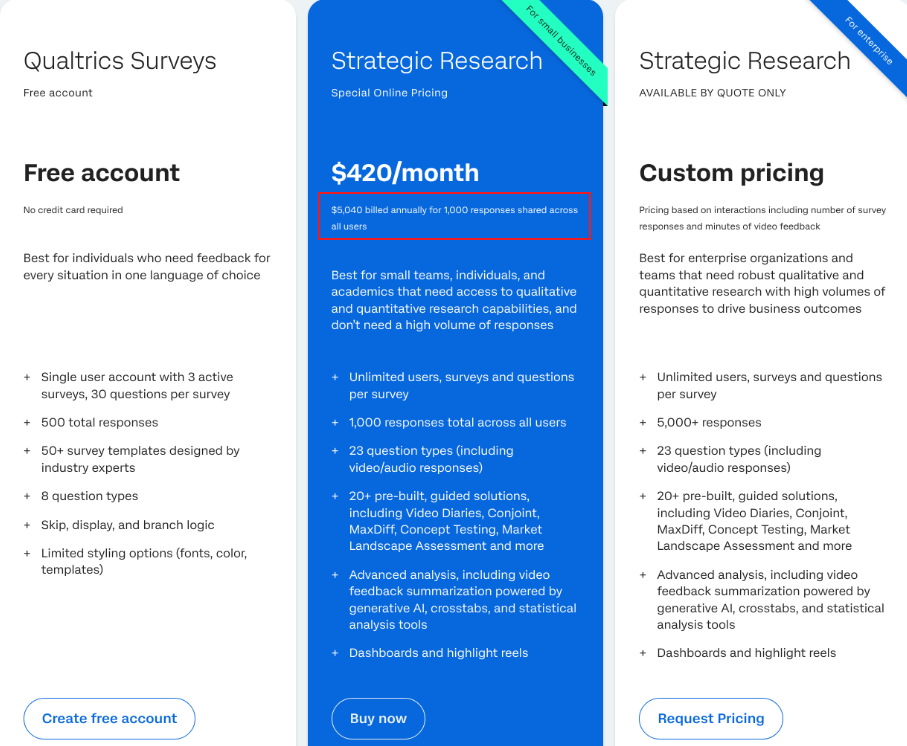
Checked on October 13, 2026.
What happens when you pass 1,000 responses?
You can't buy more responses online. If you need more than 1,000, the plan page says the Qualtrics Sales team will help you find a plan, and it doesn't say whether the 1,000 resets when you renew.
So what does the next plan cost? Qualtrics doesn't publish it, which makes conjoint analysis pricing on Qualtrics hard to plan past year one. The best public guide is Vendr's Qualtrics pricing page, which draws on 322 purchases and puts the median contract at $30,000 a year, with a range from $7,020 to $138,884 (last updated February 2026).
That median is about six times the online price:
$30,000 ÷ $5,040 = 5.95
The online plan also sets your platform cost per response:
$5,040 ÷ 1,000 responses = $5.04 per response
That's before you pay anyone to take the survey, since neither platform includes participants in the price.
What do OpinionX's Free and Analyze plans include?
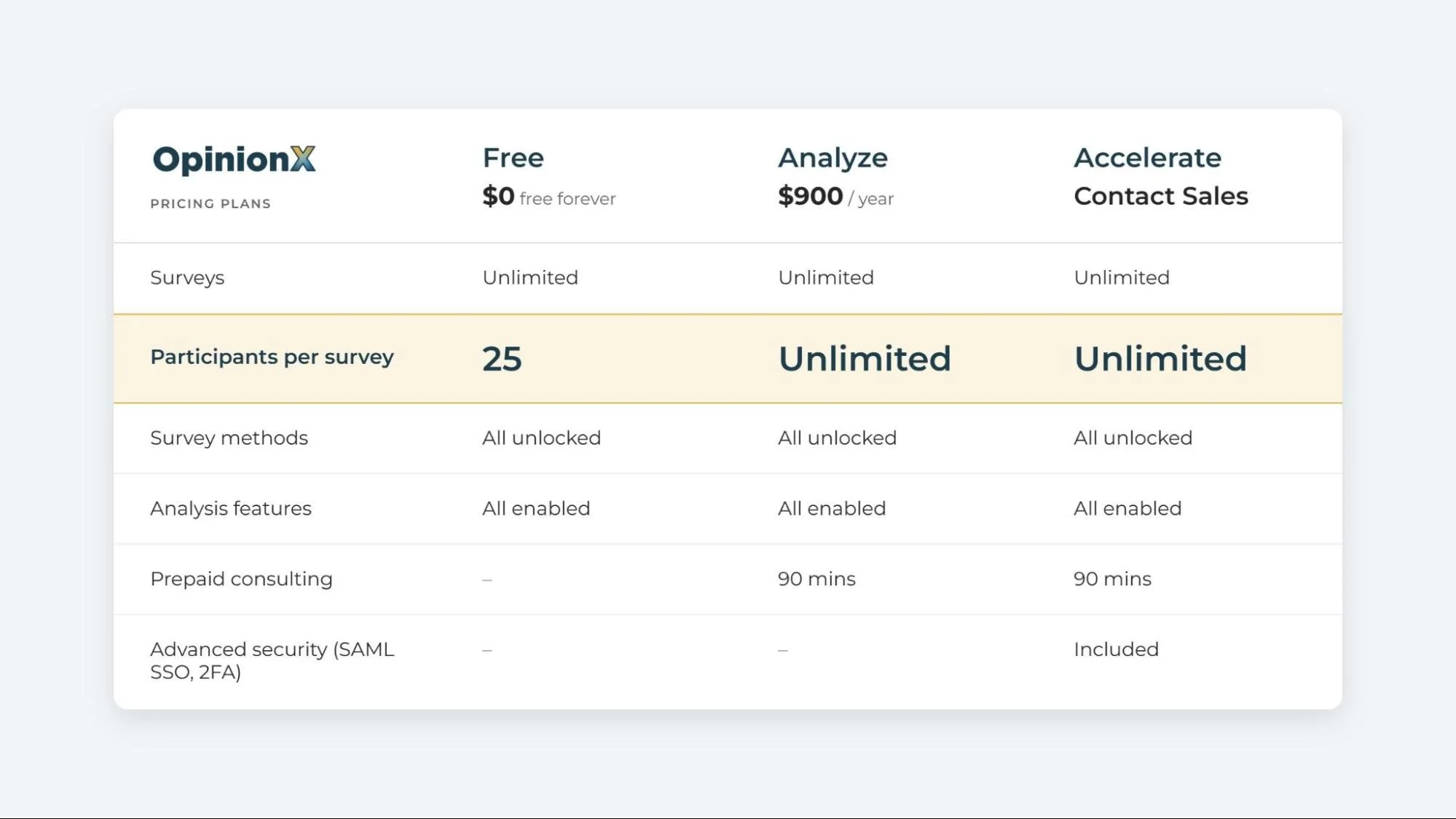
OpinionX has three plans, and every one of them includes every survey method and every analysis feature.
Free, $0. Unlimited surveys with no time limit, and each survey shows results for its first 25 participants. The cap is per survey, so every new survey starts again at zero.
Analyze, $900 a year, billed upfront. Unlimited participants on every survey, 90 minutes of prepaid help from a research expert, and no OpinionX branding.
Accelerate, contact sales. Adds private team folders, SAML SSO, two-factor sign-in and procurement support.
Every plan gives you unlimited survey creators, so the two platforms match on seats, since Qualtrics' online plan also has unlimited users. The gap is in responses: OpinionX only caps participants per survey on Free, while Qualtrics caps responses for the whole account on its paid plan.
The free plan lets you build the exact study you plan to run, pilot it with 25 people and read the actual conjoint output before you decide whether to pay. Qualtrics' free account can't do that: it has 8 question types, 3 active surveys, one user and 500 responses, and guided studies only appear on the paid plans.
What does a year of conjoint analysis and MaxDiff analysis cost on each?
Take a product team that plans three studies this year:
A conjoint survey on pricing plans.
A MaxDiff survey on the feature backlog.
A second conjoint survey on a new add-on.
Each study needs 400 responses, so 1,200 in total.
On Qualtrics, $5,040 covers the first 1,000 respondents, so the third study stops 200 short of its 400 responses, and the last 200 need an enterprise sales contract.
On OpinionX Analyze, $900 covers all 1,200, which works out at $0.75 per response if broken down across the three plans (OpinionX doesn’t charge per participant):
$900 ÷ 1,200 = $0.75
The gap in list price alone is $4,140 a year:
$5,040 − $900 = $4,140, so OpinionX costs 82% less
Now say the team picks up the pace to ten studies of 400 responses, or 4,000 in total. OpinionX still costs $900 ($0.23 a response), while Qualtrics needs the sales contract, where the median is $30,000 a year, according to Vendr.
| Research year | OpinionX Analyze | Qualtrics Strategic Research (online) |
|---|---|---|
| 2 studies, 800 responses | 🟢 $900 ($1.13 per response) | 🟡 $5,040 ($6.30 per response) |
| 3 studies, 1,200 responses | 🟢 $900 ($0.75 per response) | 🔴 $5,040 covers 1,000, then a sales contract |
| 10 studies, 4,000 responses | 🟢 $900 ($0.23 per response) | 🔴 Sales contract (Vendr median $30,000/year) |
You can run the same three studies on OpinionX's free plan first, with every method and chart unlocked, and only upgrade when you need more than 25 participants.
Here's what a conjoint survey looks like from the participant's side. Vote through a few rounds, then open the results.
Can you run conjoint analysis, MaxDiff and pricing research in one survey?
Not on Qualtrics. Qualtrics conjoint analysis and MaxDiff each run as their own project type, which you start from the Catalog as guided projects, and Qualtrics' docs set the rule plainly: one conjoint or MaxDiff block per project.
You can add ordinary questions in other blocks, but conjoint and MaxDiff can't share a project, and neither can two conjoint exercises.
Qualtrics' docs add two more limits:
Conjoint and MaxDiff answers can't drive survey logic, piped text, quotas or scoring.
Some licence types allow only 5 conjoint projects at a time.
So what does the one-block rule mean in practice? Take a common two-step study: you run MaxDiff to rank 25 features, then a separate survey later with conjoint analysis to run a pricing study of the top five features.
On Qualtrics, that's two projects with two survey links, and if the same 400 people take both, you've used 800 of your 1,000 responses.
On OpinionX, every method is a block in the builder, and you can put several advanced question types in one survey in any order, including conjoint analysis, MaxDiff, Van Westendorp, Gabor Granger, pairwise comparison and constant sum (points allocation). The two-step study above becomes one survey with one link, where each person counts once and all the data aggregates together as one results dashboard.
Having it all inside one survey helps with analysis too, since you can filter or split the conjoint results by any multiple-choice answer from the same survey (for example to compare differences in preferences between people on your monthly plan vs people on your annual plan).
Pricing research has the same problem on Qualtrics. Qualtrics has Gabor Granger as a guided project and Van Westendorp as a study template, but its own Gabor Granger docs say you can only have one pricing block per survey, so you can't test the prices of two products in one study. You can't combine results from separate Gabor Granger studies in one report either.
On OpinionX, Van Westendorp and Gabor Granger are blocks like any other. You could test the price of your monthly and annual plans with two Gabor Granger blocks, then add a conjoint analysis on what goes in each plan, and split every result by the same segments. The Van Westendorp guide and the Gabor Granger guide show you how to set them up.
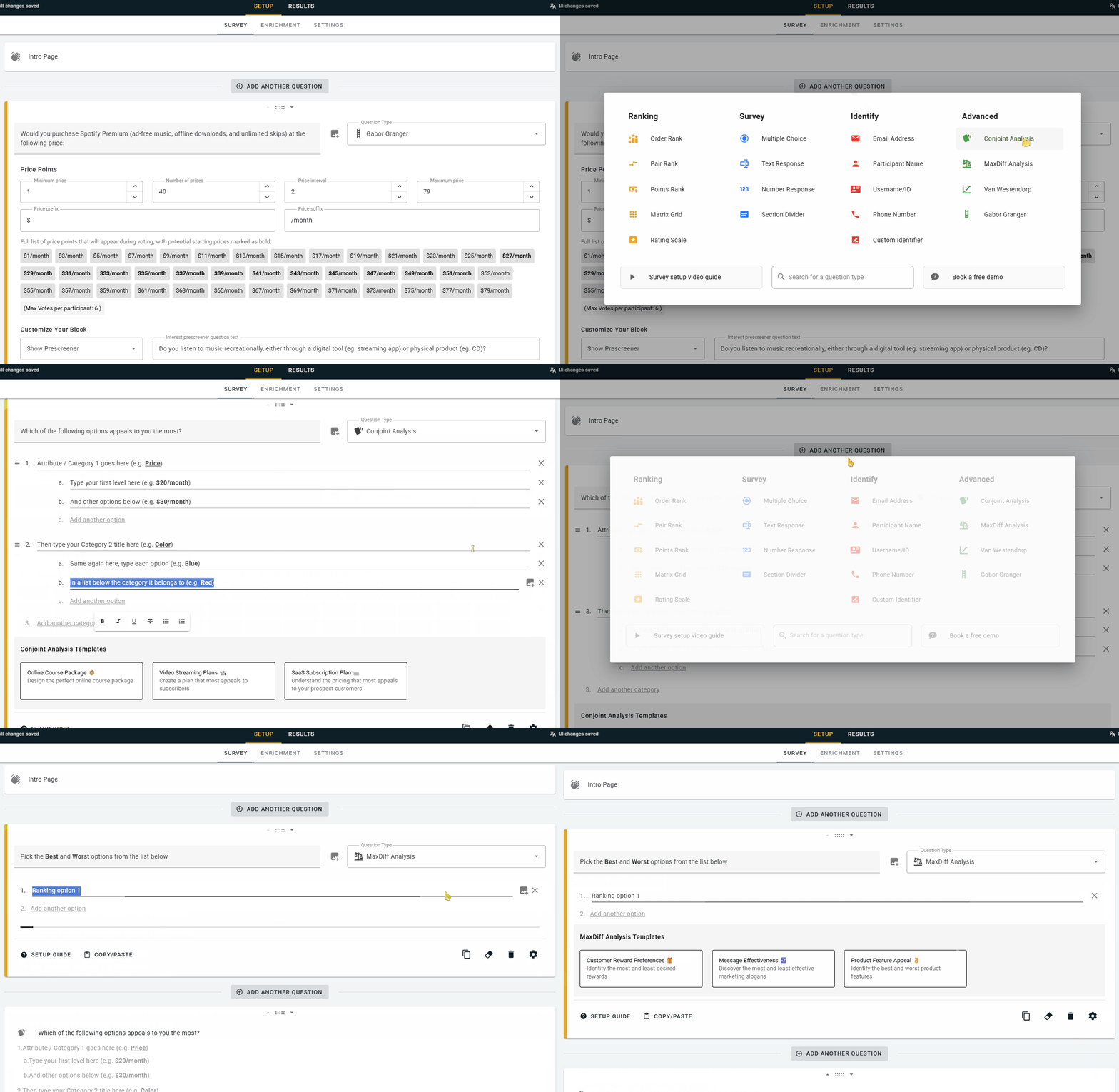
Mixing methods in one survey takes some planning, mostly around survey length and the order of the blocks. If you'd like a second pair of eyes on yours, a research expert will walk through the setup with you on a free 30-minute call.
What do conjoint analysis results include on each platform?
Start with the scoring model, because both platforms use the same type. Qualtrics' technical paper says Qualtrics scores its conjoint analysis with a Hierarchical Bayes multinomial logit model, written in Stan. OpinionX scores conjoint analysis with the same type of model, a hierarchical Bayes multinomial logit (HB-MNL), and runs it with the No-U-Turn Sampler, the method from Hoffman and Gelman's 2014 paper that Stan uses by default.
What does "Hierarchical Bayes" mean here? Each person only votes on a handful of profiles, so their own data is thin. The model fills the gaps by borrowing from the whole group, then nudges each person's scores towards their own votes, which gives you a score for every option, for every participant.
Kenneth Train's Discrete Choice Methods with Simulation is the standard free textbook on these models if you want the full detail. For a plain walk-through, see how conjoint results are calculated.
So the scores are comparable, and the differences are in what each platform builds on top of them.
What both platforms give you:
Conjoint simulator. You set up products that compete, and it predicts which one people would pick. OpinionX shows market share and revenue, while Qualtrics shows preference share with a margin of error at 95% confidence.
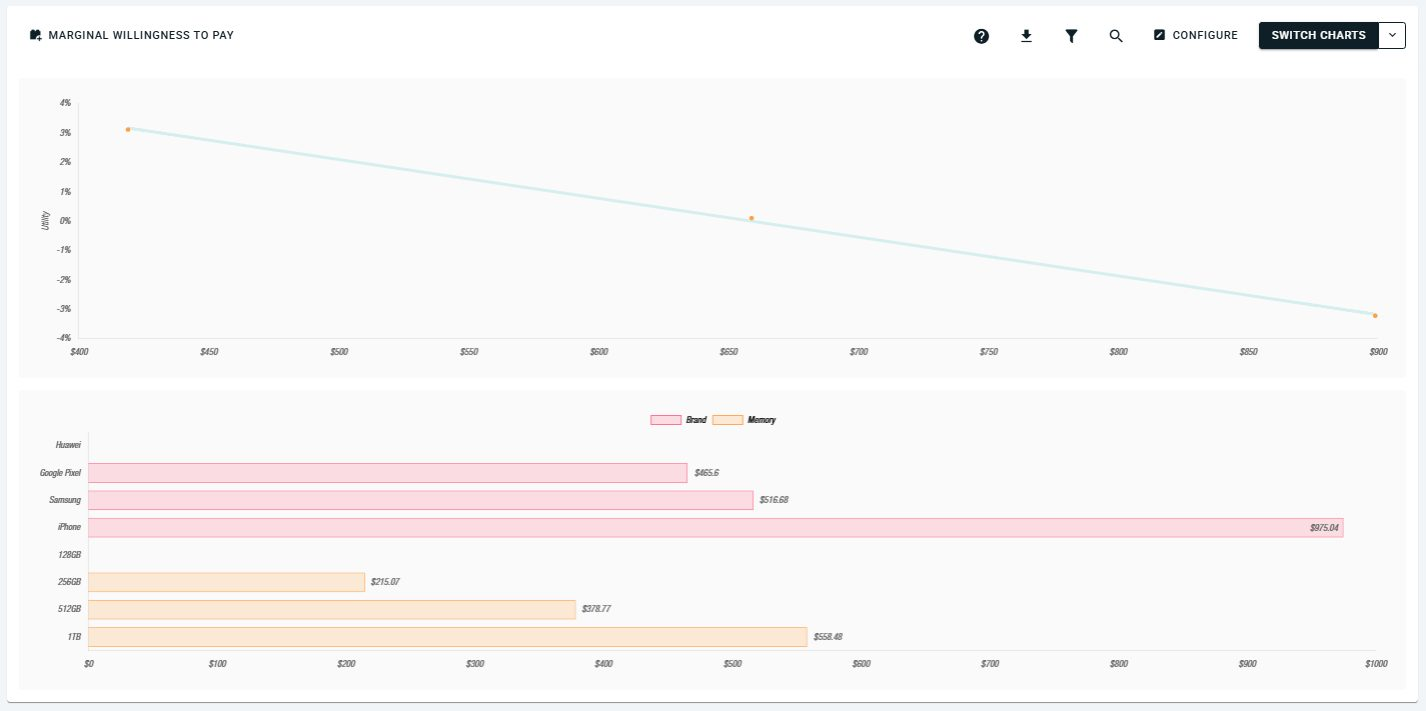
Marginal willingness to pay. Each platform turns conjoint scores into the extra amount people would pay for one option over another in the same category, as long as price is one of your categories. It’s marginal because it prices the difference between options, not the whole product.
"None of the above" choice. Participants can reject every profile, and either simulator can show the share of people who'd buy nothing.
Segmentation analysis. You can read the results for one group at a time on either.
Where they’re different: Qualtrics adds cost inputs, so its simulator can project profit as well as revenue. It also offers a "dual choice" format, where people pick a profile and then say whether they'd actually buy it.
OpinionX adds a rejection rate chart, which splits the "none of the above" votes out by option so you can see which attribute levels are causing the most rejection or churn.
Say "iPhone" has a 3% rejection rate. That means in 100 voting rounds where an iPhone profile was on screen, people picked "none of the above" 3 times. Run that across every option and you see which ones push people to walk away. Qualtrics' docs describe the overall share who'd buy nothing, but not a breakdown by option.
OpinionX's other conjoint outputs which Qualtrics does not offer on the Strategic Research plan:
A scenario simulator with three modes: market share, revenue and churn. The revenue mode assumes 1,000 target customers, and the churn mode adds an opt-out group for people who'd pick none of your profiles.
A ranked list of every possible profile, ordered by net preference.
Profile logic, which stops unrealistic combinations from showing up. Use it sparingly, because blocking combinations biases the scores and the marginal willingness-to-pay figures.
One more difference shows up before you even get to results: OpinionX designed its conjoint voting screen to work on any screen size, including responsive design for smaller smartphone screens. Here's how mobile layout affects conjoint analysis surveys.
How long can a Qualtrics MaxDiff list be, and can you segment it?
Qualtrics MaxDiff needs at least 8 items and allows at most 30, and its docs suggest 12 to 25 as best practice.
Both ends of that range cause problems. A shortlist of five features can't run as a Qualtrics MaxDiff at all, while a backlog of 60 feature requests needs cutting to 30 first, or splitting across two projects with two samples. And cutting a voting list before you put it into a MaxDiff Analysis survey means someone has already guessed which half is worth keeping, which defeats the purpose of a relative-importance measurement study.
So why does Qualtrics cap list length? Every MaxDiff round shows each person a small set of items. If every person had to see every item a few times, a long list would mean a long survey. For a 30-item list, shown 4 items at a time, where each person sees each item 3 times:
30 items × 3 views ÷ 4 per round = 22.5, so 23 rounds
That's a lot of rounds for one person. But nobody needs to see every item. The scores pool across everyone who takes the survey, so each person can vote on a random shortlist drawn from the full list.
OpinionX's MaxDiff works this way, with no set minimum or maximum list length. You choose how many rounds each person votes on, and each round shows 3 to 6 items (4 by default). The sample size calculator then works out how many people you need so every item appears in at least 200 rounds across the survey. With 10 rounds per person and 4 items a round, a 30-item list needs 150 people, and a 200-item list needs 1,000:
200 rounds × 200 items ÷ (4 items × 10 rounds per person) = 1,000 people
That's also why MaxDiff beats pairwise comparison on long lists. One MaxDiff vote on 4 items tells you how 5 of the 6 possible pairs rank: the best item beats the other 3, and the worst loses to the 2 in the middle. A pairwise vote tells you about 1 pair. For shorter lists or other jobs, see when to use pairwise comparison, the best free pairwise ranking tools and other MaxDiff alternatives.
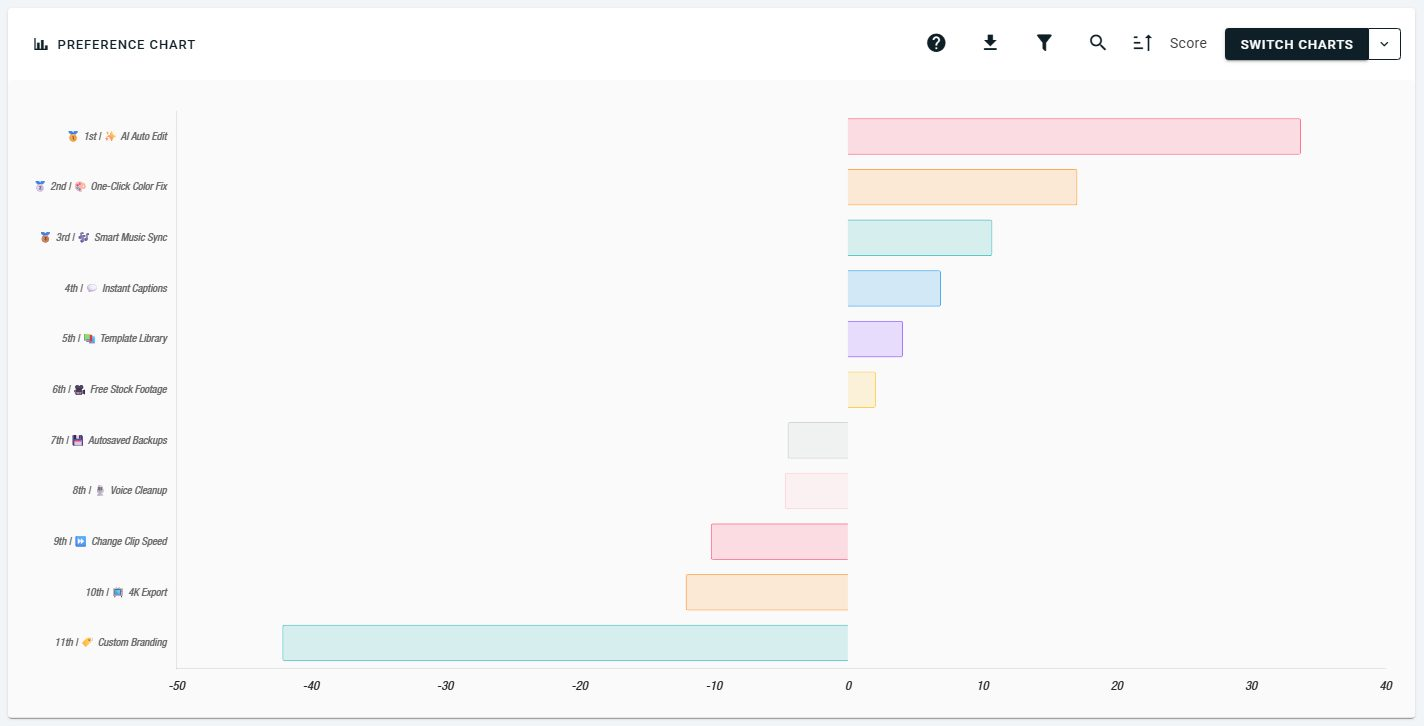
Here's what OpinionX's MaxDiff results look like for 11 features of a video editing app. Each score is the share of rounds where people picked a feature as most important, minus the share where they picked it as least important. A feature shown in 20 rounds, picked best 11 times and worst 3 times, scores 55 − 15 = 40.
Why is segmentation more important than the average?
The average ranking is usually the least useful result in a MaxDiff. Picture a phone survey where half the people rank battery life first and half rank the camera first: the average puts both in the middle and tells you nothing. The useful finding is in the split, the same pattern a segmented PMF survey turns up.
Qualtrics' MaxDiff report docs say Text iQ, Stats iQ and crosstabs aren't available for MaxDiff, and its conjoint report has a dropdown to view only one group at a time.
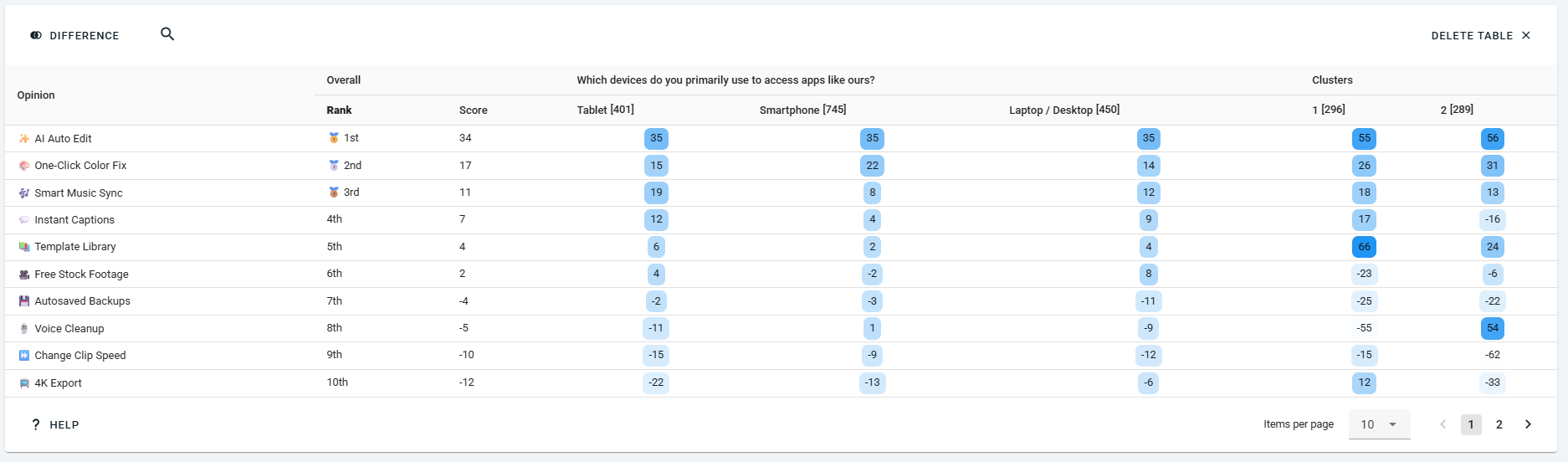
On OpinionX, every method works with the same segmentation tools:
Filter recalculates every result for one group.
Compare Tab shows two groups side by side.
Segments Tab is a crosstab with up to 30 segments as columns.
Cluster Tab uses AI to group people with similar voting patterns, so you can find segments you didn't define in advance.
You can build segments from any multiple-choice answer, or import your own customer data before launch with a CSV upload or hidden fields in the survey link. That's the basis of needs-based segmentation. For how it differs from grouping people by attitudes, see psychographic segmentation.
What are OpinionX's limitations next to Qualtrics?
Qualtrics is a full experience management suite with survey research as one part of it, and that breadth gives it some advantages.
Security and compliance. Qualtrics holds SOC 2 Type II and ISO 27001, plus FedRAMP High and several other ISO standards. OpinionX doesn't currently hold a SOC 2 report or ISO 27001 certification (as of October 2026 when this post was written). Its hosting providers do, but that isn't the same thing.
Participants. Both platforms let you buy participants in the app. Qualtrics sells online panels up to $15,000 per purchase, with B2B and B2C targeting, though it doesn't publish how many people they reach. OpinionX's built-in panel is newer and smaller: it launched in October 2026 with over 200,000 people, and it's still growing. You can also bring your own participants through a link, or email invites at $0.10 each on OpinionX's paid plans.
Statistics. Qualtrics' online plan includes Stats iQ significance testing and response weighting, and its conjoint simulator shows a margin of error. OpinionX has no significance testing and no weighting. Weighting corrects a sample to match a population, such as a national census, and teams surveying their own customers rarely need it, though teams measuring a whole market do.
TURF. Qualtrics runs TURF analysis on MaxDiff results. TURF finds the mix of items that reaches the most people, so it's built for product range decisions like which five ice cream flavours to stock, and ranking a feature backlog doesn't need it. OpinionX doesn't offer TURF.
AI study builder. Qualtrics announced a Research Agent on 7 August 2026: you describe the decision and it builds a conjoint or MaxDiff study for you. Qualtrics doesn't say whether the online plan includes it. OpinionX uses AI for persona clustering and survey translation, but has no AI study builder.
Breadth. Qualtrics' online plan has 23 question types, including video and audio answers, and runs surveys in 70+ languages, against 59 on OpinionX. It also sits next to Qualtrics' customer and employee experience products, under one contract.
If two or more of these are must-haves for you, Qualtrics conjoint analysis is the better buy. If none of them is, you'd be paying $4,140 more a year for features you won't use, with a guaranteed path to a $30k enterprise sales conversation with Qualtrics once you hit 1000 participants total.
Which one can a product team run without a research specialist?
Ease of use is where reviewers split the two most clearly. On G2, Qualtrics Market Research scores 4.4 from about 3,000 reviews, and several reviewers flag the learning curve on advanced features.
One small-business reviewer, Vivek S., about Qualtrics, names "the steeper learning curve, especially for new users". OpinionX scores 4.7 on G2, where Morgan F., a Research Director, puts it the other way round: "very easy to use, especially for new users".
Pace Pricing, a pricing research agency, acted on that gap and switched from Qualtrics to OpinionX for its pricing surveys.
Sharing results works differently too. Qualtrics' docs say there's no way to limit what collaborators on a conjoint or MaxDiff project can do, so anyone you add can edit, publish and distribute. For read-only access, you share a public report link, with an optional password.
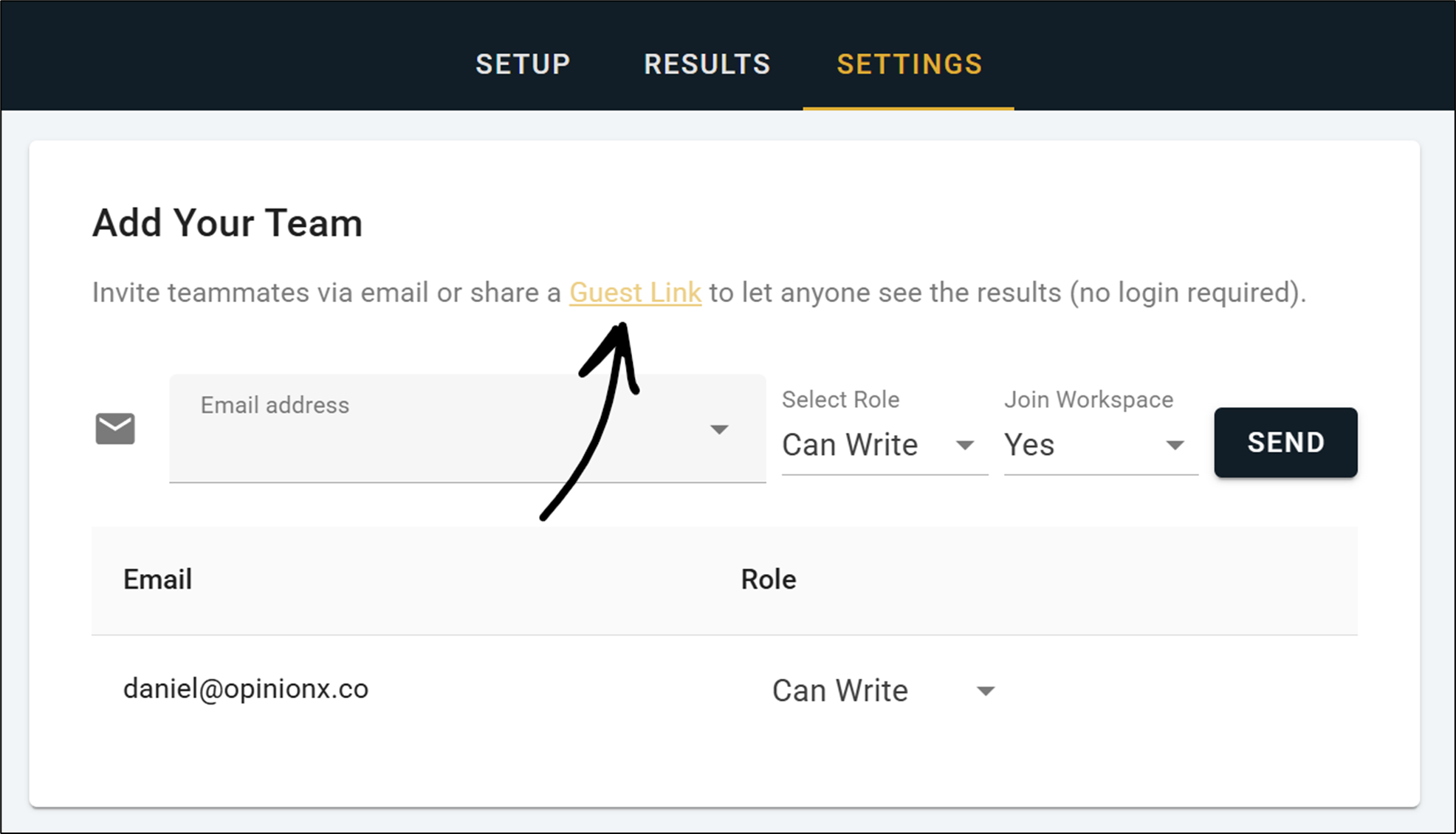
On OpinionX, each survey has up to 5 editor seats you can assign to anyone, and every plan includes unlimited viewer seats. You can also publish results to a guest link that anyone can open without signing up. Workspaces on OpinionX also have unlimited researcher seats, where every seat can create their own surveys or be added as an editor on someone else’s survey.
There’s also a big difference when it comes to support. OpinionX offers live-chat customer support for all users. Its premium Analyze plan includes 90 minutes of prepaid time with a research expert, who can help you design the study and read the results, and even more hours included in the Accelerate tier. On the other hand, Qualtrics' online plan page doesn't list expert help on that plan.
OpinionX vs Qualtrics: side-by-side comparison
| OpinionX | Qualtrics (Strategic Research, online) | |
|---|---|---|
| Entry price with conjoint and MaxDiff | 🟢 $0 (Free), then $900/year (Analyze) | 🔴 $5,040/year for 1000 participants, then ~$30,000/year |
| Free plan includes conjoint and MaxDiff | 🟢 Yes, 25 participants per survey | 🔴 No. Free has 8 question types and 500 responses |
| Responses on the entry paid plan | 🟢 Unlimited per survey | 🔴 1,000 in total, shared across all users |
| Users | 🟢 Unlimited survey creators and viewers | 🟢 Unlimited users |
| Advanced methods in one survey | 🟢 Any mix, in any order | 🔴 One conjoint or MaxDiff block per project |
| MaxDiff list length | 🟢 No hard-coded minimum or maximum limits | 🔴 8 to 30 items |
| Pairwise comparison | 🟢 Yes (Pair Rank) | 🔴 No |
| Constant sum (points) | 🟢 Yes (Points Rank) | 🟢 Yes |
| Conjoint scoring | 🟢 Hierarchical Bayes MNL | 🟢 Hierarchical Bayes MNL |
| Conjoint simulator | 🟢 Market share, revenue and churn | 🟢 Preference share with margin of error, revenue and profit |
| Marginal willingness to pay | 🟢 Yes | 🟢 Yes |
| Rejection rate by option | 🟢 Yes | 🟡 Overall "would not purchase" share only |
| Crosstabs on Conjoint or MaxDiff results | 🟢 Yes, up to 30 segments at once | 🔴 No |
| Significance testing | 🔴 No | 🟢 Yes (Stats iQ) |
| Response weighting | 🔴 No | 🟢 Yes |
| TURF analysis | 🔴 No | 🟢 Yes, on MaxDiff |
| Buy participants in the app | 🟢 Yes | 🟢 Yes, up to $15,000 per purchase |
| AI study builder | 🔴 No | 🟡 Research Agent; plan coverage not stated |
| SOC 2 and ISO 27001 | 🔴 No | 🟢 Yes |
| Read-only sharing | 🟢 Viewer seats and a guest link with no login | 🟡 Public report link with optional password |
| Survey languages | 🟢 59 languages, with free automatic translation | 🟢 70+, with built-in machine translation |
| Video and audio answers | 🔴 No | 🟢 Yes |
| Expert help included | 🟢 90 minutes on Analyze | 🟡 None included |
Should you pick OpinionX or Qualtrics?
Pick OpinionX if you're a product, growth or UX research team running conjoint and MaxDiff at scale, which usually means more than 1,000 responses. If you want flexibility, like mixing several methods in one survey, having MaxDiff lists shorter than 8 or longer than 30, and expanding the scale of your research or team later without having to pay more. It's also the pick if comparing customer groups with segmentation analysis is the result you need. You'll pay $900 a year with no response cap, and you can build and pilot your full study on the free plan before you spend anything, and expanding OpinionX across your broader team over time won’t cost you anything extra.
Pick Qualtrics if your procurement team needs a SOC 2 report, you need significance testing, weighting or TURF reports. It also makes sense if your company already pays for Qualtrics' experience products and research is one more use for them.
Still not sure? Our conjoint analysis software roundup compares OpinionX with nine other top research platforms. If you're still deciding whether conjoint fits at all, read when not to use conjoint analysis, the alternatives to conjoint and conjoint analysis vs AHP first. For MaxDiff tools, see the MaxDiff software comparison.
Frequently asked questions
Does Qualtrics include conjoint analysis on the $5,040 plan? Qualtrics' online plan page lists Conjoint and MaxDiff among the guided studies in Strategic Research, at $5,040 per year, but its help docs still describe both as an additional purchase, so it’s not clear you can run them on that plan without paying extra.
How many responses does Qualtrics Strategic Research include? The online plan includes 1,000 responses in total, shared across all users and surveys. Once your surveys reach a combined 1000 participants, you can't buy more online. Your only option is to discuss it with Qualtrics’ sales team. Vendr puts the median Qualtrics contract at $30,000 a year plus per-respondent fees. Therefore, running conjoint analysis or MaxDiff surveys on Qualtrics doesn’t cost $5040 in practice, as it is instead a discounted option that funnels you to an inevitable Qualtrics enterprise sales meeting.
Can you run conjoint analysis surveys for free? Yes. OpinionX's free plan includes conjoint, MaxDiff, pricing methods like Van Westendorp and Gabor Granger, and every analysis feature, all for free. Results for the first 25 participants per survey are available on the free tier, while the Analyze plan removes that participant cap for unlimited respondents at a cost of $900 per year. Qualtrics' free account doesn't offer conjoint or MaxDiff analysis.
Is OpinionX's conjoint analysis as rigorous as Qualtrics’ algorithms? Yes. Both calculate conjoint analysis results with a Hierarchical Bayes multinomial logit model, using Markov chain sampling. Qualtrics adds a margin of error to its simulator and offers significance testing, while OpinionX adds a per-option rejection rate and customisable crosstab reports for every survey method.
Qualtrics' own plan page says the $5,040 ‘Strategic Research’ plan is for teams that don't need a high volume of responses, and three studies of just 400 respondents already break that limit. Build your next conjoint analysis or MaxDiff analysis study on OpinionX's free plan instead, where you can design and pilot your survey with 25 people for free, and view the interactive automated results, before you need to consider spending anything.