
“Of the nine tested, OpinionX is the only one that runs a complete MaxDiff survey on a free tier: $0 for 25 participants per survey, then $900 a year to lift the cap. Sawtooth Software’s free tier stops at 50 participants, and it has the deepest statistical analysis of any platform here. SurveyKing is the cheapest way to field a survey at $19 per user per month, though the calculated utility scores need a Custom-tier quote from $500 a year. Alchemer runs $1,895 per user per year on Full Access, with a seven-day trial first. SurveyMonkey’s Best-Worst Scale sits on Team Advantage, $30 per user per month and a three-user minimum. Qualtrics, QuestionPro, Forsta and Q Research won’t show you the MaxDiff question type without a sales conversation. Prices verified 25 August 2026.”
I tested nine of the most popular MaxDiff analysis tools on the same four questions. Is there a free version that runs a real MaxDiff survey? What does the survey look like to a participant? Is the scoring statistically sound? And does it come with the analysis you need afterwards?
Every price below was re-checked on 25 August 2026, and I've said so where a vendor no longer publishes one.
What is MaxDiff analysis, and why do the tools differ so much?
MaxDiff analysis measures people's priorities by showing them a set of three to six options and asking them to pick the best and the worst. Each time a participant votes, a new set is drawn from the full list of options. Add up everyone's votes and you get the whole list ranked from highest to lowest relative importance.
The method is also called best-worst scaling, and it comes out of the discrete choice literature, formalised by Jordan Louviere and George Woodworth in the 1980s and written up at length in Best-Worst Scaling: Theory, Methods and Applications (Louviere, Flynn and Marley, Cambridge University Press, 2015). There's also a plain-language summary of MaxDiff if you want the short version. If you want the mechanics rather than the history, we've written up best-worst scaling with the formulas, and the Ultimate Guide to MaxDiff Analysis covers setup calculators and worked examples.
The reason it beats a rating scale is that it forces a trade-off. Ask people to score twenty things out of ten and most of them land between six and eight, which is central tendency bias and gives you nothing to act on. MaxDiff makes them choose. Nielsen Norman Group covers the same trade-off logic across prioritisation methods more broadly.
That difference matters for this comparison, because MaxDiff analysis tools vary far more in what they let you configure, and in what they charge for the results, than in how they count the votes.
How were these MaxDiff analysis tools compared?
Four criteria, applied identically to all nine MaxDiff analysis tools.
Can you run a real MaxDiff survey on the free tier? Not a preview, not a locked demo. A survey you can send to actual people and get results back from.
What does the survey look like to a participant? Set size, layout, whether options repeat, and whether it works on a phone.
Is the scoring statistically sound? Whether the tool does the counting properly and what it exposes about how.
What analysis comes with it? Segmentation, filtering, exports, simulators.
I re-verified every price on August 2026 against each vendor's own published pricing page. Where a vendor doesn't publish a figure, I've said that rather than quoting an old one. Where a vendor gates the calculated MaxDiff scores separately from the question type, I've said which tier you actually need.
Full disclosure, which should be obvious: I run OpinionX, and OpinionX comes first on this list. The criteria above are the ones I'd apply if I didn't, and every claim about a competitor is checkable against their own site.
Which survey tools support MaxDiff analysis?
1. OpinionX 🟢
OpinionX is an advanced market research survey platform, used mostly by product teams and user researchers measuring user needs, mapping customer segments and testing pricing changes. MaxDiff is one of its most used ranking methods, handling anything from 20 images to 200-plus text statements.
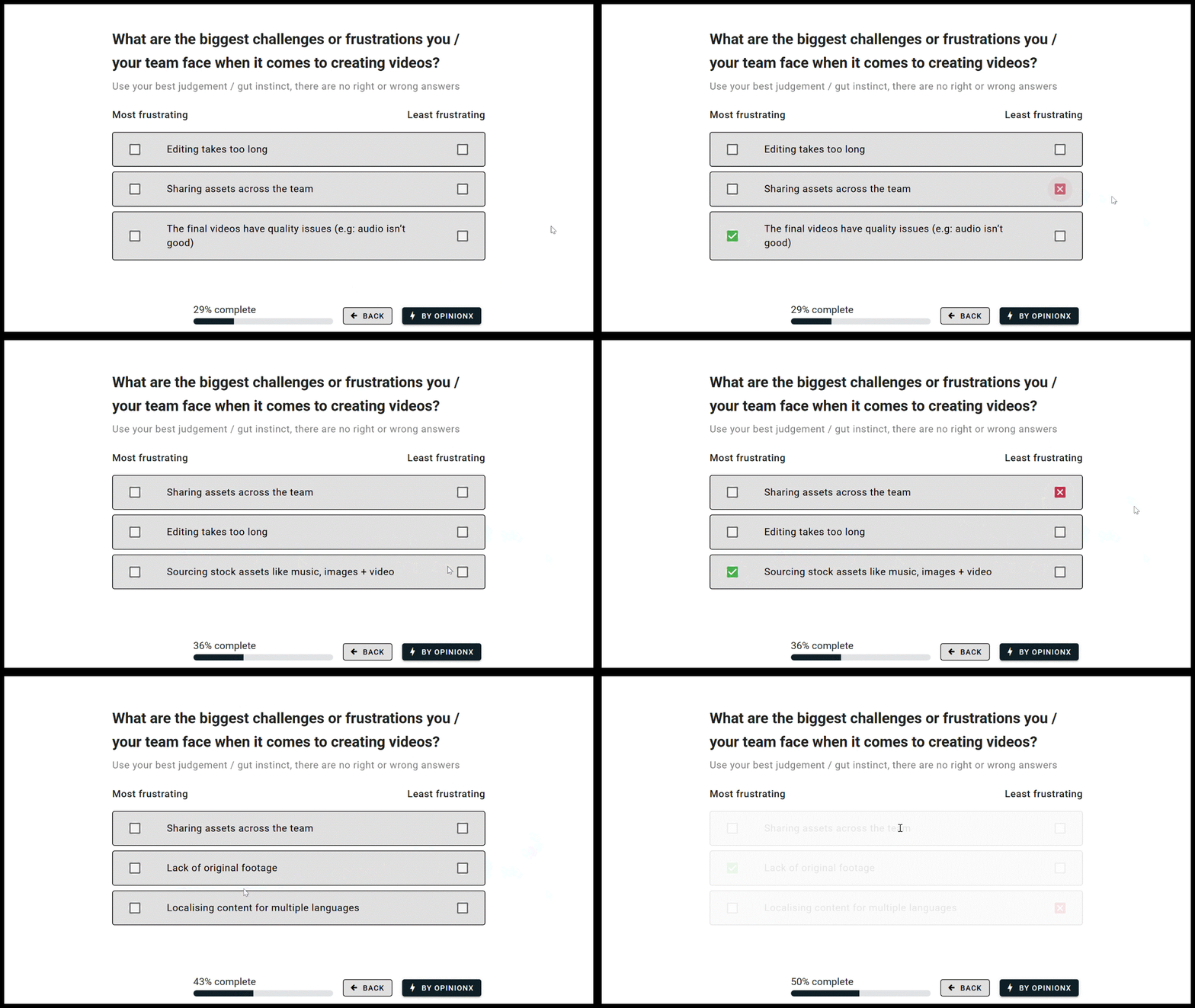
Example of a MaxDiff Analysis survey on OpinionX (via VEED Case Study)
MaxDiff behaves like a normal survey question. Several tools on this list treat MaxDiff as a special research method with rules about where it can sit in a survey. On OpinionX you drag it into any position, add as many separate MaxDiff questions as you need to one survey, and set the number of options per voting set and the number of sets per participant yourself.
Results calculate automatically, and you can check the workings. You don't need spreadsheets or manual formulas, and the scoring isn't a black box either: the best-worst scaling guide sets out the formula the counts run on, and participant-level data exports in full so you can reproduce the numbers yourself.
Segmentation is one click. The first thing anyone asks after seeing a MaxDiff result is how it would change for a particular subgroup. OpinionX has a one-click segmentation filter on the results table, plus crosstab analysis for the more involved comparisons.

MaxDiff Analysis survey results chart on OpinionX
There's a design calculator built in. Deciding options per set and sets per participant is the part people get wrong, so there's a calculator for it in the builder, alongside a sample surveys gallery and one-click templates.
Image-based MaxDiff. Of the nine platforms tested, OpinionX was the only one where you can import pictures and ask people to pick the best and worst image, which is what you want for logo options, design mockups or sketch concepts. There's a separate image ranking surface for the related methods.
Partial completes are kept. Votes save in real time, so if someone abandons the survey halfway you can still include the votes they did cast. That matters when you're running research with your own customers and every invitation is finite, rather than with a panel where you only pay for completes.
New since this article first published: a MaxDiff Scenario Simulator shipped in July 2026. You build a comparison set from your ranked options and it reports the percentage of your participants who would pick each one, calculated from each participant's own votes and then aggregated. It's on the free tier too.
Price: free tier is $0, with every MaxDiff setup and analysis feature unlocked and a cap of 25 participants per survey. Analyze is $900 a year for unlimited participants and unlimited researcher seats. That free tier is the difference from most of this list, where you need a paid plan or a card on file just to see what the MaxDiff interface looks like.
2. Forsta 🔴
Forsta, the brand that came out of the merger between Confirmit, FocusVision Decipher and Dapresy, offers MaxDiff as part of their "dynamic questions" range.
I turned over every rock on the internet looking for a live demo or even a rough price range and came back with nothing. Their pricing URL returned a 404 when I checked in August 2026, so this hasn't changed since 2023. You'll be going through a full sales qualification conversation to find out what it costs. Good luck to the brave.
3. Qualtrics 🔴
Qualtrics has a MaxDiff question format, but it isn't available without an existing PX or EX premium subscription, or a CX licence that includes the journey optimizer. Even then you need an additional purchase through your Account Executive to unlock it.
Qualtrics no longer publishes any pricing at all. Their pricing page carried no figures when I checked on 25 August 2026, so I've removed the entry-price estimate that used to sit in this section rather than leave an undated number on the page. Assume five figures and a procurement cycle.
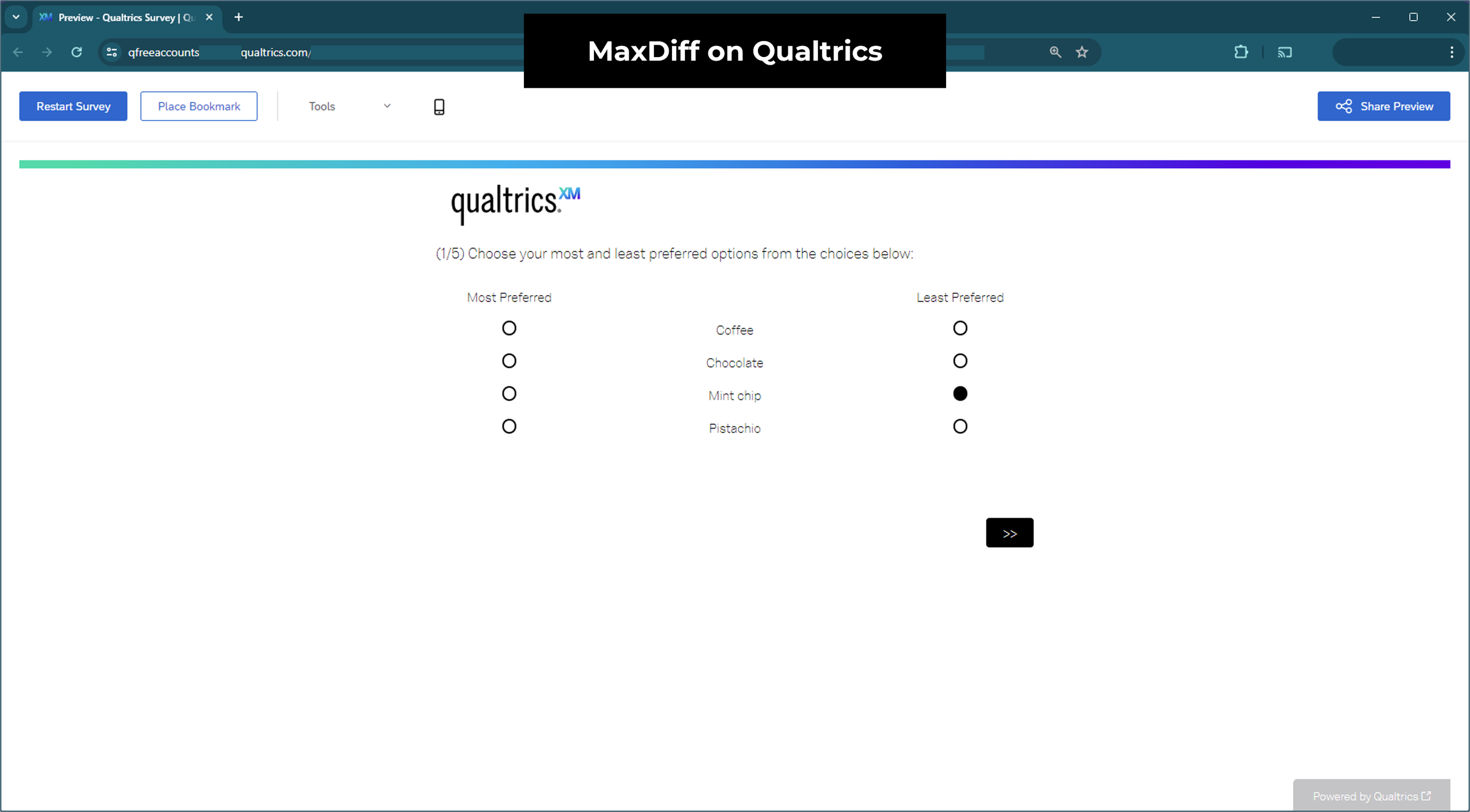
I did get access to a test version of MaxDiff on Qualtrics, which shows a dummy survey pre-filled with sample data. In that version the MaxDiff voting sets appear to be fixed and identical for every participant, which defeats most of the point of running MaxDiff at all. Their demo mode doesn't allow editing, so I couldn't confirm whether a better configuration exists behind the paywall.
4. SurveyMonkey 🟡
More has changed here than in any other section since 2023, so if you looked at SurveyMonkey before and moved on, look again.
SurveyMonkey added a MaxDiff question type in October 2023 called "Best-Worst Scale". At the time, the information about it was contradictory: their pricing page implied it was on all paid plans, a friend's premium account showed it locked behind the most expensive tier, and I couldn't find a single screenshot of it anywhere on the internet, including in SurveyMonkey's own help centre.
That's now resolved. As of August 2026, Best Worst Scale is listed on SurveyMonkey's plan comparison page as available on Team Advantage, which is $30 per user per month, starting at three users and billed annually. That's their mid-tier team plan, not the top one, and it's a real drop from where this feature sat when I first wrote this section.
What I still can't tell you is what the participant experience looks like, because there's no free tier that includes it and no public example. If you're already on a SurveyMonkey team plan, go and test it. Otherwise you're buying three seats to find out.

5. Sawtooth Software 🟡
Sawtooth Software has been building market research tools since 1983, aimed squarely at academics and market research organisations, with research expertise available as a service on top.
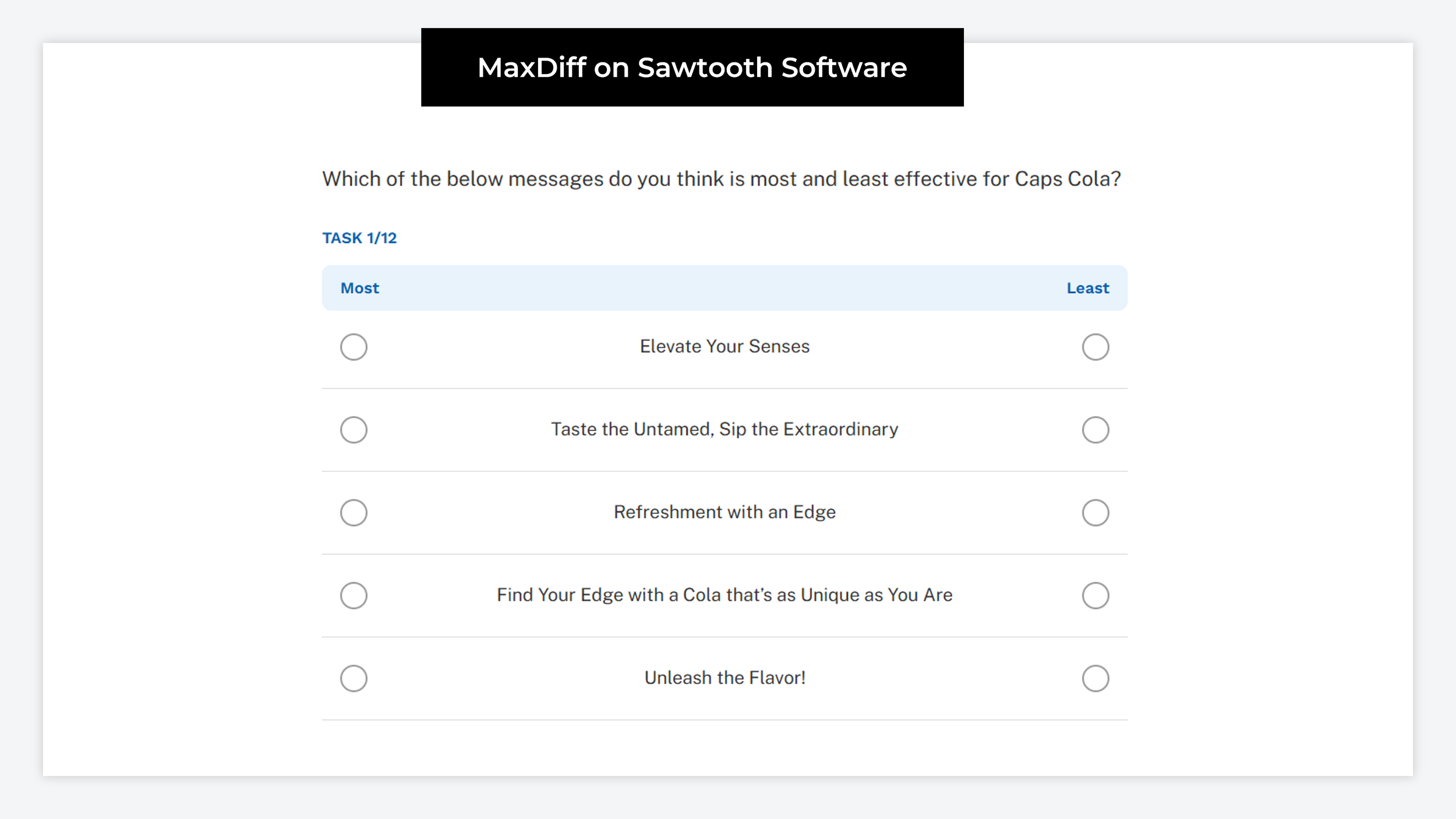
It's the strongest option here for deep technical analysis, and the one I'd point you to if your work needs it. Sawtooth offers a proprietary MaxDiff variant called Bandit MaxDiff, which uses Thompson sampling to adapt which options each participant sees based on the votes cast so far. That sits on the Premier tier, in their Windows desktop application Lighthouse Studio. Their technical paper library is genuinely the best free resource on MaxDiff design anywhere, whatever tool you end up using.
Price, updated: Sawtooth has stopped publishing prices. Discover Professional and Discover Premier both show "Request Pricing" as of August 2026, so the per-seat figure that used to be in this section is gone. What they have added is a free tier capped at 50 participants per survey, which means you can now build and test a MaxDiff survey before entering a sales conversation. That's a meaningful improvement.
6. QuestionPro 🔴
QuestionPro is another of the large general survey platforms, and in functionality it doesn't differ much from SurveyMonkey.
MaxDiff and conjoint sit only in their most expensive tier, Research Suite, which is available by custom quote. Their pricing page showed "Contact sales for pricing" against Research Suite on 25 August 2026, with no figure attached. Their separate Workplace product starts at $5,000 a year, which tells you the neighbourhood but not the price, so I've dropped the estimate this section used to carry.
There's no free trial of MaxDiff either, so you can't see the question type before you buy.
7. SurveyKing 🟡
SurveyKing offers a wide range of question types at a low price, and it's the only tool here besides OpinionX and Sawtooth where you can put a MaxDiff question in front of a participant without paying first.
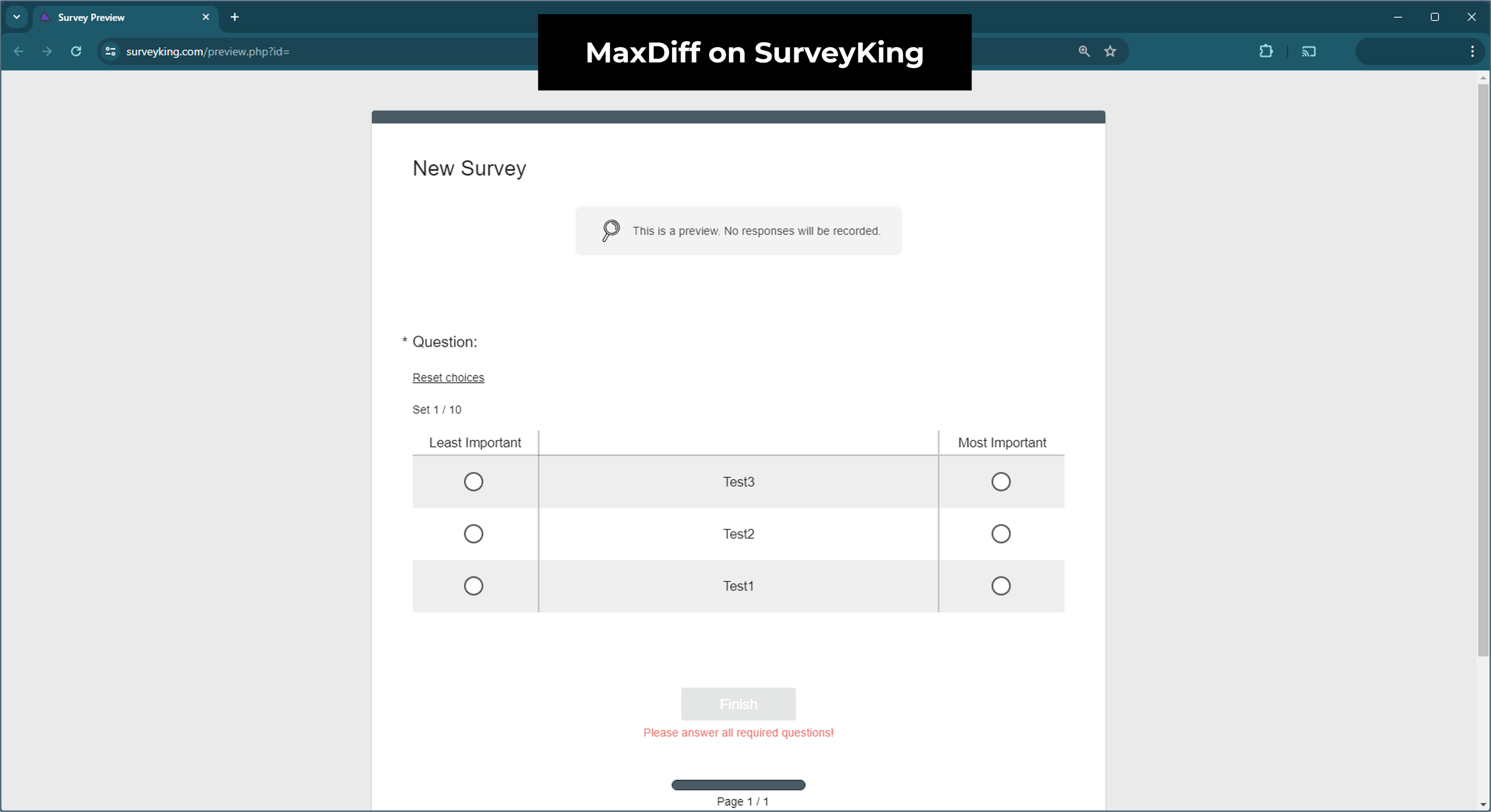
The free tier is genuinely free rather than a trial, but it's tightly capped: two surveys, five questions, five answers, and MaxDiff limited to three attributes. Three of anything is a preview of the survey design rather than a ranking. You can also only view 20 responses.
There's a design problem worth knowing about too. Nothing stops the same set of options appearing repeatedly for the same participant, which quietly damages both the experience and the data, since a MaxDiff design is supposed to spread exposure evenly across the list.
Price, verified August 2026: Pro is $19 per user per month with no contract, which lifts MaxDiff to unlimited attributes and gives you unlimited surveys and questions. Note the response ceiling: you collect unlimited responses but only the first 2,000 are viewable in your account.
The catch that matters most for MaxDiff. SurveyKing's statistical outputs, which is where MaxDiff utility scores and statistical significance live, sit only on their Custom tier, quoted individually and starting from $500 annually. So on the $19 plan you can field the survey and see the raw counts, but the calculated utilities are behind the enterprise quote. If you're comparing on price alone, compare the tier that actually gives you the numbers.
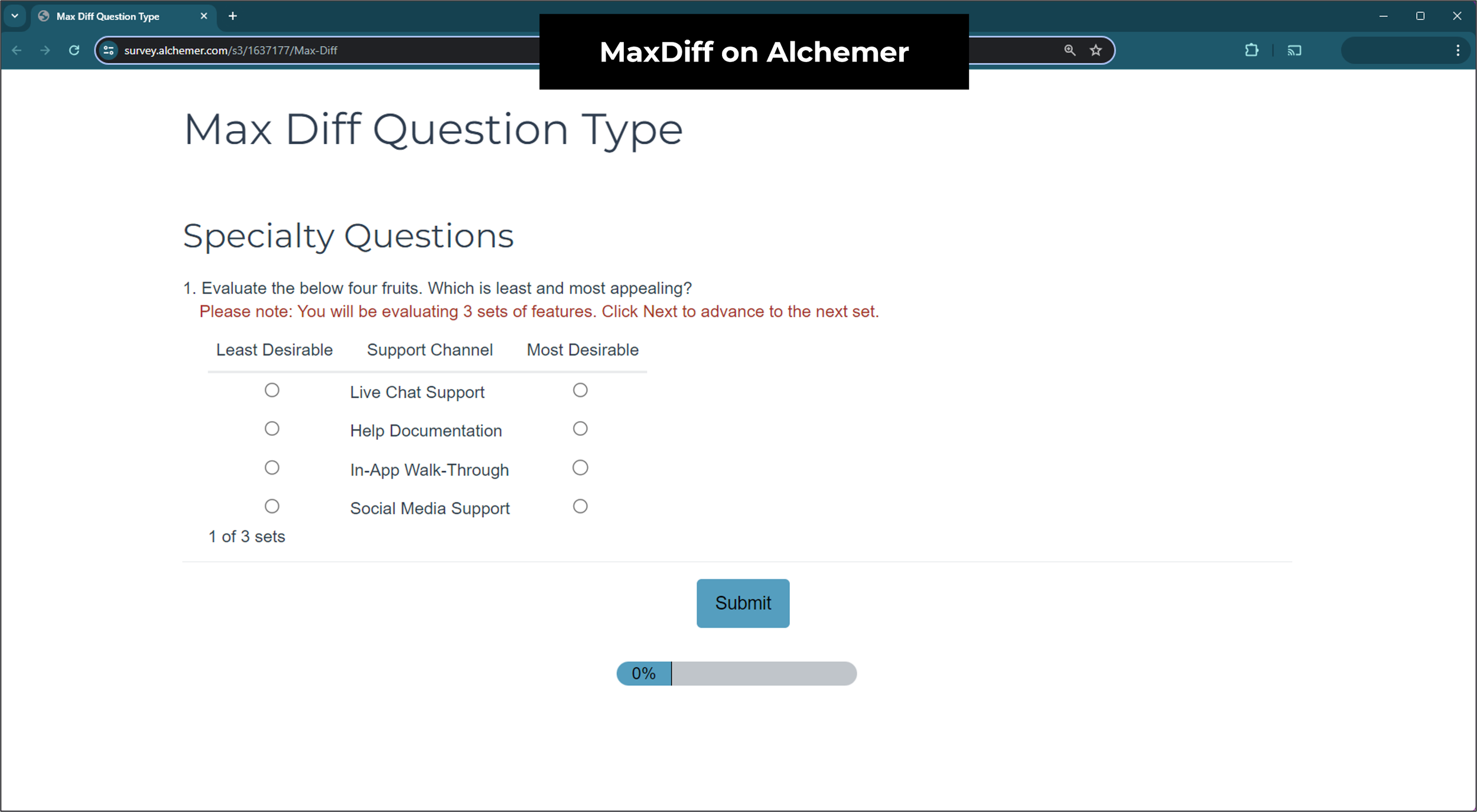
8. Alchemer 🟡
Alchemer, formerly SurveyGizmo, describes itself as offering tools that rival Qualtrics at a price point closer to SurveyMonkey.
MaxDiff sits in the advanced research question types on Full Access, their most expensive self-serve tier.
Price, verified August 2026: $275 per user per month, or $1,895 per user per year billed annually. There's a seven-day free trial with full access to the plan you pick and no card required up front, so you can test the MaxDiff question type before buying.
The structural limit is the one to watch. Full Access caps at three users. Beyond that you're on a custom-quoted Platform plan, and three seats at the annual rate is already $5,685 a year before you get there. If MaxDiff is something more than two colleagues will need, price the Platform tier before you start.
9. Q Research Software / Displayr 🔴
Q Research Software is a data analysis and reporting tool built for traditional market researchers, part of Displayr's portfolio. It offers automated data cleaning, formatting and statistical testing, which is genuinely useful for that audience.
It isn't a survey platform, though. You bring your data to it. There's no free tier and no public demo of the MaxDiff tooling, so you buy a licence and then find out.
Price, updated: the Standard Licence is $3,259 per user per year and the Transferrable Licence is $9,777 per licence per year, both verified on their pricing page on August 2026. Both figures have risen since this article first published.
Which MaxDiff analysis tool should you pick?
| Platform | Test before you buy? | Price, checked 25 Aug 2026 | Verdict |
|---|---|---|---|
| OpinionX | 🟢 Full method free, 25 participants | $0, then $900/year | 🟢 Image MaxDiff, one-click segmentation, scenario simulator |
| Sawtooth Software | 🟢 Free tier, 50 participants | Not published, quote only | 🟡 Deepest analysis and Bandit MaxDiff, but Windows desktop and a sales cycle |
| SurveyMonkey | 🔴 No free access to the question type | $30/user/month, 3 users min, annual | 🟡 Now on a mid-tier plan, but no public example of the participant experience |
| SurveyKing | 🟡 Free, capped at 3 attributes | $19/user/month; utilities from $500/year | 🟡 Cheapest way to field one, but MaxDiff utility scores are enterprise-only |
| Qualtrics | 🔴 Locked demo, no editing | Not published, plus an add-on purchase | 🔴 Voting sets appear fixed across participants in the demo |
| QuestionPro | 🔴 No trial of MaxDiff | Research Suite, contact sales | 🔴 Top tier only, sight unseen |
| Alchemer | 🟡 7-day trial, no card needed | $275/user/month or $1,895/user/year | 🟡 Full research suite, but top tier only and capped at 3 users |
| Q Research / Displayr | 🔴 No free tier, no demo | $3,259/user/year or $9,777/licence/year | 🔴 Analysis tool, not a survey platform |
| Forsta | 🔴 No demo found | Not published, pricing URL 404s | 🔴 Sales qualification before you see anything |
What should you check before choosing a MaxDiff analysis tool?
Shortlist two or three MaxDiff analysis tools, build the same small survey on each, and send it to yourself.
Check the design variables you can control. Options per set and sets per participant drive your sample size requirements. A tool that fixes them decides your study design for you.
Make sure the sets vary between participants. Fixed or repeating sets defeat the method, and it's the most common flaw in the tools here.
Find out which tier calculates the scores. Fielding the survey and getting the utility scores back are sometimes sold separately, which is the difference between $19 a month and a quoted enterprise plan.
Open it on a phone. Most survey responses come from phones now, and nobody compares a MaxDiff set properly if they have to scroll through it.
Ask what exports. If participant-level data doesn't come out, you can't rerun the analysis or check the tool's arithmetic.
Look at the segmentation before you need it. What you're usually after is how the ranking changes between groups, which is why needs-based segmentation leans on this method so heavily.
Count the total cost, including seats. Several tools here price per user with a minimum seat count, which changes the number substantially for a team.
When is MaxDiff the wrong method?
You need trade-offs between bundles, not a ranked list. MaxDiff ranks individual options against each other. If you need to know how people weigh price against features against brand, that's conjoint analysis.
The question is really about price. MaxDiff can rank price levels alongside other options, but for willingness to pay you want Van Westendorp or Gabor Granger.
Your list is very short. With five or six options, a simple pairwise comparison or drag-and-drop ranking gets you there with less participant effort. MaxDiff earns its complexity on long lists.
There's a fuller treatment in our guide to MaxDiff alternatives, and worked examples in the Uber and Airbnb case studies.
Frequently asked questions
What is the best free MaxDiff analysis tool? OpinionX is the only one of the nine MaxDiff analysis tools tested that runs a complete MaxDiff survey on a free tier, with every setup and analysis feature unlocked and a cap of 25 participants per survey. Sawtooth offers a free tier capped at 50 participants, and SurveyKing's free version caps MaxDiff at three attributes, which is too few to rank anything real.
Does SurveyMonkey have MaxDiff analysis? Yes, as a question type called Best-Worst Scale, added in October 2023. As of August 2026 it's listed on the Team Advantage plan, which is $30 per user per month with a three-user minimum, billed annually.
How much do MaxDiff analysis tools cost? It depends entirely on the platform. OpinionX runs it free and charges $900 a year to lift the participant cap. SurveyKing starts at $19 per user per month, though its calculated utility scores sit on a quoted plan from $500 a year. Alchemer is $1,895 per user per year and Q Research is $3,259. Sawtooth, Qualtrics, Forsta and QuestionPro don't publish a price for the tier that includes MaxDiff.
What is MaxDiff analysis used for? Ranking a long list of options by relative importance: feature priorities, messaging, brand attributes, customer problems, or any list where a rating scale would return everything scoring similarly.
How many options should each MaxDiff set show? Three to six, with four being the common default. Fewer sets per participant means you need more participants to cover the list evenly, which is what a design calculator works out for you.
MaxDiff isn't a complicated method. It's counting best and worst votes and normalising the result, and the published prices across these nine MaxDiff analysis tools run from $0 to $9,777 a year.
Want more like this? Over 42,000 researchers and product people get The Full-Stack Researcher in their inbox. Subscribe for the next teardown.
Every MaxDiff feature on OpinionX works on the free tier, including the scenario simulator and segmentation: $0, unlimited surveys, unlimited researcher seats, capped at 25 participants per survey, then $900 a year to lift the cap (full pricing). Create a free MaxDiff survey, or book a demo first.