
“A product/market fit (PMF) survey asks customers how they’d feel if they could no longer use your product; if 40% or more say “very disappointed”, you have product/market fit (the Sean Ellis test). To run one you need a survey tool, and they vary a lot on three things: whether the free tier is genuinely usable, whether you can branch questions and segment results (both essential for PMF analysis), and how you distribute the survey. This guide reviews 12 tools on price, functionality and analysis. The short version: dedicated in-product microsurvey tools (Refiner, SatisMeter, Userpilot) are purpose-built for PMF surveys and are often the best fit; general survey builders (Typeform, SurveyMonkey, Jotform) work but gate branching and volume behind paid plans; and OpinionX is strong if you also want ranking and segmentation, though its focus is preference ranking rather than PMF specifically.”
Product/market fit surveys help companies measure how well their product matches the needs of their target market, by tracking the percentage of customers who'd be "very disappointed" to lose it. A score of 40% or higher, according to Sean Ellis, indicates strong product/market fit.
To run a PMF survey, you need a survey tool. To help you choose, I tried out 20 different survey tools and noted their price, limitations, advantages and disadvantages, then wrote up the 12 most noteworthy below. Before the reviews, here's what I assessed in each tool.
1. Price and limitations
Can you test the survey before fully committing to it? ⭐
Is the free tier genuinely free, or are you forced to upgrade before launching your research?
What features or usage limits come with the paid plans?
2. Survey functionality
Are there enough question types (multiple choice, text response, rating, ranking, and so on)?
Can you branch users to different customised questions based on their prior answers? ⭐
What options are there for distributing the survey to users?
3. Analysis functionality
Can you filter the results to see differences between each PMF group (Very vs Somewhat vs Not Disappointed)?
Can you segment the results to see which types of user were most represented in each PMF group (say, which customers had the highest percentage of "Very Disappointed" responses)? ⭐
Can users be individually identified for any follow-up questions about their response?
With the criteria covered, let's dig into each tool. (Prices and free-tier limits below were checked in August 2026; they change often, so confirm the current figures on each vendor's own pricing page before relying on them.)

1. OpinionX

📃 Summary: OpinionX is a survey tool for measuring your customers' preferences and priorities. It comes with a range of ranking, rating, and voting methods designed to quantify what people care about most, along with segmentation analysis features to help you compare and identify the differences between groups of customers.
🪙 Price: OpinionX's free plan offers unlimited surveys, unlimited questions and unlimited teammate seats, capped at 25 participants per survey. Every research method and analysis feature is included on the free tier. The premium Analyze plan is $900/year for unlimited participants, billed yearly.
🟢 Pros: OpinionX has one of the most generous free tiers on this list. Unlike most tools here, it puts every research method and every analysis feature on the free plan rather than gating them behind a subscription (the cap is 25 participants per survey, not the features). It also comes with question types you won't find elsewhere on this list, like pairwise ranking, points allocation, and image ranking.
🔴 Cons: You can create and launch a PMF survey on the free tier, but branching logic and segmentation analysis are both paid features. OpinionX's premium Analyze plan is $900/year for unlimited participants, among the cheaper paid options here.
🔘 Conclusion: ✅✅✅
OpinionX covers all the core requirements of a PMF survey tool: it's easy to set up, offers a generous free tier, has branching logic and segmentation analysis, and can be distributed by link, email, or embed. Two things are worth a closer look.
The first is its ranking features. OpinionX has a range of ranking types that measure what your customers' preferences or priorities are. Product teams use them to:
Measure feature importance to customers.
Identify the problems hitting users hardest.
Rank a list of feature ideas by preference.
Test assumptions about how customers think and act.
Find the messaging that resonates best with users.

The second is segmentation. OpinionX's segmentation features go well beyond a simple filter that looks at "Very Disappointed" participants in isolation. They let you compare groups side by side, or map the scores for every possible subgroup of users in one colour-coded table. Here's an example of how the segmentation matrix works for a PMF survey:
Once you combine these three features, you start to see how useful OpinionX is:
Create and distribute a PMF survey to as many users as you like.
Measure your customers' top benefits or pains using OpinionX's ranking and voting formats.
See which types of people are your best customers with the segmentation features, which do the analysis work for you.
Here's a PMF survey template you can try yourself. Once you've finished it, you'll have access to all the results. :)
2. Refiner

📃 Summary: Refiner is a micro-survey tool, meaning you can make short surveys and quick polls that appear inside your product as a popup, widget, or embed.
🪙 Price: Refiner's free tier allows 25 survey responses per month, which is really only enough to test it out. Paid plans start at $99/month (Essentials, billed annually), and the 5,000 monthly-active-user tier is Growth at $239/month; the cost scales upwards with larger userbases.
🟢 Pros: Refiner has a range of display options, from basic methods like survey links and emails to integrated widgets like in-app popups.
🔴 Cons: As a micro-survey tool, Refiner is built for short surveys of 1-3 questions, and even then its status brings limits: text-response answers can only be 255 characters or fewer (about half a tweet). Filtering is easy, but more advanced segmentation needs technical work to integrate third-party products.
🔘 Conclusion: ✅
If you specifically want an integrated micro-survey tool to run a quick popup PMF poll inside your product, just the multiple-choice "disappointment" question and one open-ended response, Refiner is a strong fit. Keep in mind you'll have to upgrade to a paid plan before rolling it out, and for anything longer than two or three questions you'll want a more thorough research platform like OpinionX.
3. Qualtrics

📃 Summary: Qualtrics is the juggernaut of survey platforms. It covers almost every survey format, customisation, and visualisation method possible ("almost" because it doesn't offer pairwise comparison, for one). As you'd expect for the category leader, it also leads on price and complexity.
🪙 Price: Qualtrics uses an alluring free tier to back teams into an expensive "all or nothing" decision later on. Its free tier offers 500 total responses spread across 3 surveys, but once you exceed that limit, you're forced to upgrade or delete your entire account and all its surveys. Qualtrics restructured into suites in 2024, and the only self-serve paid tier with a published price is Strategic Research at $420/month (billed annually at $5,040); everything else, including CoreXM, is quote-only through their sales team.
🟢 Pros: Qualtrics' free tier includes 8 question types and easy filters, so you can compare your three main PMF groups (Very, Somewhat, and Not Disappointed).
🔴 Cons: The account-based limit of 500 participants means you can never really stay on the free tier forever. You can't remove existing participants from that count, even if you delete them from old surveys. The free tier is complex enough as is; upgrade to unlock more functionality and the product gets so complicated that you'll either need to become your company's in-house Qualtrics expert or find someone to fill that role.
🔘 Conclusion: 50/50
If your company already has a Qualtrics subscription and an in-house expert to navigate its features, the breadth is hard to beat. Otherwise, sign up knowing you're heading for an inevitable upgrade with a very high price tag and a lot of complexity.
4. PMFSurvey.com

📃 Summary: PMFSurvey.com was created by Seán Ellis, who first published the 40% rule and created the original PMF survey format. Today it mostly serves as a public example of PMF surveys, but is rarely used by anyone for their own research.
🪙 Price: 100% free (there are no paid plans).
🟢 Pros: Comes with easy filters for viewing text responses from different user groups, though the results page only shows 5 answers; to see more you have to export to a spreadsheet and filter manually. The public demo is a good example of what PMF survey results look like.
🔴 Cons: Surveys are completely predefined. You can't edit the question wording or add other sections, you just use the pre-built template. The survey's first question asks how the participant discovered your product, and 50% of the options are channels we don't use at our company (Facebook, Appstore, Ads), but I can't remove them.
🔘 Conclusion: ❌
The predefined format, lack of analysis tools, lack of branching logic, and inability to add other questions make this pretty much unusable for real research.
5. Involve.me
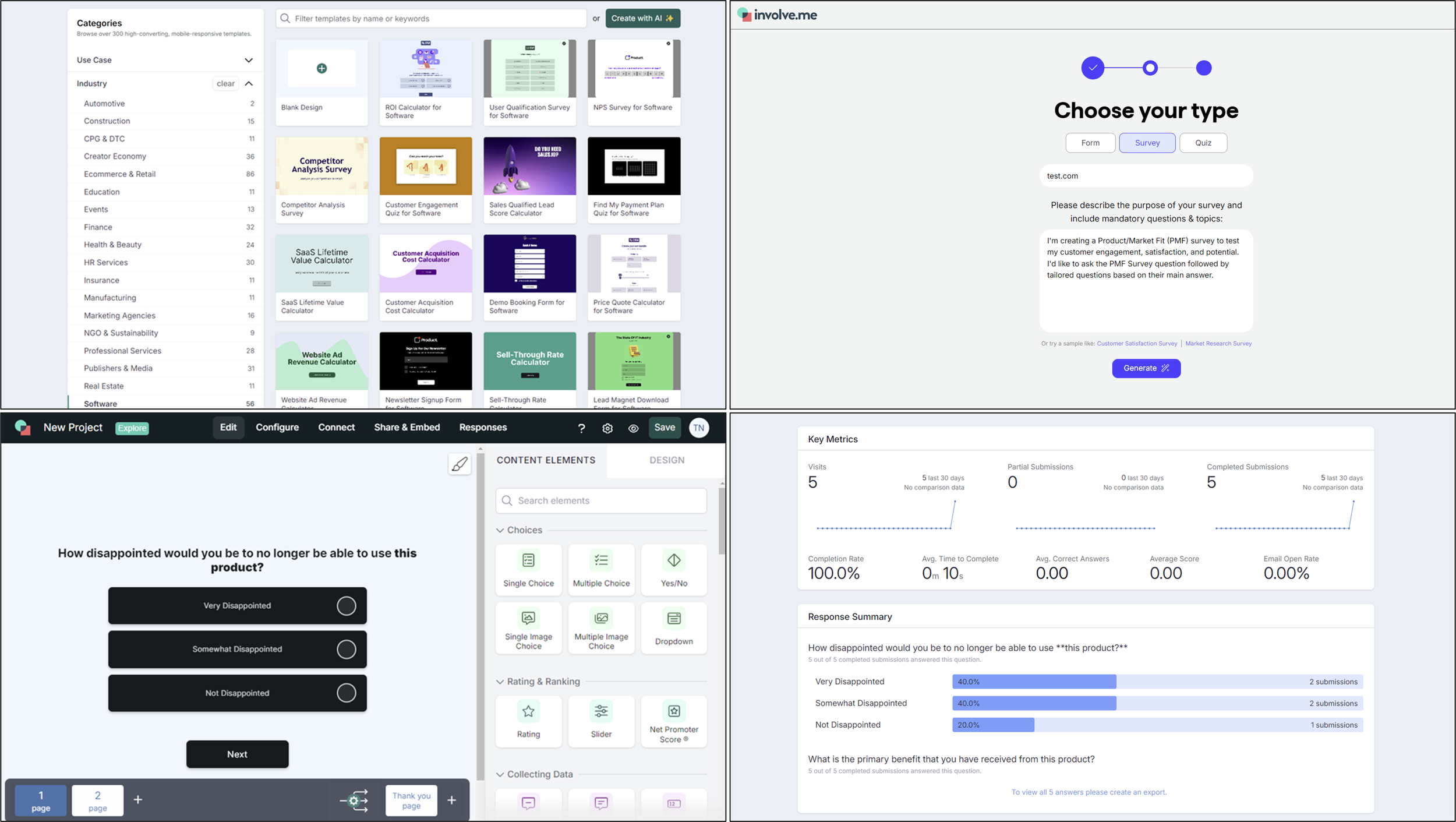
📃 Summary: Involve.me is a survey platform that specialises in using AI to near-instantly generate whole surveys from a description of your research requirements.
🪙 Price: InvolveMe's free plan only allows 50 submissions per month and auto-deletes your survey participants after 30 days. Paid plans start at $348/year (Starter, $29/month billed annually) for 5 surveys, 1,000 submissions per month, and one user seat (no collaboration).
🟢 Pros: Involve.me is a full survey tool with the distribution advantages of a micro-survey, offering 6 sharing methods: link, iframe embed, popup, chat button, side drawer, or side tab.
🔴 Cons: The AI survey generator doesn't work for PMF surveys (I tried multiple times). Text-response submissions are completely hidden on the Free plan and the cheapest paid plan, "Personal". Even on the top tiers, you have to export to .csv to read users' text responses.
🔘 Conclusion: ❌
Involve.me ultimately offers nothing better than OpinionX or Refiner on either survey or distribution functionality. The AI builder doesn't work for PMF surveys and the analysis dashboard is poorly suited to this use case. It seems better suited to quizzes and calculators, its old value proposition before a pivot to AI-generated surveys in early 2023.
6. Typeform
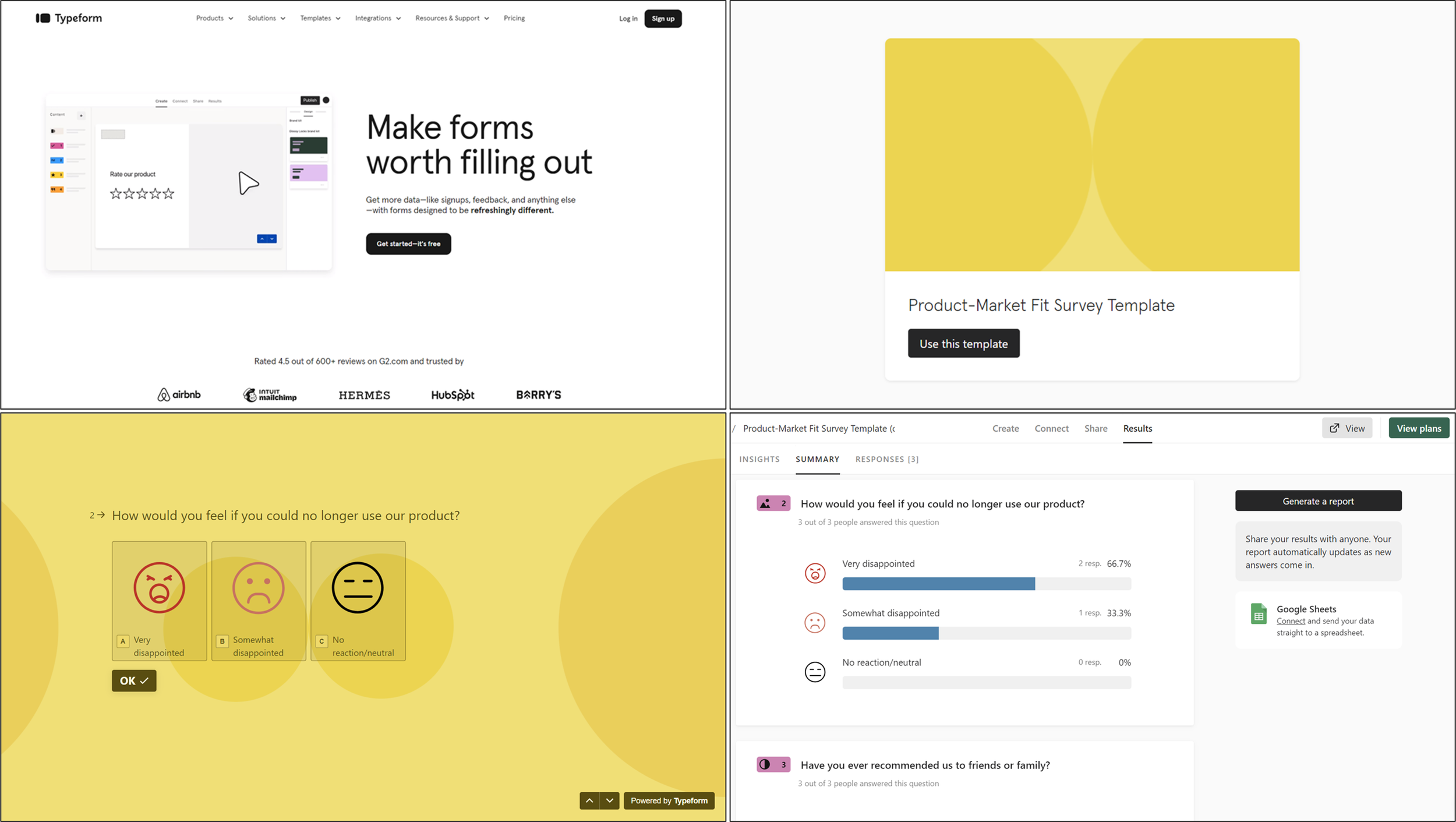
🪙 Price: The free plan is limited to 10 responses/month. Paid plans start at $28/month billed annually (Basic, about $336/year), which still only offers 100 responses per month and only 1 user seat.
🟢 Pros: Typeform has a prebuilt PMF survey template and offers more visual design customisation than the other tools here, with colours, fonts, backgrounds, and survey style all editable.
🔴 Cons: Typeform has no analysis features. You can't filter or segment to see responses from each PMF category (Very, Somewhat, Not Disappointed), on any pricing plan.
🔘 Conclusion: ❌
Typeform is a form collector, not a research tool. It has no clear advantage over anything else here, and its harsh freemium limits plus missing analysis make it a poor choice for PMF surveys.
7. SurveyMonkey
🪙 Price: SurveyMonkey's free tier allows 10 questions and 25 participants per survey, but it only offers two types of questions (multiple choice and text response). Paid pricing splits into Individual plans (Advantage around $468/year, Standard around $99/month month-to-month) and Team plans ($30 to $92 per user per month with a 3-seat minimum, so roughly $1,080/year at the floor). Paid tiers have a lot of feature limitations too, so consult their pricing page carefully before deciding on this product.
🟢 Pros: SurveyMonkey has a feature called "rules" for filtering your survey results, however, free-tier users can only test this out one time before it is locked completely. Unlimited segmentation is only available on their top self-serve Team plan, which runs into four figures a year once you add the required minimum seats.
🔴 Cons: 25 participants per survey makes the free version unusable for PMF surveys. The free tier doesn't even include basic question types like rating, ranking and slider, all locked to premium plans. The design has also grown complex and outdated in recent years.
🔘 Conclusion: ❌
The only people who use SurveyMonkey are teams that already have a company subscription. The free tier is extremely limiting, and segmentation is locked to the most expensive plan.
8. Jotform

🪙 Price: Free tier allows 100 monthly submissions in total (not per survey) across up to 5 surveys. The Bronze tier offers 1000 monthly submissions for $408/year. None of the paid plans allow team collaboration (extra user seats) without a custom Enterprise contract.
🟢 Pros: You can easily filter results to view specific participants, say just those who answered "Very Disappointed".
🔴 Cons: Jotform has no results dashboard to view all submissions on one page. You view results one by one via the form "inbox" page instead. There's a separate product called "Reports Builder" that turns your data into a slideshow-style presentation, but that still doesn't cover the basic results dashboard most survey tools have.
🔘 Conclusion: ❌
Jotform, as the name suggests, is for creating forms like event RSVPs and order submissions. It isn't built for customer research and lacks critical functionality like an aggregated results dashboard.
9. SatisMeter

🪙 Price: SatisMeter's free tier allows 25 monthly responses or up to around 250 monthly active users (whichever limit you hit first). The paid Growth plan costs $199/month (about $2,388/year) for up to 1,000 monthly responses or 3,333 monthly active users (again, whichever limit you hit first). For larger implementations, you'll have to negotiate a custom contract.
🟢 Pros: The free version offers conditional branching logic, sending participants to different questions based on their prior answers. It also has a pre-made PMF survey template that calculates your PMF score for you (though that's just the percentage of "Very Disappointed" answers, which almost every survey tool works out automatically).
🔴 Cons: Survey functionality is very limited, with only three question types: free text, multiple choice, and 5-star rating scale.
🔘 Conclusion: ❌
SatisMeter takes the same approach as the other micro-surveys here but at a higher price for less functionality. Unless you benefit from the fact that Productboard owns SatisMeter and offers a direct integration, you're better off with a different tool.
10. Delighted
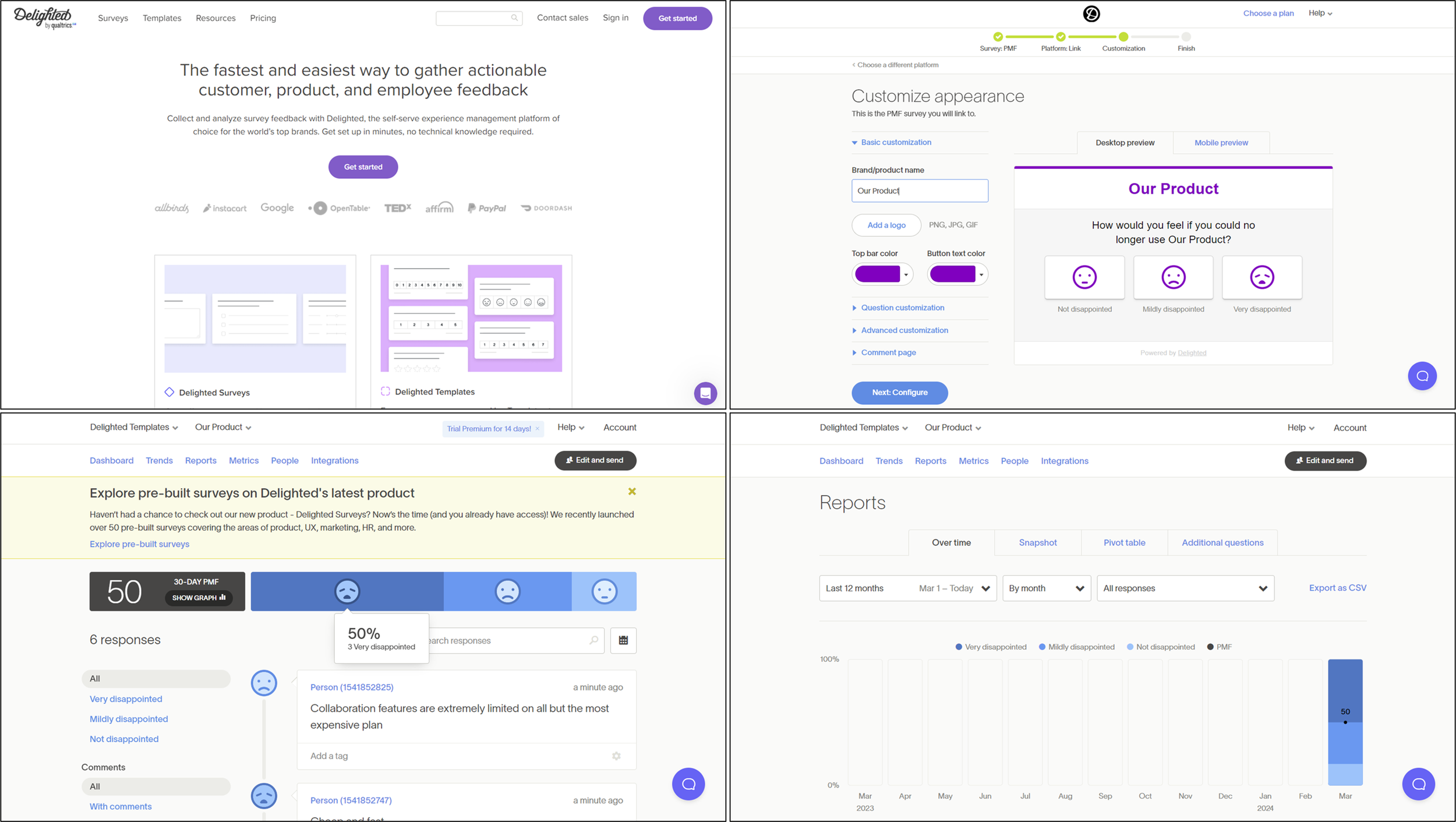
📃 Summary: Delighted was a micro-survey tool owned by Qualtrics. It has been discontinued and stopped taking new signups and shut down on 30 June 2026, with its functionality folded into Qualtrics. It's included here for reference, but it's no longer a tool you can adopt.
🪙 Price: No longer available. While it operated, it ran a free tier plus paid plans scaling by monthly response volume.
🟢 Pros: The results page breaks your survey results into a horizontally stacked bar chart that's easy on the eye and shows a monthly breakdown using the same component for tracking changes over time. It's also easy to filter participants by their "disappointment" answer.
🔴 Cons: Its PMF survey template is fixed as a two-question micro-survey that can't be edited or extended. Delighted takes its pricing a step further than SatisMeter: even less functionality and lower limits, but an even higher price. The premium plans don't unlock any extra functionality, just larger limits.
🔘 Conclusion: ❌
Moot now that it's discontinued. While it was live it offered less functionality than other micro-survey tools here at a higher price, so even setting the shutdown aside it was never the pick for a PMF survey. If your company already runs Qualtrics, that's where this capability now lives.
(I kept the entry rather than deleting it, so the list stays honest and doesn't silently drop a tool readers may have heard of. Say the word if you'd rather cut it entirely, that's a one-liner.)
11. Userpilot

📃 Summary: Userpilot is a full user engagement platform. Micro-surveys are just one part of it; they also offer product analytics, user engagement, and user feedback products, each a suite of tools in its own right.
🪙 Price: No free plan available. "Starter" costs $299/month billed annually (about $3,588/year) and is capped at 2,000 monthly active users rather than a response count. You can do a 14-day free trial of "Starter" but only if you sign up with a verified business email address (no Gmail allowed).
🟢 Pros: Userpilot comes with a 5-part PMF survey template that's better worded, from a research perspective, than most of the other templates here. It's a decent micro-survey option within a broader platform.
🔴 Cons: You can't test Userpilot without a full implementation. The only way to try a PMF survey is to install their JavaScript snippet in your product or integrate via a CDP provider like Segment.com.
🔘 Conclusion: ❌
The survey functionality, which Userpilot calls its "User Feedback" component, is a minor part of the overall product. Its pricing only really makes sense if you're implementing many of their solutions, not the survey tool alone.
12. Usersnap

📃 Summary: Usersnap is a user feedback platform with a range of products including a roadmap board, feature upvoting, bug reporting, customer support chat, screen recording, micro-surveys, and a range of AI functionality.
🪙 Price: No free tier; Usersnap has a 15-day free trial of their paid plans available, which start at around $69/month (Startup) for micro-surveys, with the Company tier at around $249/month for higher volume and advanced survey logic.
🟢 Pros: Usersnap is one of the cheaper integrated micro-surveys on this list, starting around $69/month (OpinionX includes unlimited surveys for free, capped at 25 participants each).
🔴 Cons: Shareable links and email surveys aren't available on the free trial, only embedded or integrated distribution, so it's hard to test the survey experience or generate demo results. It's limited as a survey tool, with only text input and multiple-choice questions. Unlike the other micro-surveys here, all your questions appear at once on Usersnap, which forces you to keep the survey very short, 2-3 questions max.
🔘 Conclusion: ❌
Cheaper it may be, but Usersnap has less functionality than micro-survey tools like Refiner, its reporting dashboard is less suited to PMF surveys, and it lacks the filtering, segmentation and branching that PMF surveys need.
Frequently asked questions
What is a PMF survey? A product/market fit survey asks active users "How would you feel if you could no longer use our product?" with three answers: very disappointed, somewhat disappointed, not disappointed. The share answering "very disappointed" is your PMF score, and 40% or higher indicates product/market fit.
What's the best tool for a PMF survey? It depends on how you distribute it. In-product microsurvey tools like Refiner and SatisMeter are purpose-built for triggering PMF surveys to active users inside your app. General survey builders like Typeform or SurveyMonkey work for link and email distribution but gate branching and volume behind paid plans. Pick based on where your users are and whether you need segmentation.
Do I need branching and segmentation for a PMF survey? Effectively yes. Branching lets you ask each PMF group (very, somewhat, not disappointed) a different follow-up, and segmentation lets you see which types of user love the product most. Both are what turn a PMF score into something you can act on, and several tools gate them behind paid plans, so check before committing.
Is there a free tool for PMF surveys? Several have free tiers, but most are limited (10 to 50 responses a month, or branching locked to paid plans). Check whether the free tier actually lets you launch and analyse a real survey rather than just build one.
What counts as a good PMF score? 40% or more of users answering "very disappointed" is the benchmark from the Sean Ellis test. Below that, the product usually needs more iteration before scaling.
Across all twelve, the tools that actually earn their place are the ones whose free tier lets you launch a real survey, whose branching lets you follow up with each PMF group, and whose analysis lets you segment the results. Most here fall down on at least one of those three. Start from how you'll reach your users, and rule out anything that can't do the part you need.
Want more like this? Over 42,000 researchers and product people get The Full-Stack Researcher in their inbox. Subscribe for the next one.
If you want to build the actual PMF survey next, the 19 PMF survey templates guide has three ready to copy, and PMF survey segmentation covers how to analyse the results. You can run all of it on OpinionX for free (full pricing).