
“Most survey tools throw away the answers of anyone who starts your survey but doesn’t reach the finish page, which can mean losing a large share of your data to distraction, forgotten sessions, or a design flaw that makes people think they’re done early. Partial completion capture (also called incomplete survey data) saves those answers anyway, so a participant who quits halfway still counts. It’s rarer than you’d expect: of the 18 tools compared here, only some save partial data automatically, and fewer still let you view and analyse it. OpinionX saves every answer the moment it’s given, on every tier, and has a one-click “Show Incompletes” toggle on the results page. Beyond recovering lost data, this unlocks a useful trick: for long ranking surveys (like a pairwise or MaxDiff vote over 50 options), you can let people stop whenever they like and still keep every vote they cast.”

Why do people drop out of surveys before completing them?
Most people assume survey drop-off comes down to design problems: it was too long, too difficult, or too boring to finish. That's sometimes the case, but a lot of common external factors make people start without completing your survey:
They got distracted, or another commitment pulled their attention away. Most survey drop-off happens because a colleague, a family member, or an everyday circumstance (their train reaching its stop) pulled the participant elsewhere. There's no universal way to fight distraction like that, which is why it matters to pick a survey tool that captures partial completion data.
They meant to return and finish later, but forgot. Many tools let participants resume a survey later, usually if their session or browser cookies are still intact, but it's hard to get someone back once they've been gone a while. If they never return, you want a tool that eventually saves their partial answers as incomplete submissions after a set timeframe (usually somewhere between 24 hours and 30 days).
They hit a page that made them think they'd finished, and closed the tab before the real "finish page". This one gets overlooked in survey design. These people didn't realise they hadn't completed your survey. If your tool lacks partial completion capture and your survey has an unnoticed design flaw like this, you risk irrecoverably losing significant data.
The surprising advantages of incomplete survey capture
Capturing as much data as possible is the best way to stop external factors like these dragging down your results. On top of that, using a tool that captures partial completion data unlocks a few research opportunities you might not expect:
Say you're trying to rank a list of 50 options. You can use a voting format like pairwise comparison, which breaks that list into a series of head-to-head votes for each participant. Without incomplete survey capture, you'd have to set the votes per person really low to minimise dropout, maybe 5-15 pair votes each. With it, you can put the voting section at the end of your survey, tell people to vote on a minimum of 10, and let them quit once they get bored or reach the end. Whenever they drop off, the partial completion functionality captures everyone's votes in your final result. This also works for other series-based voting methods like MaxDiff or conjoint analysis.
When your research budget is low and you can't afford to offer participants an incentive like vouchers, direct payments or lottery entry (see our guide to finding free participants), you'll usually see a lower completion rate and a higher drop-off rate. In cases like these, picking a tool that collects every bit of data possible is essential. Paying for a tool with partial completion functionality is often much cheaper than incentivising every single participant.
Collecting partial data from participants who quit helps you spot the bottlenecks in your survey design where drop-off spikes. You can tailor the survey as you go, fix the design issues, and improve completion for the next batch of participants.
Which survey tools collect partial completion data?
I did a deep dive into the pricing pages, help centres, and technical documentation (I even messaged some of their customer support agents) to figure out which of the 18 most popular survey tools offer partial completion functionality, how much they cost, and whether they have any important limitations to know about.

1. OpinionX
OpinionX is a survey tool for ranking people's preferences and comparing how each group ranked things differently. It lets teams research customer priorities and inform product decisions using ranking methods like pairwise comparison, maxdiff analysis, conjoint analysis, and more.
Does it offer Partial Completion? Yes! ✅
OpinionX captures partial completion data for all participants on all surveys, free tier or paid.
Once a participant answers any question in your OpinionX survey, their data is saved automatically. If they quit or leave the survey idle for more than 24 hours, everything they've answered so far is saved as an "Incomplete" profile. By default, the results page only shows data from participants who completed the whole survey; to include incomplete participants, switch on the "Show Incompletes" toggle at the top of your results overview page. Here's an example:
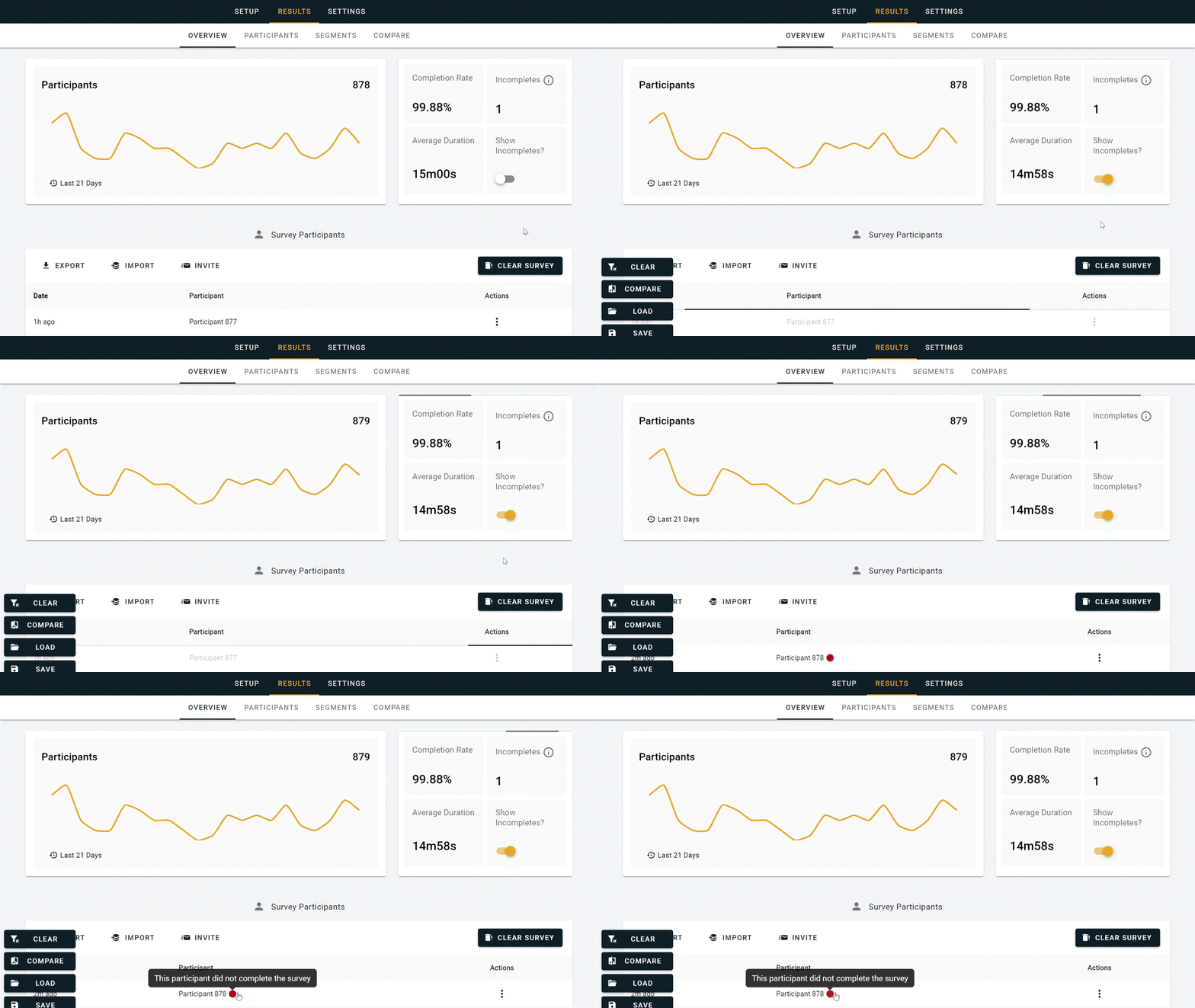
⬆️ Turning on the “Show Incompletes” toggle on OpinionX
Every survey comes with a mini dashboard that tracks the percentage of participants who complete your survey (Completion Rate), how many started but quit mid-survey (Incompletes), an Average Duration timer, and the toggle for showing or hiding incomplete submissions. OpinionX's free tier offers unlimited questions, unlimited teammates and unlimited surveys with up to 25 participants each. The premium Analyze plan has all the same functionality with unlimited participants per survey. Getting started is quick: create a free account and you can have your first survey running in about 5 minutes, no credit card needed.
2. Typeform
Typeform is a popular tool for building customised forms and data-collection questionnaires.
Does it offer Partial Completion? No ❌
Customers have asked Typeform for years to add incomplete-survey capture, but as of August 2024 there's still no timeline or public plan for it. Instead, if you want to capture partial data, Typeform recommends splitting your survey into multiple separate forms using their premium "completion redirect" feature to bridge participants to the next form. That obviously makes analysing your results much harder, since the data is split across many separate projects. In March 2024, Typeform did roll out a feature called "Partial Save Point", which could be added to one point in the survey to capture data up to there. It was initially available only on the Pro plan or higher, but it was taken down shortly after launch and hasn't been available since.

3. Google Forms
Google Forms is a free basic form builder for making simple questionnaires in the Google Docs suite.
Does it offer Partial Completion? No ❌
Google Forms doesn't offer partial completion capture, has no "save and continue later" feature, and there are no plans to add any of it. The only workarounds are to split your survey into multiple separate forms to create forced save points, or to use an external tool for $3500/year that bolts this functionality onto Google Forms for you.

4. Jotform
Jotform is a no-code online tool for building custom forms, pages, and questionnaires.
Does it offer Partial Completion? No ❌
Despite years of people asking for incomplete-survey capture (literally years, check out these examples: 1, 2, 3, 4), Jotform doesn't offer it. They do have a "Save & Continue Later" feature, but even if a participant uses it, their partial data is automatically deleted after 2 months if they don't return and complete their session.

5. Alchemer
Alchemer (formerly SurveyGizmo) positions itself as an alternative to SurveyMonkey and Qualtrics: priced like SurveyMonkey, with a broad range of features, and less complex than Qualtrics.
Does it offer Partial Completion? Yes, via paid plan only. 💲
This one was tricky to pin down. Alchemer has a help centre article titled Understanding Response Statuses that includes a status named Partial, for participants who "clicked the Next button on at least the first page but have not yet reached the Thank You page." I couldn't find anything in the product or elsewhere showing this in action, so I contacted their support team, who said "it is available on our Professional and Full Access licenses". The Professional tier starts at $1075/user/year and Full Access at $1895/user/year. Both are limited to 3 seats, after which you must upgrade to a custom enterprise package. All plans come with a response limit, and the Professional tier locks research methods like MaxDiff and Conjoint behind additional paywalls.

6. Microsoft Forms
Microsoft Forms is a simple form builder that comes as part of the Office 365 suite, alongside Microsoft Teams and Excel.
Does it offer Partial Completion? No ❌
On Microsoft Forms there's no concept of a participant starting the form but not fully completing it, so there's no way to see when people drop off or to access the data they entered before abandoning the survey.

7. QuestionPro
QuestionPro is a general-purpose online survey builder covering most of the same functionality as tools like SurveyMonkey, Alchemer, and Qualtrics.
Does it offer Partial Completion? Unclear… 🤷♂️
Drop-off participants and incomplete capture get mentioned in passing in a couple of QuestionPro's documents, but I couldn't work out what functionality is actually available or which pricing plan it's on. I contacted customer support on two separate occasions to try to figure it out; they said the functionality is available, but couldn't show me anything to confirm it (no documentation links or product screenshots), so I'm still none the wiser. QuestionPro does offer general drop-off statistics on the free "Essential" plan, plus dropout analysis on the paid plans to understand where in the survey users are leaving. I didn't find anything that clarified their partial-data capture.

8. SurveyMonkey
SurveyMonkey is a market leader in online survey platforms, offering a wide range of questionnaire functionality used by millions of people worldwide.
Does it offer Partial Completion? Unclear… 🤷♂️
SurveyMonkey has sooooooo many blog posts and product docs, but most of it is frustratingly vague and indirect, making it unnecessarily hard to work out what they do and don't offer. This document says participants get a "Partial" status tag if they start but don't complete your survey. On further reading, though, that's specifically for survey invitations, to show you they accepted the invite and started, and it can't show you what their partial data actually is.

9. Zoho Survey
Zoho Survey is an online survey builder that's part of the broader Zoho suite. It's mostly used by teams already working in the Zoho Office suite, since otherwise it's pretty similar to other products on this list.
Does it offer Partial Completion? No ❌
Zoho Survey has a "Save and Continue Later" feature that lets participants return and finish later. But capturing data from partially completed sessions where the participant abandoned the survey isn't possible, with or without Save & Continue Later.

10. Tally
Tally.so is a no-code form builder, quickly becoming a popular alternative to Typeform, Google Forms, and Jotform for collecting structured info like event registrations and onboarding questionnaires, since its pricing is much more budget-friendly than Typeform or Jotform.
Does it offer Partial Completion? Yes, via paid plan only. 💲
Tally offers Partial Submissions on its paid plan ($25/month or $250/year). Unlike OpinionX, partial submissions on Tally only work once you upgrade and turn the setting on, and won't apply retroactively to anyone who took the survey before that. They also don't work with integrations or notifications, aren't shown on the "Summary" tab, and only apply to "form" fields.

11. Paperform
Paperform is an online form builder used by SMEs to onboard clients, generate leads, take payments, automate workflows, and get documents signed.
Does it offer Partial Completion? Kinda 🟠
Paperform stores partial completes for 30 days before removing them automatically. You can only view partial submissions on Paperform's Pro or Business tiers; the feature isn't available on the Free plan or the Essentials premium plan.

12. SurveyLegend
SurveyLegend is a Swedish company offering an online survey tool focused on mobile-friendly responsive questionnaires built with a drag-and-drop no-code builder.
Does it offer Partial Completion? Unclear… 🤷♂️
I found two obscure references to partial submission data on SurveyLegend: a GetApp review from 2023 mentioning their inability to remove partial data from analysis to focus only on full completions, and a similar 2022 review raising the same struggle under "Cons". Neither was a positive reference to the functionality, and I couldn't find anything else, so I'm really not sure whether SurveyLegend offers this feature.

13. SurveySparrow
SurveySparrow is an online survey tool offering conversational surveys with a chat-like interface, offline survey capabilities, and quiz creation.
Does it offer Partial Completion? No ❌
This one is a little confusing. SurveySparrow lists "collect partial submissions" as a feature on all pricing plans, but dig into the explanation and it says "Partial submissions allows to skip the questions and submit the surveys". That's not the functionality we're after; it just lets participants submit the survey even if they skip some questions.

14. SurveyKing
SurveyKing is an online survey builder specialising in fully anonymous surveys (k-anonymity).
Does it offer Partial Completion? No ❌
I couldn't find anything about partial submissions or incomplete data capture for SurveyKing despite an extensive search, which leads me to believe it isn't available on this product.

15. Qualtrics CoreXM
Qualtrics is the market-leader survey platform, an advanced experience management platform with over 100 question types and complex analytical tools. It's one of the most expensive research platforms, aimed at large organisations with professional researchers.
Does it offer Partial Completion? Yes ✅
In the Responses section of your survey settings, you'll find "Incomplete Survey Responses", where you can decide whether incomplete responses are recorded or automatically deleted, how long after starting a session should be saved as "incomplete", and whether that period is measured from starting the survey or from last activity. This is available on the free tier, but note that on Qualtrics your account locks pending a paid upgrade once you exceed 3 surveys, 30 questions per survey, or 500 responses across all surveys combined. Paid plans are expensive: they start at $5,000/year, before the extra fees that begin once you pass 1000 participants (not per survey, but across your entire workspace indefinitely). Don't be fooled by the initial free plan, this is an expensive tool.

16. Sogolytics
SogoSurvey, by Sogolytics, is an online survey builder with some unique features like customisable dashboards, sentiment analysis, and personalised survey experiences. It's mostly focused on employee feedback and engagement.
Does it offer Partial Completion? Unclear… 🤷♂️
Each time a participant hits "Next" in a premium-tier SogoSurvey, their data is saved. But I couldn't find any clarification on whether that partial data is available for analysis or works more like an "Autosave and Continue Later" feature.

17. Survicate
Survicate is an online survey builder that includes formats like NPS surveys, AI analysis, and plenty of native integrations.
Does it offer Partial Completion? Yes ✅
Survicate offers Partial Completion on their free tier and all paid plans. The free tier only allows 25 participants per month (partial completions included) and just 1 active survey, so it's more like a free trial than an actual free tier. Survicate's paid plans start at $1188/year for 250 participants per month.

18. Pollfish
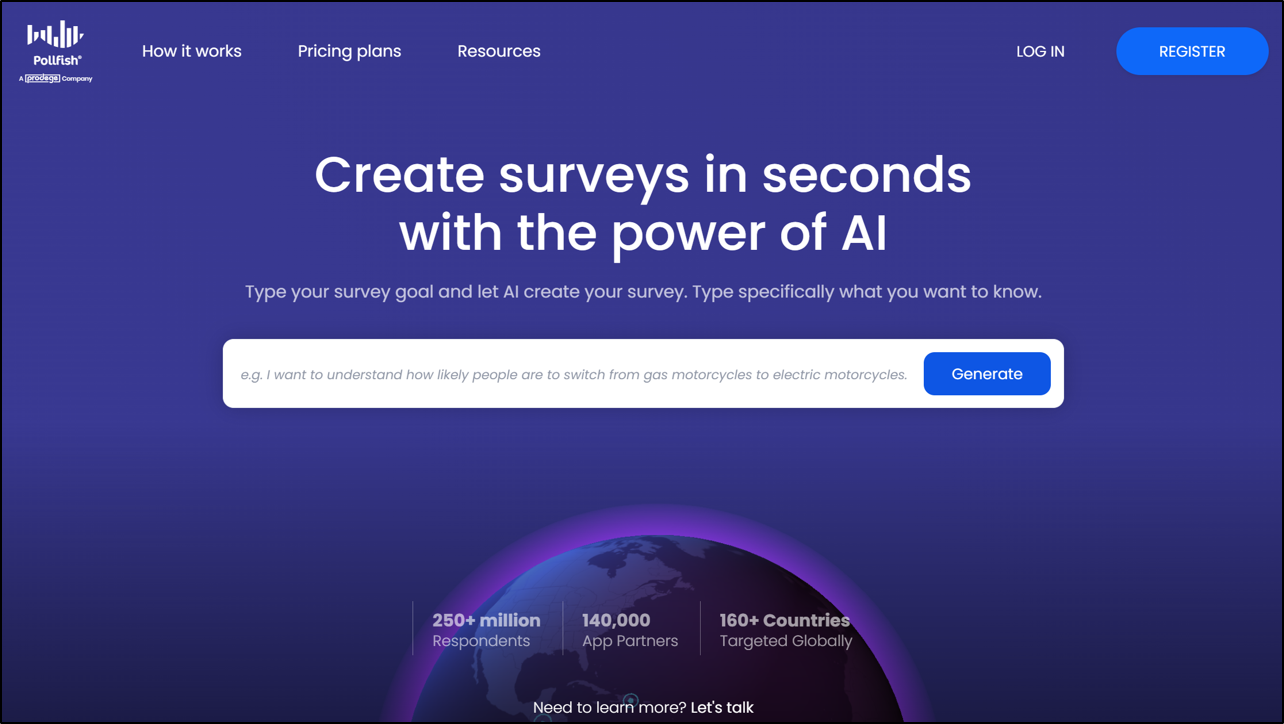
Pollfish is an online survey tool that comes with access to an audience of 250 million+ participants worldwide you can pay to complete your surveys. It's particularly focused on selling to market research and advertising customers.
Does it offer Partial Completion? No ❌
While Pollfish is a leading platform used by hundreds of thousands of organisations, there's no reference online to any incomplete session capture or partial submission functionality of any kind on their platform.
18. Pollfish
Pollfish is an online survey tool that comes with access to an audience of +250 million respondents around the world that you can pay to complete your surveys. It’s particularly focused on selling to customers in market research and advertising sectors.
Does it offer Partial Completion? NO ❌
While Pollfish is a leading platform used by hundreds of thousands of organizations, there is absolutely no reference online to any incomplete session capture or partial submission functionality of any kind existing on their platform.
⬆️ Incomplete surveys are autosaved on all OpinionX surveys (including for free users)
Across the 18 tools here, OpinionX was one of the few that saves partial data automatically on both its free and paid tiers, and the only one that surfaces it with a one-click toggle. The free tier lets you test the whole thing without commitment or a card, by building your own survey or playing with the sample surveys.
Frequently asked questions
What is partial completion data in surveys? The answers from people who start a survey but don't finish it. Tools with partial completion capture save those answers as "incomplete" submissions instead of discarding them, so you keep the data from everyone who dropped off partway.
Why do people abandon surveys before finishing? Usually external factors rather than bad design: they get distracted, they intend to return later and forget, or a mid-survey page makes them think they've finished so they close the tab early. Capturing partial data protects your research from all three.
Which survey tools save incomplete responses? Of the 18 compared here, only some save partial data automatically and fewer let you view and analyse it. OpinionX saves every answer as it's given on all tiers, with a one-click toggle to show or hide incomplete submissions on the results page.
Does OpinionX capture incomplete survey data on the free tier? Yes. OpinionX captures partial completion data for every participant on every survey, free or paid. Once a participant answers any question, that data is saved; if they leave the survey idle for more than 24 hours, their answers so far are stored as an "Incomplete" profile.
How does partial data help with long ranking surveys? For a series-based voting method like pairwise comparison or MaxDiff over a long list, you can ask people to vote on a minimum number and then stop whenever they like. With partial completion capture, every vote they cast still counts, so you get more total data without forcing anyone to finish.
Losing half your responses to a closed tab is an avoidable problem. If your research depends on capturing as much data as possible, especially for long ranking surveys, pick a tool that saves partial submissions by default and lets you actually see them.
Want more like this? Over 42,000 researchers and product people get The Full-Stack Researcher in their inbox. Subscribe for the next one.
OpinionX captures partial completion data on every tier, free included: $0, unlimited surveys, unlimited researcher seats, up to 25 participants per survey, then $900 a year for unlimited participants (full pricing). Every answer is saved the moment it's given, with a one-click toggle to view incompletes.
About The Author:
Daniel Kyne is the Co-Founder of OpinionX, a free research tool for stack ranking people’s priorities — used by thousands of product teams to better understand what matters most to their customers. OpinionX comes with a bunch of research methods for measuring people’s preferences — including automatic capture of incomplete survey sessions. Try it now!