
Free Van Westendorp Google Sheets template (no sign-up)
Our free Van Westendorp Google Sheets template turns your survey answers into the four Van Westendorp lines, finds the optimal price and the edges of the acceptable price range, and draws the chart for you. Van Westendorp, also called the Price Sensitivity Meter, is the four-question pricing survey first published by Peter van Westendorp in 1976 (ESOMAR). The template is free and ungated, with no email form and no sign-up: open it, make a copy and paste in your data.
The template comes filled with actual answers from a practice Van Westendorp survey OpinionX ran about a 30oz Stanley Cup, so you can see a finished result before you add your own. This guide covers what the template calculates, how to use it with your own survey data, and what it can't do.
What does the Van Westendorp Google Sheets template calculate?
The template has two tabs: "Sheet2" holds the raw survey answers, one participant per row, and "Van Westendorp" reads those answers and does the analysis in three parts.
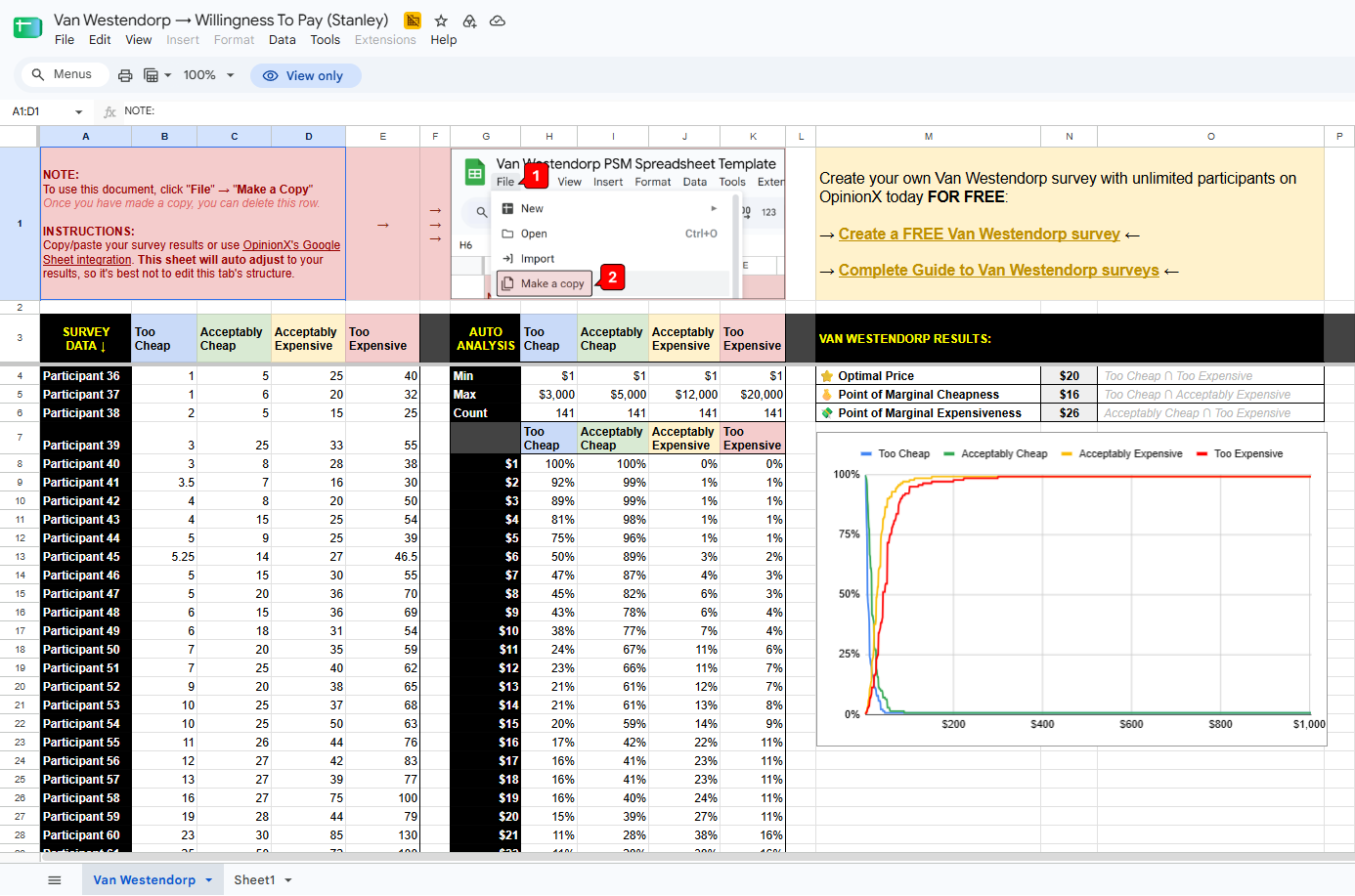
1. Survey Data pulls each participant's four prices from Sheet2. The template calls the four questions Too Cheap, Acceptably Cheap (a bargain), Acceptably Expensive (starting to get expensive) and Too Expensive.
2. Auto Analysis builds the four lines. Column G is a list of prices that starts at the lowest price anyone gave and goes up in $1 steps, and for each price, the next four columns show what share of participants put it into each group:
Too Cheap counts everyone whose "too cheap" answer is that price or higher, because someone who calls $10 too cheap would also call $8 too cheap. Acceptably Cheap works the same way.
Acceptably Expensive counts everyone whose answer is that price or lower, because someone who says $40 is getting expensive would say the same about $50. Too Expensive works the same way.
In the Stanley Cup data, for example, the row for $20 shows 16% Too Cheap and 11% Too Expensive, and the row for $21 shows 13% and 16%, so the two lines cross between those rows.
3. Van Westendorp Results reads off three key prices, with the two lines that cross written next to each one:
⭐ Optimal Price: the highest price where the Too Cheap share is still at or above the Too Expensive share, which is $20 in the Stanley Cup data. At this price, the fewest participants reject the product as either too cheap or too expensive.
🫰 Point of Marginal Cheapness: the first price where Too Cheap falls to or below Acceptably Expensive, which is $16. This is the bottom edge of the acceptable price range.
💸 Point of Marginal Expensiveness: the first price where Acceptably Cheap falls to or below Too Expensive, which is $26. This is the top edge of the acceptable price range.
A line chart next to the results plots all four lines against price and updates whenever the data changes. Our guide How to read a Van Westendorp chart explains what each line and crossing point means.
The template skips the fourth key price, the indifference price point, where as many people call a price a bargain as call it getting expensive. Want it? Paste this formula into an empty cell next to the results box on the Van Westendorp tab, such as R4: =INDEX(G8:G10002, MATCH(TRUE, I8:I10002<=J8:J10002, 0)). Skip the cells straight under the results box, because the chart sits on top of them. In the Stanley Cup data the formula returns $21.
How do you use the template with your own data?
Make a copy. Open the template and click File, then Make a copy. The note at the top of the template asks you to do this before you change anything, and your copy is yours to edit.
Export your answers. Download your survey results as a CSV file (a spreadsheet file you can open in Google Sheets or Excel), with one row per participant and the four price answers in separate columns.
Clean the answers. The template doesn't check for out-of-order prices or joke answers, so delete those rows yourself. In the Stanley Cup survey, 9 of the 143 people who answered all four questions gave prices out of order (a bargain price higher than their too-expensive price, say), and one person typed 41,387,560 as a too-cheap price. Extreme answers like that also wreck the chart: in the Stanley Cup data, a few answers between $5,000 and 41,387,560 stretch the price axis out to $1,000, so the four lines squash against the left edge even though every crossing sits under $30. Type prices as plain figures, without currency symbols.
Paste into Sheet2. Delete the Stanley Cup rows, then paste your data from row 3 down, with the participant name or ID in column B and the four prices in columns D to G, in this order: too cheap, bargain, getting expensive, too expensive.
Read the results. Go back to the Van Westendorp tab, where the price list, the four lines, the three key prices and the chart all update by themselves.
Run your survey on OpinionX and you can skip the export step, because OpinionX's live export to Google Sheets sends answers straight into a sheet as they come in, on every plan. Just check that the four price columns land in columns D to G of Sheet2, and move them there if they don't.
What are the limitations of the template?
The template does the core calculation, but it has five limits to know about before you rely on it.
Prices go up in $1 steps. The price list starts at the lowest answer and adds $1 each row. In the Stanley Cup data one person answered $0.99, so the key prices are actually $19.99, $15.99 and $25.99, shown rounded as $20, $16 and $26. That's fine for products priced from about $10 to $1,000, but too coarse for something priced in cents, like a $2.49 coffee. The Van Westendorp tab also has about 1,030 rows, so the price list stops roughly $1,000 above the lowest answer, and a range from $5 to $5,000 won't fit unless you add rows. That same row limit caps the template at about 1,030 participants.
It keeps every answer you paste in. The template doesn't remove out-of-order answers, so cleaning them is on you (step 3 above). That's also why its Stanley Cup results sit a dollar or a percentage point off our chart guide: it keeps the out-of-order answers and starts its price list at $0.99.
There's no segment analysis. To compare customer segments, such as people on different pricing plans, make one copy of the template per segment and paste in only that group's rows. Our guide on how to segment Van Westendorp results explains why the overall result can hide very different prices for different groups.
There's no revenue estimate. The template doesn't support the Newton-Miller-Smith extension, the two "how likely are you to buy?" questions that turn the acceptable price range into a revenue estimate.
Sample size is up to you. The template will happily draw a chart from 10 answers, but a chart that small moves a lot when a few answers change. The pricing consultancy 5 Circles Research suggests at least 200 participants for a business product and 400 for a consumer product, and our Van Westendorp sample size calculator works out how many your study needs.
The Van Westendorp question type on OpinionX handles all five: it stops participants from entering prices out of order, finds all four key prices, splits the chart by segment, adds the Newton-Miller-Smith questions with one checkbox, and shows how many valid participants each chart uses.
For the full method, from writing the four questions to choosing participants, read our Van Westendorp pricing guide. Comparing pricing methods before you start? Our guide on Van Westendorp vs Gabor Granger explains which question each one answers.
About to run your first Van Westendorp survey and want a research expert to look over your questions and price settings before it goes out? Book a free 30-minute setup call, with no obligation.
The Van Westendorp question type is on OpinionX's free plan with up to 25 participants per survey, so you can compare it with the template on the same data.
