
Miscellaneous Updates throughout January 2025
-- -- --
🪄 Segmentation Logic 🪄
You can now use AND, OR, NOT logic to configure more advanced segmentation filters.
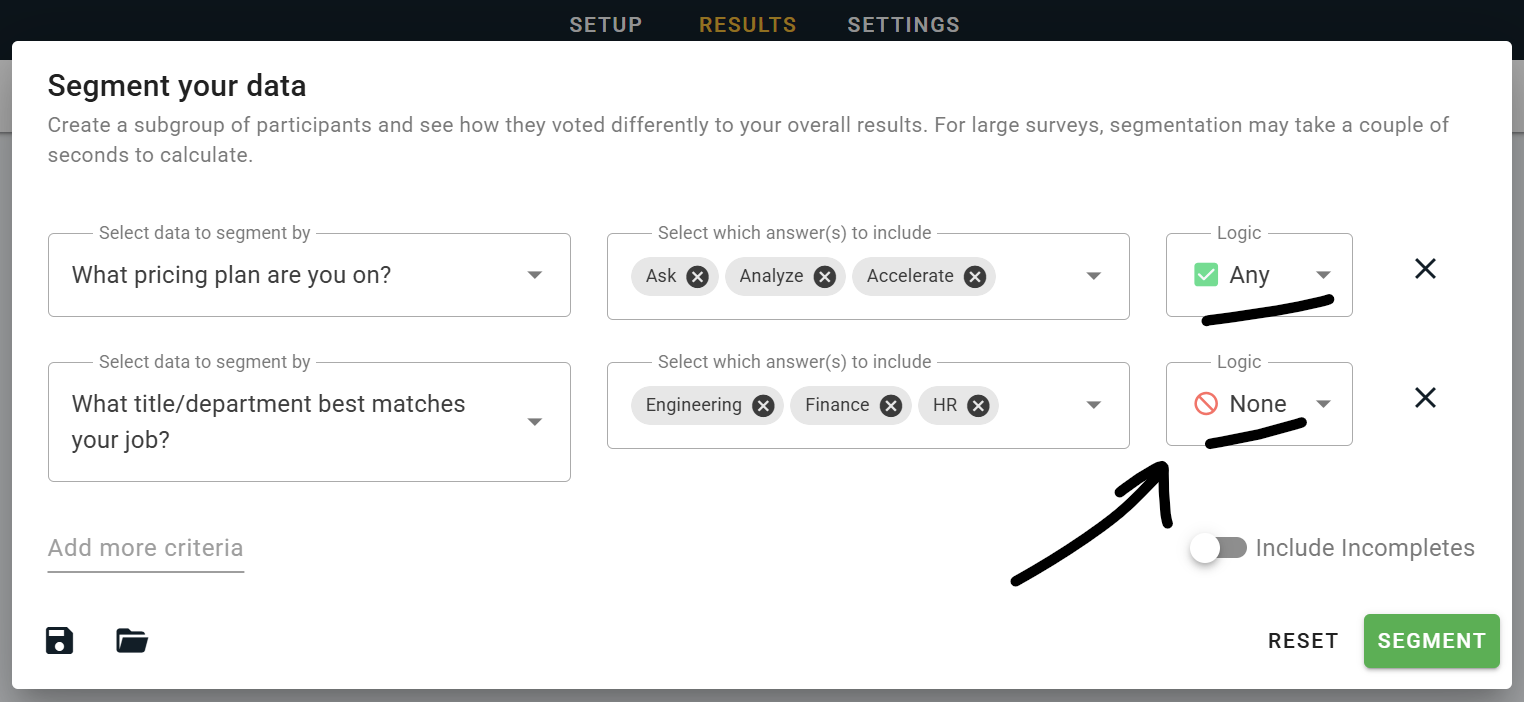
For example, the screenshot shows a filter that is configured to show results for (i) any participants who are on the "Ask", "Analyze" or "Accelerate" pricing plans AND (ii) any departments except "Engineering", "Finance" or "HR".
-- -- --
Product Improvements
Added a revenue projection to the "Monte Carlo" Scenario Simulator for Profile Rank (Conjoint Analysis).
Answer Branching now works for "Other" write-in answers on Multiple Choice blocks.
New helpful tiles at the bottom of the workspace homepage (eg. tells you what pricing plan you're on).
One-Time Upgrades now add credits to your account that you can self-allocate to your chosen survey.
Profile Rank scores now show to one decimal place, reducing perceived ties in your results.
Unique links created on the Enrichment Tab that are not set to single-use expiry will now copy enrichment data to everyone that completes the survey via the same link, not just the first respondent.
-- -- --
Product Fixes
Fixed the Partial Completes summary card showing a lower than accurate count of data available.
Improved the efficiency of exporting, reducing overall CPU usage for large export requests.
Fixed the display logic on the Intercom live chat widget to prevent it from appearing in surveys.
Fixed a bug on the Raw Data exports which was merging blocks of the same type into a single sheet.
Disabled Email Notifications for Partial Completes to reduce unnecessary inbox clutter.
Improved the time estimates for Profile Rank blocks, which are now generally shorter and more realistic.
Better caching and loading for segmentation filters, particularly on the data-heavy Segments Tab.
Various minor bugs and usability improvements for Profile Rank (eg. auto-highlighting during setup!).
Profile Rank categories now correctly show in the order you arrange them on your survey setup tab.