
How To Rank Images in Google Forms Surveys
“You can’t rank images in Google Forms. It has no ranking question type at all, for images or anything else, so the closest option is a Matrix Grid workaround that breaks on mobile and gives you no ranking analysis. No other mainstream survey tool (SurveyMonkey, Qualtrics, Typeform, Microsoft Forms, Jotform, Slido or Mentimeter) offers native image ranking either.”
The way to actually do it is Pairwise Comparison: show two images at a time and ask people to pick the better one, then score each image by how often it wins. It's easy on any screen size, and OpinionX is the only free tool that runs it on images. For the full how-to and a comparison of every tool, see our image ranking guide. This page is the quick Google Forms version.
Can you rank images in Google Forms?
No. Google Forms is one of the most popular survey tools around, but you can't use it to rank images, because you can't use it to rank anything. It has no ranking question type.
And if you're hoping to jump to another mainstream tool, no luck there either: there's no native image-ranking format on SurveyMonkey, Qualtrics, Typeform, Microsoft Forms, Jotform, Zoho Surveys, Slido or Mentimeter.
Why does none of them offer it? Over 56% of surveys are now answered on mobile, and small phone screens are poor for most ranking questions, images worst of all. So the big survey tools never built a format for it.

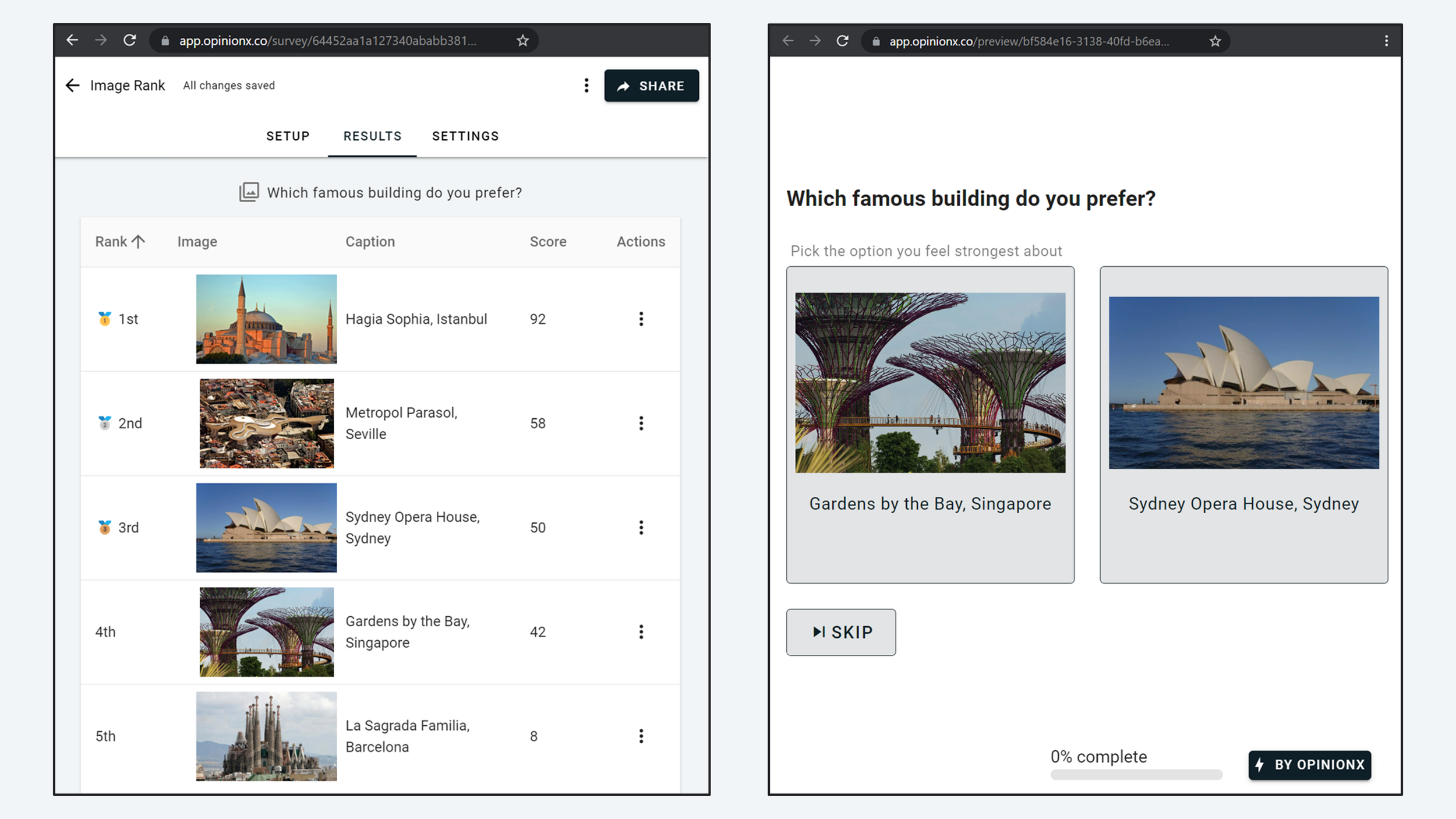
^ Example of pairwise comparison via OpinionX
The fix: rank images with Pairwise Comparison
The best way to rank images, easily and on any screen size, is an approach called Pairwise Comparison.
Pairwise Comparison takes a list of options and breaks it into a series of head-to-head pairs to vote on. Each option scores by the share of its pair votes it won (say an image shows up in 20 pairs and gets picked 15 times, that's 75 out of 100). It turns one huge ranking task into a run of quick micro-decisions, and because it only ever shows two options at once, it suits mobile screens and image ranking especially well.
There's only one tool that runs image-based pairwise ranking: OpinionX, which we built. Image ranking is on the free tier alongside its other ranking formats, with no limit on the number of images you can rank or surveys you can create, no time limit, and no credit card required.
For the full walkthrough, a citable comparison of which tools can rank images, and use-case examples, see our complete image ranking guide.
Frequently asked questions
Is it possible to rank images with Google Forms? No. Google Forms has no ranking question type, so it can't rank images or any other list of options. The only workaround is a Matrix Grid, which breaks on mobile and gives you no ranking analysis.
What's the best way to rank a list of images? Pairwise Comparison: show participants two images at a time and ask them to pick the better one, then score each image by how often it wins. It keeps the task easy and works well on mobile, unlike most ranking formats.
Is there a free tool to rank images? Yes. OpinionX ranks images for free using its Pair Rank (Pairwise Comparison) format, with no limit on the number of images or surveys. See the full image ranking guide for a comparison of the alternatives.
Rank images for free
You can build your first image ranking survey in under 5 minutes on OpinionX.