
How to create a MaxDiff Analysis survey on Typeform
Typeform does not offer a MaxDiff Analysis question type on its free tier nor on any paid plan — because maxdiff is an advanced research method and Typeform is a form builder tool, not a research platform.
If you want a tool with maxdiff, try one of these 10 survey platforms that offer maxdiff analysis instead of Typeform.
However, if you’re one of the many thousands of their customers looking for a solution to run maxdiff analysis on Typeform, this guide includes a DIY workaround you can use to get your maxdiff research up and running on Typeform (because Typeform have no intention of adding maxdiff any time soon)…
— — —
Research Scenario
Imagine you’re running a project to understand the issues that prevent people from effectively learning a new language. You’ve got a list of 14 challenge statements:
Forgetting vocabulary
Remembering noun genders
Staying motivated
Feeling progress is slow
Understanding native speakers
Making mistakes while speaking
Understanding slang/idioms
Pronunciation/accents
Mixing up verb conjugations
Irregular verbs
Translating in your head
Reading long texts
Feeling embarrassed speaking in public
Confusing similar words
You need a way to measure which of these issues has the biggest effect on language learners’ progression. That’s what MaxDiff Analysis is ideally suited to.
A maxdiff analysis survey takes a list of options like this and breaks it down into a series of subsets with 3-6 options at a time, and asks people to pick the best and worst option from the list each time. Whenever the respondent votes, a random new set of options from the list appears. By analyzing which options get picked most as best/worst, you can measure the relative importance of all options and rank them from first to last.
Using maxdiff for this language survey will help you to rank the list from the biggest barrier down to the smallest barrier when learning a new language.
— — —
DIY Solution for MaxDiff Surveys on Typeform
However, Typeform doesn’t have a maxdiff question type. So what can you do instead?
One option is to use a series of preprogrammed matrix questions like this:

You need to create many matrix questions with the same question. The rows on the matrix grid remain unchanged (eg. in my screenshot I’ve used “Most Frustrating” and “Least Frustrating”).
Here’s how voting works on a phone for this Typeform DIY maxdiff survey:
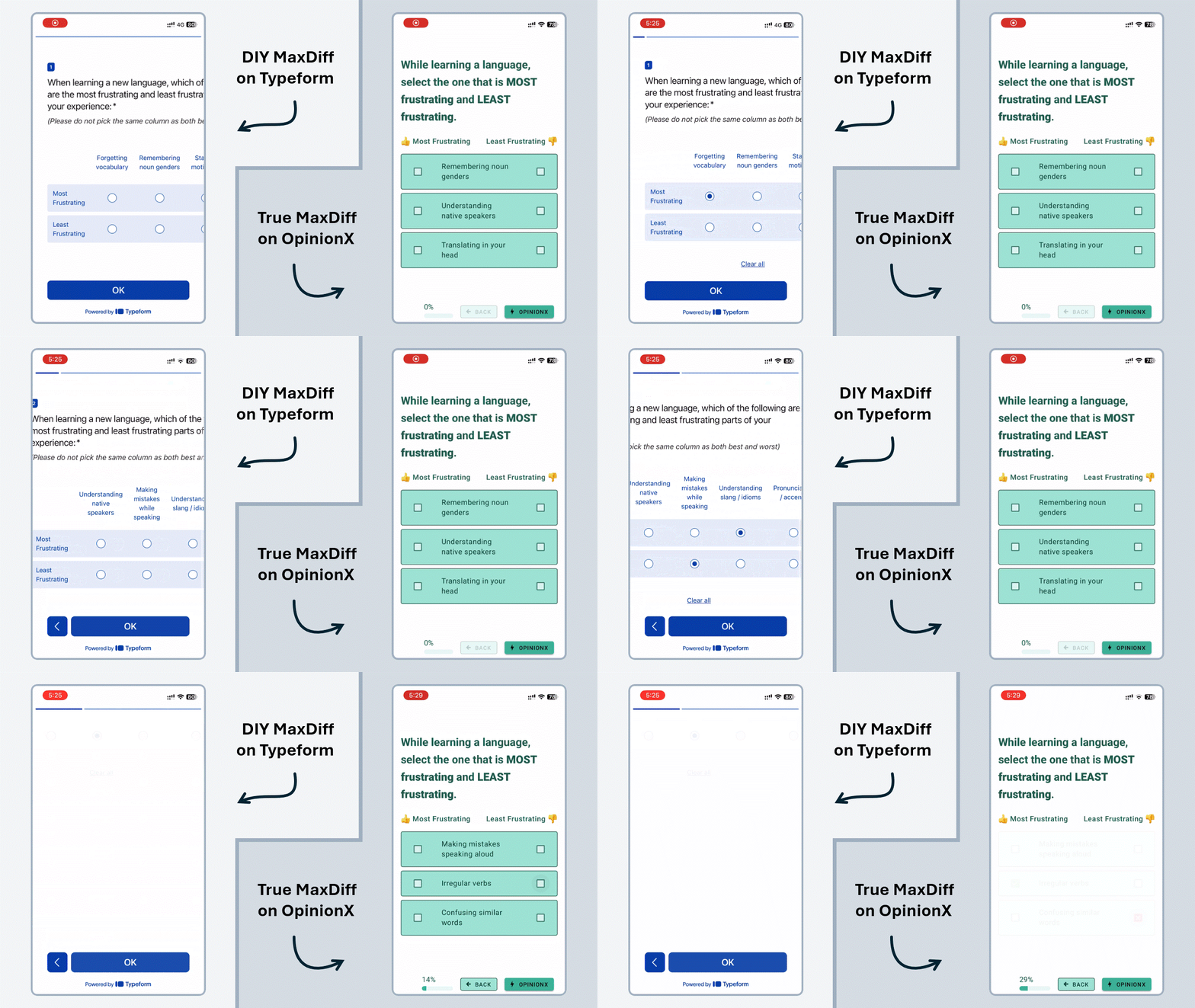
After testing this approach myself on Typeform, I have to strongly advise against it. I thought Typeform might have a better mobile UI for matrix grids, but as you can see in the GIF above (left side), the experience is bad in many ways. When you consider this alongside the fact that there are many downsides to manually defining your maxdiff sets, this starts to look like it’s not a maxdiff survey at all — especially when you compare it to a purpose-built maxdiff survey like the example from OpinionX on the right.
Problems with using Matrix Grid to run MaxDiff Analysis on Typeform
Here’s a more detailed breakdown of the issues I see with this DIY MaxDiff approach on Typeform:
1. Usability: Matrix Grid questions don’t fit well on mobile screens, so respondents are required to scroll over and back just to read the question and see the voting options.
2. Position Bias: There is no way to randomize the order of columns, so there will always be an increased likelihood that the left-most options will be chosen more often.
3. Not Balanced: Everything must be set up in a fixed format beforehand, which makes it impossible to get statements rotated equally and appearing alongside every other option, which is key to maxdiff analysis research.
4. Long Lists: One of the main reasons people use maxdiff surveys is to rank a long list of options, but when there’s no randomization involved, it means that every participant needs to see every option. To do this, you’d need to include an unfeasible number of voting sets. This makes the DIY-matrix approach unfeasibly long for maxdiff analysis when you have many ranking options.
5. Long Statements: The voting statements in my example are very concise. It’s common to have long sentences in maxdiff voting. The matrix grid format is already partially unusable on mobile devices, so longer text options would make the user experience even worse when voting.
6. Input Errors: On a matrix question, it’s possible to pick the same option as both best and worst, thereby breaking the entire point of maxdiff analysis. While you can ask people not to do this, like I did in the screenshot example from Typeform, it is risks junk data collection that purpose-built maxdiff survey tools can more easily avoid.
7. Manual Analysis: If you do manage to collect a lot of votes from respondents, you will then have to export your data to a spreadsheet to analyze manually. Survey platforms offering maxdiff analysis will automatically calculate preference scores for you and allow you to filter and compare results for different groups, which is a key part of analyzing maxdiff results.
This is what MaxDiff Analysis results are meant to to look like, on a survey platform that calculates them automatically:

Screenshot of a MaxDiff Analysis results chart on OpinionX
— — —
Purpose-Built MaxDiff Survey Tools
It takes a lot of time and effort to run any survey. If you’re going to ask hundreds, potentially thousands, of people to complete your maxdiff survey, you should ensure that you can get the insights you need from the results.
OpinionX is the ideal balance between Typeform and Qualtrics. It gives you powerful research methods from Qualtrics, like maxdiff analysis and segmentation comparison, but in an affordable and easy-to-use platform like Typeform.
That’s why OpinionX is the number one research platform for advanced survey methods like maxdiff analysis. It has a mobile-optimized interface that randomizes which options appear in each voting set and automatically calculates results for you instantly.
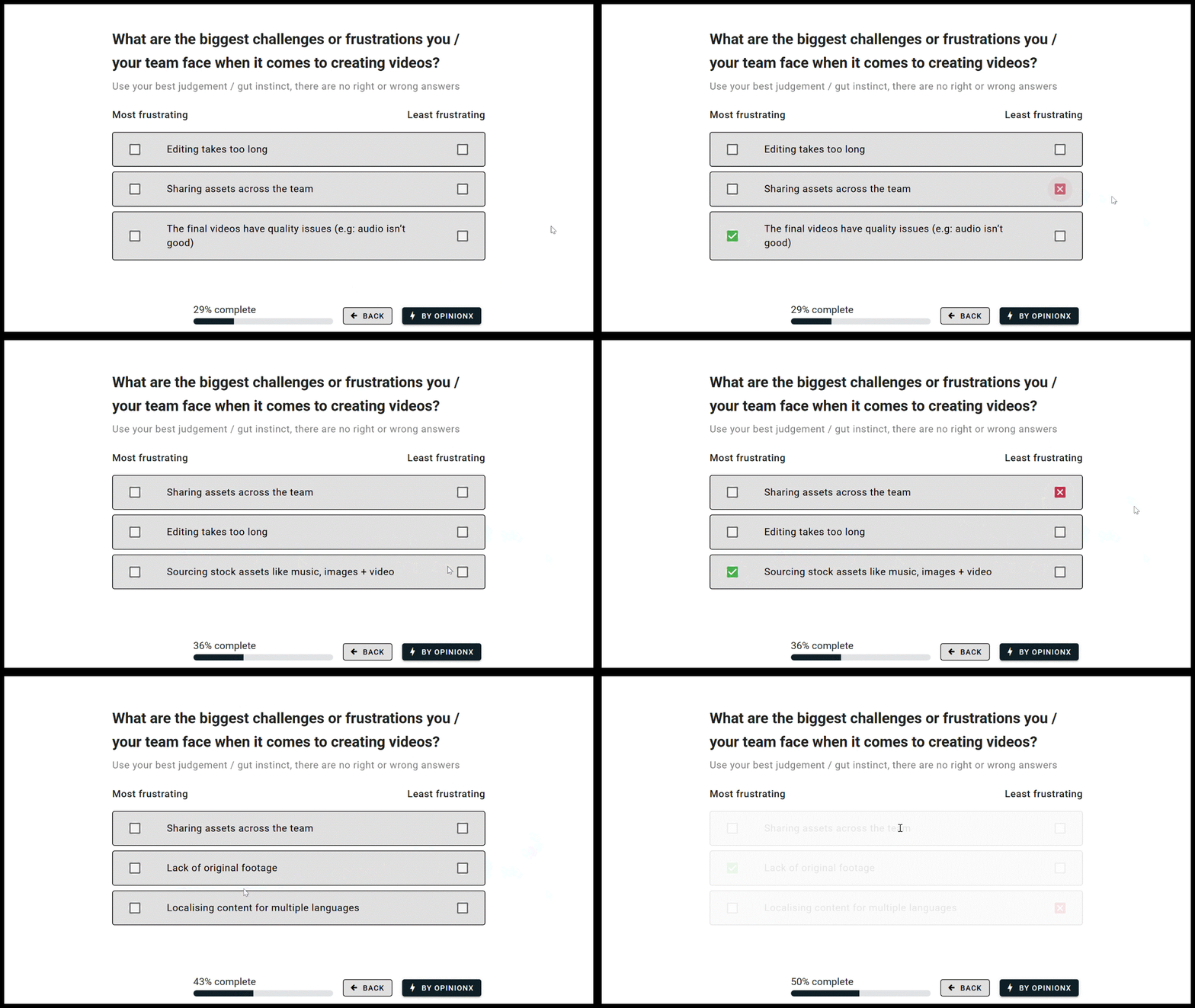
MaxDiff Analysis survey from the research platform OpinionX
OpinionX’s free plan includes MaxDiff Analysis, so you can set up your own maxdiff surveys, gather data from real participants, and interact with your results without ever needing to pay. This generous free plan lets you confidently confirm that OpinionX will fulfill your research needs upfront.
MaxDiff Analysis is an advanced survey method that you won’t find on any form builder tool like Typeform, Jotform, Google Forms, or Tally. If you want to run advanced projects like this to measure people’s preferences and priorities, you need an advanced survey platform that will maximize your ability to succeed.

Filtering MaxDiff results on OpinionX to compare groups
OpinionX offers advanced survey methods in an easy-to-use platform, with clever automations, simplified terminology, sample surveys, one-click templates, and an affordable pricing model, which altogether make it possible for anyone to run maxdiff analysis surveys.
Here’s an example of a MaxDiff Analysis survey on OpinionX that you can vote on yourself:
(If the embedded survey above doesn’t load for you, you can click this link to open it in a new tab)