
How to create a MaxDiff Analysis survey on Typeform
“Typeform has no MaxDiff question type, on the free tier or any paid plan, because it’s a form builder rather than a research platform. You can fake one with a run of matrix-grid questions, but I tested it and I’d steer you away: the matrix approach can’t randomise or balance the option sets, breaks on mobile, lets people pick the same option as best and worst, and leaves you scoring everything by hand in a spreadsheet. If you want MaxDiff done right, use a purpose-built tool. Below is the DIY workaround, why it falls short, and a better way to run it.”
MaxDiff is an advanced research method and Typeform is a form builder, so the question type was never going to be there, not on the free plan and not on any paid one.
If you want a tool with MaxDiff, try one of these 10 survey platforms that offer MaxDiff analysis instead of Typeform.
But if you're one of the many Typeform customers still asking how to run MaxDiff without leaving the tool, here's a DIY workaround (Typeform has no plans to add MaxDiff any time soon).
Can you run MaxDiff on Typeform? A research scenario.
Imagine you're running a project to understand what stops people from learning a new language. You've got a list of 14 challenge statements:
Forgetting vocabulary
Remembering noun genders
Staying motivated
Feeling progress is slow
Understanding native speakers
Making mistakes while speaking
Understanding slang and idioms
Pronunciation and accents
Mixing up verb conjugations
Irregular verbs
Translating in your head
Reading long texts
Feeling embarrassed speaking in public
Confusing similar words
You need a way to measure which of these has the biggest effect on progress. That's what MaxDiff Analysis is built for.
A MaxDiff survey takes a list like this, breaks it into small sets of 3 to 6, and asks people to pick the best and worst in each set. Every time someone votes, a fresh random set appears. Tally which options get picked as best or worst most often and you can rank the whole list from first to last.
The DIY workaround for MaxDiff surveys on Typeform
With no MaxDiff question type, you've got one route: a series of preprogrammed matrix questions, like this:

You build a stack of matrix questions with the same setup. The grid rows stay fixed (in my screenshot, "Most Frustrating" and "Least Frustrating").
Here's how voting looks on a phone:
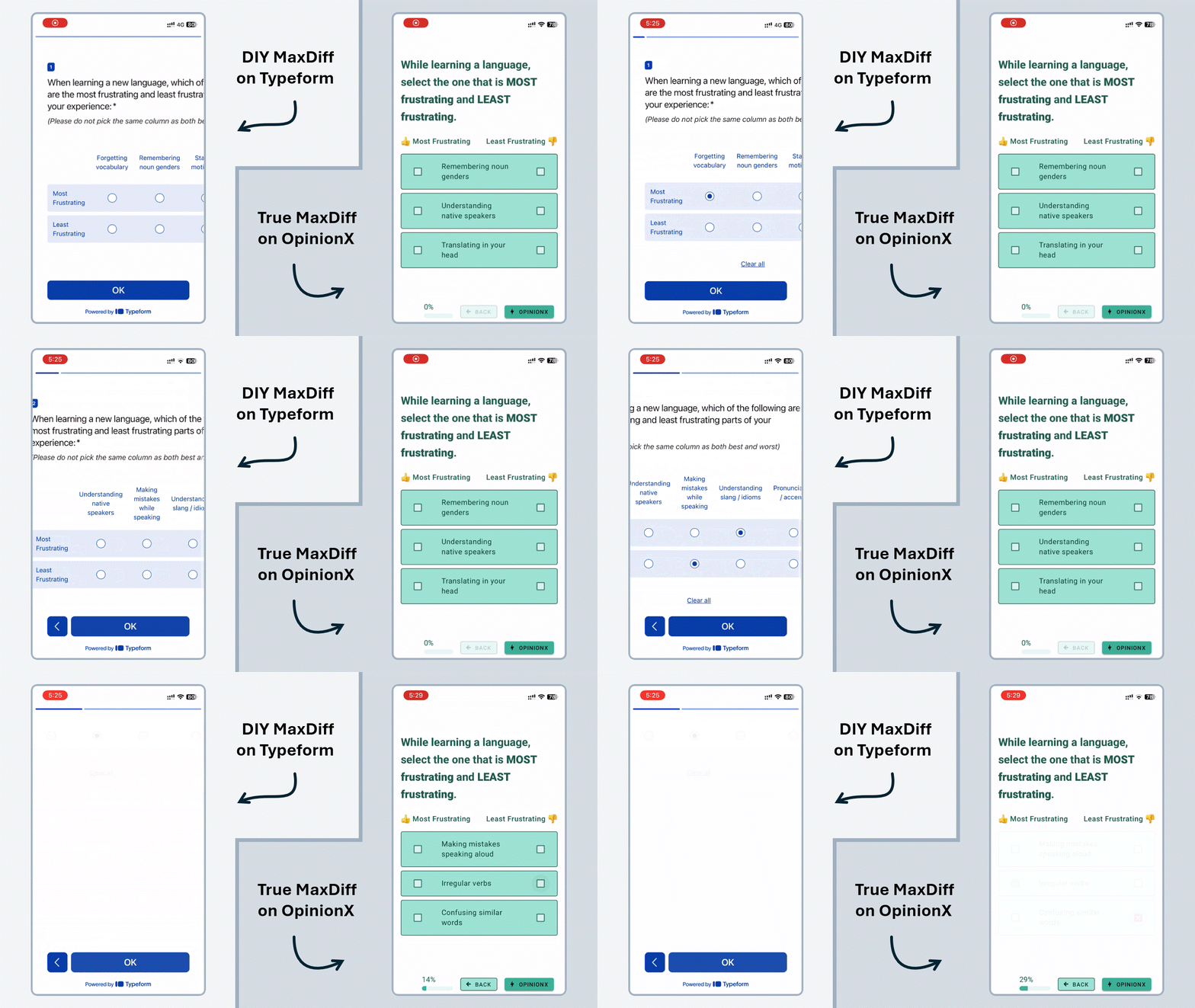
I ran it on Typeform myself, and it doesn't hold up. I'd hoped the mobile UI for matrix grids might be decent, but the GIF above (left side) shows how rough it gets. Add the downsides of defining every set by hand, and it stops looking like MaxDiff at all, next to a purpose-built version like the OpinionX example on the right.
Why the Matrix Grid workaround isn't really MaxDiff
Here's where it falls down:
Usability. Matrix grids don't fit mobile screens, so people scroll back and forth just to match a question to its options.
Position bias. You can't randomise the column order, so the left-most options get picked more often.
No balancing. Every set is fixed up front, so you can't rotate the statements to make each one appear alongside every other an equal number of times. That even rotation is the core of MaxDiff.
Long lists. People reach for MaxDiff to rank long lists, but with no randomisation every participant has to see every option. That needs an unworkable number of sets, and the survey gets far too long for a real study.
Long statements. My example uses short statements, but MaxDiff often has full sentences. The grid is already cramped on mobile; longer text makes it worse.
Input errors. A matrix lets someone tick the same option as best and worst, which breaks the whole thing. You can ask them not to (I did), but you'll still collect junk a purpose-built tool would block.
Manual analysis. Collect enough votes and you're then exporting to a spreadsheet to score them by hand. Purpose-built platforms calculate preference scores for you and let you filter and compare across groups, which is a big part of reading MaxDiff results.
This is what MaxDiff results look like on a platform that scores them for you:

Screenshot of a MaxDiff Analysis results chart on OpinionX
Purpose-built MaxDiff survey tools
Any survey takes real time to run. If you're asking hundreds, maybe thousands, of people to vote, make sure the results will actually tell you something.
Here's how the Typeform workaround compares to a purpose-built MaxDiff tool:
| Matrix-grid DIY on Typeform | Purpose-built MaxDiff (OpinionX) | |
|---|---|---|
| Option sets | Fixed and defined by hand | Randomised automatically |
| Balanced design | No, options rotate unequally | Yes, every option rotated evenly |
| Mobile experience | Poor, scrolling a cramped grid | Mobile-optimised voting |
| Long lists | Unfeasible, everyone sees every option | Handled via sampled sets |
| Best/worst errors | Possible (same option as both) | Prevented by design |
| Analysis | Manual export to a spreadsheet | Automatic preference scores + segmentation |
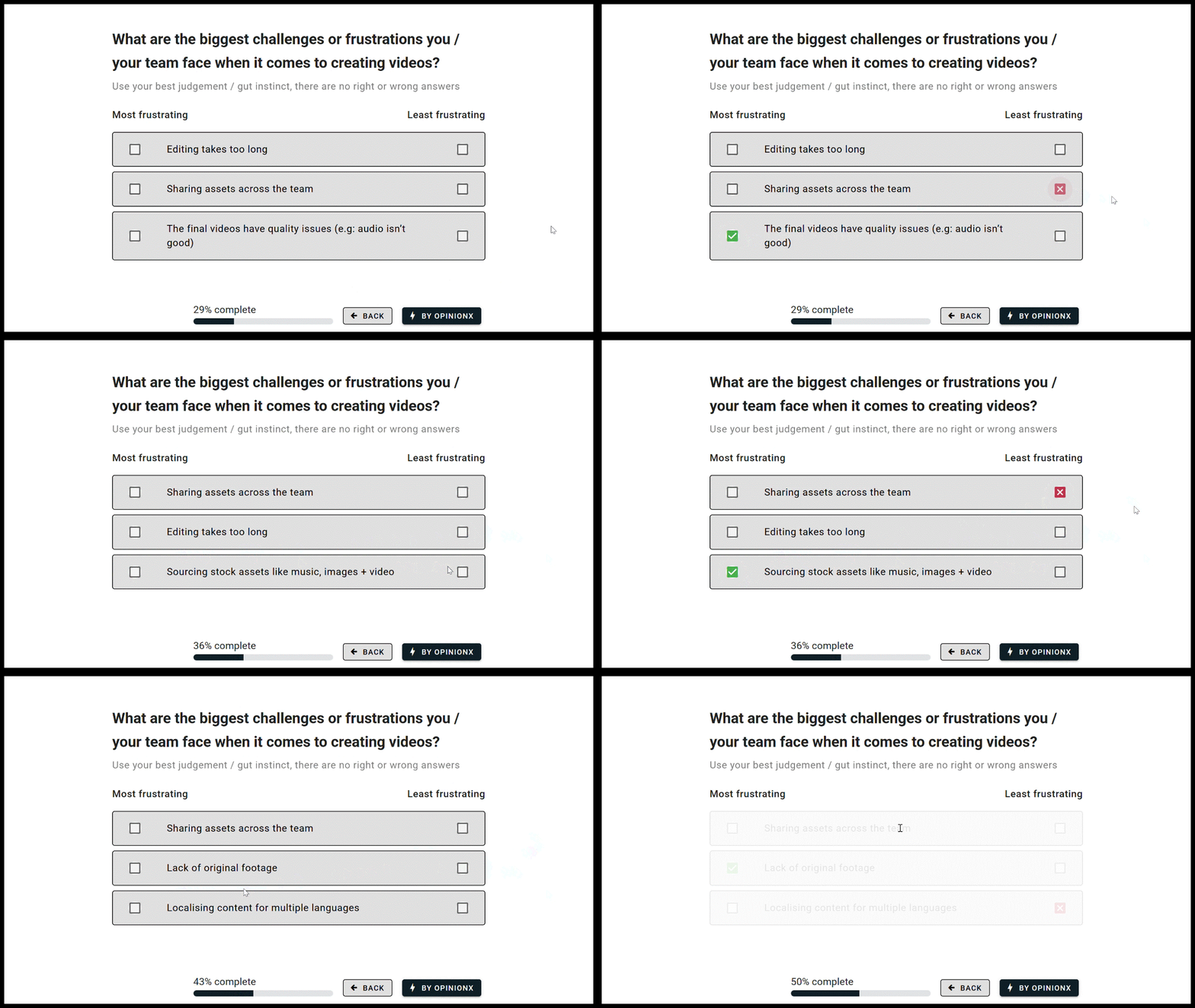
MaxDiff Analysis survey from the research platform OpinionX
OpinionX gives you the look and feel of Typeform with the advanced toolkit of Qualtrics Enterprise, MaxDiff and segmentation included, without the specialist price tag or the learning curve. It's a research platform built specifically for advanced survey methods like MaxDiff, with a mobile interface that randomises each voting set and scores the results for you.
A MaxDiff Analysis survey on the research platform OpinionX.
The free plan includes MaxDiff, so you can build a survey, collect real responses (up to 25 per survey on the free tier), and dig through the results without paying anything. Enough to know it fits before you commit.
MaxDiff is an advanced method you won't find on any form builder, not Typeform, Jotform, Google Forms or Tally. To measure what people actually prefer and prioritise, you need a platform built for it.

Filtering MaxDiff results on OpinionX to compare groups
OpinionX keeps the plain-language labels, sample surveys and one-click templates that let anyone run a MaxDiff survey.
Here's an example of a MaxDiff Analysis survey on OpinionX that you can vote on yourself:
(If the embedded survey above doesn’t load for you, you can click this link to open it in a new tab)
Frequently asked questions
Can you do MaxDiff analysis on Typeform? Not with a native question type, Typeform doesn't offer one on any plan. The only way to run MaxDiff on Typeform is a manual workaround using a series of matrix-grid questions, and it has serious problems (no randomisation, no balancing, poor mobile experience, and manual scoring).
How do you create a MaxDiff survey on Typeform? You'd build several matrix-grid questions with fixed "best" and "worst" rows and define the option sets by hand. It technically collects best/worst votes, but because you can't randomise or balance the sets, it isn't a valid MaxDiff design, which is why we don't recommend it.
Why isn't the Typeform matrix workaround a real MaxDiff survey? Proper MaxDiff needs randomised, balanced option sets so every option is compared fairly. The matrix approach fixes the sets manually, biases toward the left-most options, breaks on mobile, and lets people pick the same option as best and worst. You also have to score the results by hand.
What's the best tool to run MaxDiff analysis? A platform built for it, which randomises the voting sets, prevents input errors, and calculates preference scores automatically. OpinionX does this and includes MaxDiff on its free tier (up to 25 participants per survey), so you can validate your design before paying.