
Workspace Whitelabelling and Custom Survey Subdomains (August 2026 Updates)
OpinionX now has an expanded range of custom branding option -- including custom survey domains and workspace default settings for things like survey theme, finish page, and footer components.
1. Workspace Whitelabelling
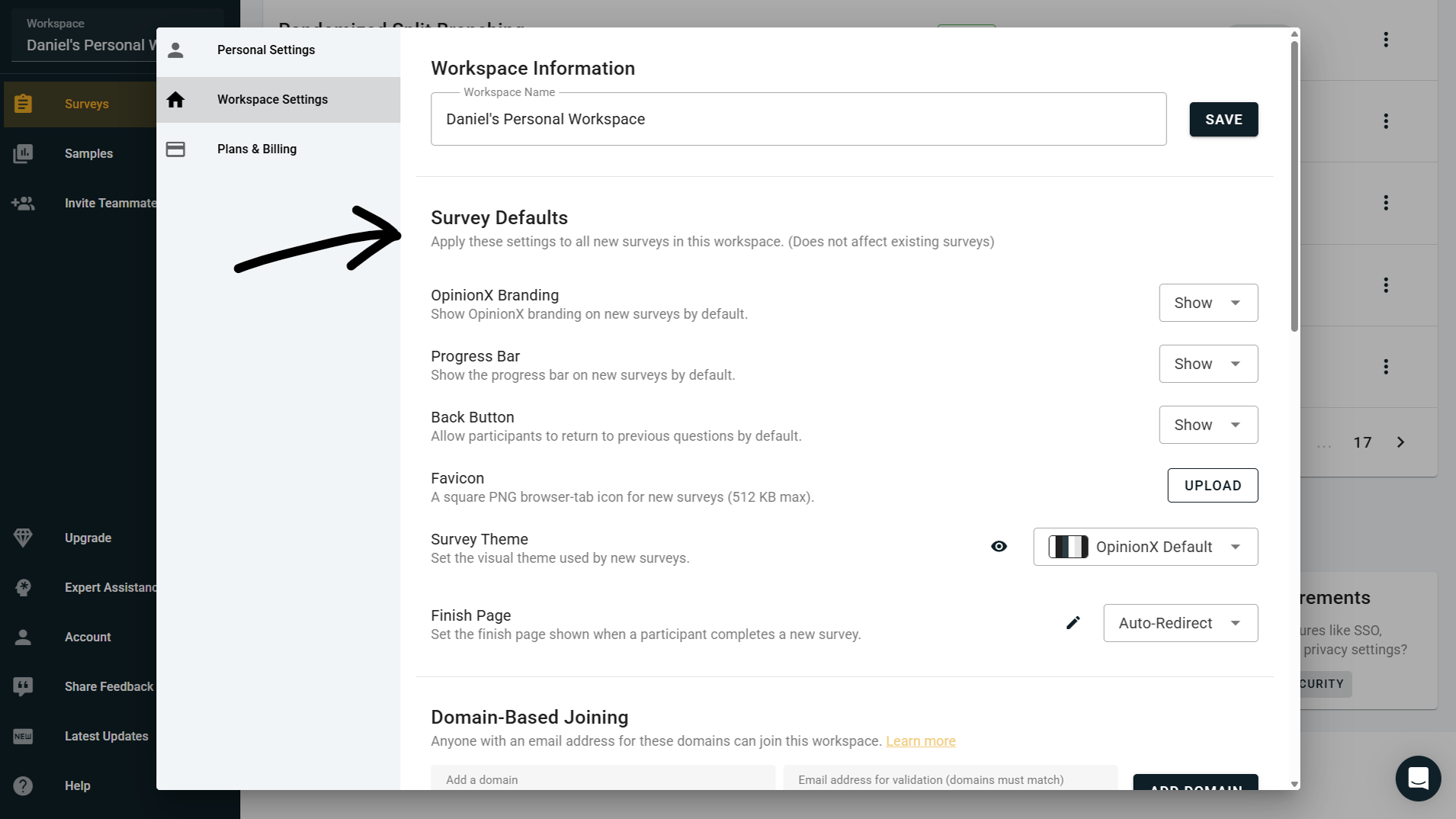
OpinionX customers on the Accelerate tier can now set workspace-wide defaults that apply to every new survey created inside their workspace. This makes it much easier to keep your surveys consistently branded without having to manually configure every setting each time you spin up a new one.
Here's everything you can now set as a workspace-wide default:
Custom Favicon → Upload your own favicon that will appear in the browser tab whenever a survey participant is taking one of your surveys.
Default Custom Theme → Set your workspace's default color scheme, fonts, and background so that every new survey inherits your brand's look and feel automatically.
Default Finish Page → Set a default finish page or redirect link that all newly created surveys will use once a participant completes the survey.
Progress Bar Visibility → Show or hide the survey progress bar by default across all newly created surveys.
Back Button Visibility → Show or hide the participant Back button by default. Useful if you want to prevent respondents from reviewing or changing earlier answers, particularly on research studies where order effects or first-instinct answers matter for data quality.
'Powered by OpinionX' Visibility→ Show or hide the Powered by OpinionX button that appears in the footer of survey participation pages by default.
All of these are workspace-level defaults rather than locked settings, so you can still override any of them on individual surveys where you need something different. This is especially useful for teams running lots of surveys where consistency matters — client-facing research agencies, in-house research teams at larger companies, product teams running recurring pricing or feedback studies, that sort of thing.
2. Custom Subdomains (Enterprise add-on)
For customers who want to take whitelabelling all the way, we can now also set up an entirely custom subdomain for your survey participation links, eg. surveys.yourdomain.com. This means your participants only ever interact with your branded link, not with opinionx.co at any point during the voting experience.
Your OpinionX dashboard for building surveys and analyzing results still lives at app.opinionx.co — this is just about what participants see when they open your survey link. Setup involves adding a CNAME record on your domain pointing to OpinionX, which we'll walk you through when you get in touch.
Custom subdomains are not included in the Accelerate tier and aren't self-serve in the workspace settings — this is a premium add-on for enterprise customers, configured directly by our team. If you're an enterprise customer and this sounds useful, reach out to your dedicated account manager and they'll get it set up for you. If you're not on an enterprise plan yet but want to explore this, book a call and we'll walk you through what's involved.
3. Other Updates
There were a couple of other changes included in this batch of July 2026 updates:
Dynamic Page Titles → Your browser tab now shows a customized page title based on your current screen (eg. the name of the survey you're editing, or the results tab you're viewing) rather than just "OpinionX" on every tab. This makes it much easier to navigate when you have several OpinionX tabs open at once, which is pretty common for anyone running multiple surveys or comparing results across studies.
Gabor Granger Vote Count Preview → The Gabor Granger survey setup screen now displays the exact maximum number of votes a participant may need to cast during the Gabor Granger section of your survey, updated live as you change the number of prices. Because Gabor Granger on OpinionX uses binary search to pick each subsequent price, this number stays surprisingly low even for large price ranges (a survey with 40 prices only needs 6 votes per participant, for example) — so this preview helps researchers see exactly how efficient their setup is before launching.