
Screener questions: why hiding the target beats adding more (with evidence)
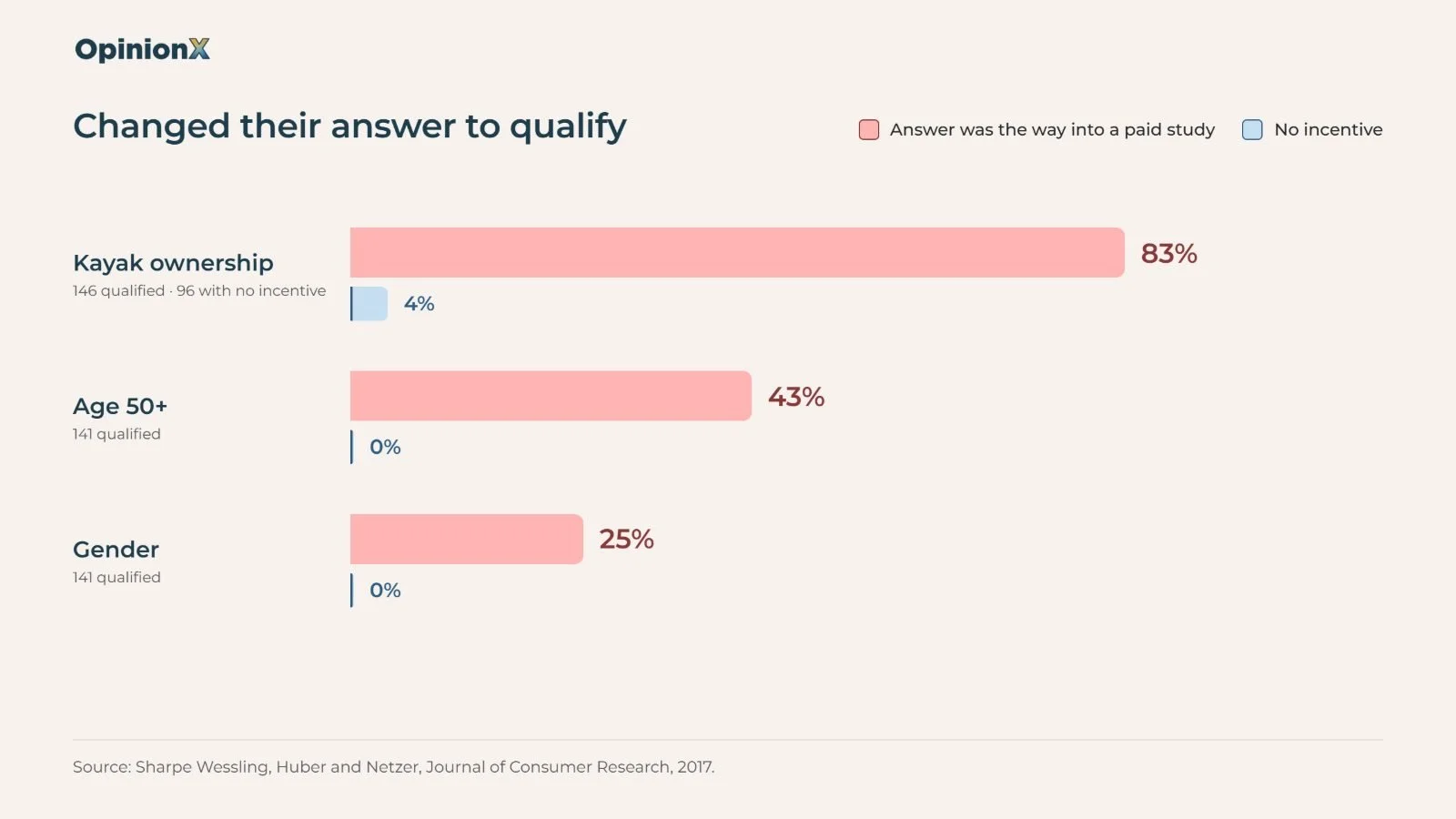
When owning a kayak got people into a paid study, 83% of the 146 people who got through had changed their answer to qualify, against 4% of a comparison group who had no reason to lie. That's from a 2017 study in the Journal of Consumer Research by Kathryn Sharpe Wessling, Joel Huber and Oded Netzer. A screener question is a question at the start of a survey that decides who's allowed to take part, such as "Do you own a kayak?" or "What's your job title?".
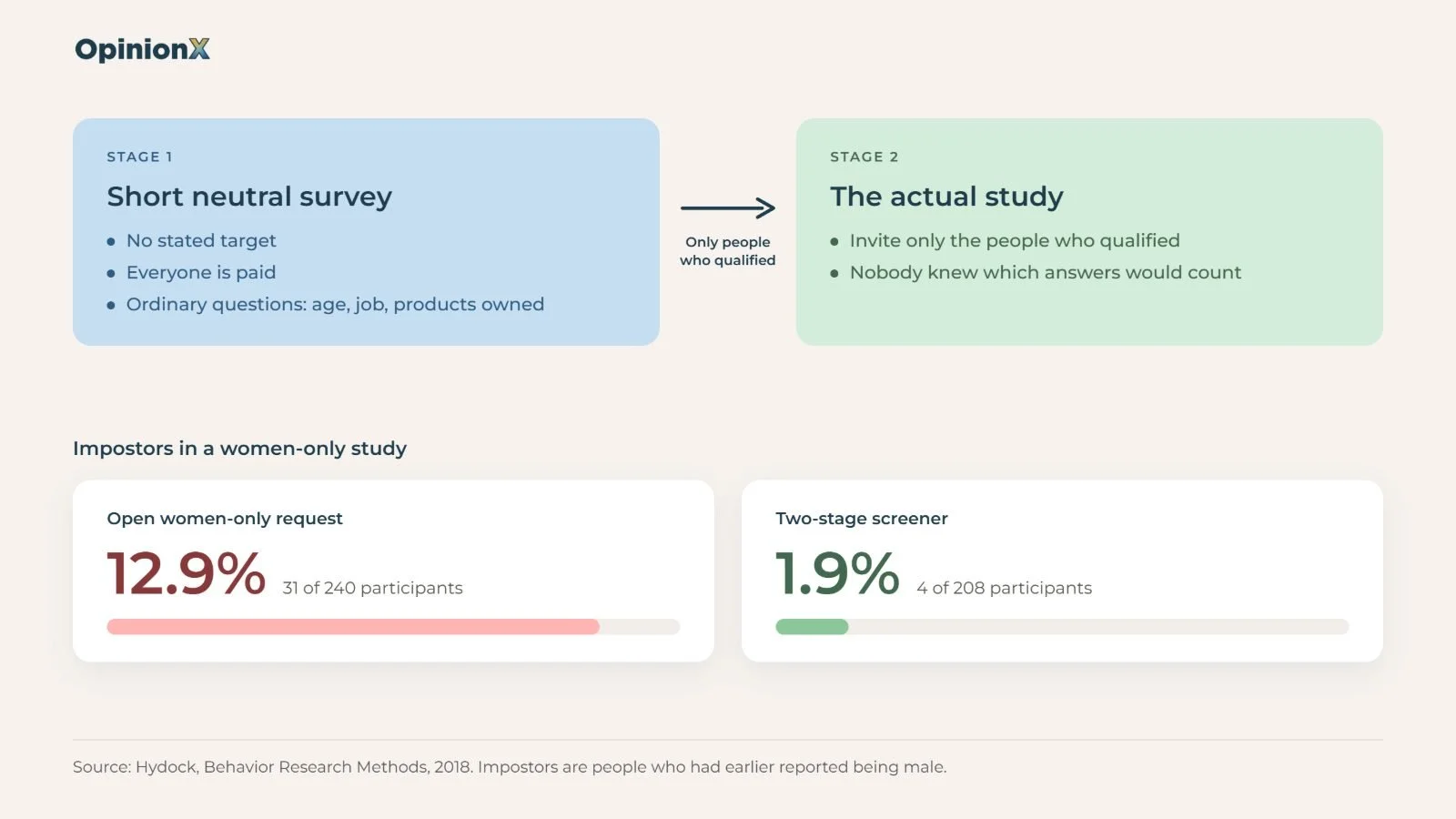
When the qualifying answer is plain to see and there's money on the other side of it, some paid participants give that answer whether it's true or not, and the fix is hiding which answer you're looking for, not adding more screener questions. A 2018 study by Chris Hydock found that an openly women-only study drew 12.9% people who had earlier reported being male, against 1.9% when the target was kept out of sight.
This guide covers why people lie on screener questions, why impostors do the most damage to segment results, how to write screener questions that don't give the game away, and how screening out works on OpinionX.
Why do people lie on screener questions?
People lie on screener questions when two things are true at once: there's a payment for qualifying, and the question makes it plain which answer qualifies. In the kayak study, everyone answered the ownership question once with nothing riding on it. The comparison group answered it again, still with nothing at stake, and only 4% of those 96 people changed their answer. The study group answered it again when owning a kayak was the way into a paid survey, and 83% of the 146 who got through were impostors.
Sharpe Wessling, Huber and Netzer ran the same test on two other screener questions. When being aged 50 or over was the requirement, 43% of the 141 people who qualified had lied about their age, and when the study wanted one gender, 25% of 141 changed the gender they'd given before. In both comparison groups nobody changed their answer at all. The authors' conclusion was that without safeguards, "misrepresentation can be destructively common".
Most paid participants still don't lie. Hydock's own summary was that "a nontrivial portion misrepresent their identity", which describes a small group, not a majority. The problem is where that small group ends up: honest participants spread across every answer to a screener question, while dishonest participants all pick the one answer that pays. Only 7% of the 1,000 people in the kayak study's starting panel actually owned a kayak, and with a target group that small, a handful of people willing to lie can outnumber the actual kayak owners who get through.
Why do impostors hurt segment results most?
Impostors do the most damage to segment results because they pile into the rarest group you're recruiting, which is usually the group you most want to look at on its own. A segment is a group of participants you view separately or compare against another group, such as enterprise buyers against small businesses. The rarer the segment, the fewer genuine members a panel holds, so the same number of impostors makes up a bigger share of it.
Jesse Chandler and Gabriele Paolacci put this in the title of their 2017 paper in Social Psychological and Personality Science, "Lie for a Dime: When Most Prescreening Responses are Honest But Most 'Eligible' Respondents are Lies". They found that when you recruit a rare population, a large share of the people who qualify can be deceptive, even though nearly everyone answered the screener question honestly.
Pew Research Center tested this in 2020 across more than 60,000 interviews from six online sources. Pew found 4% to 7% bogus participants in opt-in panels (panels anyone can sign up to for payment), against about 1% in panels recruited by mailing home addresses. The bogus participants also bunched together: 30% of them said they were Hispanic, against 10% of everyone surveyed. Pew notes the 30% is probably inflated, because the question was yes/no and someone answering at random says yes about half the time. That's no comfort for a screener question though, since a careless yes gets someone into your segment just as well as a deliberate lie. Pew's conclusion was that bogus participants "may bias poll estimates and not merely add noise", meaning they push results in one direction.
For a conjoint, MaxDiff or Gabor Granger pricing study, that's where impostors do the damage. A MaxDiff survey ranks a list of items by asking people to pick the most and least important from small sets, and a conjoint survey measures how people trade off features and price. The point of running either on a narrow audience is to split the results by segment, and our guide to needs-based segmentation shows why those splits are where the useful differences turn up. If 30 of the 100 "enterprise buyers" in your MaxDiff study ticked the enterprise box to get paid, your enterprise ranking is partly what non-buyers guess enterprise buyers want. Our guide to participant-level data shows how to read each person's answers on their own, but keeping impostors out at the screener question is still far cheaper than hunting for them afterwards.
A 2024 paper in JMIR Mental Health by Blandine French and colleagues shows how bad it gets when nothing stands in the way. One of their case studies was a survey for 11 to 19 year olds, promoted on social media with a prize draw: 184 of the 391 people who finished were outside the age range, and only 42 of the 391 (10.7%) were judged genuine. That survey had no paid panel, just an incentive and an eligibility rule anyone could read.
How do you write screener questions that don't give the game away?
You write screener questions that don't give the game away by making the qualifying answer look like every other answer. If a participant can't tell which answer gets them in, the people willing to lie have nothing to aim at, and they spread across the options the same way honest people do. The table compares the four main screener designs, and the sections below it explain how to do each one, starting with the cheapest changes.
| Screener design | What it gives away to an impostor | What it costs you | When to use it |
|---|---|---|---|
| Overt yes/no question ("Do you own a kayak?") | 🔴 Everything. The qualifying answer is one of two, and it's the one that sounds like the study. | Nothing to build, but you pay for impostors in the results. | Only when there's no payment, or the trait is common enough that impostors can't move the results. |
| Multi-select with distractors ("Which of these do you own?") | 🟡 Little, if the distractors are believable. A guesser has one chance in eight or more. | A few minutes writing believable distractors. | The default for any paid study with a screener question. |
| Panel prescreen data | 🟢 Nothing at the time of your study. People answered when they joined the panel. | Depends on which filters your panel offers. Old answers can be out of date. | Whenever your panel stores the trait you need. Add your own screener question on top to confirm it. |
| Two-stage screener | 🟢 Nothing. The first survey has no stated target and pays everyone. | Two surveys to run, a payment for everyone in the first one, and a few days of extra fieldwork. | Rare groups, and any study where you'll split results by a narrow segment. |
Writing a screener for a hard-to-reach group and want a second pair of eyes on it? Book a free 30-minute setup call and a research expert will go through your screener questions, your distractors and whether your study needs a two-stage screener.
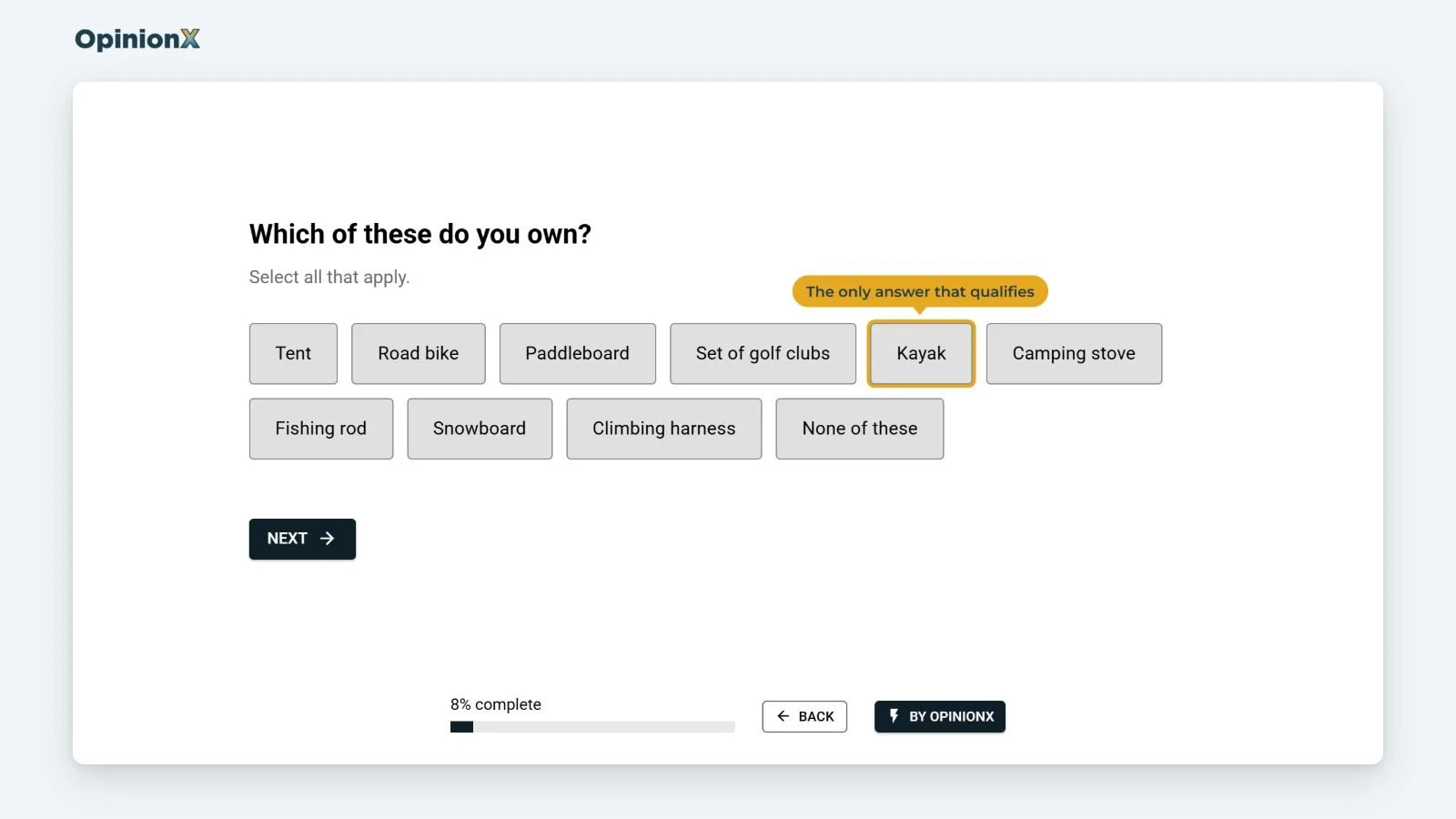
Bury the qualifying option in a multi-select question with believable distractors. Don't ask "Do you own a kayak?". Ask "Which of these do you own?" and list a kayak among eight or so other items a person might own, like a tent, a road bike, a paddleboard and a set of golf clubs. Distractors are the answer options that don't qualify anyone, and they need to be believable, because a list of one outdoor item and seven kitchen appliances gives the target away just as fast. The same works for job roles, software used or purchases made: list the qualifying answer among others of the same type, and screen out anyone who doesn't pick it.
Keep the target out of the panel listing and the survey intro. When you buy participants from a panel such as Prolific, Cint or Respondent, the study title and description are often the first thing a participant reads, and "Survey for marketing directors at SaaS companies" tells every reader which answers to give. Describe the study in general terms ("a 10-minute survey about software you use at work") and let the screener question do the filtering in private. The same goes for your survey's welcome page.
Put the screener questions first, so people leave early. Screener questions belong at the very start of the survey, before any study questions. Someone who doesn't qualify spends 30 seconds instead of 10 minutes, which saves them time and saves you money, since many panels expect you to pay screened-out participants for their time. Prolific, for example, is moving to a fixed minimum of £0.10 or $0.14 for each participant screened out inside a study, according to Prolific's own help article on screening.
Use the panel's own prescreen data where it exists. Most panels store answers people gave when they joined, such as age, country, job and the products they use. Filtering on that data means the panel only shows your study to people who already said they qualify, at a time when they had no idea what study it was for. It's the closest you'll get to a two-stage screener without running a second survey yourself.
For rare groups, run a two-stage screener. A two-stage screener is a short, neutral first survey that asks a set of ordinary questions (age, job, products owned) with nothing riding on the answers, followed by an invite to the actual study for only the people who passed. Both Sharpe Wessling and Hydock landed on this fix. In Hydock's women-only test, 31 of 240 people (12.9%) who answered the open request had earlier reported being male. With the two-stage version, which paid everyone for the short first survey and then invited only eligible people back, that dropped to 4 of 208 (1.9%), and Hydock's over-35 test went from 13 of 124 (10.5%) to 0 of 138.
Accept that screening on self-report never gets to zero. Every method above relies on people telling you about themselves, and some people will tell you whatever pays; a two-stage screener still let 1.9% through in Hydock's test. That's why hiding the target is so important: you can't make lying impossible, so make it pointless, because nobody knows which lie to tell.
How does screening out work on OpinionX?
Screening out on OpinionX ends the survey early for anyone who doesn't meet your criteria, shows them a screen-out page, and records them with the Screened Out status, which keeps them apart from the people who completed your survey. It works on every plan, including the free plan, which costs $0 and allows 25 participants per survey with every research method (see our pricing page). There are two ways to send someone to a screen-out.
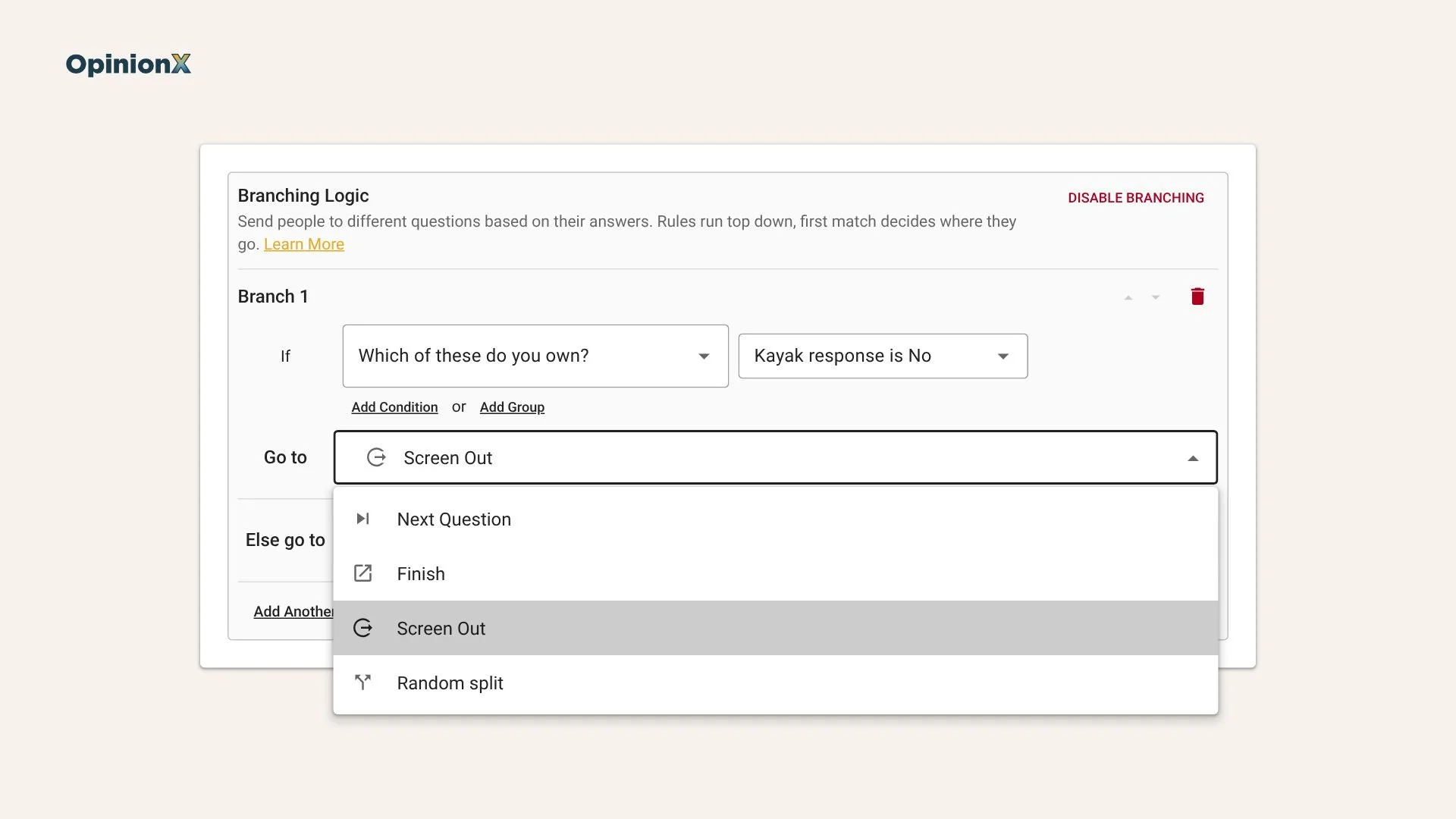
Route 1: a Screen Out destination in Branching Logic. Branching Logic sends participants to different parts of the survey depending on their answers, and our branching logic update explains how it works. Create a branch with a condition for who should leave, such as "didn't select kayak", and set its "Go to" destination to Screen Out. Anyone who meets that condition goes straight to OpinionX's default screen-out page, which needs no setup, translates itself into your survey's language and follows your survey theme.
Route 2: a Finish Page with its status set to Screened Out. A Finish Page is the last page a participant sees, and each one has a Participant Status dropdown with two options, Completed and Screened Out. Set it to Screened Out, write your own message or add a redirect link, and point the relevant branch at that page. Participants never see their status or the name of the Finish Page. Use this route when you need a custom message, or when a panel needs screened-out participants sent back to its own site.
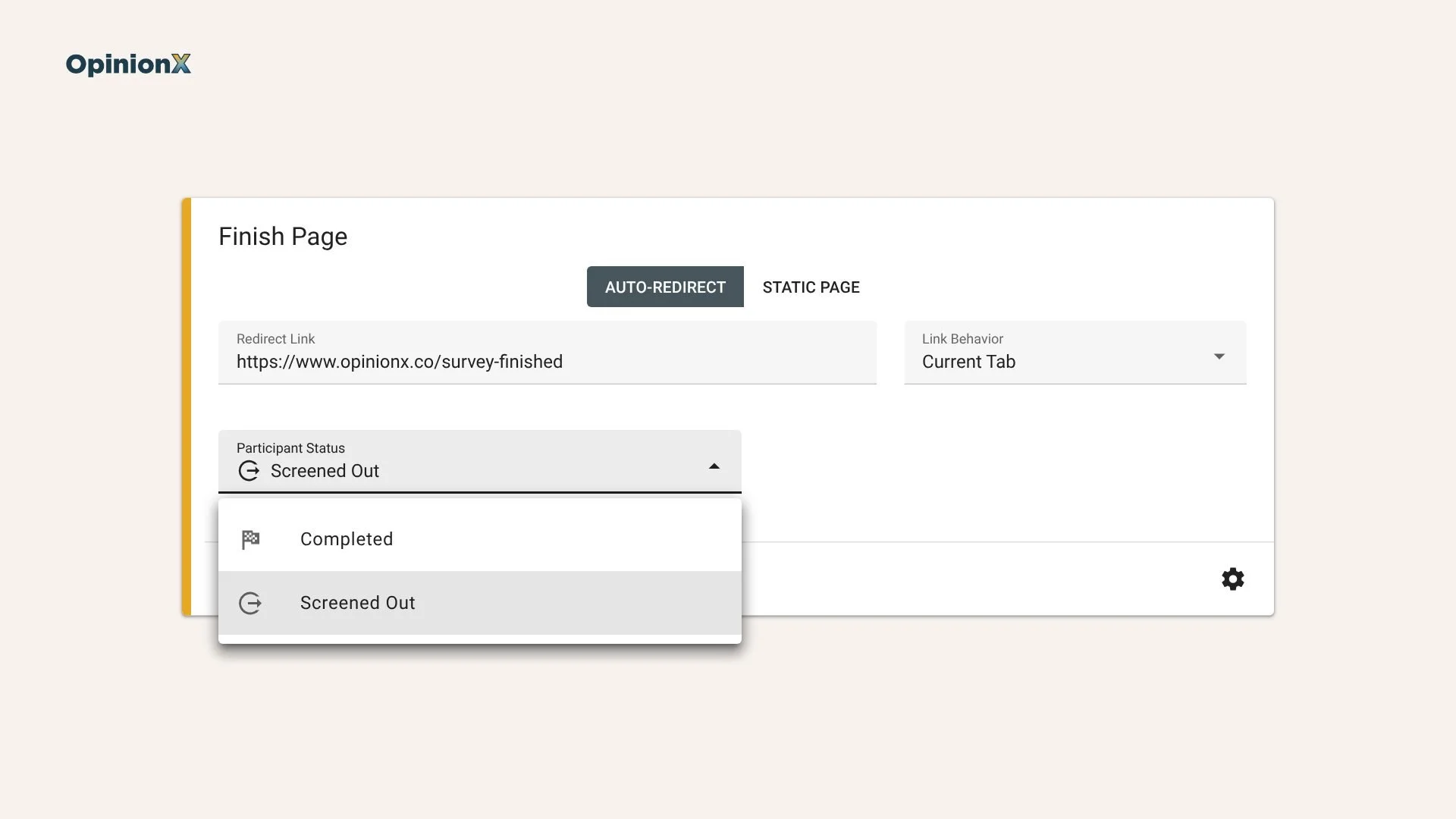
Make one screen-out Finish Page per reason. If you screen people out for being in the wrong region and for having the wrong role, give each reason its own Finish Page, such as "Screened out: region" and "Screened out: role", so you can see which screener question is turning people away. If 80% of your screen-outs come from the role question, your panel targeting is probably too broad, and that's worth fixing before you spend more on fieldwork.
Panel redirects need three settings to line up. Most panels need each screened-out participant sent back with their panel ID, so the panel knows who to pay the screen-out rate. On OpinionX, open the screen-out Finish Page, click the settings icon (⚙️) and switch on "Redirect link parameters". The parameters fill themselves in, as long as two other things exist: a field on the Enrichment tab to store the panel ID, and a Hidden Fields link that passes the ID into OpinionX through the survey URL. Our Hidden Fields update shows how URL parameters carry data from the panel into each participant's profile, and our update on buying participants from online panels covers the rest of the panel setup.
Screened Out, Over Quota and Incomplete mean different things. Screened Out is about fit: the person didn't qualify. Over Quota is about volume: the person qualified, but their group was already full, and our guide to survey quotas explains how quotas cap the easy-to-recruit groups. Incomplete is someone who started the survey and quit before reaching any finish page.
| Status | What triggers it | Counts as a complete? | Counts toward the participant limit? |
|---|---|---|---|
| Screened Out | Branching Logic sends the person to the Screen Out destination or to a Finish Page set to Screened Out | No | Yes |
| Over Quota | The person qualifies, but a quota for their group is already full | No | Yes |
| Incomplete | The person starts but never reaches a finish page. An unfinished session becomes Incomplete 24 hours after it started | No | Yes |
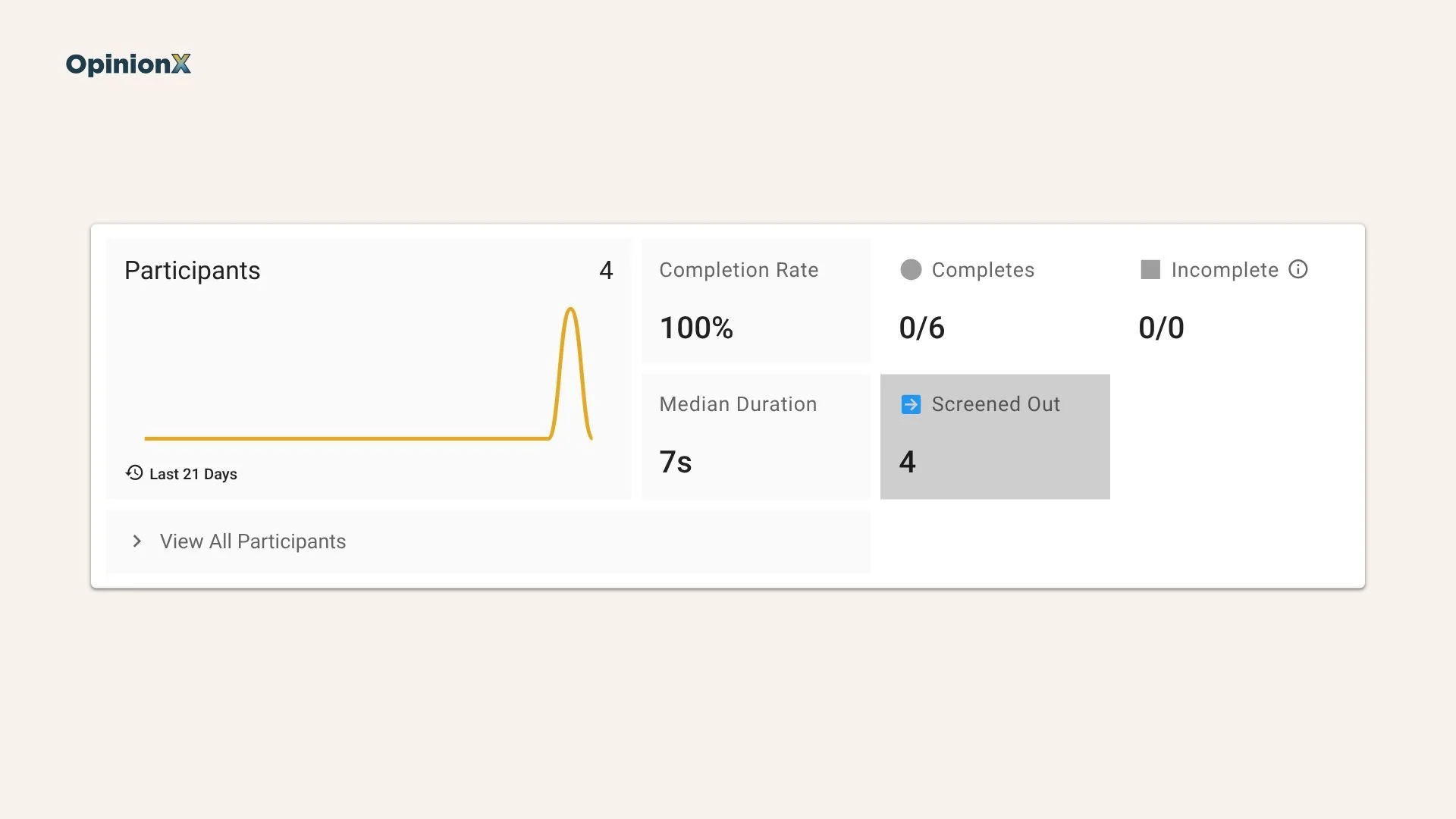
Screened-out participants aren't completes, but they do count toward your participant limit. On the free plan, that means screen-outs take places from your 25. Your results include screened-out participants by default, so the overall results mix qualified and unqualified people until you exclude them. Click the Screened Out tile at the top of the Results Overview to toggle them out, or use Segmentation → Participant Status to build a saved segment of qualified participants only. Screened-out answers are still worth a look on their own though, because they show you who your panel is sending that you didn't ask for.
Want to see screen-out routing, the status tiles and the Participant Status filter working on an actual study? A demo walks through a survey from the screener question to segmented results.
Frequently asked questions
How do you stop people lying on a screener question?
You stop most people lying on a screener question by hiding which answer qualifies. Put the qualifying option in a multi-select list with believable distractors, keep the target out of the study title, and for rare groups use a two-stage screener. Hydock's 2018 study cut impostors from 12.9% to 1.9% this way.
What's the difference between screened out and over quota?
Screened out means a participant didn't qualify for the survey, such as being in the wrong region or role. Over quota means the participant did qualify, but their group was already full. Screened out is about fit and over quota is about volume.
Do screened-out participants count toward your sample size?
Screened-out participants don't count toward your completed sample size, because only completes do. On OpinionX they do count toward your plan's participant limit, so on the free plan screen-outs take places from your 25 participants per survey. Plan your panel order with the screen-out rate in mind.
Should you pay participants who get screened out?
Yes, you should pay participants who get screened out for the time the screener questions took, and most panels require it. Prolific is moving to a fixed minimum of £0.10 or $0.14 per screened-out participant. Putting screener questions first keeps that time, and the cost, small.
Where should screener questions go in a survey?
Screener questions should go at the very start of a survey, before any study questions. People who don't qualify leave after a few seconds instead of several minutes, which cuts what you pay for screen-outs and keeps unqualified answers out of your study questions.
Screening decides who gets into your survey, and quotas decide how many of each group you keep. Our guide to survey quotas covers the second half, including which groups to cap on conjoint, MaxDiff and pricing studies. Once the right people are in, our guide to how MaxDiff results are calculated and how to size a study and our conjoint analysis guide show how to read the results by segment. Pricing for a narrow group with a Van Westendorp survey or Gabor Granger? Our guide to segmenting Gabor Granger results shows why one overall price can suit nobody. And if you're not buying from a panel at all, our guide on finding survey participants for free covers where else to look.
Build your screener questions and your study in one survey on OpinionX's free plan, with every research method included.
