
Survey quotas for advanced research (conjoint, MaxDiff, pricing and segmentation)
Picture a MaxDiff survey (a survey that ranks items by asking people to pick the most and least important from small sets) on ten product features, sent to a paid panel, that comes back with 300 completed responses. 210 of those participants work at small companies and 90 work at large ones, so 70% of the data comes from one group. The "overall" ranking at the top of the results page is mostly the small-company ranking, and the large-company customers you most wanted to hear from barely move it.
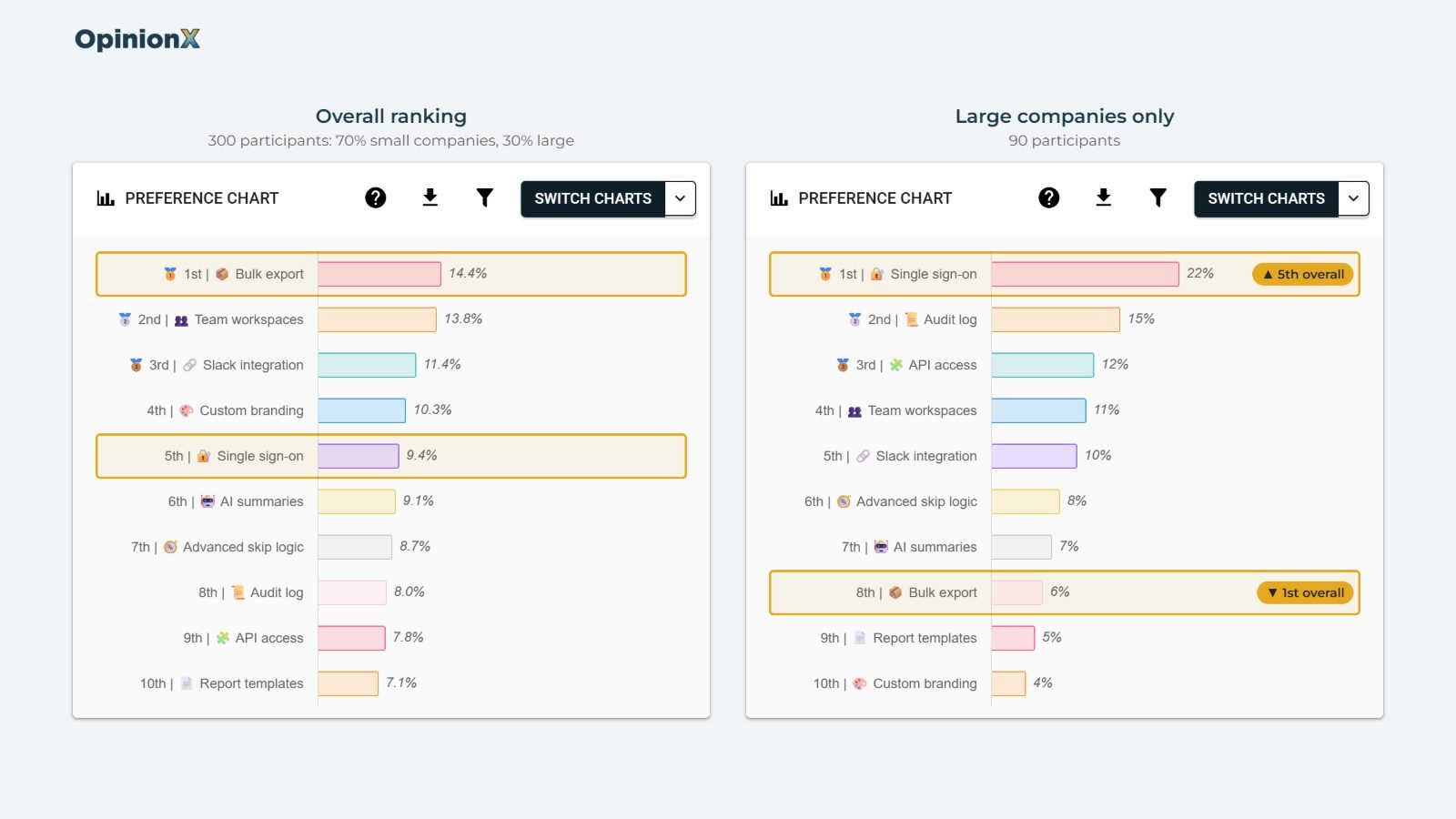
Survey quotas are the usual fix here, but they work differently from how most people expect. A quota (a rule that stops accepting participants from a group once you've collected enough of them) caps the group that's easy to recruit. It doesn't fill the group that's hard to recruit; finding those people is your panel's targeting job. What the cap does is stop you spending your budget on the easy group, so the rest of your fieldwork can go to the people you're trying to understand. That's most important on conjoint, MaxDiff and pricing surveys, where you'll split the results by customer segment.
This guide covers what survey quotas do and don't do, why balancing during fieldwork beats fixing the sample afterwards, how to set quotas up on OpinionX, and what to cap on for each research method.
How does a skewed sample change your results?
A skewed sample changes your results because the "overall" figure is a weighted average, and the weights are whoever turned up. Here's the MaxDiff example worked through with two features, where each figure is a share of preference (the percentage of total preference a feature earns across everyone in the group).
| Feature | Small companies | Large companies | Overall at 70/30 | Overall at 50/50 |
|---|---|---|---|---|
| Bulk export | 18% | 6% | 0.7 × 18 + 0.3 × 6 = 14.4% | 0.5 × 18 + 0.5 × 6 = 12% |
| Single sign-on | 4% | 22% | 0.7 × 4 + 0.3 × 22 = 9.4% | 0.5 × 4 + 0.5 × 22 = 13% |
Neither group's preferences changed between the last two columns. Only the mix of participants changed, and that was enough to flip which feature comes out on top. If your roadmap meeting looks at the overall ranking, the recruitment mix just made the decision for you.
What do survey quotas do?
Survey quotas stop collecting responses from a group once that group hits a target you set. On OpinionX, a quota has three parts: the condition says who it applies to, such as "company size is 1 to 50 employees", the target is how many completed participants you want from that group, and the overflow destination is where people go once the group is full.
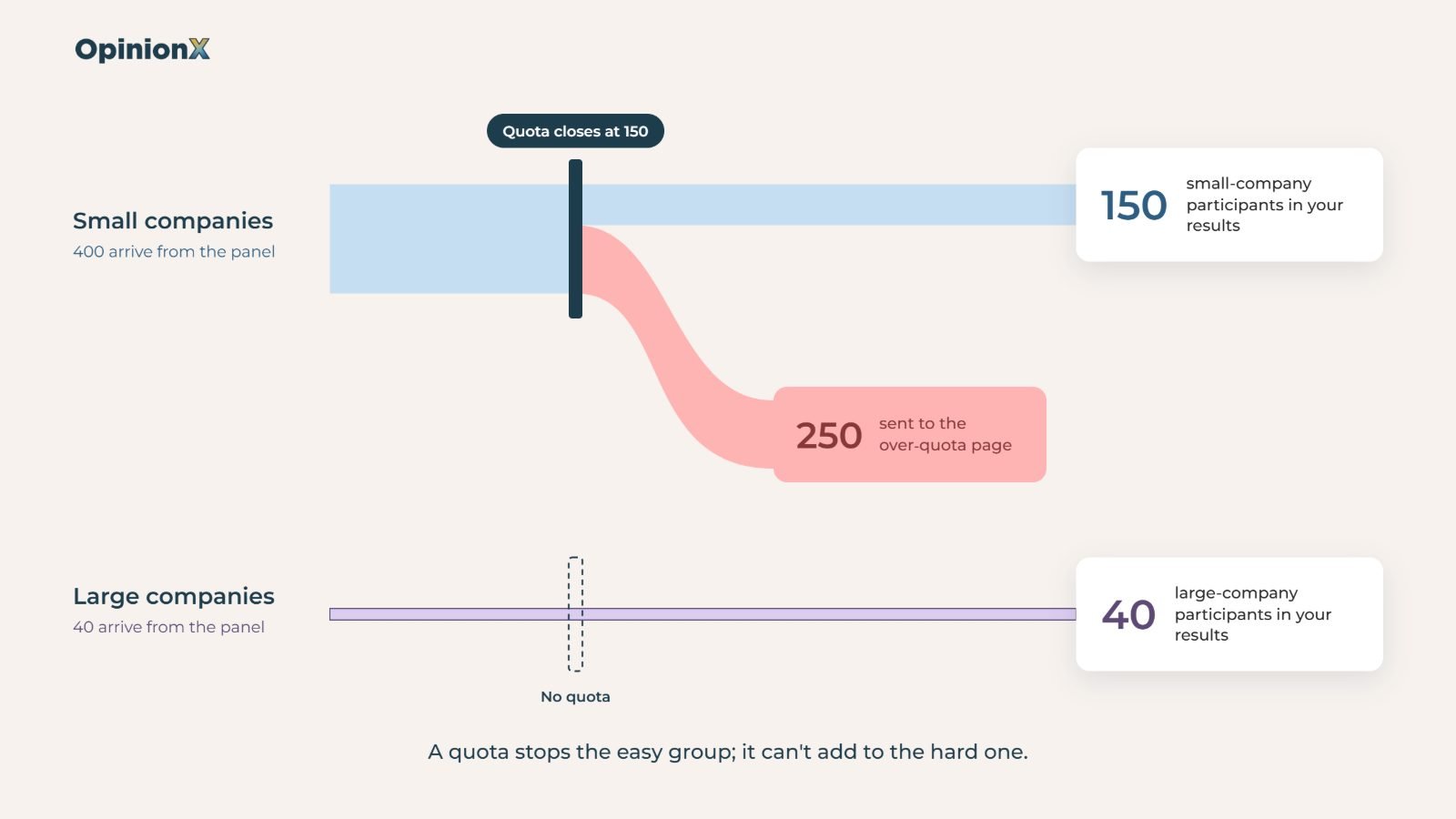
A quota can only ever say no. It can turn away the 151st small-company participant, but it can't produce a single extra large-company participant. If your panel sends you 400 small-company people and 40 large-company people, a 150-person cap on the small group leaves you with 150 and 40, not 150 and 150. Filling the hard group comes from targeting at the panel: the screening filters you choose, the incentive you pay and how long you leave the study open.
Pollsters found this out in 1948. The American Association for Public Opinion Research's 2013 task force on non-probability sampling recounts how every leading pollster in that year's US presidential election used quota sampling, and every one of them predicted the wrong winner. The quotas matched the population on the traits the pollsters chose to control, but interviewers filled each group with people who were somewhat more educated and better off, and nothing in the quotas checked for that. A quota only balances the variables you set it on, and Prolific's guide to quota sampling (2024) says the same for online panels: the sample represents the variables you controlled and can miss everything else.
So pick the quota variable that matches the comparison you'll make in the results. If you'll split a MaxDiff by company size, cap on company size; a quota on age won't protect a company-size comparison.
Why balance your sample during fieldwork instead of fixing it afterwards?
Balancing during fieldwork beats fixing the mix afterwards because the usual fix, weighting, makes your results less precise. Weighting means giving each participant's answers more or less influence so the sample matches the mix you wanted. In the example above, each small-company answer would count 0.71 times and each large-company answer 1.67 times, so the two groups each carry half the result.
The statistician Leslie Kish gave a formula for what that costs, in his 1992 paper "Weighting for unequal Pi" in the Journal of Official Statistics, as restated by Chatrchi and colleagues at Statistics Canada in 2015. The design effect from weighting equals 1 plus the squared coefficient of variation of the weights (a measure of how spread out the weights are). Divide your sample size by the design effect and you get the effective sample size, meaning how many unweighted participants your weighted results are as precise as.
Here's the calculation for the 70/30 sample:
Average weight: 0.7 × 0.71 + 0.3 × 1.67 = 1.0
Spread of the weights: 0.7 × (0.71 − 1)² + 0.3 × (1.67 − 1)² = 0.19
Design effect: 1 + 0.19 = 1.19
Effective sample size: 300 ÷ 1.19 = 252 participants
You paid for 300 completed responses and got the precision of 252. Weighting also can't create information you didn't collect, so every large-company result still rests on the same 90 people, with each of their answers stretched further. Pew Research Center's 2018 study of weighting methods spells out the trade-off: adjusting a sample this way brings "more variable and extreme weights, which tends to increase the variance of survey estimates". In Pew's tests on 2,000 interviews, the average margin of error went from ±1.3 points unweighted to ±1.9 points after raking, one of the most common weighting methods.
Survey quotas fix the balance before the money is spent. Cap the small-company group at 150, keep the study open, and every response you pay for after that point comes from the groups that are still short.
How do you set up survey quotas on OpinionX?
Survey quotas on OpinionX live on the Settings tab of your survey dashboard, in a section called Screening Quotas, separate from the survey builder. Each quota reads like a sentence once it's filled in: "Once [100] participants [match the following criteria], send overflow to [the over-quota page]."
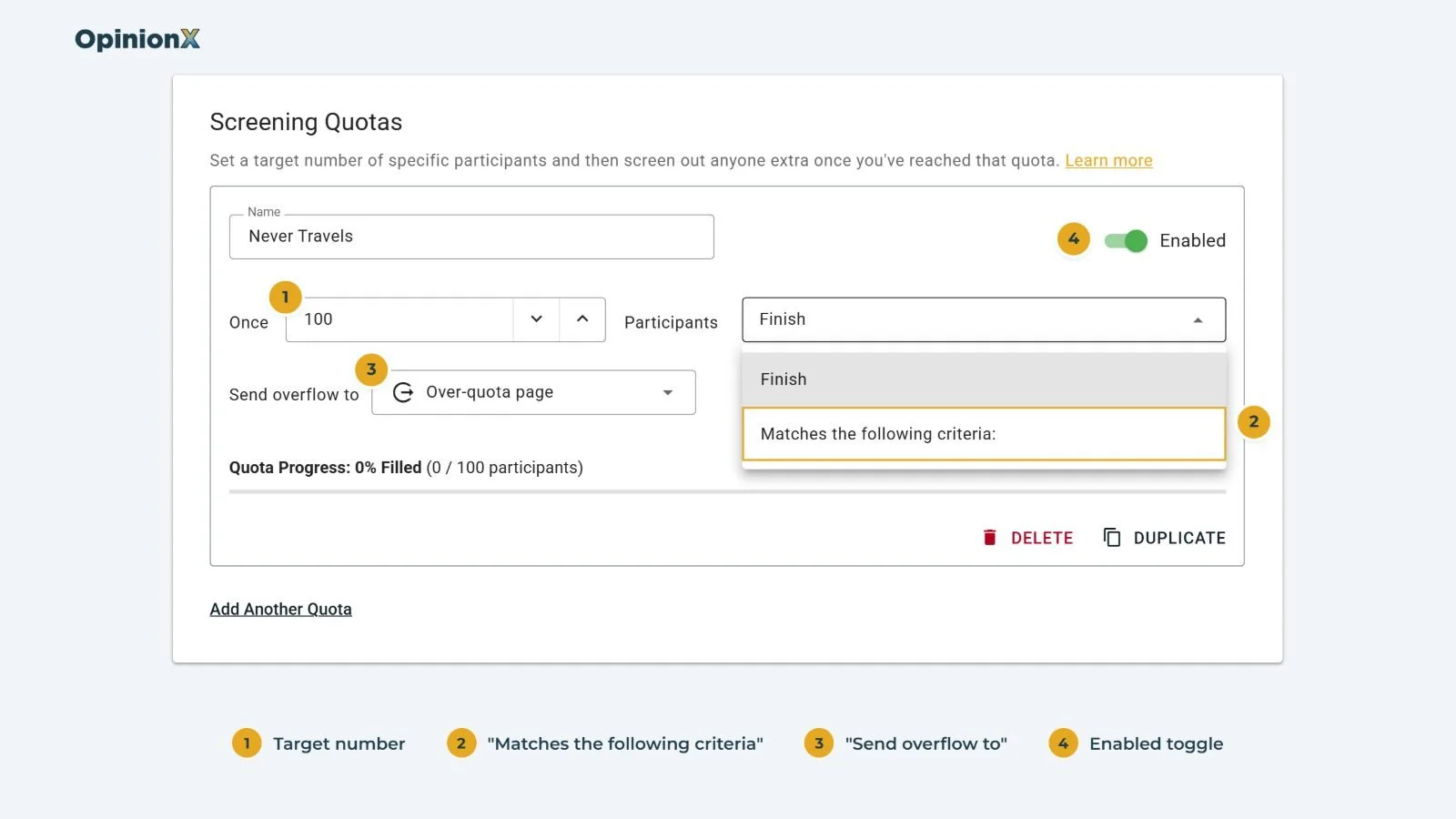
Open Screening Quotas. Go to the Settings tab and click Add Quota. Give the quota a name you'll recognise, like "Small companies"; participants never see it.
Set the target. Type it into the field between "Once" and "participants". This is how many completed participants you want from the group.
Choose who it applies to. To cap the whole survey, leave the Finish option selected, with no condition needed. To cap one group, switch the dropdown to "Matches the following criteria" and build the condition: pick a question, an operator and an answer, the same way you'd build branching logic.
Choose where overflow goes. The default is OpinionX's over-quota page. If your panel needs participants sent back to a specific link, pick a custom Finish Page instead (more on this below).
Check the quota is enabled. On a survey with no participants yet, new quotas switch on automatically. On a survey that's already collecting responses, new quotas start switched off, so you can finish setting them up before they start turning people away. Flip the toggle in the top-right of the quota card when you're ready.
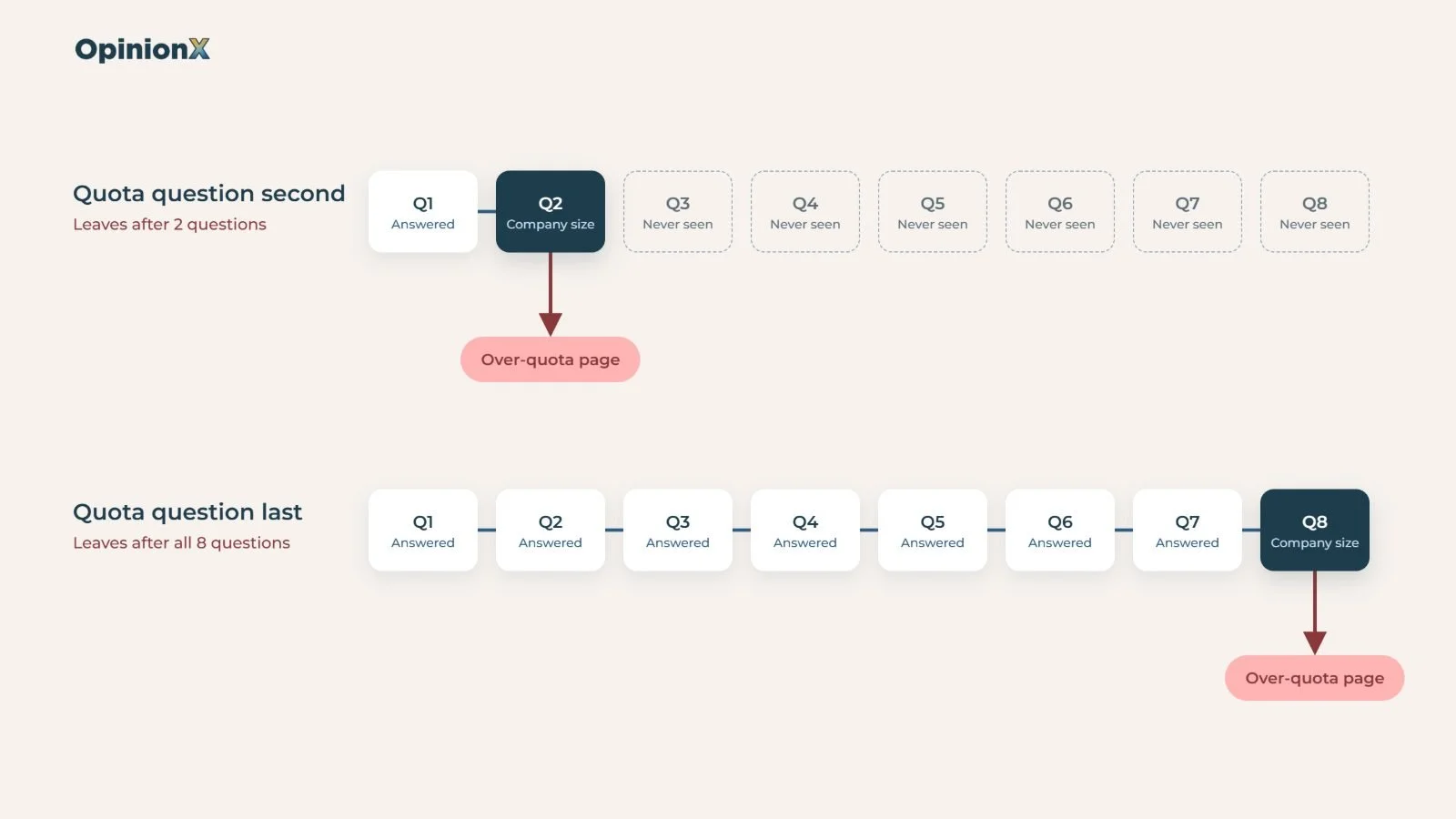
Put the question your quota depends on early in the survey. OpinionX checks a quota the moment a participant answers the question its condition uses. If the company-size question comes second, an over-quota participant leaves after two questions. If it comes last, they leave after answering everything, which wastes their time and, on most panels, your money.
Use one quota per cell when you need groups inside groups. Interlocking quotas cap combinations, like small-company product managers, small-company researchers, large-company product managers and large-company researchers. OpinionX counts every quota on its own, so build each combination as a separate quota with both conditions inside it, not one quota on company size and another on role.
Test on your live link, not in Preview Mode. Preview Mode doesn't enforce quotas, because screening only happens on live responses. A completed test response counts toward the quota, so delete test participants afterwards or use Clear All Participant Data on the Results Overview before you launch.
About to field to a panel and want a second pair of eyes on your quota cells? Book a free 30-minute setup call and a research expert will check which groups to cap, how big each cell should be and where your quota question should sit in your survey.
What happens when a quota fills up?
When a quota fills up, the next participant who matches it is tagged Over Quota and sent to the overflow destination. Each quota on the Settings tab shows a live progress bar, for example "45% Filled" when 45 of a 100-person target have completed, and the Participants tab of your results has a Quota column showing the quota each person counted toward or was turned away by.
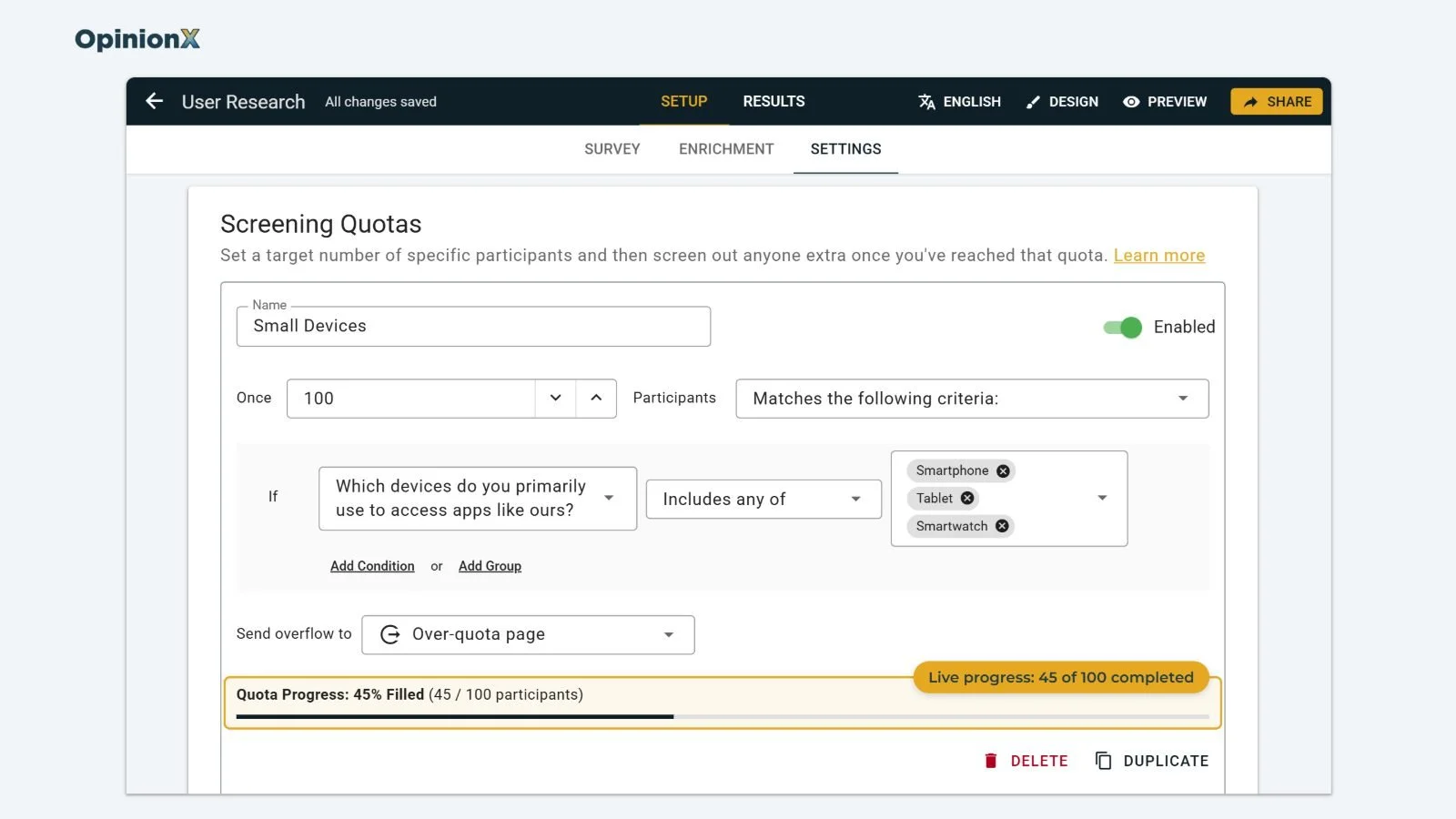
Three behaviours look like bugs the first time you see them, and all three are on purpose.
A quota can finish slightly over its target. A 200-person quota can end at 201. Anyone admitted while there was still room gets to finish, even if the group fills while they're still answering, because OpinionX won't throw someone out after they've done the whole survey. Overshoot is more likely with a long survey and an early quota question, or when you send the survey to a lot of people at once. Need a hard cap with zero overshoot? Set it at your panel, since the panel controls how many people get in. Cint's documentation on over-quota terminations, for example, has suppliers check that a quota is still open before sending each person in.
Only completed participants count. Someone who starts and drops out, or someone screened out by branching logic, never fills a quota. Our guide on incomplete survey responses explains why partial answers get handled separately.
Changing a quota only affects new participants. If you edit a condition halfway through fieldwork, OpinionX doesn't re-sort the people who already finished. Deleting a completed participant lowers the count and can reopen the quota, but it doesn't bring back someone already sent away as over quota.
How do you send over-quota participants back to a panel?
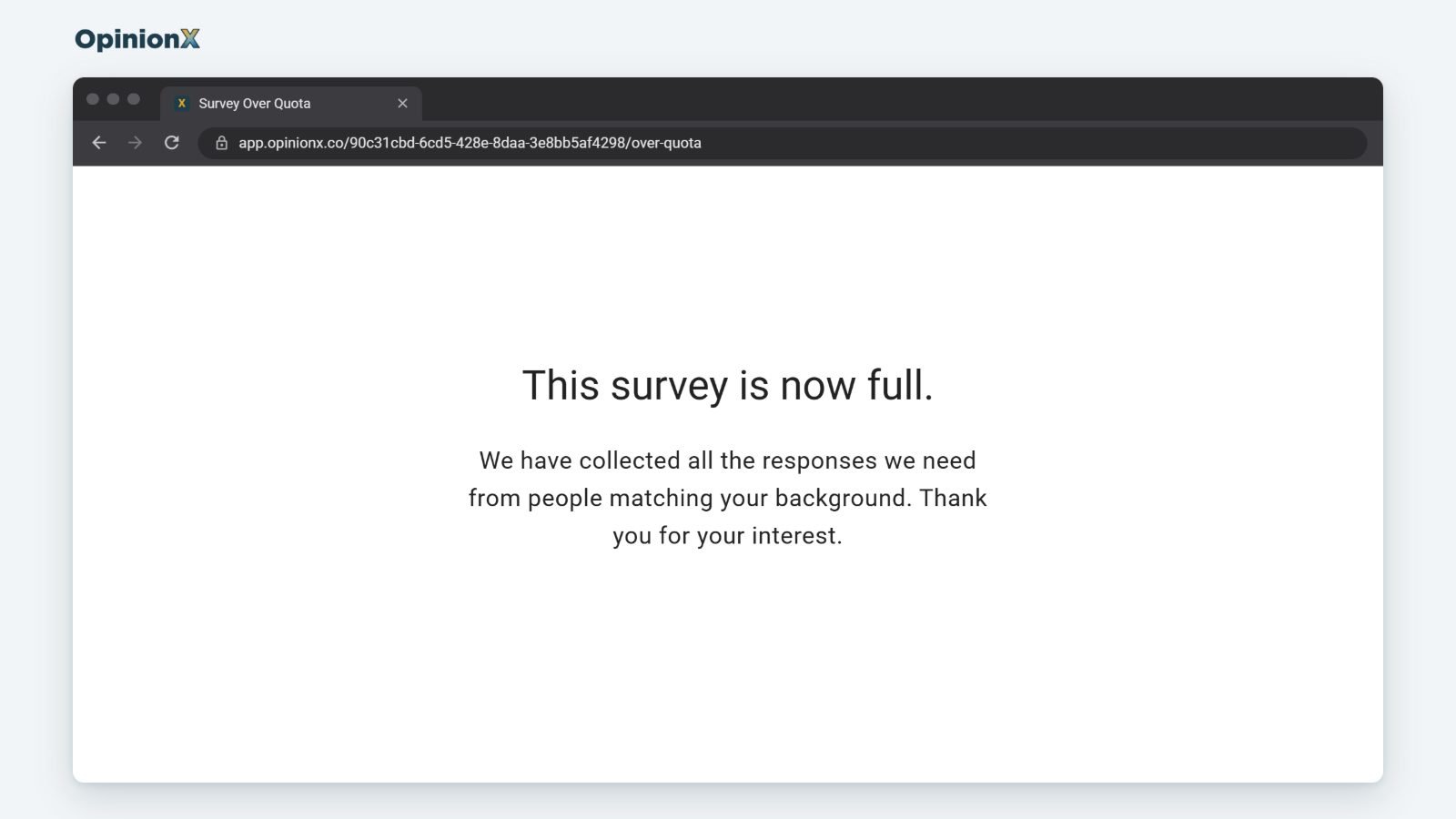
Panels like Cint and Prolific usually give you a separate return link for over-quota participants, so those people get paid correctly and your study gets billed correctly. On OpinionX, create an extra Finish Page on the Survey Setup tab with that link as its redirect, then choose it in the "Send overflow to" dropdown. If your panel needs its own participant ID sent back on that link, pass the ID into the survey with hidden fields, and the Finish Page's URL parameters setting adds it to the redirect; our update on using third-party panels to recruit participants walks through it. The participant still gets the Over Quota status, even though the Finish Page has its own status setting, because a participant can only have one status and Over Quota takes priority. Don't need a redirect? The default over-quota page translates itself into your survey's language, including on multi-language surveys, and matches your survey's theme.
How do you keep over-quota participants out of your results?
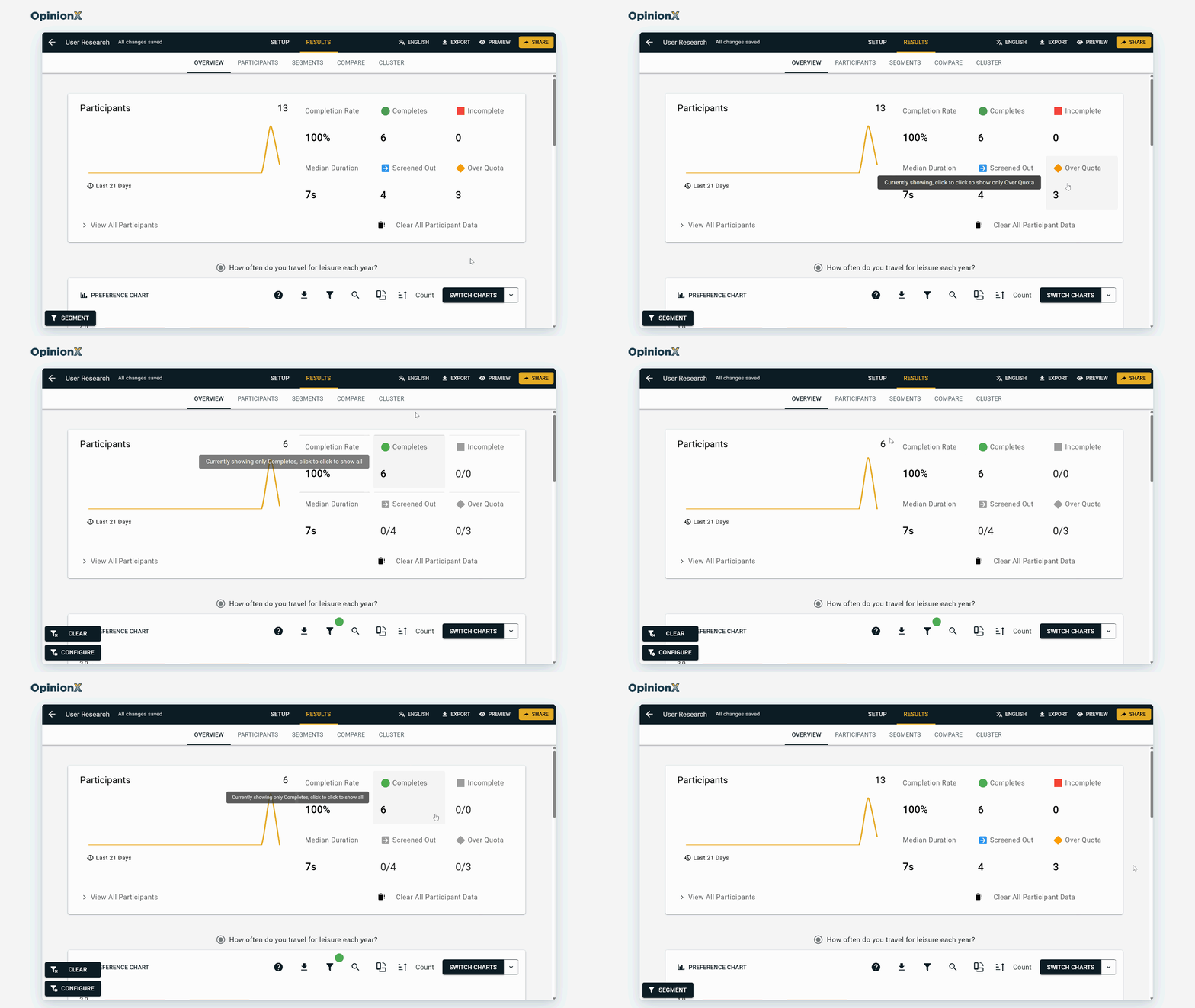
OpinionX shows every participant on your results page by default. Click the Completes tile at the top of the Results Overview tab to hide everyone who didn't complete, and the dashboard recalculates straight away. For a filter you can reuse, open the segmentation menu, filter on Participant Status (which includes Over Quota), and store it as one of your saved segments.
Quota, screen-out or participant limit?
Survey quotas get mixed up with two other controls that also keep people out of your results, and the difference is what each one checks.
| Control | What it checks | Same answer, same outcome? | Where you set it | Status given |
|---|---|---|---|---|
| Quota | Volume: do we already have enough people like this? | No. The same answer gets in early and gets turned away once the group is full. | Screening Quotas, Settings tab | Over Quota |
| Screen-out | Fit: does this person qualify for the study at all? | Yes. "I don't own a car" disqualifies everyone who picks it, every time. | Branching logic in the survey builder | Screened Out |
| Participant limit | Your plan: how many participants load on the results page | Not answer-based. Every stored participant counts, whatever their status. | Your pricing plan (25 on Free, unlimited on Analyze) | None |
Do quotas work differently for conjoint, MaxDiff and pricing surveys?
Survey quotas work the same way on every method: the setup steps above don't change whether the survey holds a conjoint question or a Van Westendorp question. What changes is what goes wrong without them, because each method turns a skewed sample into a different kind of wrong answer.
| Method | What a skewed sample breaks | What to cap on | What the cap can't fix |
|---|---|---|---|
| Conjoint analysis | Market simulator shares lean toward the over-represented group | The customer types that make up the market you're simulating | A market mix you don't know. You need actual proportions to set the caps. |
| MaxDiff | The overall ranking tilts toward whoever turned up | The segment you'll compare, such as company size or role | A thin group the panel can't find |
| Van Westendorp | Per-segment acceptable price ranges jump around on small groups | Each segment you'll read on its own, so the easy one stops eating the budget | A segment too small to read, if the panel can't find enough people |
| Gabor Granger | Too many price-insensitive people push the revenue-maximising price up | A variable linked to budget, like company size or current plan | A price range set too narrow before launch |
| Segmentation analysis | Unequal groups make the comparison unfair, since the small group's results are noisier | Every group you'll compare, with equal targets | Segments you only discover after fieldwork |
Should you set quotas on a conjoint survey?
Conjoint analysis is a survey method that shows people product options built from different features and prices, then asks which option they'd choose. Set survey quotas on a conjoint survey whenever you'll use the market simulator, a tool that predicts what share of people would choose each product option in a scenario you build. Our guide to the conjoint market simulator explains how it scores each participant's choice and then adds them up, and that adding up is the problem: if 70% of participants are small companies, the predicted shares describe a market that's 70% small companies, whether or not yours is. Cap each customer type at its actual share of your market, which you can usually pull from your CRM. Our guide to how conjoint analysis scores are calculated shows where each participant's scores come from, and our update on OpinionX's hierarchical Bayes conjoint scoring explains how those scores get estimated for each person. You can also filter the simulator to one segment, which our conjoint analysis guide covers, but that only helps if each segment has enough people in it.
Should you set quotas on a MaxDiff survey?
Set survey quotas on a MaxDiff survey when you plan to compare segments or read the overall ranking as "what our customers want". MaxDiff (also called best-worst scaling) produces a ranking that averages everyone, as the table at the top of this guide showed. Cap the group you'll split by, and read our guide on how to analyse MaxDiff results for how to filter the results by segment once the data's in.
Should you set quotas on a Van Westendorp survey?
Set survey quotas on a Van Westendorp survey when you'll read the acceptable price range for each segment separately. Van Westendorp is a pricing survey that asks four questions about when a price feels too cheap, a bargain, expensive or too expensive, and the acceptable price range is the span of prices between "too cheap" and "too expensive" for most participants. Van Westendorp builds its chart from four lines, one per question, and each line shows what share of participants gave each price as their answer, so a segment with 30 people can move several points because of two unusual answers. Capping the easy segment won't add people to the thin one, but it stops the easy one using up your panel budget. Our Van Westendorp guide walks through how those lines get built.
Should you set quotas on a Gabor Granger survey?
Set survey quotas on a Gabor Granger survey when your participants vary a lot in what they can spend. Gabor Granger shows each person a price and raises or lowers it based on their yes or no, until it finds the highest price that person would pay, then multiplies each price by the share of people who'd buy at it to find the price that earns the most revenue. If a big-budget group is over-represented, more people say yes at high prices, and the revenue-maximising price comes out higher than your actual market would pay. Cap on company size or current plan. Our Gabor Granger guide shows the revenue calculation step by step.
Should you set quotas on a segmentation study?
Set survey quotas on a segmentation study whenever the point of the study is comparing groups, which it usually is. A segment of 200 people and a segment of 40 don't give you an even comparison, because the 40-person segment's results carry a much wider margin of error, so a difference between them might just be noise. Give every group you plan to compare the same target, whether they're demographic groups, psychographic segments based on attitudes, or needs-based segments. Our guide to needs-based segmentation covers how to choose which groups to compare in the first place, and our guide to crosstab analysis covers reading two groups' answers side by side.
Want to see a segment split before you decide what to cap? A demo walks through a live MaxDiff and conjoint results dashboard, filtering the same results by company size and role, so you can see which comparisons your quotas need to protect.
How many participants do you need per segment?
Aim for at least 100 completed participants in every segment you plan to read on its own, and set your survey quotas to make that possible. No single independent study gives a per-segment rule, so that minimum is our editorial position, built from two pieces of evidence.
The first is the standard rule of thumb for choice-based studies. De Bekker-Grob and colleagues' 2015 review of sample sizes reports Pearmain and colleagues' 1991 guidance that samples over 100 give a basis for modelling preference data, and quotes Lancsar and Louviere (2008) noting that analysing subgroups needs a bigger sample. If each segment you read is effectively its own model, each segment needs its own 100.
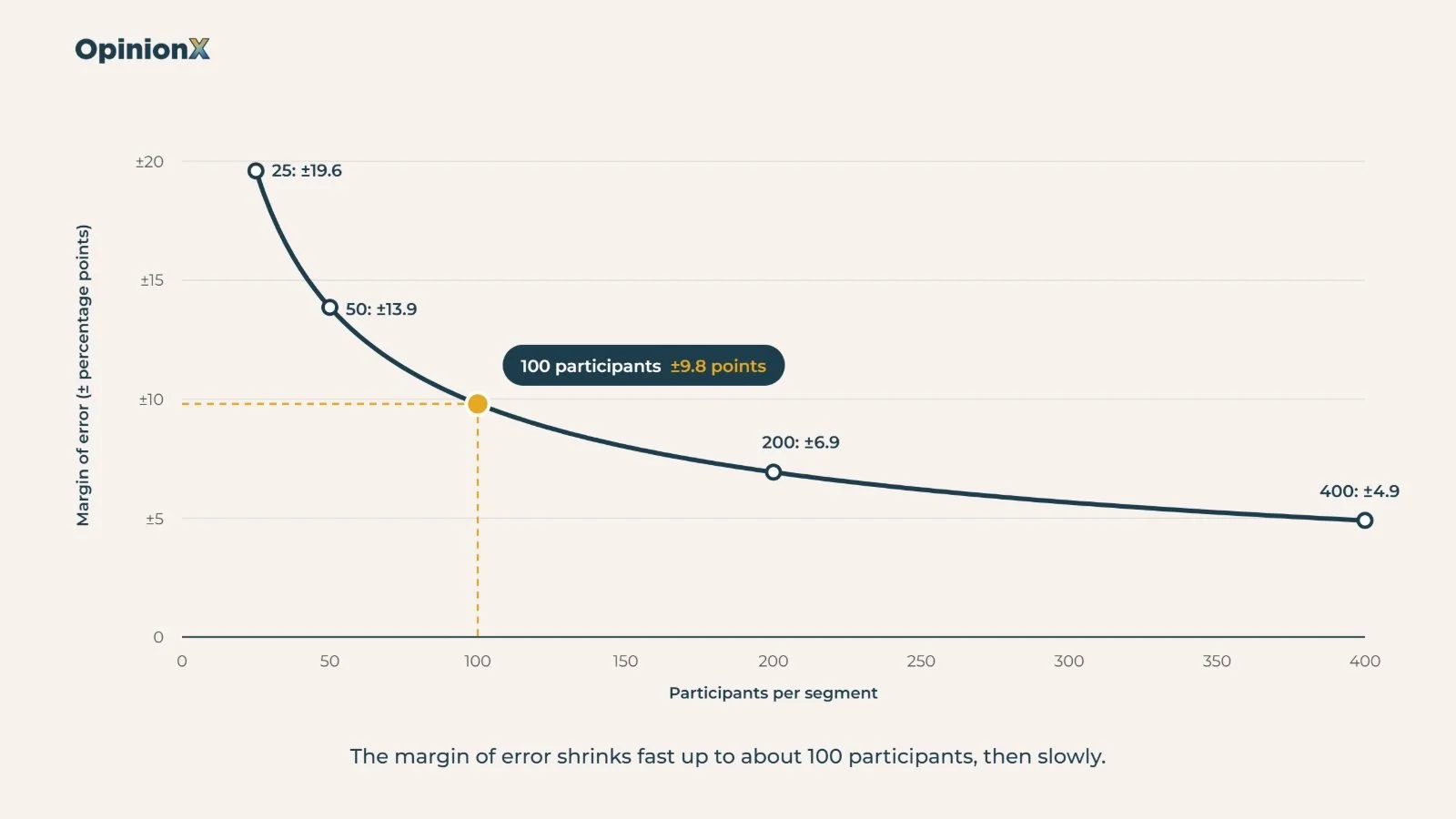
The second is the margin of error, meaning how far a result from your participants could sit from the true figure for everyone like them. For a share near 50%, the 95% margin of error is roughly 98 divided by the square root of the number of participants:
25 participants: 98 ÷ 5 = ±19.6 points
50 participants: 98 ÷ 7.1 = ±13.9 points
100 participants: 98 ÷ 10 = ±9.8 points
Pew Research Center's Andrew Mercer gives a worked case in his 2016 guide: a 1,067-person poll carries a ±3-point margin, while a 160-person subgroup inside it carries ±8 points. At 100 participants per segment, two segments need to differ by more than about 10 points before you can trust the gap.
Our guide to participant-level data explains why OpinionX keeps each person's answers separately, which is what lets you filter results by segment at all. If budget is the problem, our guide on finding free participants for your survey covers sourcing without a paid panel.
Do survey quotas cost extra on OpinionX?
Survey quotas cost nothing extra on OpinionX. They work on every plan, including Free, because OpinionX limits how many participants you can see, not which features you can use. The Free plan shows 25 participants per survey on your results page, but the survey keeps collecting responses past that point, and your quotas keep working on participant 26 onwards. Analyze ($900 a year, see our pricing page) removes the participant limit, so every completed participant loads on your results page.
Frequently asked questions
Do incomplete responses count toward a quota?
No. Survey quotas on OpinionX count completed participants only. Someone who starts the survey and drops out never fills a quota, and neither does anyone screened out by branching logic; only completed participants who match the quota's condition count toward its target.
Can a quota go over its target?
Yes, slightly. A 200-person quota can finish at 201, because anyone admitted while there was room gets to finish the survey. Overshoot is more likely with long surveys and large send-outs. For a hard cap with no overshoot, set the limit at your recruitment panel.
What's the difference between a quota and a screen-out?
A screen-out removes people who don't qualify, so the same answer always gets the same result. A quota removes people who do qualify once you already have enough of them, so the same answer can get in early and be turned away later.
Can you set quotas on a conjoint or MaxDiff survey?
Yes. Survey quotas on OpinionX work on any survey, including conjoint, MaxDiff, Van Westendorp and Gabor Granger, because you set them on the Settings tab, not on a question. Cap on the segment you plan to compare, and put that question early in the survey.
How many respondents do you need per segment?
Aim for at least 100 completed participants in each segment you plan to read on its own. At 100 participants, the margin of error on a share near 50% is about ±10 points, and below 50 it passes ±14 points, which makes differences between segments hard to trust.
Planning a ranking study? Our guide on how to analyse MaxDiff results shows how to read the ranking for each segment once your quotas have balanced the groups. For pricing, our guides to Van Westendorp and Gabor Granger explain how each pricing survey turns answers into a price. Comparing customer groups that aren't defined by demographics? Our guide to needs-based segmentation shows how to group people by what they need from your product. And to check whether answers inside each segment can be trusted, our guide to survey straightlining covers how to spot people clicking through without reading.
Sending a study to a paid panel this month? A free setup call is the quickest way to get your quota cells, segment targets and panel redirect checked before the money goes out.
