
Introducing Matrix Grid questions on OpinionX (April 2026)
Today we're launching Matrix Grid as a new question type on OpinionX, which lets you ask many questions at once using the same voting scale.

Matrix Grid makes it a lot easier to compare a series of Multiple Choice or Rating Scale questions by treating them as one data set and helps respondents move through your surveys faster.
On OpinionX, Matrix Grid questions have two display modes you can pick from:
All At Once → A classic voting table with every row visible at the same time.
One By One → Each row becomes its own card in a quick stacked-vote flow, which works much better on mobile than the traditional table and helps reduce straightlining.
Here are examples of both Display Modes for OpinionX's Matrix Grid question type:
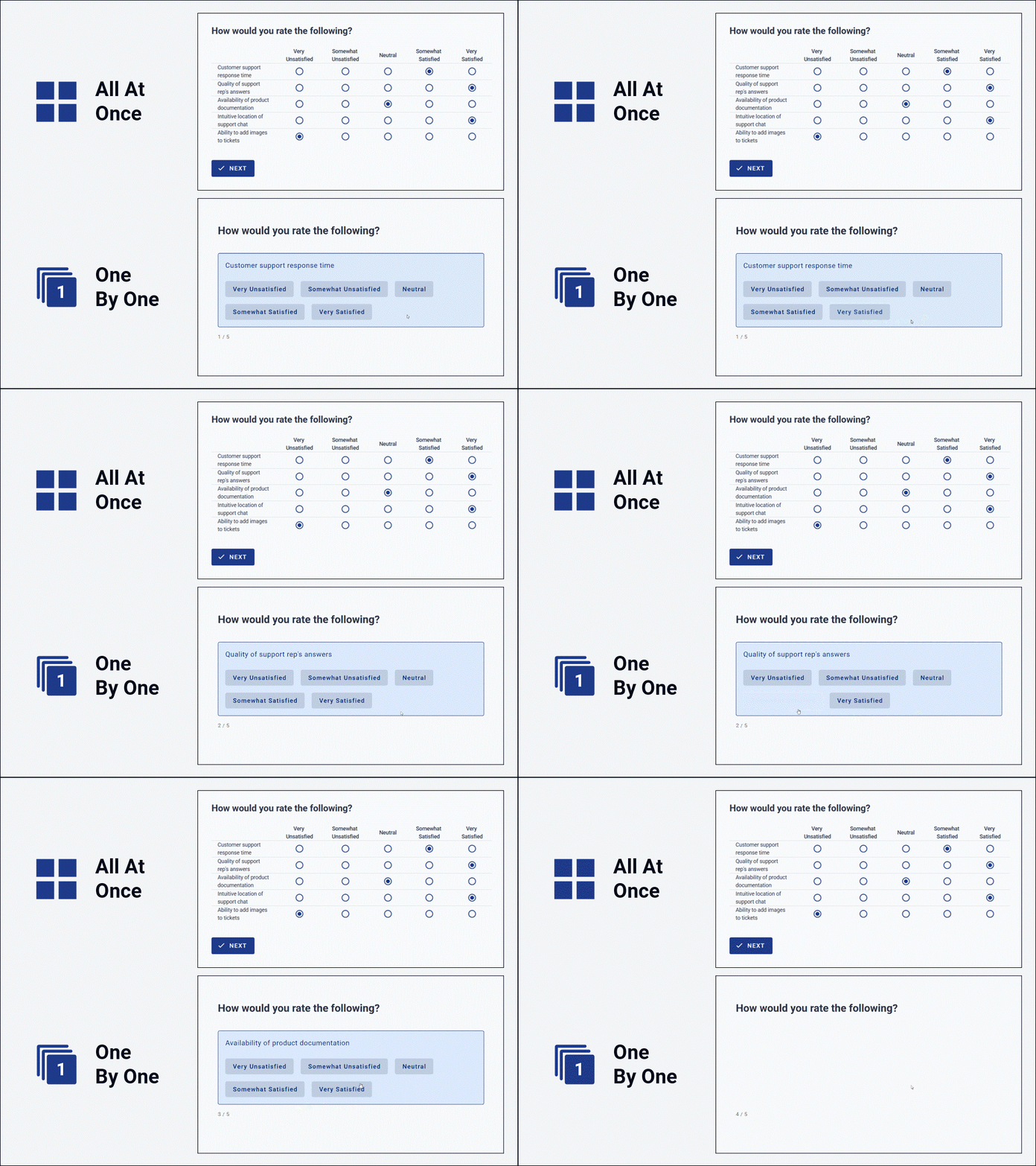
Desktop examples; both are automatically responsive to screen size and will adapt accordingly for tablet and phone users.
Numerical scoring scale
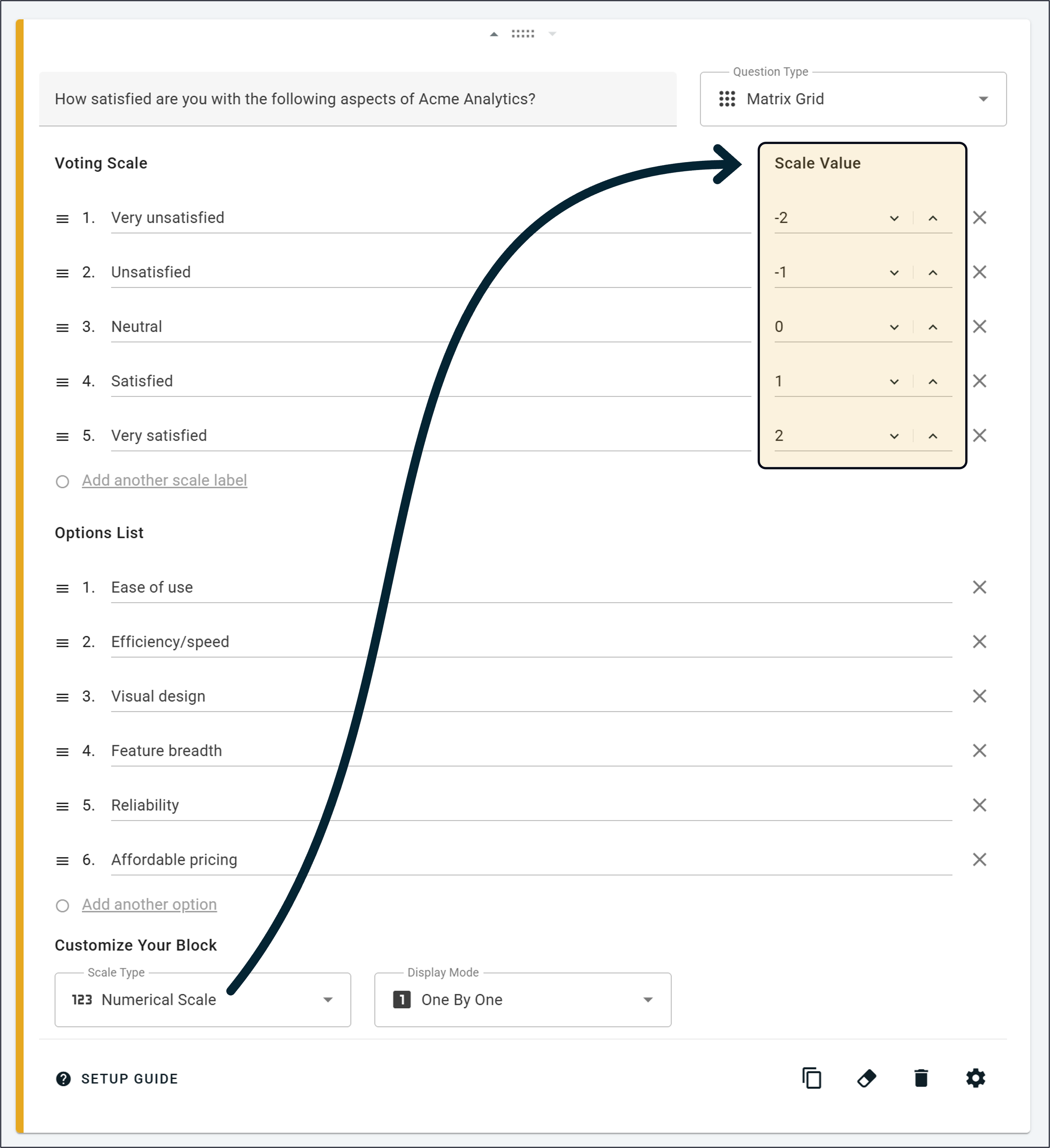
If your voting scale has an implied order — like "Very Unsatisfied" through to "Very Satisfied" — you can switch the scale from text to numerical and assign a number to each option. Configure this during setup and you'll automatically get calculated scores and ranks on your results dashboard later, without any extra work.
A common setup would be a 5-point satisfaction scale running from -2 to +2 to produce a net sentiment score per option:
Customization options
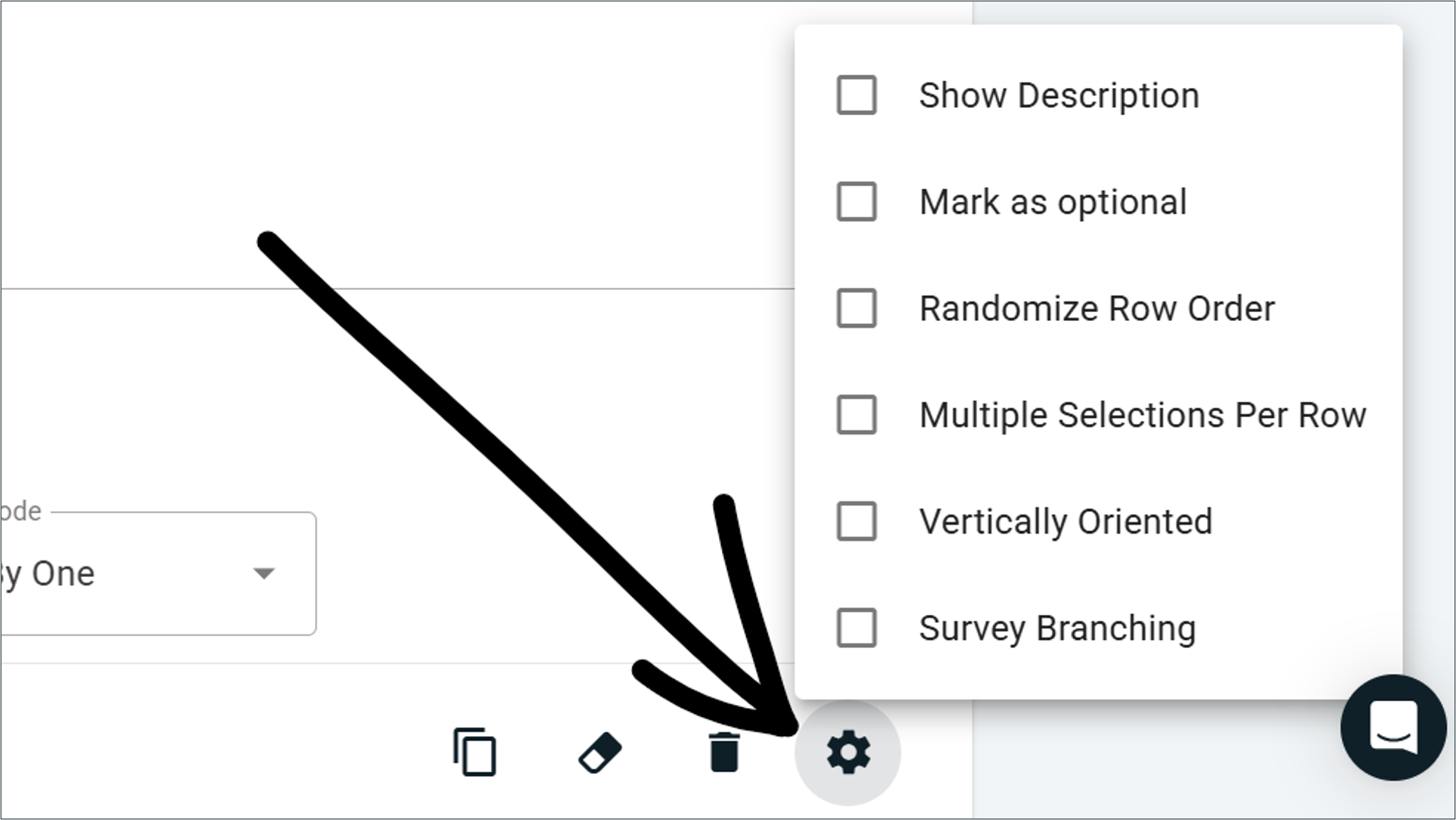
Click the settings icon (⚙️) on the block setup card to access the full list of customizations:
Show Description — adds a smaller text field below the main question for extra context or prompting.
Mark As Optional — lets respondents skip rows via a Skip button instead of forcing a response on every row.
Randomize Row Order — shuffles the order of your options list for each new participant, useful for reducing order bias.
Multiple Selections Per Row — switches rows from single-choice to multi-select, so respondents can pick all that apply.
Vertically Oriented — stacks voting buttons vertically, one per line (only applies in the One By One display mode).
Learn more about how these customizations work here
Real-time results and analysis
As soon as responses start coming in, results appear automatically in two main chart formats.
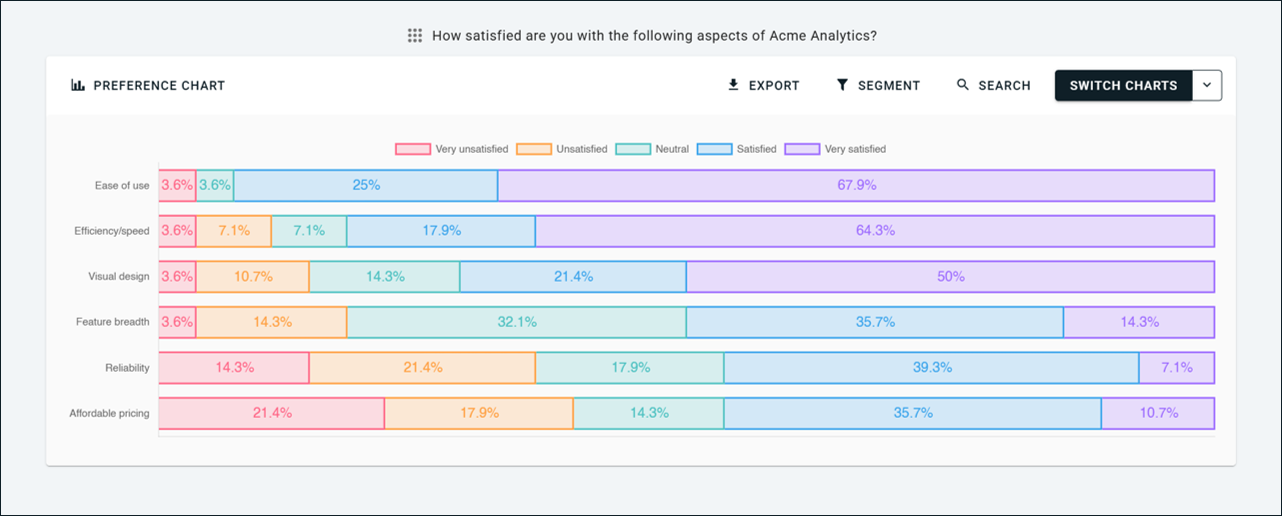
Preference Chart
A horizontal stacked bar chart showing, for each row, the percentage of respondents who picked each level of your voting scale. It's the fastest way to read the overall shape of your results.
Survey Scores
A data table with a detailed breakdown of every row, including a Score column with the average score per row (when numerical scales are enabled), automatic ranking from highest to lowest average score, and per-column vote counts or percentages that are color-coded to highlight modal choices.
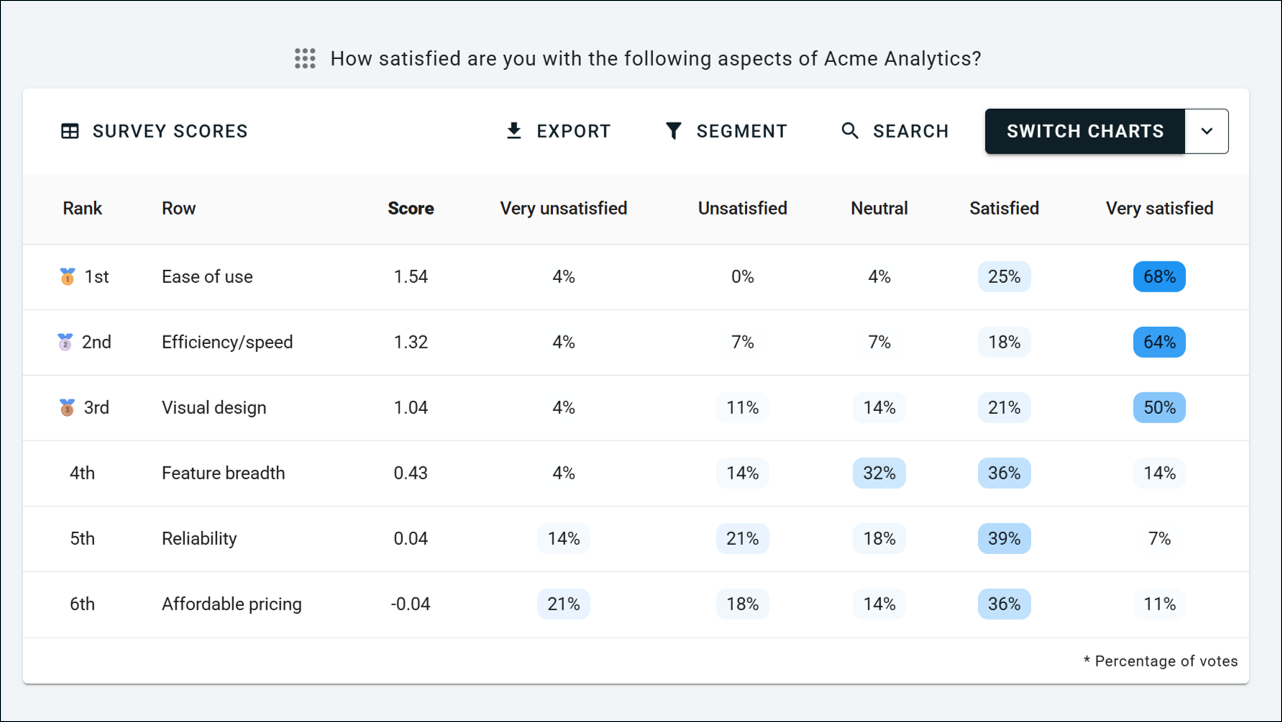
Matrix Grid questions also plug into the rest of OpinionX's analysis toolkit: Filter by Segment, Compare Groups Head-to-Head, the Segments Tab for crosstabulation, the Participants Tab, data exports, multi-language surveys, and partial completion views all work out of the box.
Available on every plan, including free
Matrix Grid is included on every OpinionX plan, including the free tier. That means unlimited Matrix Grid blocks, every chart type, segment filtering, head-to-head comparisons, crosstab reports, and exports, all included at no cost.
Note: Matrix Grid is the successor to our previous Agreement Rank question type. Same core idea (many options using the same voting scale) but significantly expanded functionality — new display modes, more flexibility, more customization options, and richer results. From now on, use the Matrix Grid block in place of Agreement Rank for any new surveys.
— — —
Other changes during April 2026:
We’ve added a cheaper entry plan, the Ask tier, to give people a more affordable way to prove OpinionX’s value at scale, to offer a superior ranking and polling platform to existing survey/form tools, and to cater specifically to people looking to run projects with up to 100 respondents.
We refined our refunds policy to make clearer how OpinionX subscriptions work, when refunds are permitted, and the conditions of renewal for yearly plans. This applies to all customers and can be found on our pricing FAQs, our product documentation about pricing, our Terms of Use that are agreed to at sign-up and purchase, and on the checkout page prior to purchase. For any questions about pricing terms, subscription conditions, and refunds policy, contact hello@opinionx.co.
A bunch of bug fixes and minor improvements, like helping more users find their workspace invite link so that they can make the most out of OpinionX’s unique offering of team workspaces with unlimited researcher seats.