
OpinionX Product Changelog
The latest news about OpinionX product updates. Check out our knowledge base for product documentation and tutorial guides.
Marginal Willingness To Pay (Conjoint Analysis) 🫰
'Marginal Willingness To Pay' is a new advanced chart for Profile Rank (conjoint analysis), available to all premium-tier customers on OpinionX ⚡
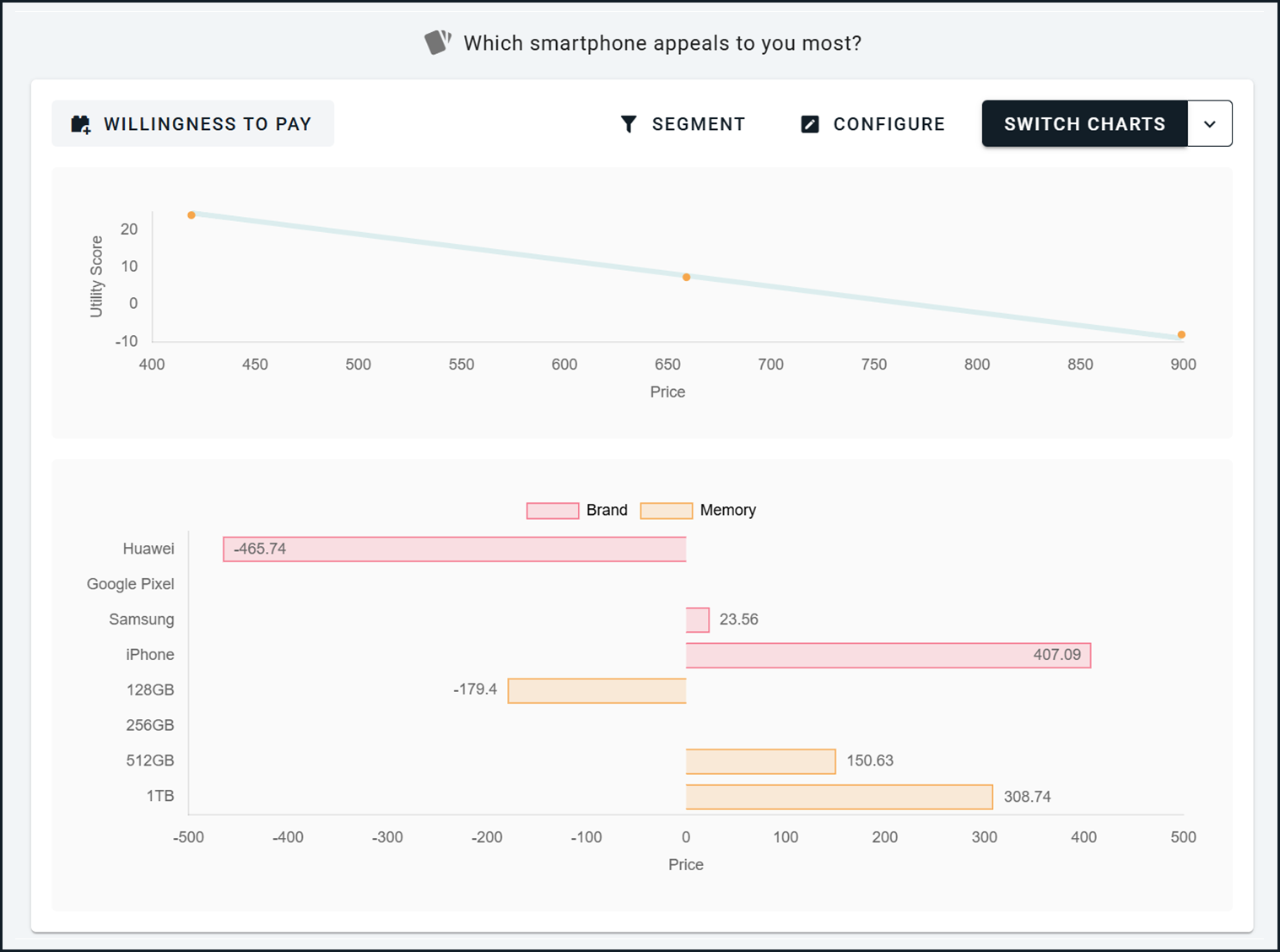
This one requires a few quick explainers:
The block type "Profile Rank" on OpinionX is a conjoint analysis survey method. Unlike the other ranking methods where each option is independent, a conjoint analysis survey is ranking two things at the same time — a list of categories (eg. brand, price, size) and a list of options within each category (eg. small, medium, large, XL for the "size" category).
Profile Rank comes with a bunch of advanced charts that automatically turn your conjoint data into useful reports, such as a scenario simulator, preference chart, and ranked concepts list.
If one of the categories in your Profile Rank block is price, then OpinionX will use the preference scores that survey participants gave to each price point to calculate a financial value that participants associate with each feature based on each option's relative importance score.
The "Marginal Willingness To Pay" report tells you how much a customer would pay to upgrade one specific feature of a product to a different option (eg. from size "small" to "large").
In the screenshot example, the "baseline product" is a Google Pixel smartphone with 256GB of storage, and it shows us that respondents would pay $150 extra to upgrade to a Google Pixel with 512GB of storage. Here's how you can read that from the chart:
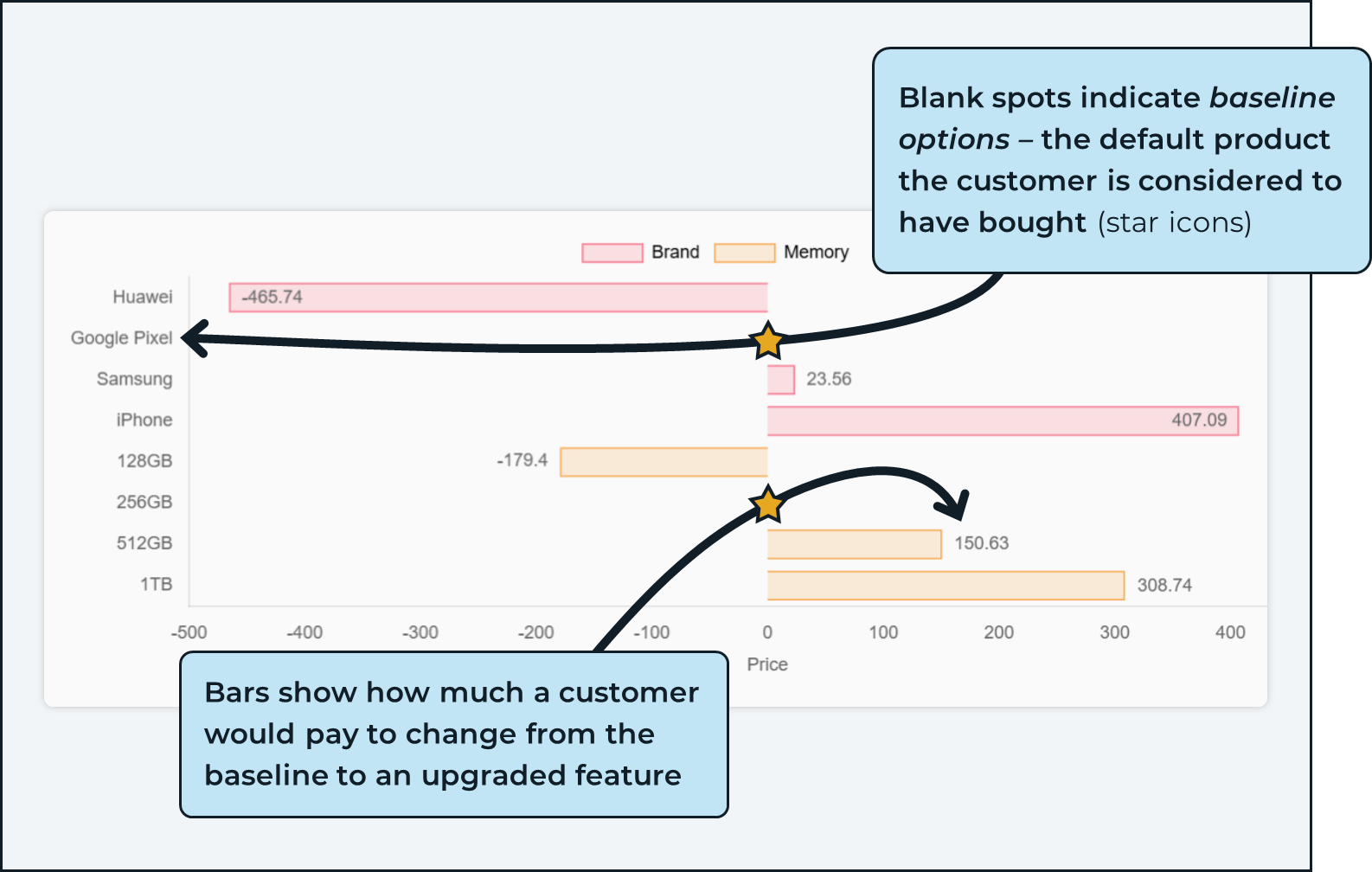
How are these numbers calculated from the pricing data? That's where the line chart comes in...
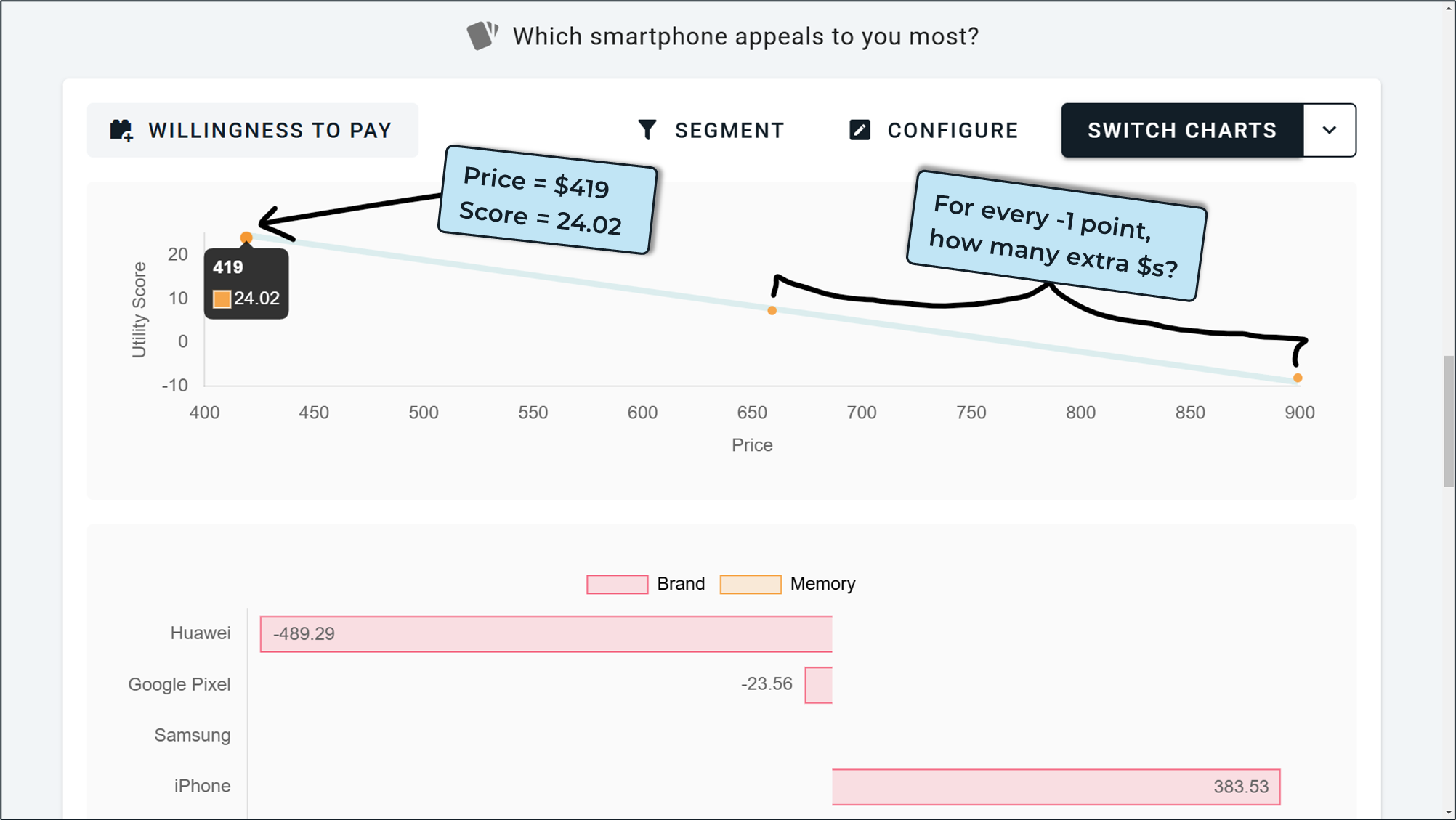
This line chart shows price points from the survey on the x-axis and preference scores on the y-axis. Each point is a specific price from the survey (eg. $419 had a preference score of 24.02). A trendline is plotted between these prices and that is used to calculate the marginal utility per dollar, which basically means "how many extra dollars on the price results in -1 point on the preference score".
By looking at the score difference between options (256GB vs 512GB storage), we can use this marginal utility per dollar to calculate the financial value customers associate with upgrading here.
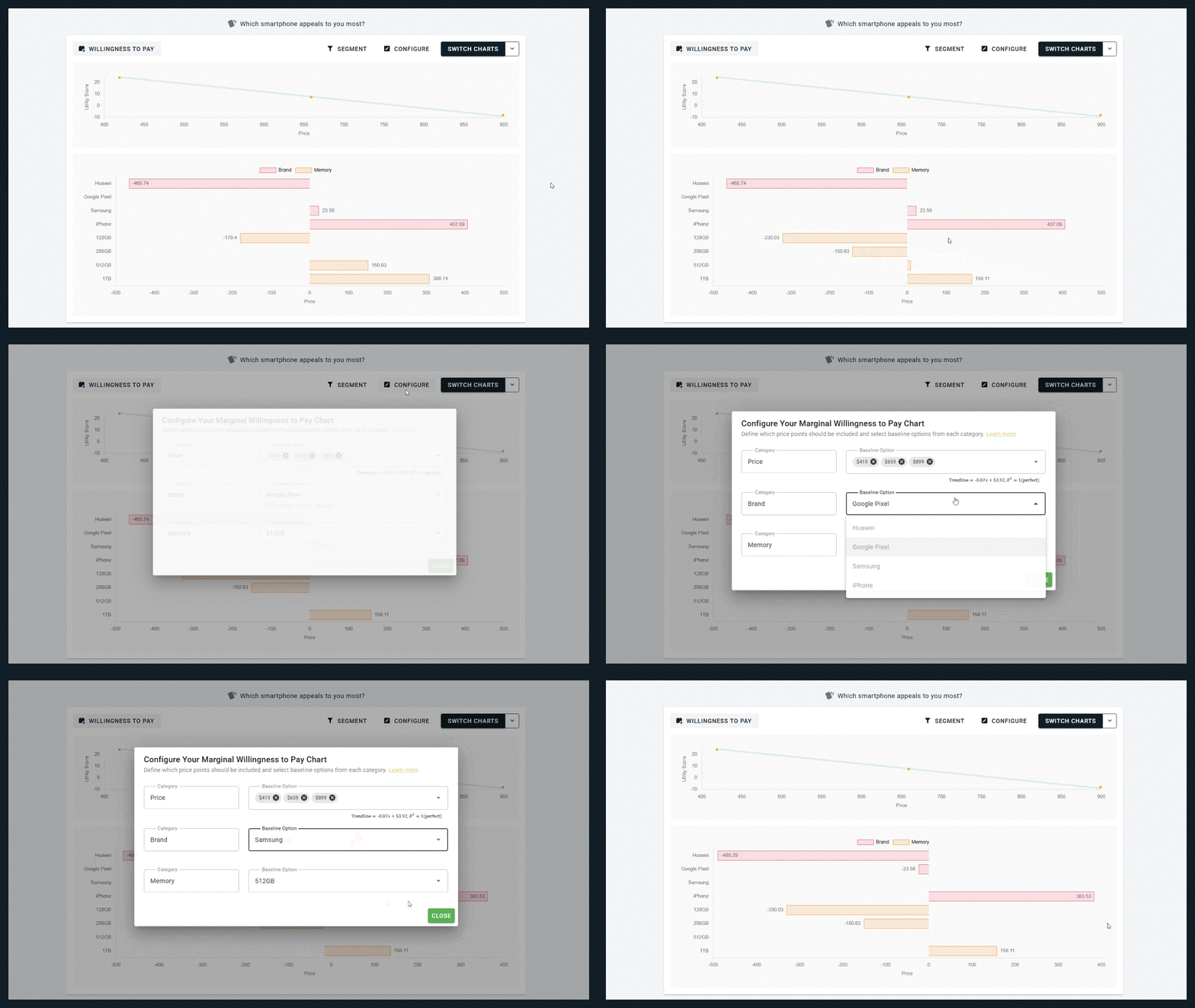
When viewing this chart, you can change which option in each category is considered the "baseline" by either (a) clicking a new bar on the bar chart to make that option the new baseline, or (b) using the Configure button at the top of the chart. The Configure window also shows some important data about the trendline used as the basis of the financial calculations.
Custom "Other" Option on Order Rank & Points Rank
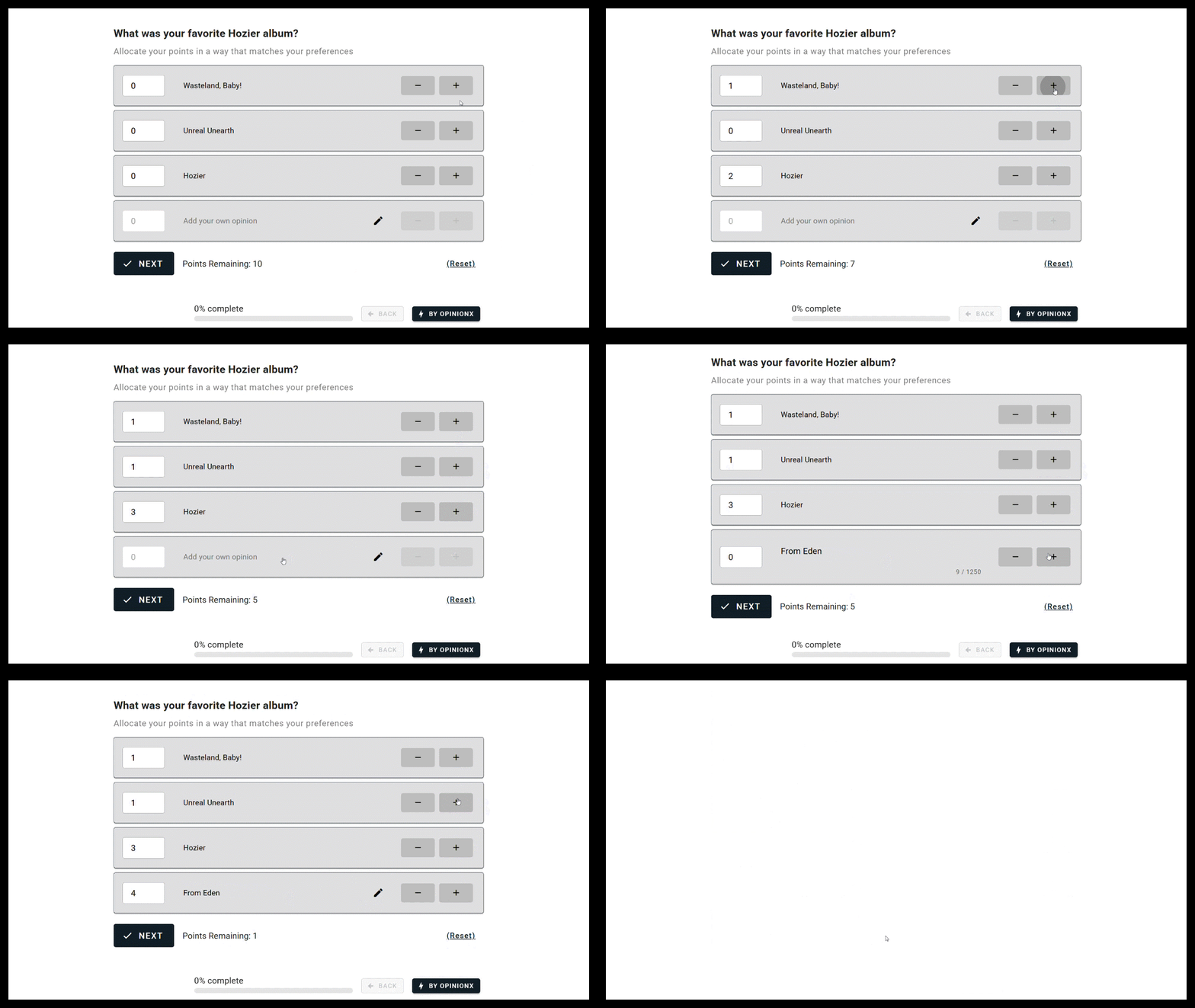
You can now allow survey participants to add their own custom option to your ranking list on Order Rank and Points Rank blocks on OpinionX.
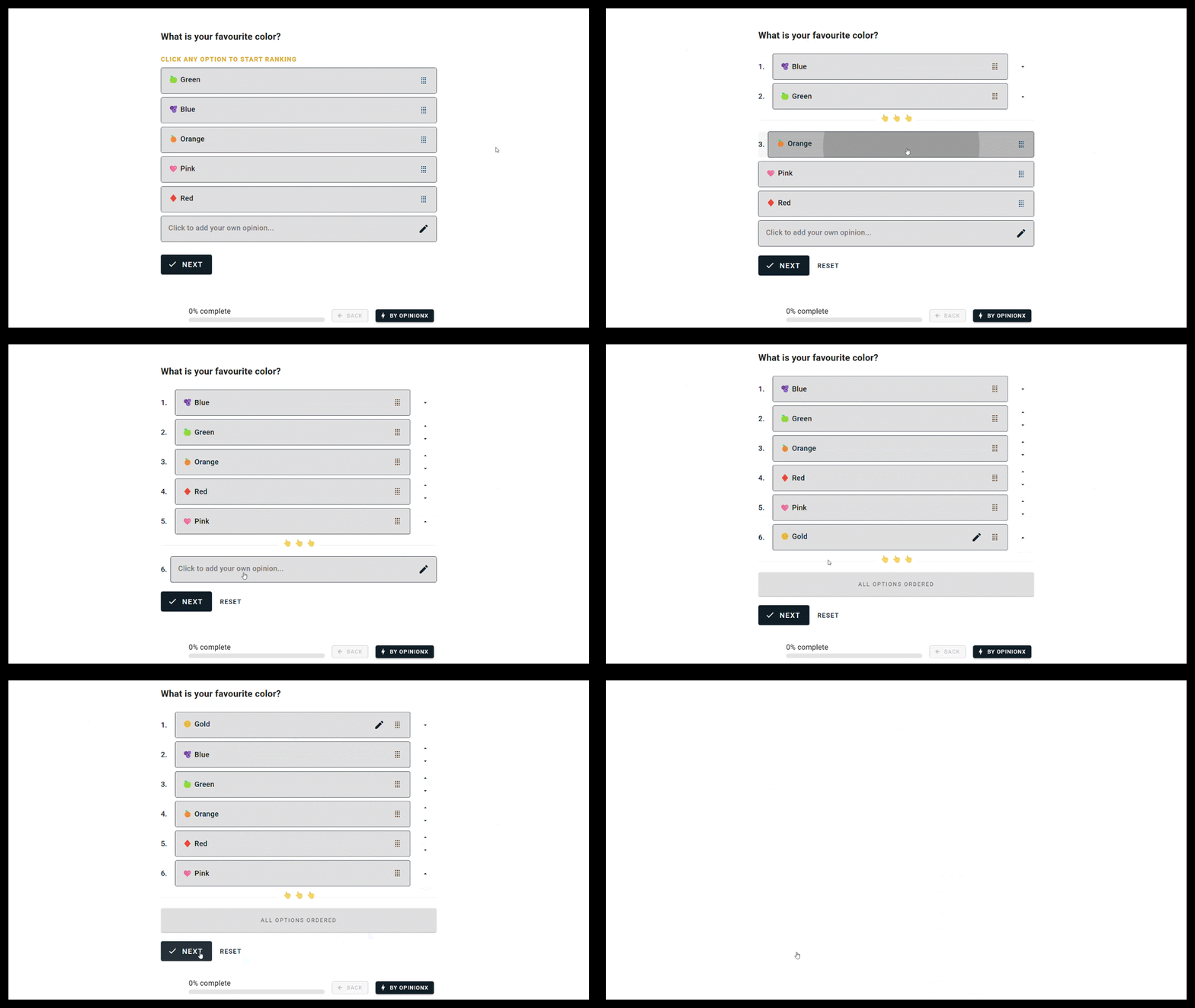
This new premium customization is available to customers on any of OpinionX's paid pricing plans. On the Overview Tab, your Order Rank and Points Rank results blocks will include a generic "Other" option that combines the scores allocated by all participants.
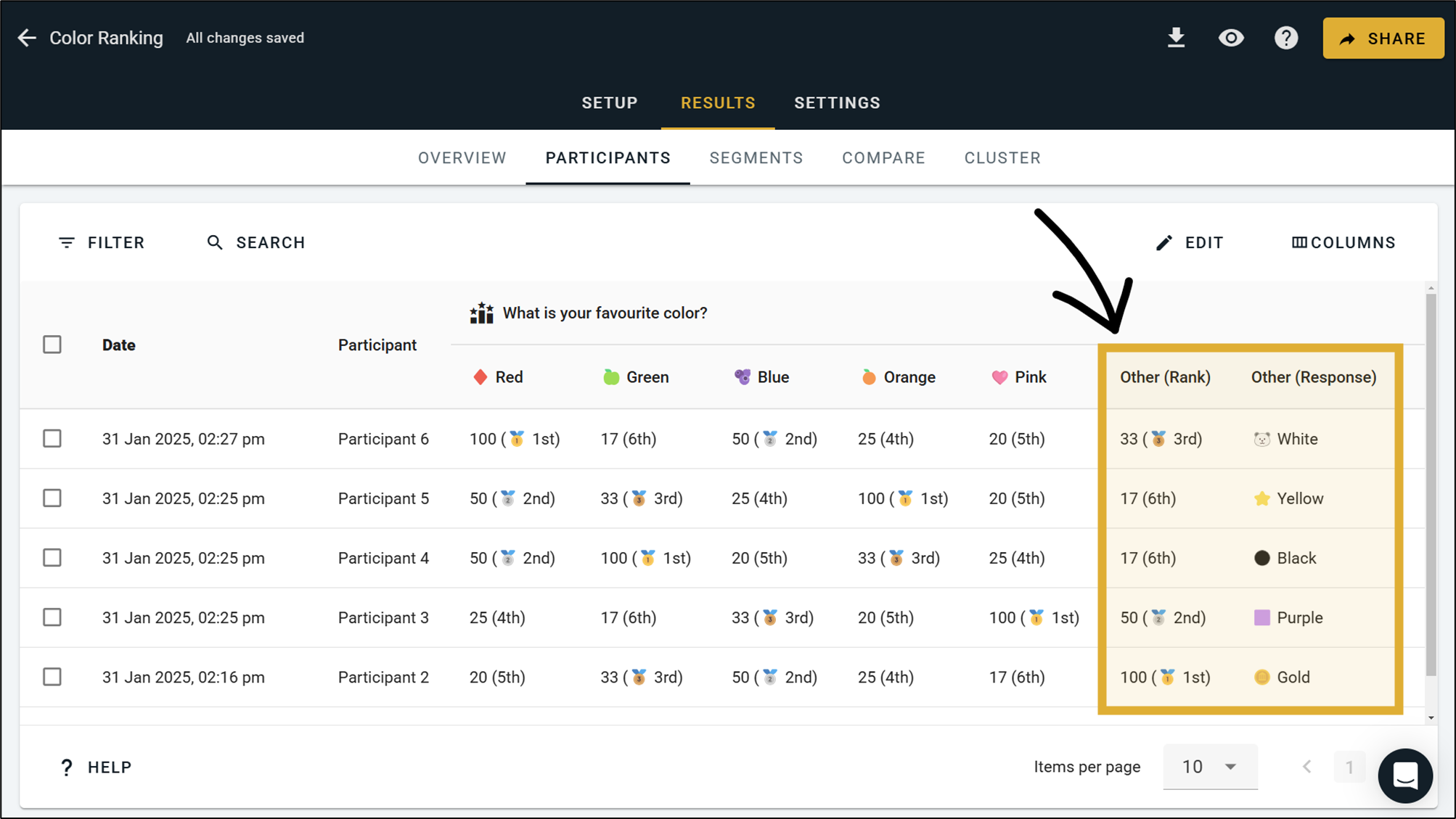
Over on the Participants Tab you can view the custom responses that each individual participant submitted and the ranked position or points they allocated to their own custom response.
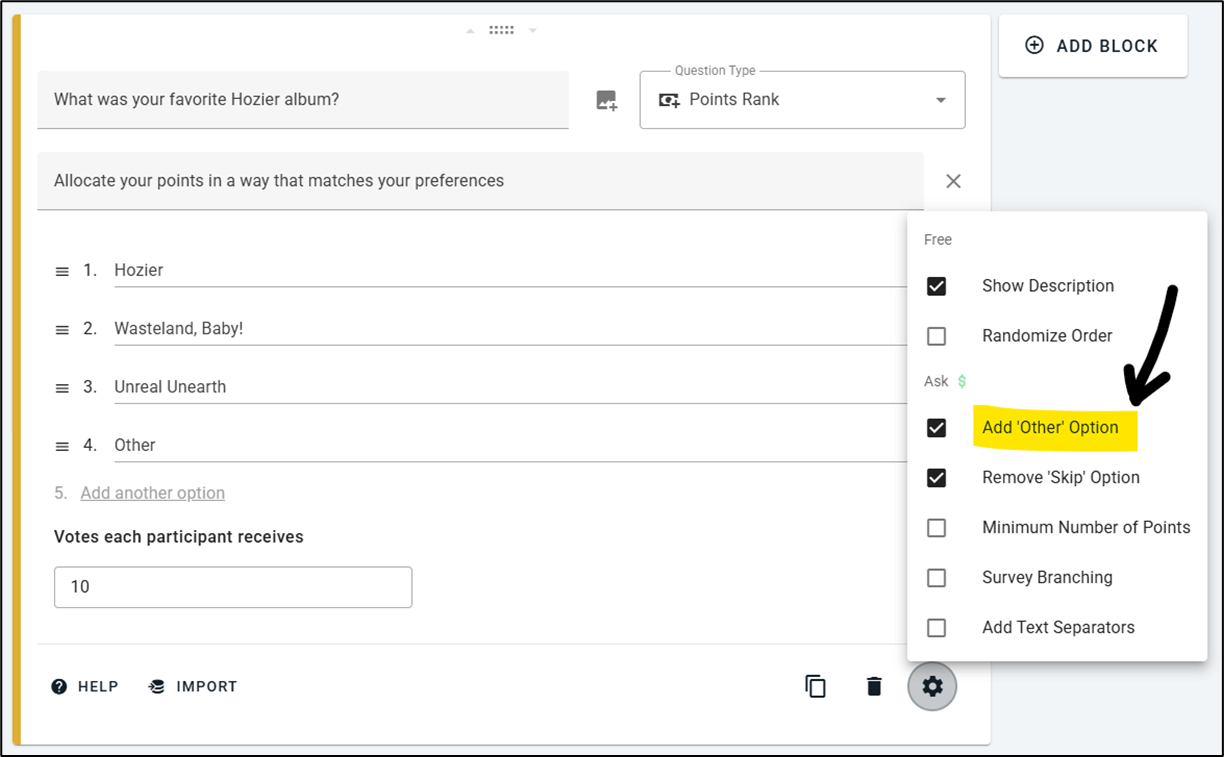
To add this feature to your survey, go to the Survey Setup Tab, go to your Order Rank or Points Rank block, click the block settings icon (), and enable the checkbox that says Add 'Other' Option.
New Block Type → Number Response
Number Response blocks are available on all OpinionX surveys to both free users and premium customers.
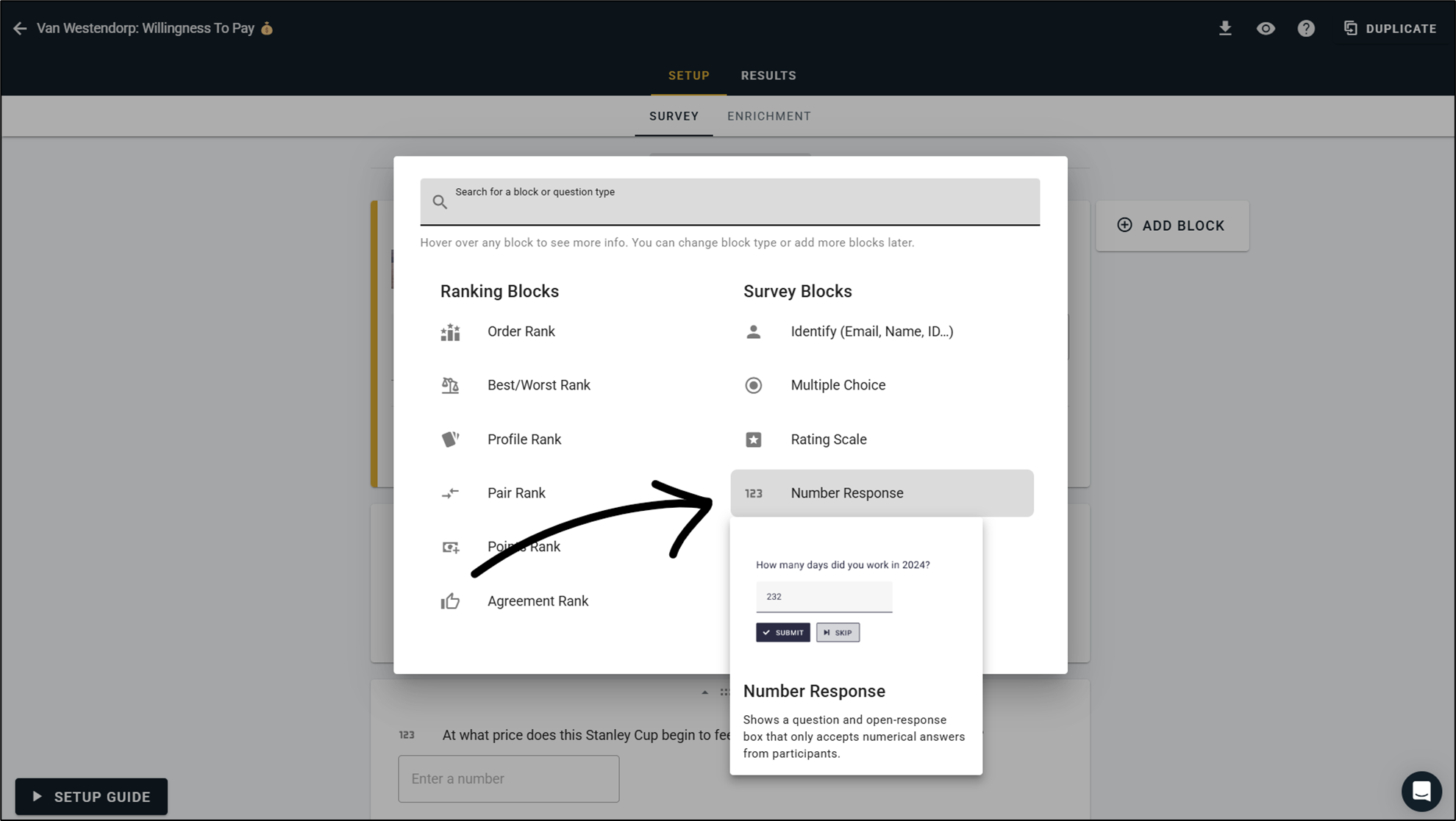
Number Response blocks are just like our Text Response block type — they allow participants to write their own custom response to your question, but in this case participants can only include numerical answers. This is particularly useful when you want to conduct follow-on research based on people's answers as the results are already in a clean format ready for you to use.
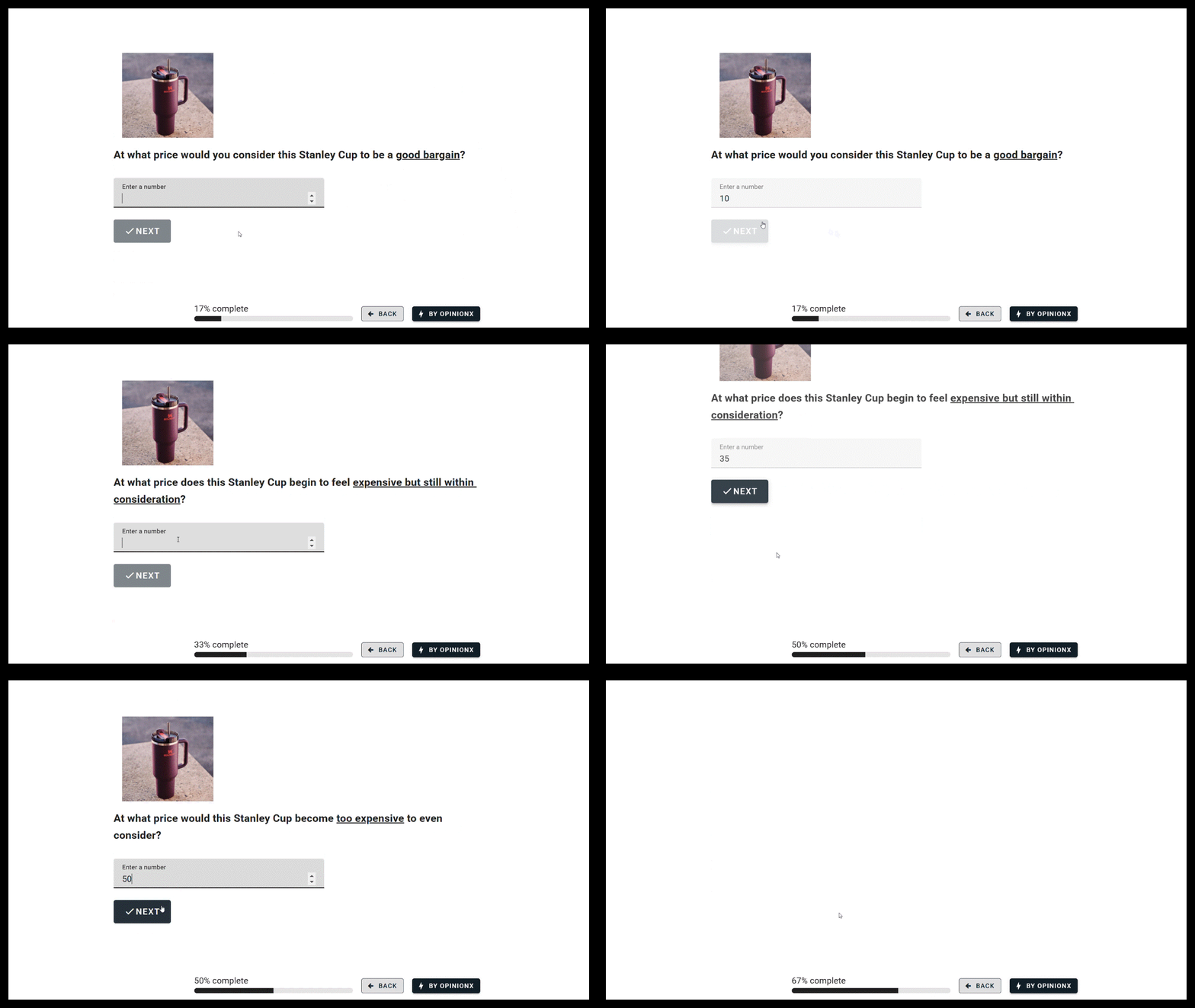
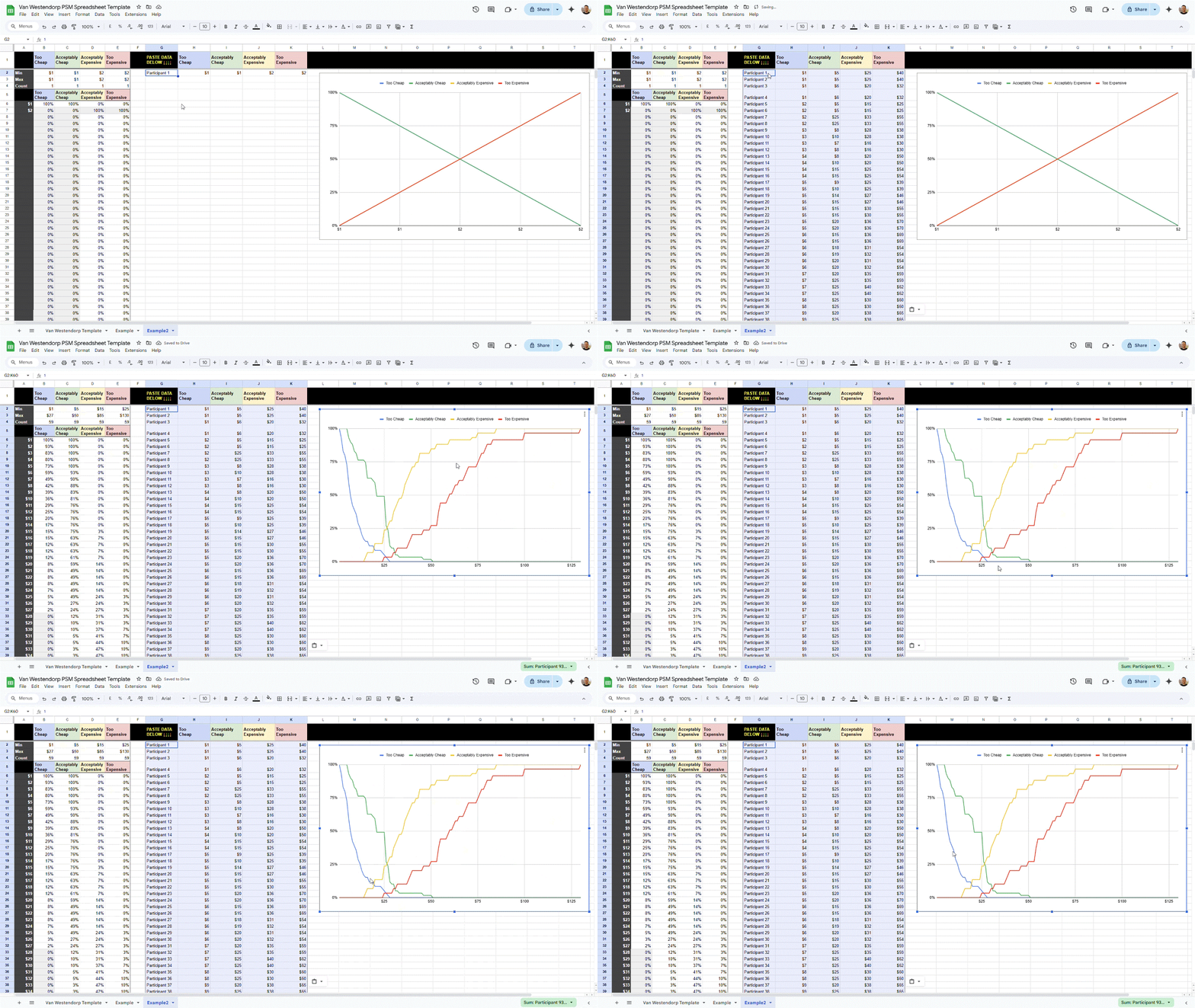
One ideal research scenario where Number Response is particularly useful is a Van Westendorp pricing study → this allows you to collect clean data that you can automatically feed into our free Google Sheet template to calculate your optimal price point.
Over the coming months, we'll be expanding the analysis options for Number Response to include visual results charts and segmentation filtering by Number Response values, so stay tuned for those feature expansions!
Learn more about OpinionX's new Number Response block type →
January 2025 Product Fixes & Improvements
Miscellaneous Updates throughout January 2025
-- -- --
🪄 Segmentation Logic 🪄
You can now use AND, OR, NOT logic to configure more advanced segmentation filters.
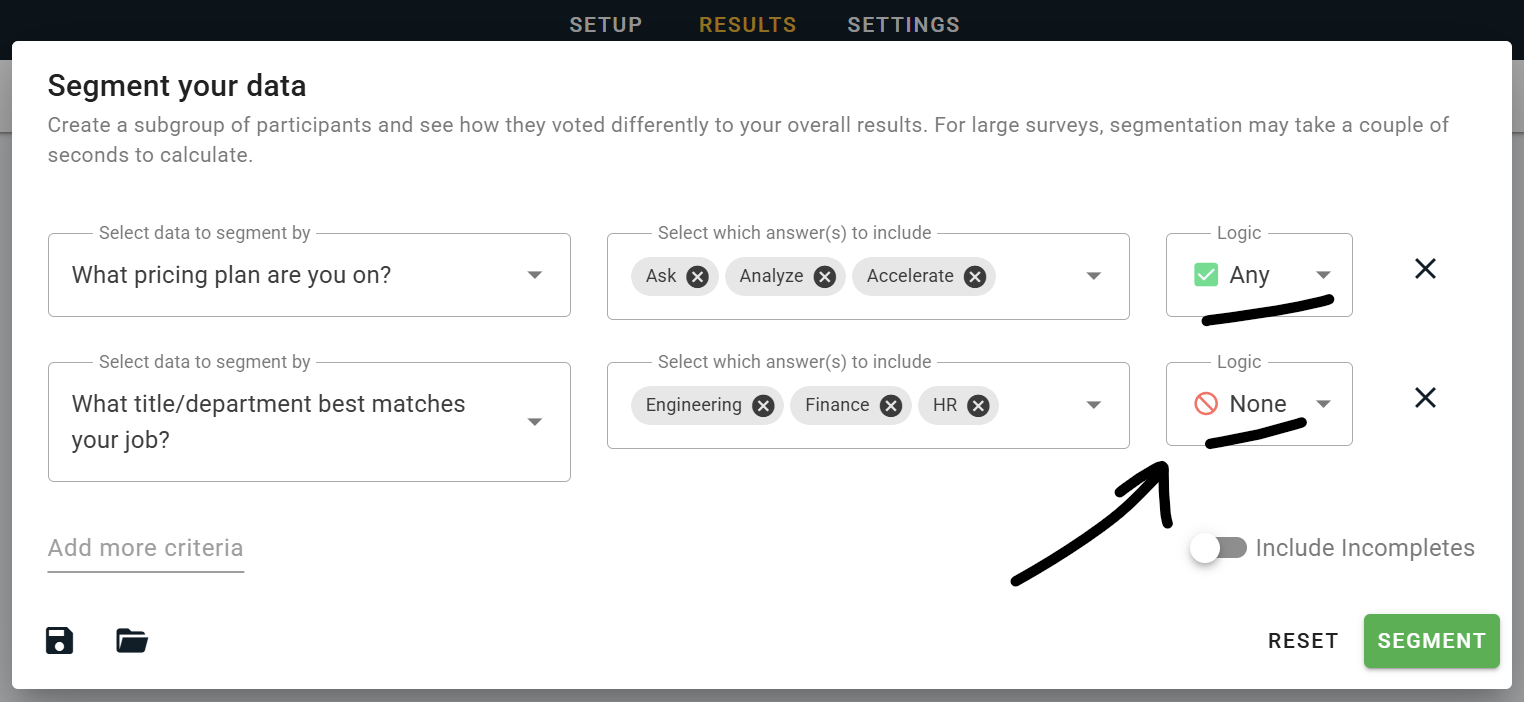
For example, the screenshot shows a filter that is configured to show results for (i) any participants who are on the "Ask", "Analyze" or "Accelerate" pricing plans AND (ii) any departments except "Engineering", "Finance" or "HR".
-- -- --
Product Improvements
Added a revenue projection to the "Monte Carlo" Scenario Simulator for Profile Rank (Conjoint Analysis).
Answer Branching now works for "Other" write-in answers on Multiple Choice blocks.
New helpful tiles at the bottom of the workspace homepage (eg. tells you what pricing plan you're on).
One-Time Upgrades now add credits to your account that you can self-allocate to your chosen survey.
Profile Rank scores now show to one decimal place, reducing perceived ties in your results.
Unique links created on the Enrichment Tab that are not set to single-use expiry will now copy enrichment data to everyone that completes the survey via the same link, not just the first respondent.
-- -- --
Product Fixes
Fixed the Partial Completes summary card showing a lower than accurate count of data available.
Improved the efficiency of exporting, reducing overall CPU usage for large export requests.
Fixed the display logic on the Intercom live chat widget to prevent it from appearing in surveys.
Fixed a bug on the Raw Data exports which was merging blocks of the same type into a single sheet.
Disabled Email Notifications for Partial Completes to reduce unnecessary inbox clutter.
Improved the time estimates for Profile Rank blocks, which are now generally shorter and more realistic.
Better caching and loading for segmentation filters, particularly on the data-heavy Segments Tab.
Various minor bugs and usability improvements for Profile Rank (eg. auto-highlighting during setup!).
Profile Rank categories now correctly show in the order you arrange them on your survey setup tab.
New Report Types → Conjoint Simulator & Ranked Concepts
Nov / Dec 2024 Updates
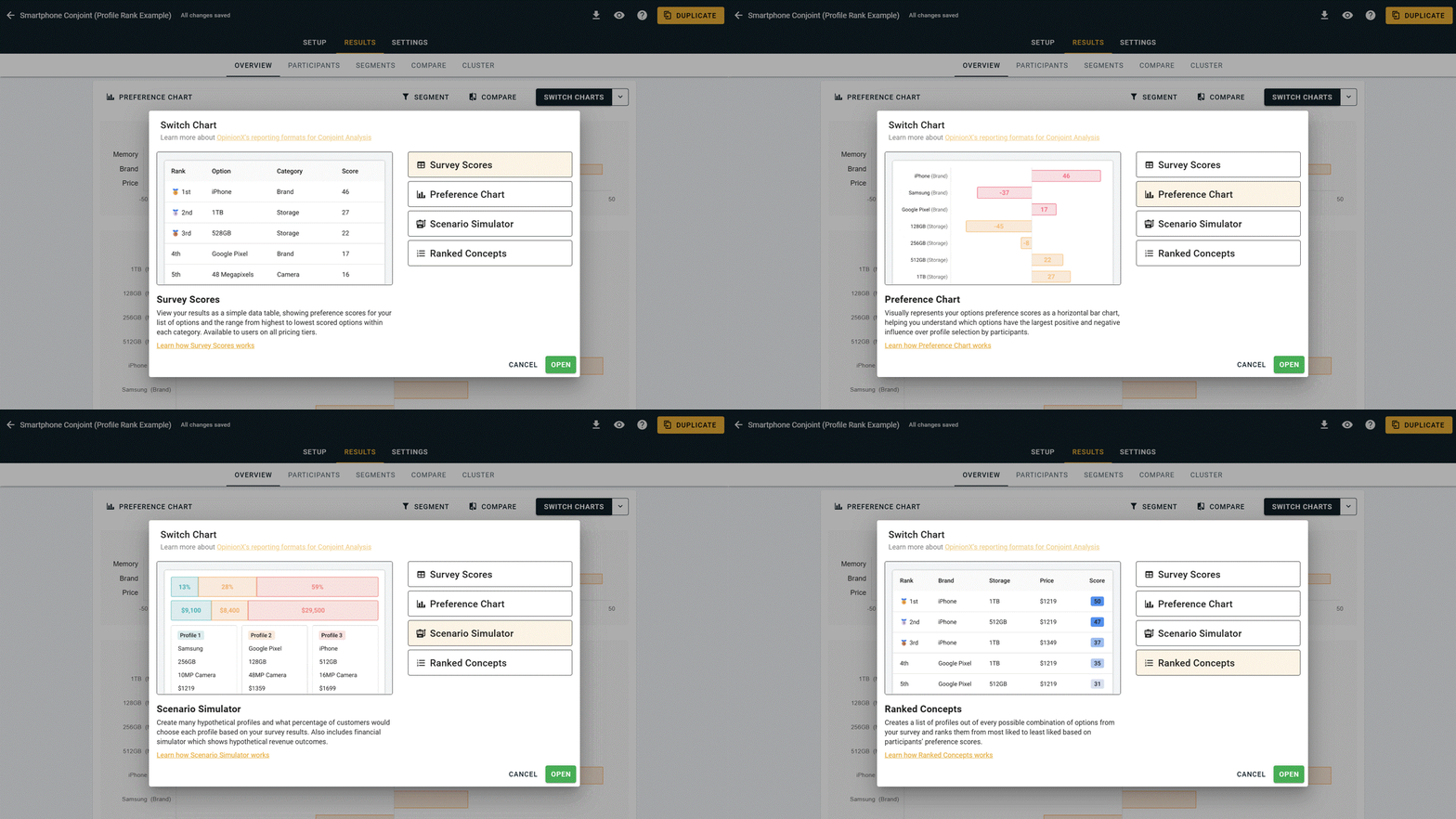
Advanced Reports for Profile Rank
Conjoint surveys on OpinionX have just got a range of new advanced analysis reports! You can try them for yourself on this sample survey — hit the Switch Charts button and switch between the following charts:
Survey Scores → Simple data table with scores for each of your options (default chart, free for all users).
Preference Chart → Bar chart for quicker visual interpretation of results (Analyze Tier).
Scenario Simulator → Hypothetical market share forecasts for a set of profiles (Analyze Tier).
Ranked Concepts → Ranks every possible combo of options based on preference (Analyze Tier).
Willingness To Pay → How much would users pay to unlock one specific option (Coming Jan '25).
Other improvements and updates to Profile Rank, our conjoint analysis format, include...
Duplicating your survey will now carry over Prohibited Pairs configuration for Profile Rank blocks.
Prohibited Pairs feature now opens automatically for configuration once enabled.
Hide Category Labels is a new setting available on Profile Rank for Ask tier customers or higher.
Made improvements to how OpinionX creates voting sets for Profile Rank, avoiding potential duplicates.
Improved the UI for the Prohibited Pairs window, with a wider display and easier to use dropdown menus.
Profile Rank blocks now have a built-in calculator to help you confidently configure your survey setup.
-- -- --
Other Updates
Added a Mean and Median score to Rating Scale blocks on the Results Overview tab.
The Aggregate Results export format for Order Rank now shows ranked position rather than raw score.
Updated how segmentation data is cached, improving overall functionality and some Profile Rank issues.
"Segment By Time" now lets you filter results based on the date/time a participant completed your survey.
Changed the "Date" data from time since creation (eg. "2y ago") to DD/MM/YYY for easier interpretation.
Improved the security of the "Survey Closed" feature to prevent unintended access by participants.
Added Slovak to our list of supported survey languages.
-- -- --
Bug Fixes
Fixed issue with numerical data importing correctly to the Enrichment Tab.
Fixed numerous usability issues related to Points Rank block setup with long option lists.
Fixed two bugs that were causing issues for a small number of users trying to sign-up or login.
Fixed a bug that was causing the Participants counter on the survey results page to show 0 participants.
Fixed a bug that temporarily caused email invites to become queued as drafts instead of sending.
Fixed a bug that was causing some overlapping text on the Welcome Page setup UI.
Google Sheets Integration
October 2024 Updates
-- -- --
We just added our first ever external integration to OpinionX for Google Sheets!
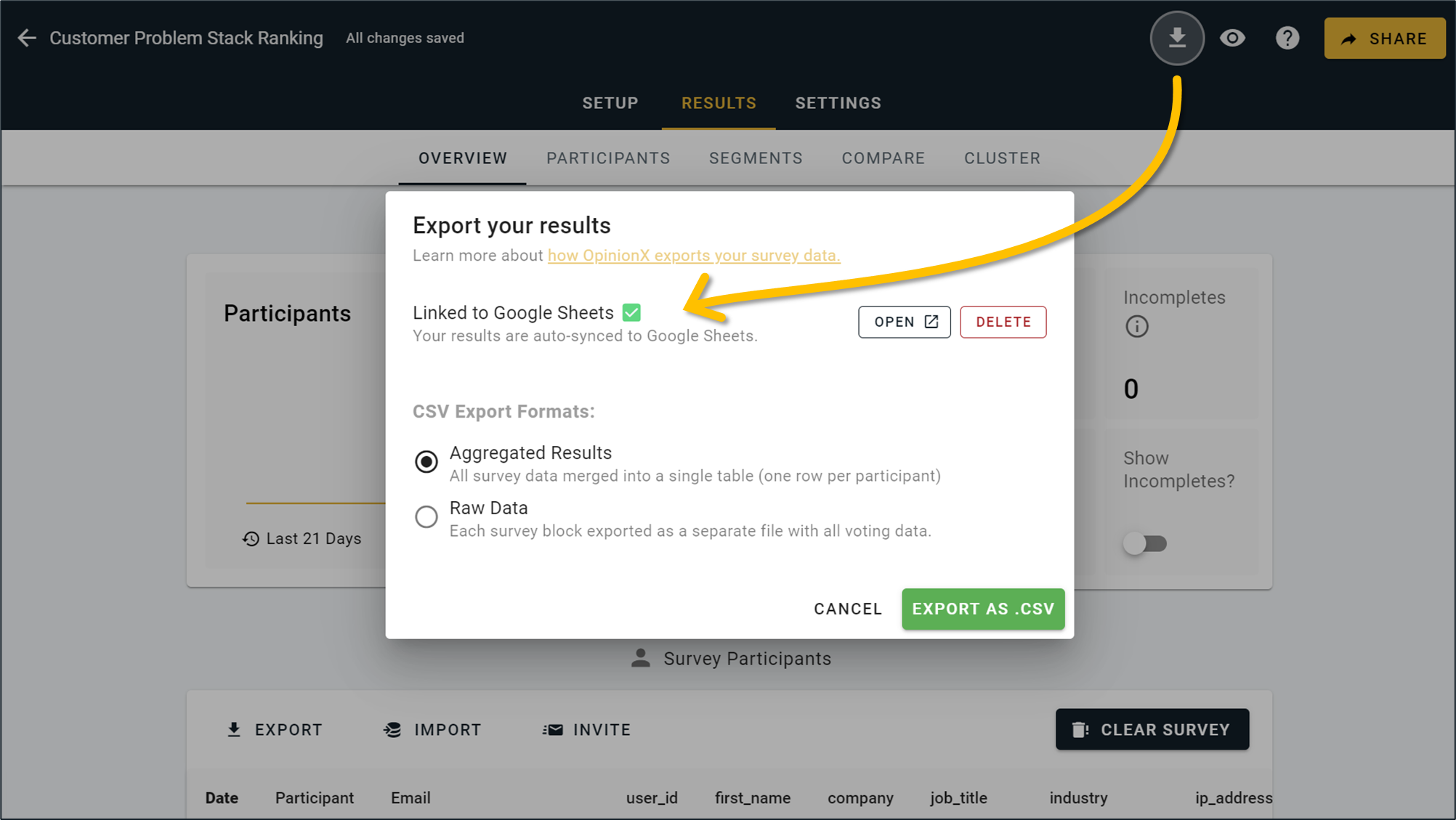
Connect your survey to Google Sheets and automatically sync your results to your linked sheet every time someone completes your survey. This new feature offers the PERFECT way to start building automated workflows using your OpinionX data. This integration is available to customers on the Analyze tier or higher.
-- -- --
Other Improvements
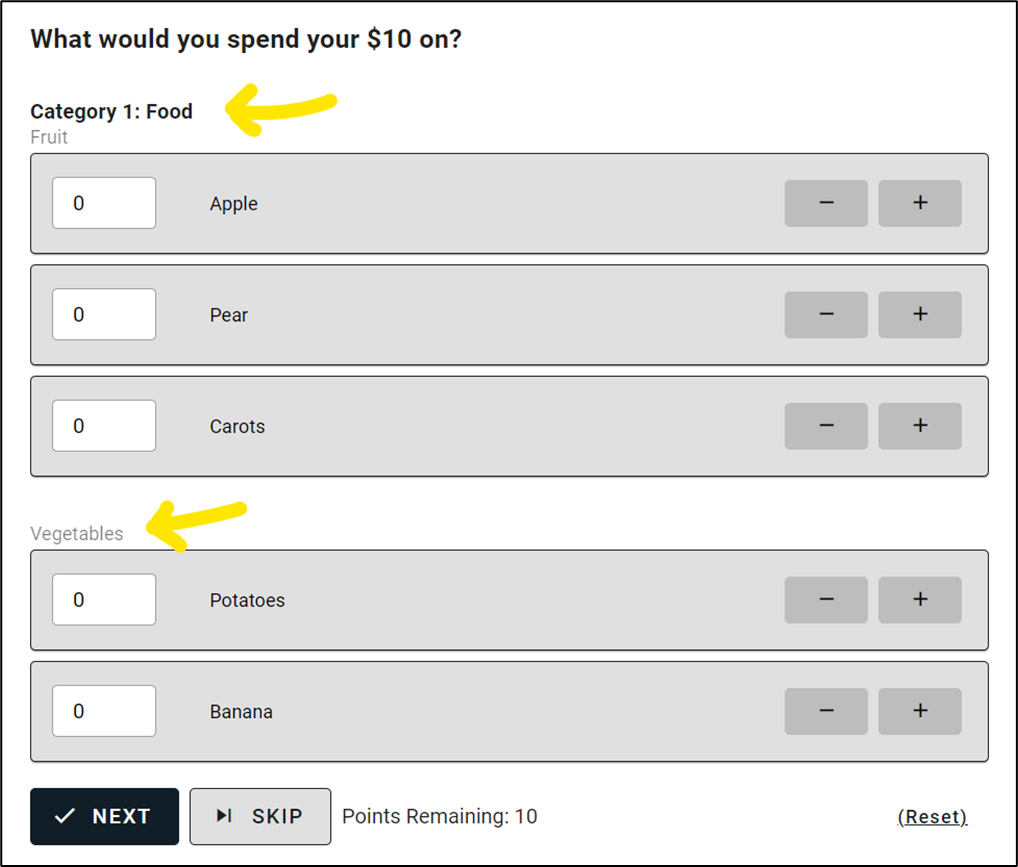
1. Points Rank Sections: Add text dividers to split your Points Rank options into similar groups with custom titles and subtitles.
2. Multiple Choice Export Format: The Aggregated Export format previously broke Multiple Choice blocks into multiple columns for each option a participant could have picked. We've updated this so that exports now include an initial column with a summary of the options selected, making it easier to build automated workflows based on participants' choices in your OpinionX survey.
3. Displaying Imported Emails: Email addresses added via the Enrichment Tab or Email Invites features now appear throughout all of your results pages, like in the Participant Details window and Participant Tab.
4. Prohibited Pairs UI: We made further improvements to the design of the Prohibited Pairs window that customers on the Ask tier or higher can use to create logic exclusions during their Profile Rank configuration.
5. Randomize Category Order: For Profile Rank, our conjoint analysis format, we added a new setting to the Ask tier for randomizing the order that categories appear during voting for each new participant.
6. Unique Links Button: On the Enrichment Tab, we've now split out the Unique Links button from the Email Invites flow so that it is quicker and easier to find.
7. Branching for "Skip": You can now use survey branching to send participants to different blocks depending on whether they answer the question or use the "Skip" button.
8. Banner Images: You can now decide whether the main image on any survey block appears as a full width banner or inline logo.
-- -- --
How to connect your OpinionX survey to a Google Sheets spreadsheet →
AI-Powered Clustering Analysis
October 2024 Updates
-- -- --
Introducing the Cluster Tab → our powerful new AI-powered analysis feature that identifies groups of participants that care about the same stuff. Get ready to make data-driven customer personas using AI!

What is the Cluster Tab?
The Cluster Tab groups participants based on their voting patterns, helping you understand the main groups with shared preferences and priorities from your survey. Using k-means clustering, OpinionX analyzes how people voted on various ranking options and create distinct "clusters" that share similar opinions. Each cluster is displayed as a simple summary and these clusters can be plugged into all of OpinionX other features.
How Does It Work?
1. Clustering Participants: The Cluster Tab identifies patterns in the voting data, assigning each participant to a cluster based on their responses. This allows you to see which groups of participants voted similarly across all ranking options.
2. Analyzing Opinions: After clustering, we dive deeper to determine which options each cluster felt most strongly about. We calculate the 'Z score' for each option, measuring how far a cluster's average score deviates from the overall average. This helps pinpoint the ranking options that resonate most with each group.
3. Understanding Characteristics: While opinions are the ranking options in your survey, characteristics are additional data points collected about participants. These insights help you identify overrepresented types of people within each cluster, enriching your understanding of your audience.

How to Use the Cluster Tab:
Getting started is simple! No data science experience is required. Just head to the Cluster Tab and click "Run Clustering." You can customize your analysis using the Advanced Configuration menu or run it with default settings for quick insights. Learn more here.
Enrichment → Bulk Import External Participant Data
September 2024 Updates
-- -- --
Enrichment
You might have noticed a new tab on your survey dashboard — the Enrichment Tab!

The Enrichment Tab lets you upload data about your participants before they join your survey and then automatically associate their survey answers with the data you already had about them -- helping you conduct advanced analysis in OpinionX without having to ask a long list of basic questions about people's name, email, industry, job department, etc.
Once you've imported your .CSV of customer data, you can either download a list of unique links to distribute to your participants or use the email invites feature to send each person their unique link directly from inside OpinionX.

Once participants complete your survey, their enrichment data will appear throughout other parts of your results dashboard like the Participants Tab. Over the coming weeks, we'll be extending a bunch of extra capabilities to enrichment data, like adding it to our segmentation and exporting features! If there is a specific way you would like to use enrichment data that we haven't built yet, please let us know.

-- -- --
Other Improvements
Data exports now include timestamps for each of your survey participants.
The aggregated export for Order Rank now shows the ranked position rather than the score.
Increased the modal width for Prohibited Pairs on Profile Rank, making it much easier to use now.
Deleting participants now auto-updates Overview Tab components without requiring a page refresh.
You can now use Apple Pay when upgrading to a paid pricing plan.
Best/Worst Rank now displays line breaks correctly for all ranking options.
Identify blocks now load for survey participants with the cursor already in the input box.
We've improved the UX of Order Rank surveys on mobile devices, particularly making scrolling easier.
Users on the Ask tier or higher can now set the Welcome Page text to left, center, or right alignment.
-- -- --
Bug Fixes
Fixed a bug that was causing an error for some users when exporting unique survey invite links.
Fixed a character limit bug that was causing text to reset after editing during Finish Page setup.
Fixed a bug that was causing Order Rank results to display everything as 0 on the Compare Tab.
Fixed an issue that caused identical profiles to appear against each other in Profile Rank voting.
Fixed some issues that were affecting the French language translation for surveys.
Fixed a bug that was causing deleted options to still appear in the Prohibited Pairs config modal.
Fixed some little typos that users were very kind to point out to us — keep them coming!
View Data From Incomplete Surveys
August 2024 Updates
-- -- --
Incomplete Surveys
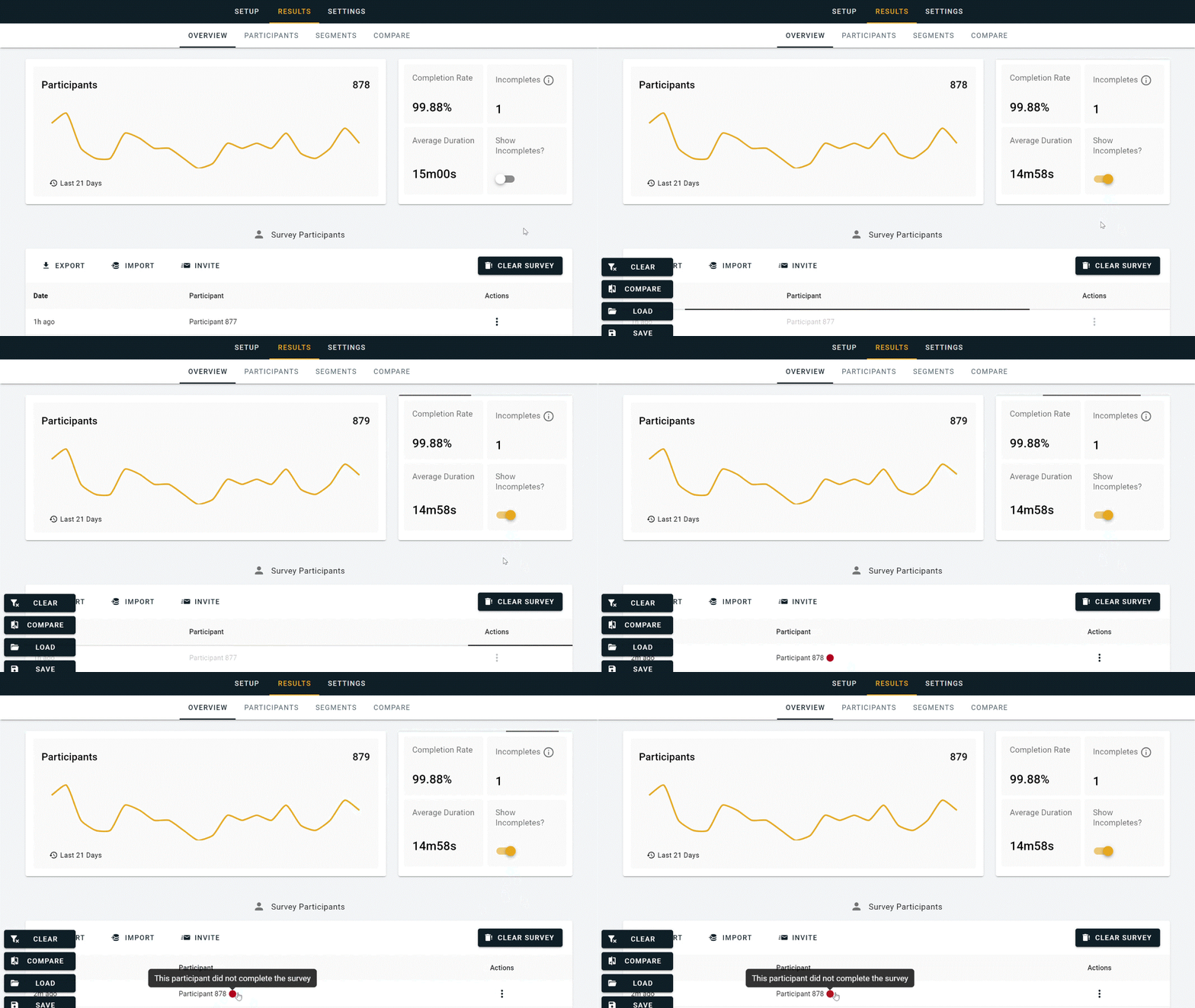
As of August 14th 2024, all OpinionX surveys now capture data every time someone votes or answers a question in your survey. By default, the results page will only show data from participants that completed the whole survey. Customers on the Analyze tier or higher can toggle on/off the new "Show Incompletes" feature to include data from participants who quit mid-survey or left it idle for >24 hours. Here's an example:
-- -- --
More Languages
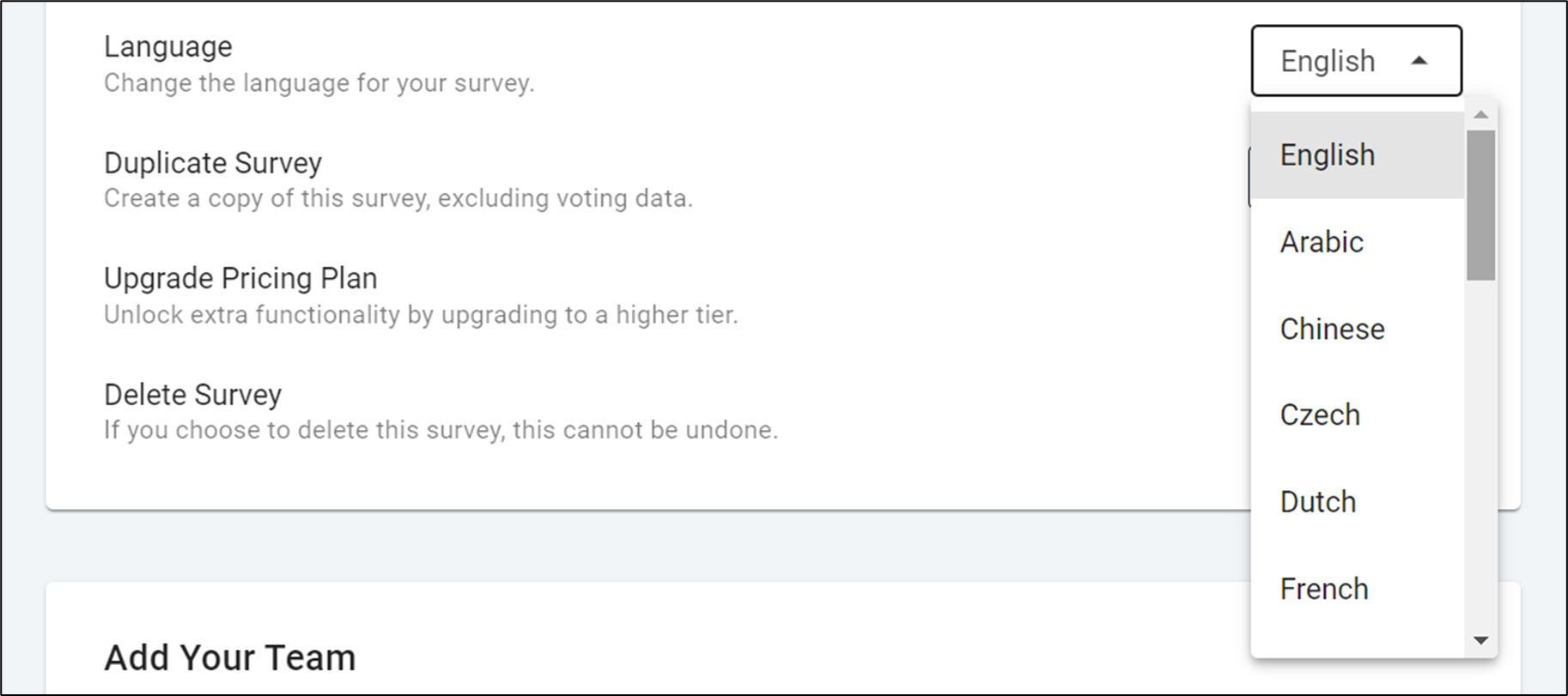
We've expanded OpinionX's list of supported languages from 7 to 21. Selecting a language changes the text in all the pre-defined survey components, such as "Next" and "Skip" buttons. Survey languages are available for free to all users from your survey's settings page. Languages currently supported on OpinionX are:
Arabic
Chinese
Czech
Dutch
English
French
German
Greek
Hebrew
Indonesian
Italian
Japanese
Korean
Persian/Farsi
Polish
Portuguese
Russian
Spanish
Turkish
Ukrainian
Vietnamese
-- -- --
Segmented Exports
Survey exports now acknowledge any active filters when compiling data to CSV. This means that when you've got a segmentation filter active and export your results, the exported data will only include participants that meet your filter configuration criteria.
-- -- --
Other changes we've built and shipped during the past two weeks include better answer validation to prevent unnecessary crashes for survey participants, more detailed error logging so that we can understand and fix bugs faster, updates to our pricing models (including the relaunch of our new custom Accelerate packages), a fix to voting animations to prevent a rare issue that caused interactivity to break by voting too fast, and some other minor/backend changes :)
Prohibited Pairing on Profile Rank
July 2024 Updates (Part 2)
-- -- --
This new feature lets you configure your Profile Rank block so as to prevent certain options from appearing together in the same profile. For example, imagine you're running a conjoint survey about houseplants where your categories (attributes) include plant type, pot style, and pot location.

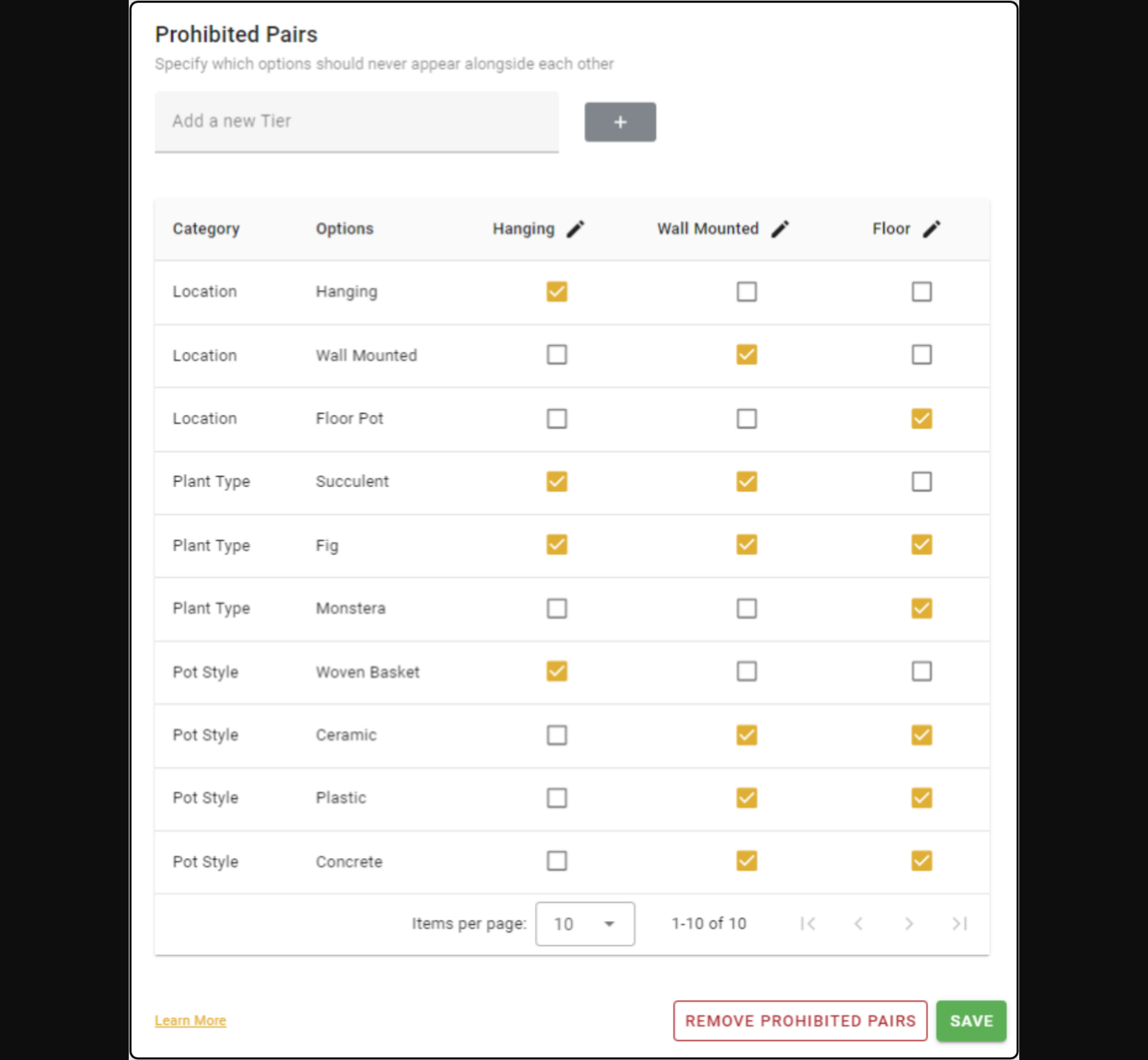
Some plants are not suitable for hanging or wall-mounted plant pots, such as the large monstera varieties. In this case, it would be ideal to be able to prevent these from appearing together -- that's where Prohibited Pairing comes in...
Prohibited Pairing revolves around "tiers" that you create and configure yourself. In this case, I have created three tiers, one for each of my Pot Location options: Hanging, Wall Mounted, and Floor. In the example above, you can see that the "Hanging" tier will only allow Woven Baskets, as that is a [hypothetical] limitation in the pot designs I can manufacture.
When OpinionX is selecting profiles to present to participants in a voting set, each profile will be get one of these tiers. The same tier can appear in more than one profile per voting set. Customers on the Ask tier or higher can add Prohibited Pairing to their survey through the Profile Rank block settings menu:

Email Notifications
July 2024 Updates
Email Notifications
Image-Based Conjoint Analysis
Reusable Unique Links + Other Improvements
— — —
1. Email Notifications
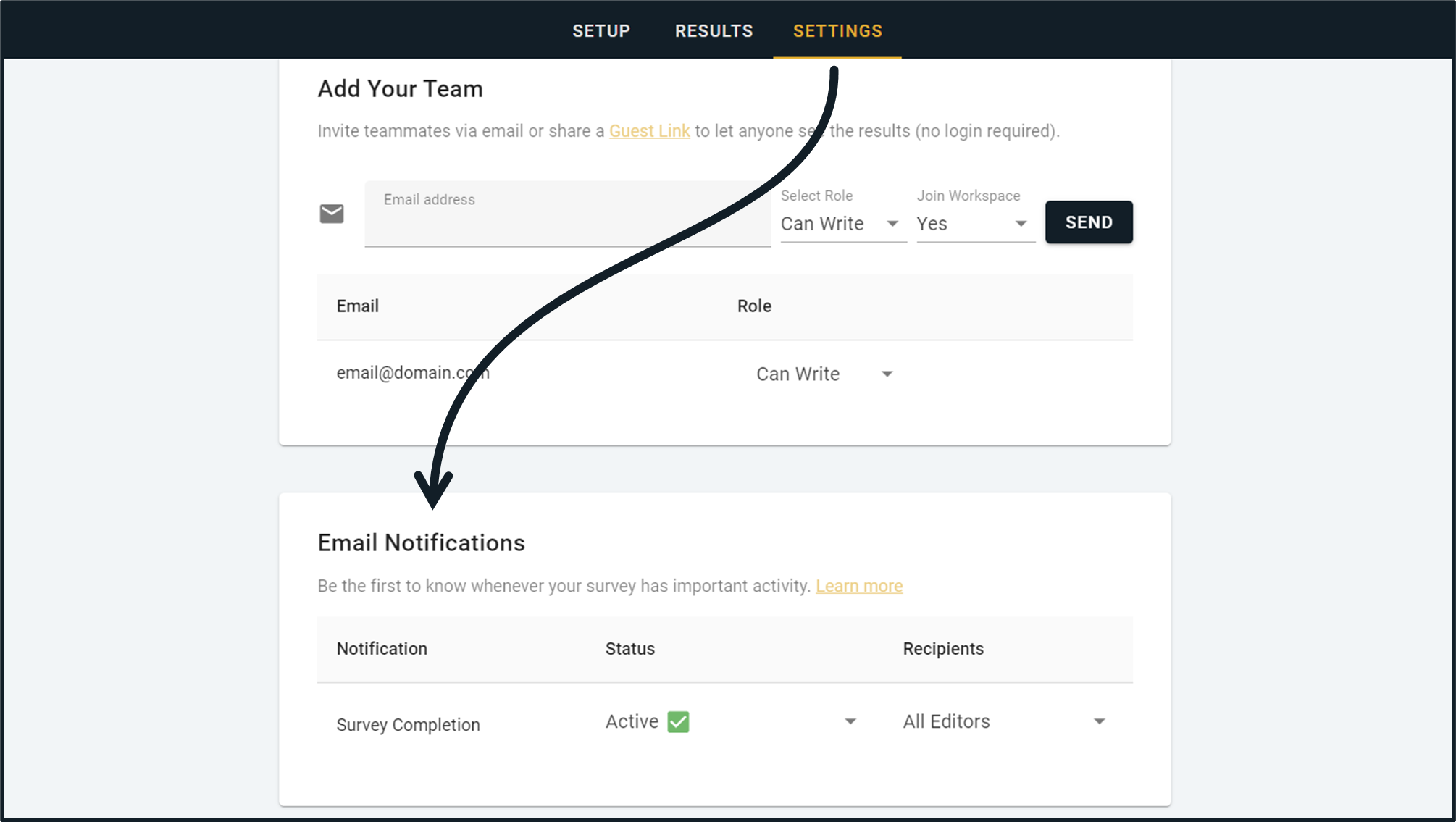
Receive an email notification every time someone new completes your survey. Decide whether it gets sent to all editors on your survey team or just specific people. Available now to all users on the Ask tier or higher.
— — —
2. Image-Based Conjoint Analysis
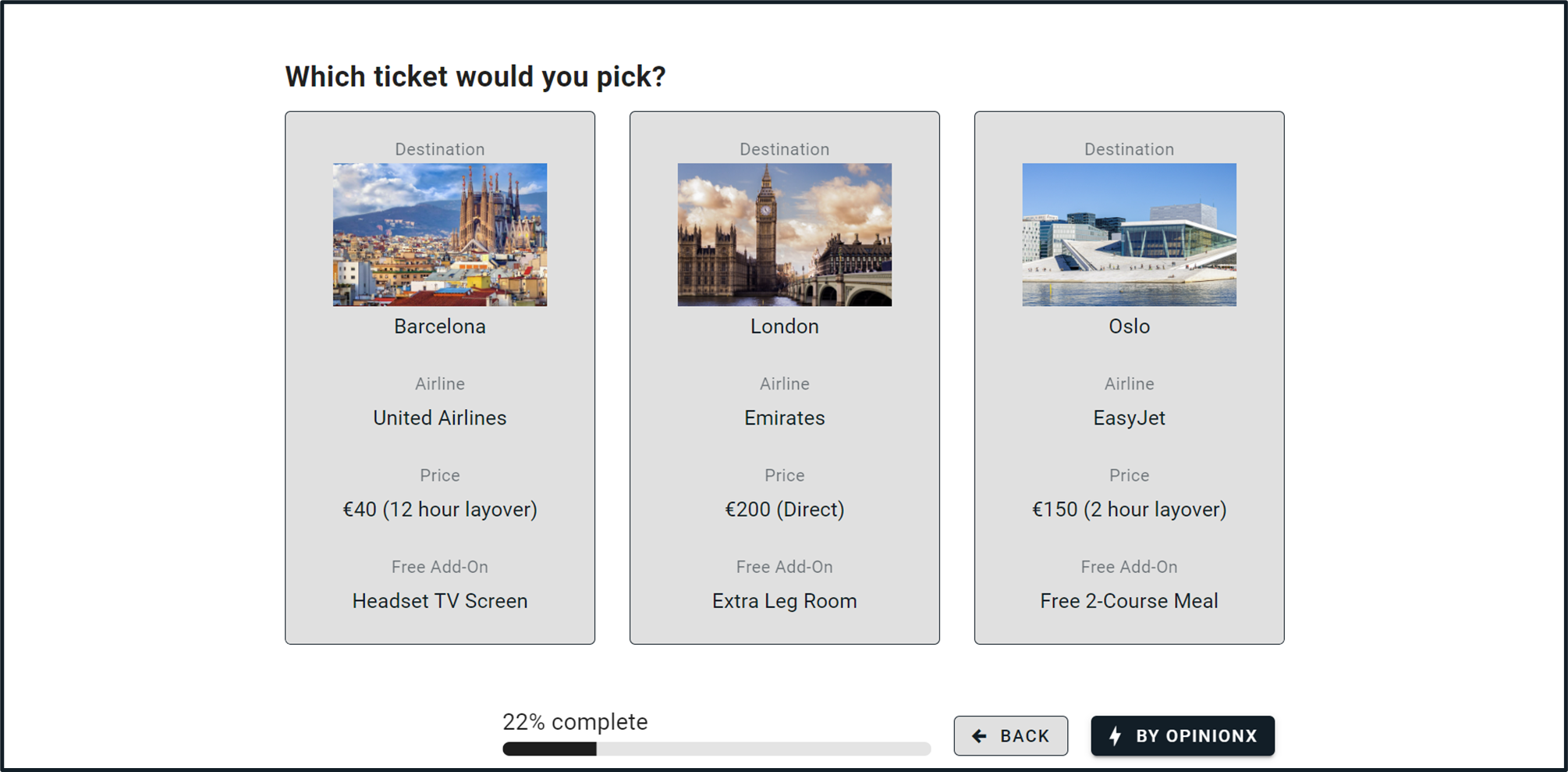
You can now add images to any options (attribute levels) on your OpinionX Profile Rank surveys. This addition means that every question type on OpinionX now allows for images, including all ranking methods as well as survey formats like Multiple Choice and Rating Scale.
— — —

3. Other Improvements
Block Selection → We updated the design of the block selection menu, grouping ranking and survey questions separately so that you can find your intended question type quicker. We also added a search bar at the top to help you find what you're looking for regardless of its name on OpinionX.
Reusable Unique Links → In the past, any participant that used a link from a previous Unique Link or Email Invites was logged as a blank new participant without any enrichment data like their email address. We fixed this gap so that any reuse of the same link will retain the same identifier data, helping you more easily spot duplicates (you can still make these links single-use during link configuration).
MaxDiff Image Size → We increased the default image size on Best/Worst Rank questions so that images are viewable without having to expand to fullscreen, rather than the previous thumbnail size we had implemented.
Persist State → Surveys now retain your progress if your page refreshes unexpectedly or you accidentally click the browser back button, helping to avoid unintended data loss.
Workspace Invites → You can now invite unlimited teammates to your workspace in one click here.
Error Logging → Improved our error logging so we can identify and fix product bugs faster.
More Images EVERYWHERE !!!
June 2024 Update
All ranking types now support images
All blocks can now have a main image above the question
You can now export unique single-use participant links
Plus a HUGE amount of usability updates and improvements :)
— — —
1. Image Ranking
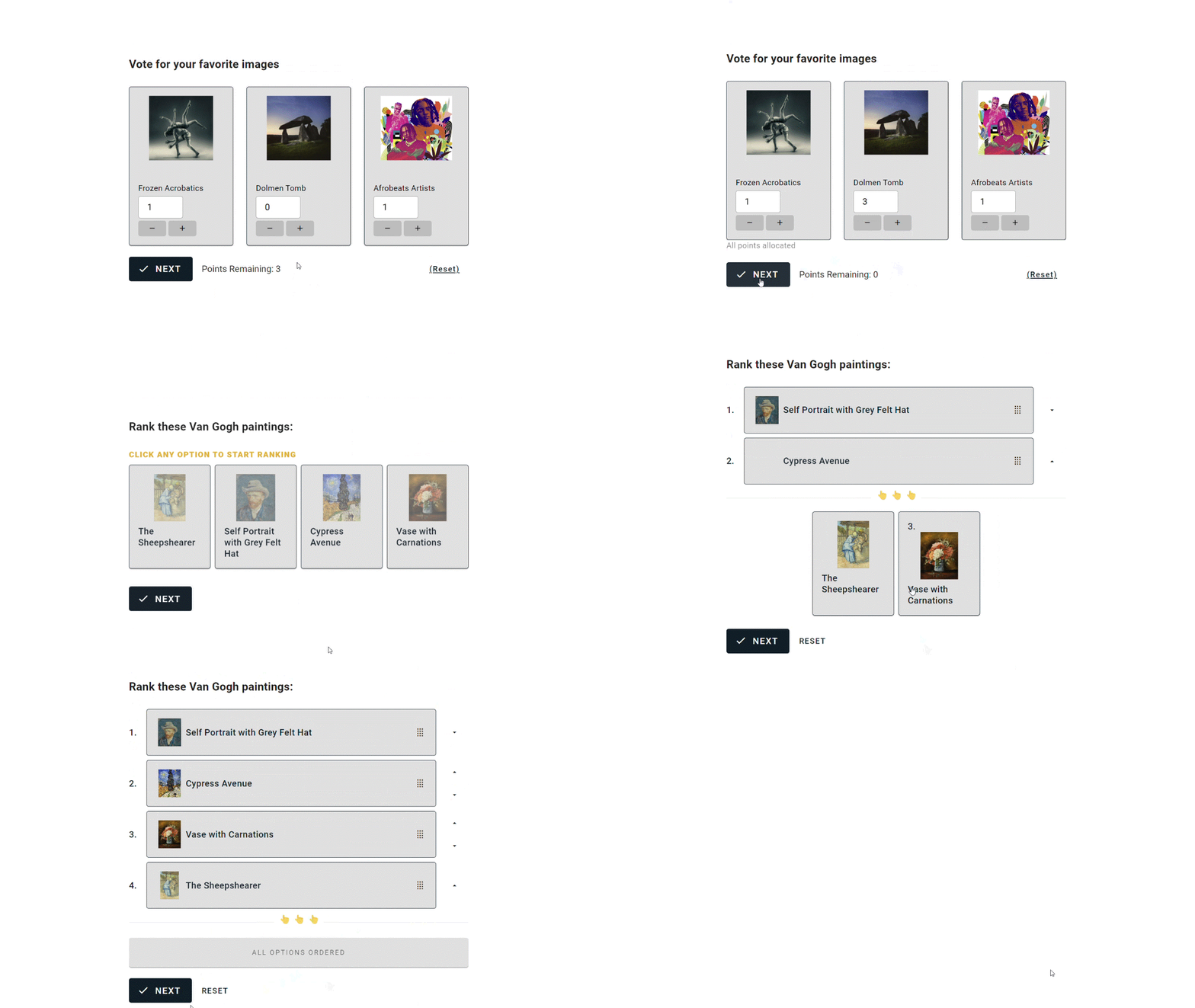
We previously had a standalone block type called Image Rank, which showed participants two options at a time using the same format as Pair Rank. Now images can be added to all block types! Just click the "image+" icon and upload your images to Order Rank, Points Rank, Best/Worst Rank, etc. Each block type comes with a second survey design that it will switch to if you add images to help make the voting process as easy and smooooooth as possible
— — —
2. Hero Images
Every question now also supports a "hero image" — a large image that appears above your question text.

— — —
3. Unique Links
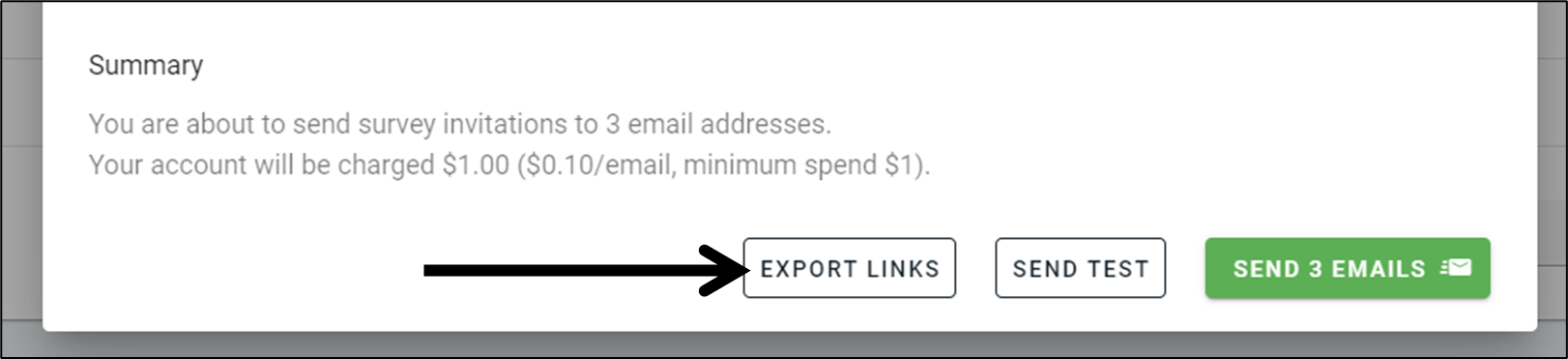
Unique Links let you (a) automatically associate a participant's email address against their participant profile on OpinionX, and/or (b) distribute survey links to participants that can only be used once before expiring. Previously, the only way to use Unique Links was by uploading a list of email addresses and using the Email Invites feature.
Now, you can download the list of Unique Links and distribute them however you'd like. You can find the "Export Links" button in the popup that appears when you click the "Configure Invites" button. There is no fee per link like how there is for Email Invites.
— — —
4. Usability Updates
You can now add line breaks to any text field. This makes it way easier to have a clearer title/subtitle structure to your list of ranking options (example here!).
Header blocks are now left-aligned so that the survey experience is more consistent and so that bullet-point/numbered lists are easier to read.
Whenever participants click an image it will now expand to fullscreen mode for easier viewing.
The back button on the survey footer now has a "Back" text label so that it's clearer and easier to find.
We changed the UI for the "Other" box on Multiple Choice blocks so that it's much clearer for participants to understand how they can submit their answer and proceed to the next question.
Any hyperlinks in your survey will now automatically open in a new tab.
Refreshing the survey no longer sends you to a broken blank screen.
Fixed issues that was causing the Survey Participants table to not show filtered results when segmentation analysis was active.
Fixed an error with the transition between the Welcome Page and first survey block.
You can now drag and rearrange the order of options during Points Rank setup.
Made the "Click any option to start ranking" prompt on Order Rank clearer and added scrollable whitespace for participants on smartphones.
Fixed a bug that caused the survey components to lost interactivity if you voted too fast many times.
The Multiple Choice results graph tooltips (boxes that appear when you hover over them) now show the full text of each option.
Fixed an issue that caused the Segments Tab to crash if some blocks had no data yet.
Made design changes to the Welcome and Finish Pages, making it easier to read the subtitle text.
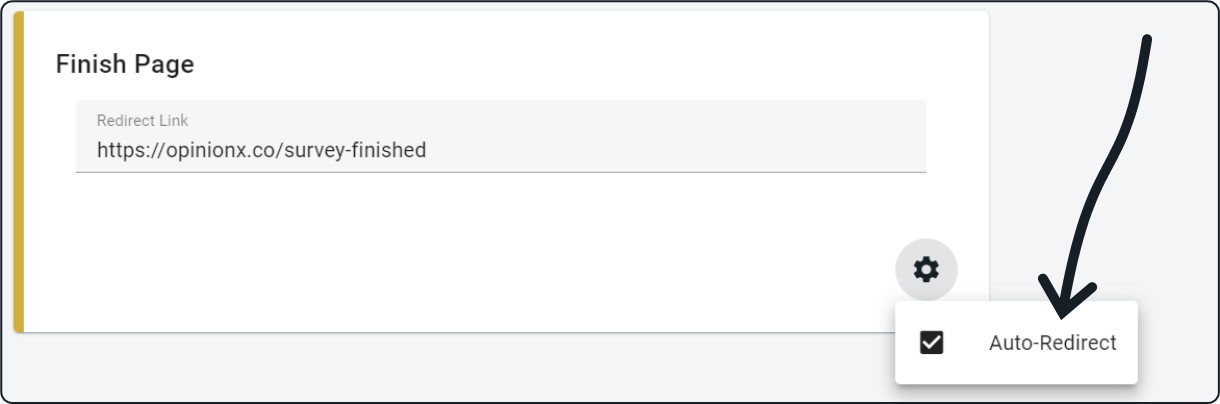
The auto-redirect option is now better integrated into the Finish Page's setup UI so that it's easier for users to figure out how to switch between a static page or a redirect link.
Text is now highlighted automatically when you add new options to any block so that you can instantly start typing to add your preferred text.
The Rating Scale block now has two separate labels so that you can better position text like "Very Bad / Very Good" alongside their corresponding numbers.
The "Custom Points" configuration box is now visible all the time on the Points Rank setup block.
The Compare Tab columns now sort data when you click the column title.
You can now use survey branching on Multiple Choice questions if a participant hits the "Other" option.
And +10 other small changes to make OpinionX easier, smoother, and more powerful to use
New Block Type → Profile Rank (aka Conjoint Analysis)
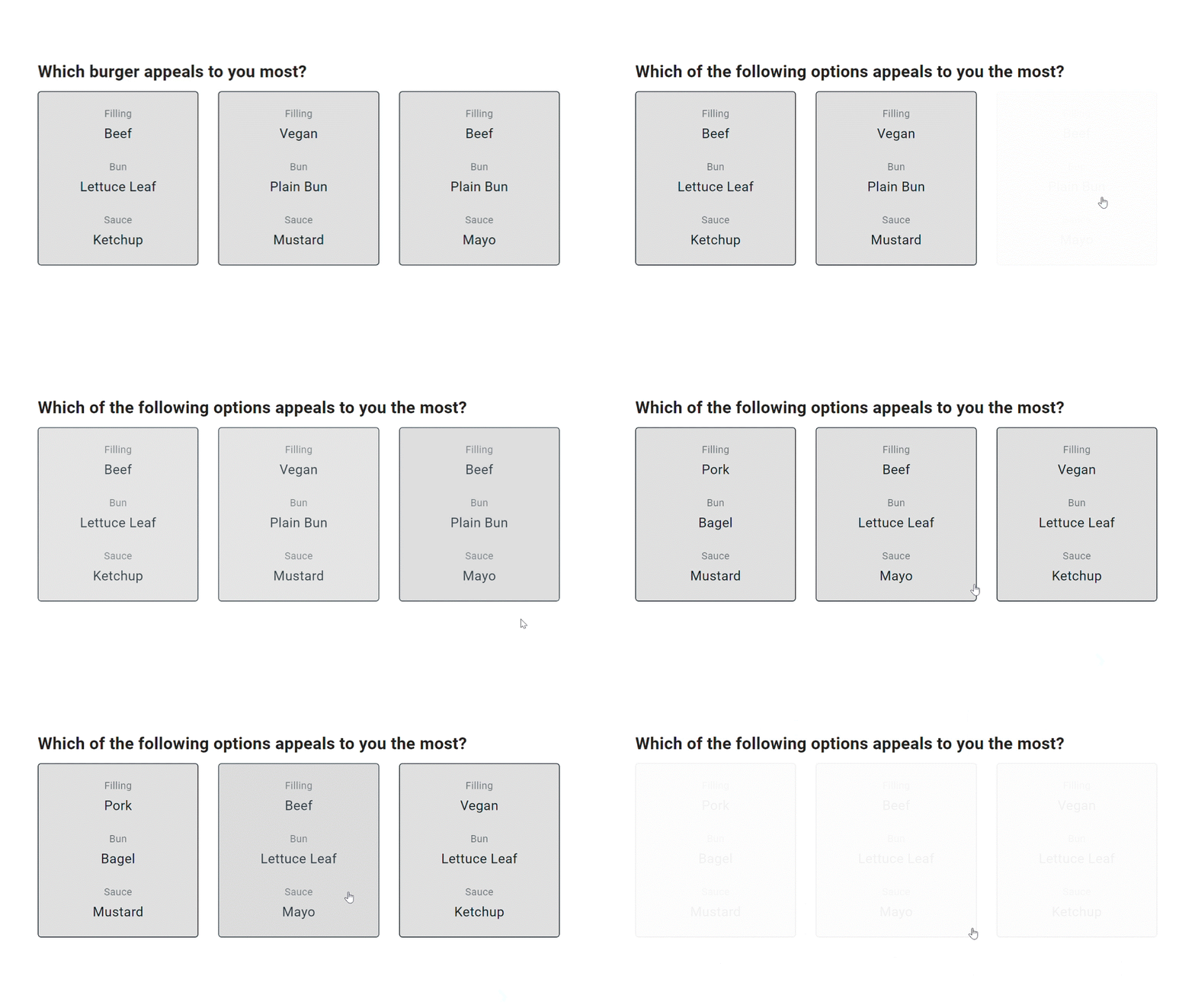
You can now create Conjoint Analysis surveys for free on OpinionX!
Conjoint Analysis is a research method that measures which features or components of an offering are viewed as most important by customers. It is most popularly used for market research and pricing research.
— — —
Profile Rank is quite different to any of OpinionX's other ranking formats. Instead of voting on individual options, Profile Rank shows participants voting cards called "profiles" that each contain multiple variables (categories and options). The categories are the same across all the profiles but the options shown under each category will vary. By tracking which profiles participants pick most, Profile Rank can tell you which categories and options have the biggest influence on people's decisions.
As seen in the results screenshot below, Profile Rank will rank the importance of the categories and the relative impact that each option has on the participant's profile choices:

New MaxDiff Analysis (Best/Worst Rank) + Participant Editing
New Block Type → Best/Worst Rank
You can now create MaxDiff Analysis surveys on OpinionX for FREE! This morning, we added a new question type called "Best/Worst Rank" which asks participants to pick the best and worst option from a shortlist of your ranking choices a number of times.
Free tier users can run MaxDiff surveys that show 3 options per set, with any number of sets (hint: use our built-in calculator to calculate the right MaxDiff configuration!). Customers on the Ask tier or higher can customize the number of options per set and the ranking labels.

--
New Analysis Feature → Participant Edits
Now available to all Analyze and Accelerate workspaces, Participant Edits lets you manually edit data on the Participants Tab. Limited to just Identify, Multiple Choice, and Rating Scale blocks, this new functionality lets you add data you already know about your participants instead of having to ask it during the survey.
My favorite way to use this new feature is to add more ways to segment participants after the survey has ended. I add a new Multiple Choice block to the survey and manually tag users into groups on the Participants Tab :)

--
Current/New Tab for Finish Page
Customers on the Ask tier or higher can now choose whether the redirect link on their survey finish page should open on a new tab or the same tab.

Crosstab Analysis + Updating The Order Rank Formula
Crosstab Analysis
The Segments Tab now lets you cross-tabulate results from Multiple Choice and Rating Scale questions. This means that OpinionX now offers automated crosstab analysis as well as segmentation analysis.
There's no setup required to use these features — if your survey has any Multiple Choice or Rating Scale questions, then the crosstab tables will appear automatically on your Segments Tab. All you have to do is pick which participant segments you want to include and the crosstab will calculate itself in seconds.

Crosstabs on OpinionX should be read vertically where each column adds up to 100%, whereas the rows act as the analysis variable. For example in the screenshot above, 58% of managers that only have 1 direct report have been with the company for less than 1 year.
--
Order Rank Scoring Update
We rolled out a minor update to the formula used to calculate Order Rank results this morning, so some users may notice small changes to the scores on their Order Rank surveys. The short explanation is that the Dowdall Count formula now includes unranked positions when calculating the average score for each option. If you want to know more about this change, I've included a more detailed explanation below :)
OpinionX uses a formula called the "Dowdall Count" to turn ranked choice voting into numerical scores. Each time an option is ranked, it gets points using the formula 100/rank, for example ranking an option as 4th will give it 100/4 = 25 points. The benefit of the Dowdall Count method is that it allows each participant to rank a different amount of options without any negative impact on their influence over the final results, so survey creators can give participants flexibility to only include options that are relevant to them without setting a hard limit or forcing participants to rank all the options (unlikely almost all other Borda Count scoring methods used on other survey tools). When we moved to the Dowdall Count method for calculating Order Rank results back in April 2023, we decided that the scoring formula should only include ranked positions when calculating the average score and not any exclusions. Today's update to the scoring formula changes this by including any instances where an option is "unranked" in the calculation of its average score (ie. zeros from unranked submissions are now counted towards the option's average score). The main benefit of this is for surveys that limit ranking to a subset of the total options, like saying "Rank only your top 5 from the list below". We've rolled this update out to all past and future surveys using the Dowdall Count formula on OpinionX, so some users might notice minor changes to the scores of their previous surveys which may now appear to have slightly lower numbers than previously. Overall, our analysis has found that few Order Rank surveys created in the past year will see actual changes to their ranked results due to this update.
Analysis Tab Improvements
Our first batch of product updates for April 2024
---
Usability Improvements for the Segments, Participants, and Compare Tabs
The "Difference" button switches the view on the Segments Tab from the overall ranking scores for each segment to the difference between that score and all other participants, helping you quickly spot the segments with the most uncommon opinions compared to everyone else.
The table header now includes the number of participants in the segment, shown inside square brackets like [4], so that you know how large your sample size is without having to check the Overview page.
You can now load more than 20 segments without the page crashing.
When you first load the Segments Tab, your Saved Segments will now load by default as one of the first five segments. In the dropdown menu for selecting which groups to display on the Segments Tab, the first option is now "Choose from your Saved Segments".
We've made the color "pills" for segment scores bigger so that they are quicker to interpret at a glance.
The column headers are now always double rowed, showing the question type on the top row and the options on the second row.
We've added better formatting, truncation, and tooltips so that the table headers remain manageable while still being easy to interpret.
When you sort a column on the Participant Tab, the blank results no longer show up on top.
Text Response submissions are now appearing correctly on the Participants Tab, instead of showing blanks incorrectly for some surveys.
New explainer video for Free users that shows what the Compare Tab is and how it works.
New empty state on the Compare Tab with an animated GIF, written explanation, and link to the Knowledge Base to help more users understand how to use this page.
We switched the Score and Rank columns to make the combined results tables for ranking blocks more intuitive to understand.
Other Improvements
We've added a bunch of new "Help" buttons throughout the results side of the product which link to explainer guides on the OpinionX Knowledge Base.
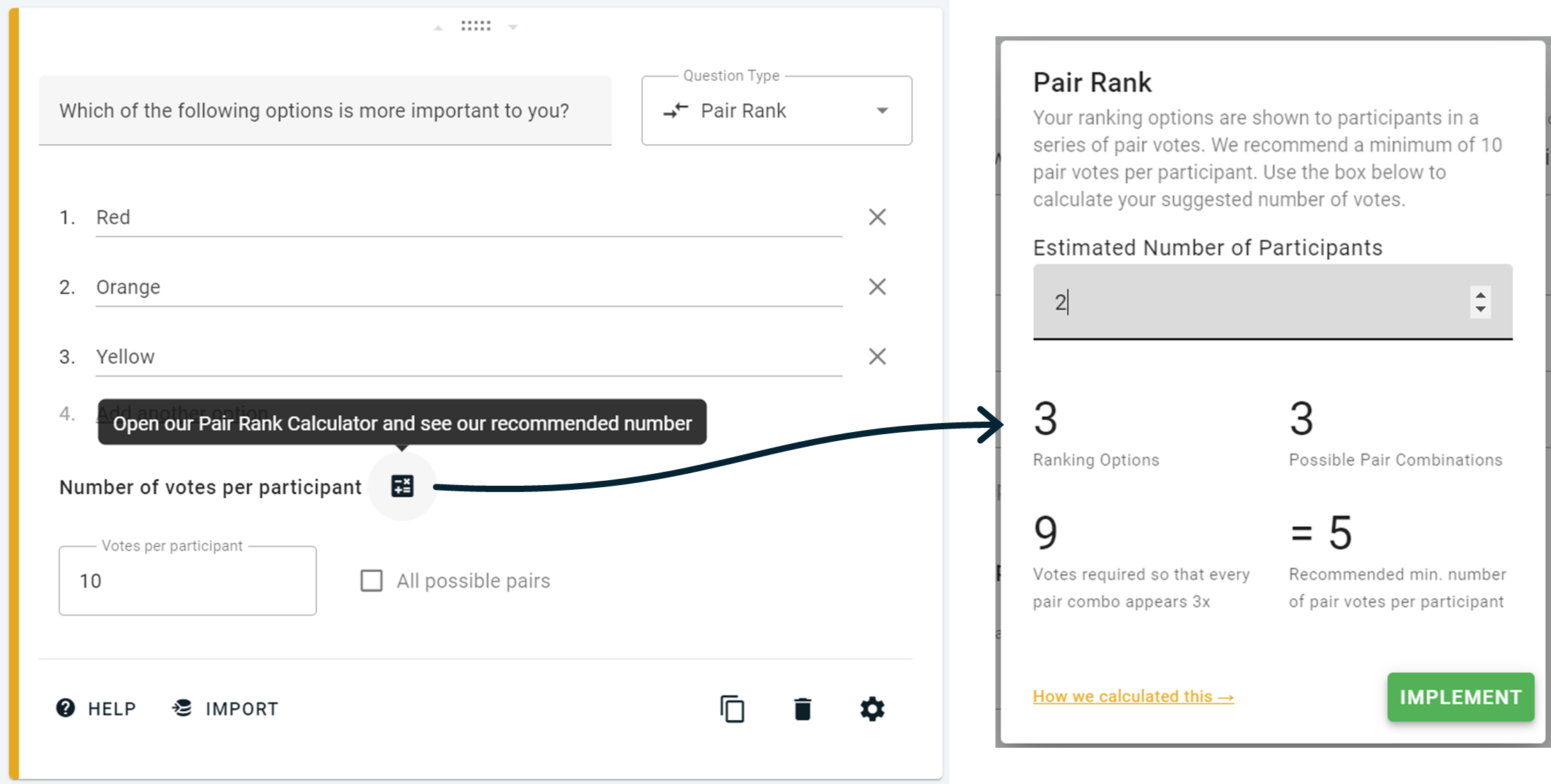
We've updated the Pair Rank Calculator, which now has a handy "Implement" button so that you can easily update your number of pair votes per participant in just one click.
We've added more info and entry points to Saved Segments to help people figure out how this functionality works and why they should try it.
Fixed an bug that caused the "All possible pairs" checkbox to appear enabled for new Pair Rank blocks, even though it wasn't.
There's now a double confirmation required to delete saved segments to prevent accidental data loss.
You can now copy your survey link from your workspace homepage by clicking the "actions" triple dot and choosing the "Share" option.
---
Pair Rank Calculator:
March 2024 Updates: "Other" for Multiple Choice + more...
"Other" for Multiple Choice
You can now include an "Other" option on your Multiple Choice question which lets respondents submit their own answer. This feature has been requested a LOT over the past few months!

More Updates!
We've made Order Rank easier to use for participants. There's no "ranking zone" at the start of the question anymore, they can just click any option to start ranking or drag the first set of options into order to kick things off.
Agreement Rank has had a makeover — the text options are now wrapped inside a clear ranking card so that its easier for participants to see what they're voting on.
Points Rank has also had a couple of changes: (1) The "Points Remaining" now appears both at the top and bottom of the list when it's too long to view on one screen, (2) there's now a "Reset" button to wipe your votes back to zero so you can start over, and (3) we've cleaned up some of the edge cases, such as allowing participants to add minus points or type a number larger than their remaining points.
We've extended the character count for ranking options from 480 characters to 1000 characters.
Rich text changes, such as making text bold, no longer adds additional characters towards the char limit.
There's now a "Setup Guide" button visible during survey setup that shows a 60 second video explaining how to create an OpinionX survey.
Users that sign-up via their Google account now get the full product onboarding experience.
There's a new "Help" button on each table shown on the Results Overview tab, with links to explainer guides that describe the scoring formulas for each ranking block (as well as a popup GIF explaining the Order Rank scoring formula, which was previously the least understood by OpinionX users).
The Intercom messenger is back in the product again after a short MIA / hiatus period
Various other minor bug fixes, stability improvements, and better guardrails to prevent things breaking in future :)

Rating Scales + Rich Text Editing
Rating Scale
Rating Scale is a new question type for measuring things like satisfaction, importance, or preference. The results from this numerical scale work seamlessly with segmentation, just like Multiple Choice questions — pick any number range to filter, compare, or segment your participants using OpinionX’s analysis features.

--
Rich Text
You can now enhance and customize your survey text with bold, italics, underline, s̶t̶r̶i̶k̶e̶t̶h̶r̶o̶u̶g̶h̶, bullet point lists, numbered lists, hyperlinks, and line breaks! Highlight a section of text on any block type to make the editing panel appear.

--
Help us decide what to build in Q2 2024
We've opened our Q2 2024 feature voting survey — vote for the ideas you'd most like to see built and submit feature ideas for us to add to the list. Voting will be open until the end of March.
Skip Welcome Page + Auto-Redirects
Skip Welcome Page
We've added a new setting to the survey welcome page that allows the page to be immediately skipped when loaded. This is particularly useful for embedded surveys (like our roadmap input survey!) where you want to instantly show interactive voting rather than an information page. Available to users on the Ask plan or higher.

Auto-Redirect Participants on Survey Completion
Similarly, you can now skip the Finish Page too and automatically redirect your participants an external URL instead. Custom finish pages (on OpinionX or redirect links) are available to users on the Ask plan or higher.
Misc
We also fixed a bug that was impacting users' ability to use the "Select Segments" feature on the Segments Tab to pick which participants they wanted to see on the heatmap matrix.
---
PS. We want to know what you need added or improved on OpinionX → help us decide by voting in our Q2 roadmap prioritization survey.
Single-Use Survey Links: Prevent participants from completing your survey multiple times
Single-Use Links
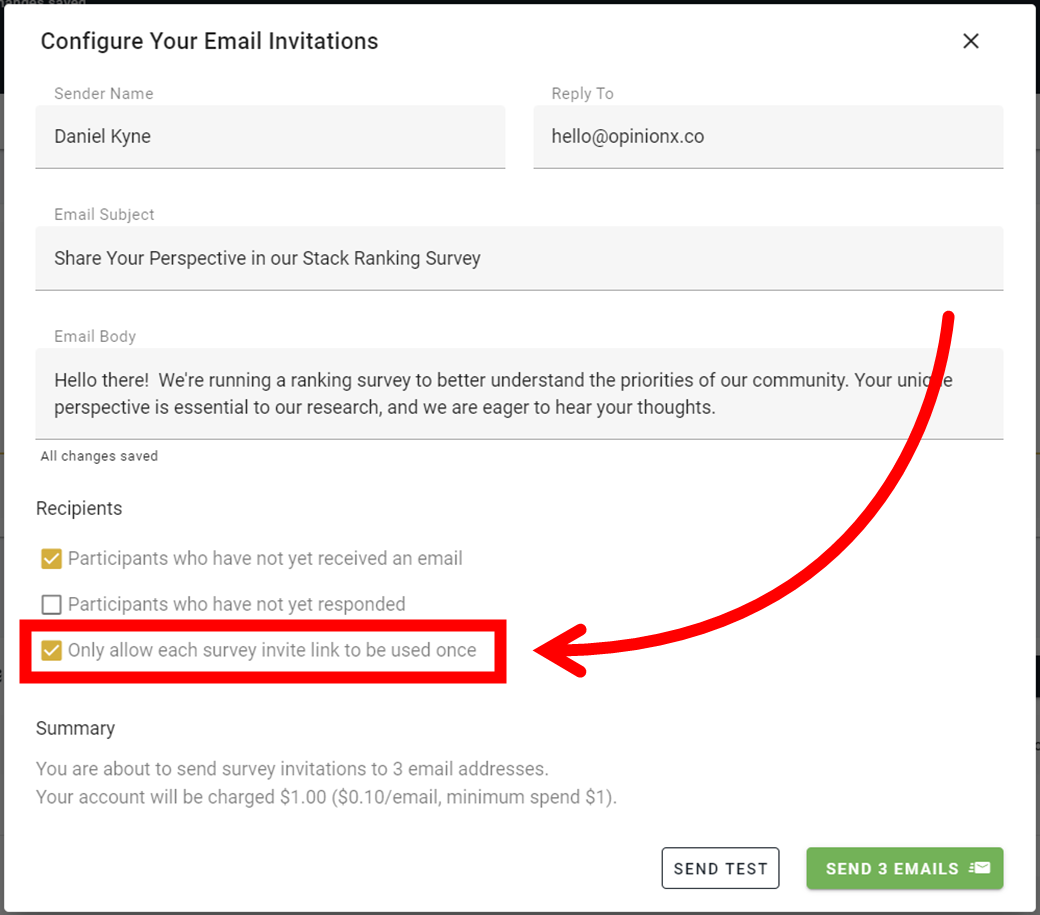
For a long time, users have been asking for ways to prevent participants from making duplicate submissions on their OpinionX surveys. In this update, we've added a "single-use" option to Unique Links. This allows you to distribute a set of links to participants that can each only be used one time.
If someone tries to access a unique link set to single-use that has already been associated against a participant, they will reach a dead-end screen that informs them that the link is no longer valid.
Other Updates
You can now set Multiple Choice questions to show only one option on each line rather than horizontally stacking them. When you're setting up a Multiple Choice question, hit the settings cog () and enable the "Vertically Oriented" checkbox.
When using the Guest Link to share your results with people who aren't OpinionX users, you can now hide all identifiable participant data (anything collected via Identify survey questions).
Increased the character limit for Text Response submissions by participants from 480 characters to 5000 characters.
Moved the "Compare Segments" feature to its own analysis tab.
Updated the design for the "Invite Teammates" popup that appears on your workspace homepage.
Fixed an issue that was causing data display issues on image rank blocks when you deleted individual participants from a survey.
Added more links throughout the product to support documents and guides on our Knowledge Base.
Fixed an issue that had broken the "actions" button on the workspace homepage.
Minor UI improvements across some survey-facing components.
Fixed how Points Rank scores appeared in the "Rank Change By Segment" section of the Opinion Details window.