
Gabor Granger tools: 6 platforms compared
Gabor Granger is a pricing survey that shows each person one price and asks if they'd buy at it. A yes brings a higher price, and a no brings a lower one.
Six well-known survey platforms offer Gabor Granger, but they don't all work the same way. They pick prices differently, and some skip steps that protect your results. This guide compares the six Gabor Granger tools on those differences, then on how each one charges you.
What should you check before choosing a Gabor Granger tool?
Check these features when deciding which tool to use for your Gabor Granger surveys, because having them changes the robustness of your results, the respondent experience, and how complex survey setup will be for you.
Before going further, if you want to learn more about Gabor Granger before considering which tool to use, check out our guide to Gabor Granger survey research.
1. Built-in question or template. Some tools have a built-in Gabor Granger question. You type in your price range and the tool handles the rest. Other tools give you a basic template made with brittle branching logic that will limit your flexibility and leave it prone to breaking. With 15 prices, a basic template needs 15 separate questions and up to 30 branching rules, all checked by hand before you can confidently launch your survey. I strongly suggest using a tool with a purpose-built Gabor Granger method, however if you plan to go the DIY approach, check out our free Google Sheets template for creating the results chart (but note that this means forfeiting the points covered in sections 3 and 5 below).
2. How the next price is picked. After each answer, the tool picks the next price in one of three ways:
Sequential: Moves one price up or down. With 15 prices, that can take 15 questions. For example, voting ‘Yes’ each time will bring you from €10 to €15, then €20, then €25, etc. until you say no. This is the most common selection method for Gabor Granger, but it is very inefficient and results in respondents each voting on a lot of prices.
Random: Jumps to any random price that could still be the answer. In practice, this is no more efficient than sequential ordering.
Binary search: Proceeds to the middle of the remaining valid prices, meaning every vote eliminates half of all possible prices. A Gabor Granger survey with 15 prices will take at most 5 votes to complete, while a survey with 81 prices means just 7 or 8 votes per person. This is by far the most efficient method for Gabor Granger ordering, and OpinionX is the only survey tool that offers this instead of sequential or random ordering.
Fewer questions lets you test more prices or include more questions around your Gabor Granger survey. Our guide ‘How a Gabor Granger survey picks the next price’ explains the difference between the three selection methods in more detail.
3. A random first price. The first price someone sees pulls their later answers towards it (Tversky and Kahneman, Science, 1974). One study found this with a yes-or-no question at a random price (Ariely, Loewenstein and Prelec, Quarterly Journal of Economics, 2003). If everyone starts at $30, every answer leans towards $30, while a random first price spreads that pull across people. The tool you pick should have a reasonable approach to first-price randomisation.
4. Automatic charts. While the Gabor Granger results are centred around an easy-to-understand line chart, creating that chart from raw survey data is no easy task. Pick a tool that not only plots this chart for you, but also allows you to filter and compare different groups. Our guide ‘How to read a Gabor Granger chart’ explains the Gabor Granger results format in more detail.
5. A prescreener. This first question before jumping into Yes/No voting asks whether someone would ever buy the product at all, and people who say no skip past the price voting. Without it, they end up saying no to every price, pulling your demand forecasts artificially lower without differentiating between ‘no interest’ and ‘price sensitive’ groups.
6. Segments. A segment is a group of people you want to view in isolation or compare against a different group. One very common segmentation approach is to compare people based on which pricing plan they’re currently on, such as Free vs Premium vs Enterprise. If these groups would each be willing to pay $5, $15 and $40, but the average result mixes them all together as one price, then you’re missing out on vital information. You should pick a survey platform that allows you to easily split your Gabor Granger results by group. Our guide ‘How to segment Gabor Granger results’ shows how this works step by step.
How does billing change what a study costs?
The six Gabor Granger survey tools charge in different ways.
Team plan. You pay one price a year, however many people use it. OpinionX's Analyze plan is $900 a year, with unlimited researcher seats, unlimited surveys, and unlimited participants per survey. Similarly, Conjointly's Professional plan costs $2895 per year for a team as of October 2026. On either plan, adding a fifth seat to a team of 4 researchers costs nothing extra.
Per user. You pay for each researcher. SurveyKing's Pro plan charges per researcher seat. SurveySparrow's Research Starter plan includes 3 seats, and more researchers cost extra.
Response limit. You can only collect a set number of answers a year. Qualtrics's self-serve Strategic Research plan costs $5040 per year for 1000 responses, shared by everyone on the account across all surveys. Qualtrics suggests about 300 people for a Gabor Granger study, so one study uses 30% of your limit and three studies use 90%. Once you hit 1000 participants total, you’re forced into a $30,000 per year Qualtrics enterprise contract.
Most teams run more than one pricing study per year, so add up the cost of your second and third study as well as whether you’ll want to share access to the platform across many researchers on your team. Our sample size calculator shows how many people each study needs.
What do the six Gabor Granger tools offer?
1. OpinionX
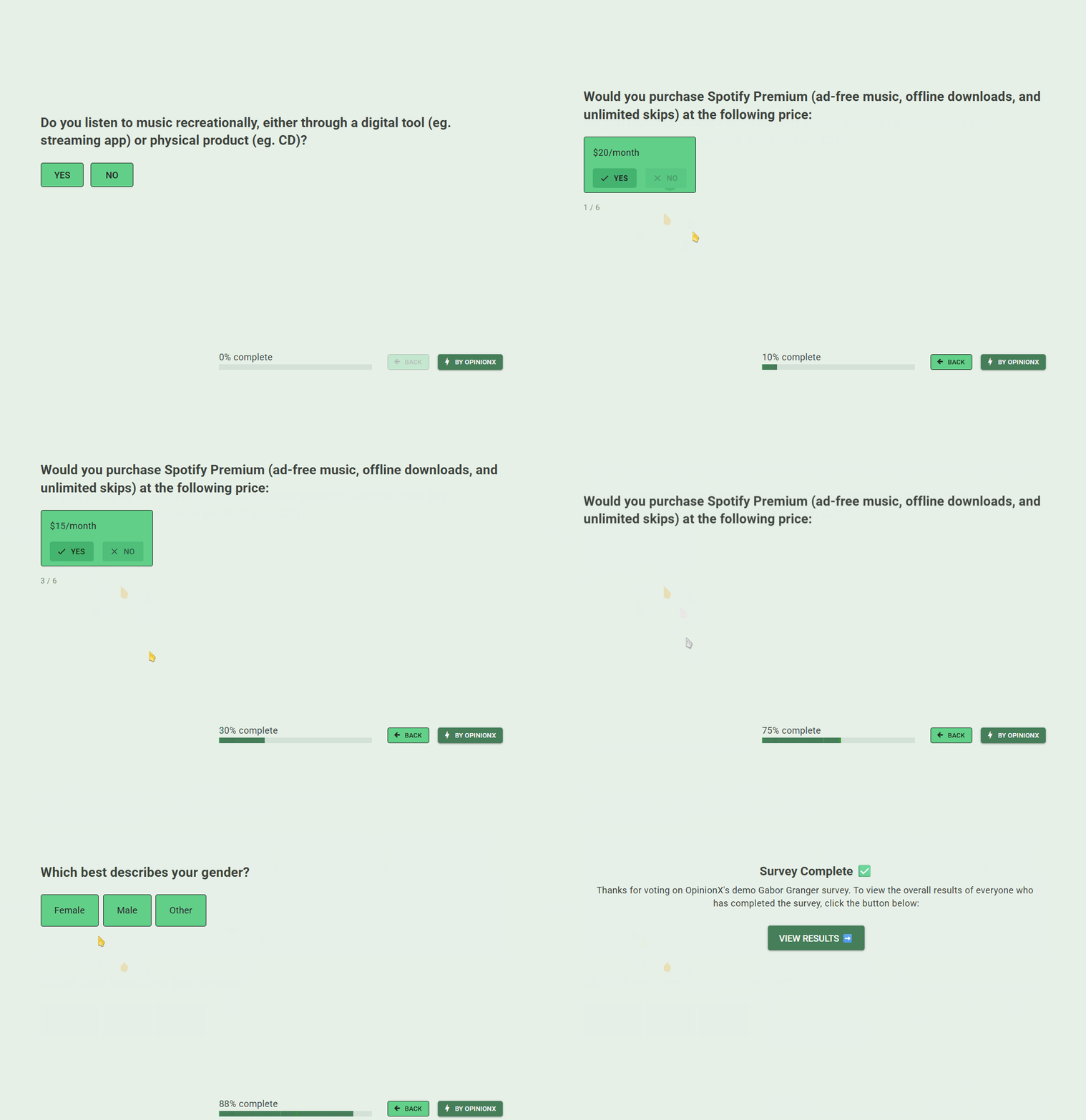
OpinionX has a purpose-built Gabor Granger question type. It picks the next price by binary search, so even 100 prices take just 8 questions at most, and it picks each person's first price at random from the middle-third of your price range. It has an optional prescreener to help you measure customer interest, and you can split every result by segment with one simple click. Two warning figures, No Ceiling and All Rejected, tell you how many people voted past the minimum and maximum price you tested, helping you identify if you need an expanded price range.
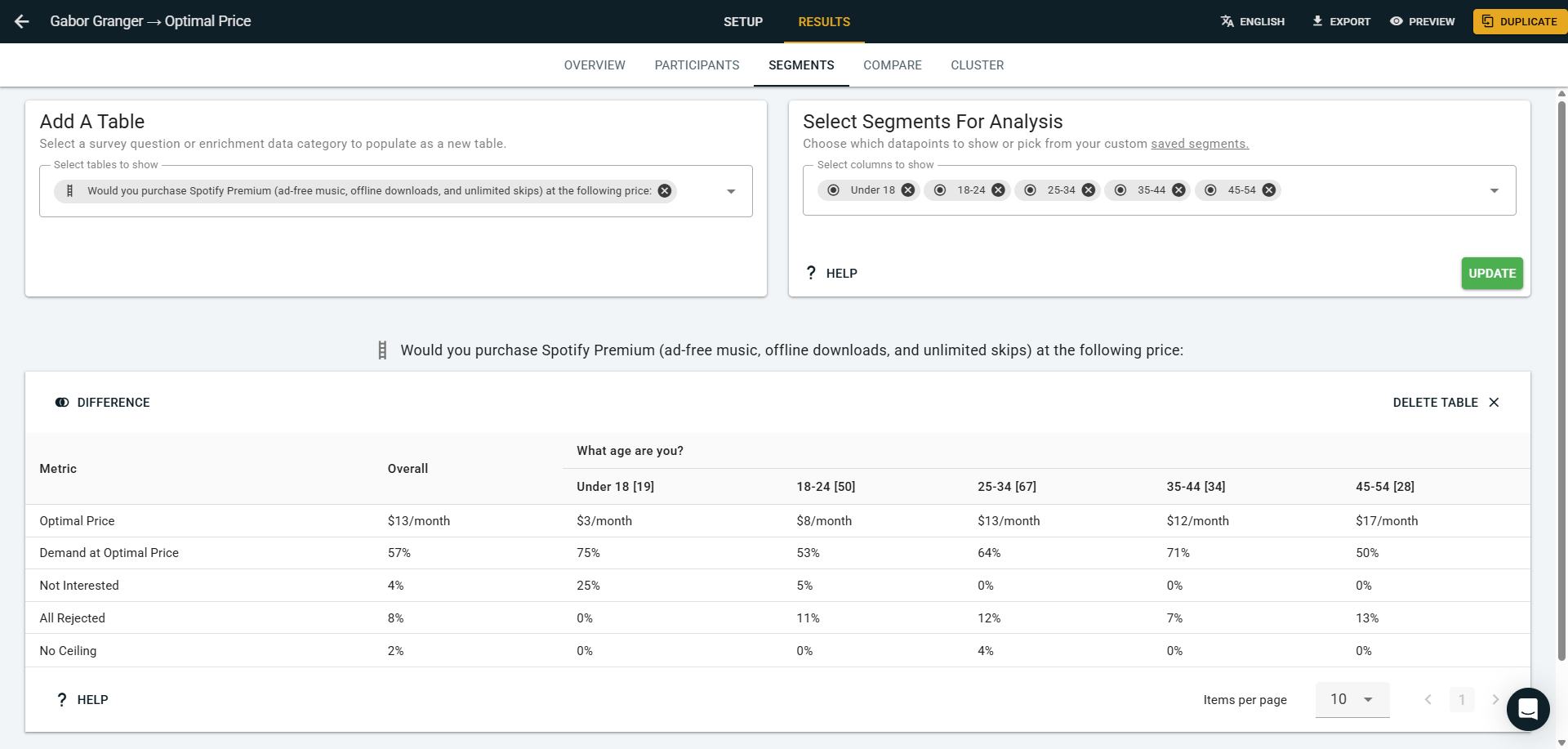
The catch: OpinionX has no option to show significance testing data, which checks whether a difference could be down to chance, and no data weighting, which adjusts results so your sample matches your market.
💰 Price: Free tier offers Gabor Granger surveys for up to 25 participants per survey. The $900 per year Analyze tier unlocks unlimited participants. All tiers include unlimited researcher seats, collaboration, and customer support.
🔍 Trial: Free tier with every method, up to 25 participants per survey.
☑️ Conclusion: OpinionX is the only Gabor Granger survey tool using binary search, so it requires fewer votes per participant. It treats Gabor Granger as a flexible question type that you can mix together with methods like conjoint and MaxDiff analysis in one survey. Pricing is flat, allowing you to expand usage or team size without hidden costs hitting you later on. It is frequently noted as having an intuitive and easy to use interface, especially for Gabor Granger research.
2. Conjointly
Conjointly has a built-in Gabor Granger study. It allows for a prescreener, which it calls a qualifying question. Conjointly offers data weighting on every plan, even the free one.
The catch: Each person starts at a random price, and after each answer it jumps to a random higher or lower price, which is less efficient than OpinionX’s binary search method and requires significantly more votes per person, affecting your survey’s completion rate. Additionally, Gabor Granger surveys cannot be mixed on Conjointly surveys with other advanced methods like Van Westendorp, conjoint analysis, or MaxDiff.
💰 Price: $2895 per year for a team on Professional, with no user limit (checked 23 September 2026).
🔍 Trial: free Basic plan, which allows up to 20 responses.
☑️ Conclusion: Significantly more expensive than OpinionX for similar functionality, Conjointly only really makes sense if you have a firm requirement for data weighting functionality for your Gabor Granger survey.
3. QuestionPro
QuestionPro has a built-in Gabor Granger question, and the next price can be picked either through sequential or random selection.
The catch: everyone starts on the same first price. By default it's the middle of your prices, so any pull from that first price pushes every answer the same way. This is generally considered a material issue in Gabor Granger research, as it introduces bias to your results.
💰 Price: The Research Suite plan starts from $10,000 per year for up to 10 users.
🔍 Trial: Gabor Granger is not available on any free tier or free trial on QuestionPro. You must contact sales to arrange a commercial demo.
☑️ Conclusion: Only worth considering if your company already has a subscription for QuestionPro’s Research Suite enterprise plan.
4. Qualtrics
Qualtrics offers Gabor Granger as a basic template in its marketplace. The branching logic is prebuilt, and it makes shareable PDF reports.
The catch: Qualtrics’ Gabor Granger basic template needs a Research Core licence, and the self-serve plan doesn't list Gabor Granger. The results are a static PDF with no analysis features. The basic template limits customization options and is prone to breaking if you edit the wrong detail.
💰 Price: Running Gabor Granger surveys on Qualtrics, even with the basic template version, requires an enterprise contract with a median starting price of $30,000 per year (checked 23 September 2026).
🔍 Trial: Gabor Granger is not included in Qualtrics’ self-serve Strategic Research plan.
☑️ Conclusion: If your company already has an enterprise contract for Qualtrics and you do not plan to engage a large population of respondents, it is worth trying.
5. SurveyKing
SurveyKing has a built-in Gabor Granger question, and both the first price and each subsequent price are selected at random.
The catch: its guide suggests adding your own screening questions, and its pricing page lists segment reports as a Custom plan feature.
💰 Price: Pro plan costs $228 per research per year (checked 23 September 2026).
🔍 Trial: free plan allows 2 surveys maximum and is limited to just 3 prices in Gabor Granger, meaning it doesn’t allow you to run a full test of the survey before choosing whether to upgrade.
☑️ Conclusion: SurveyKing is a low-cost option for one researcher who doesn't need segmentation analysis, efficient selection like binary search, or extensive survey customisation.
6. SurveySparrow
SurveySparrow has a built-in Gabor Granger question inside Research, a separate SurveySparrow product. The next price can be sequential or random, and its Smart Filters let you split results by segment.
The catch: its own guide tests $100 to $500 and finds the highest revenue at $500, the top price. That usually means the real answer is higher, and the guide doesn't say it. Our guide How to choose your Gabor Granger price points explains how to spot that.
💰 Price: Research Starter costs $2388 per year for up to 3 researchers max (checked 23 September 2026).
🔍 Trial: 14-day trial, limited to 50 responses.
☑️ Conclusion: Worth a look if you already use SurveySparrow. It shows security certifications (SOC 2, ISO and HIPAA). The catch is that Research Starter lets only one research survey collect responses at a time. You can build as many as you like, but to run a second study at once, you have to close the first or upgrade to Research Advanced.
When not to use Gabor Granger tools
Gabor Granger tools find the best price for one product, so some questions need another method:
If you have no idea where the price should be, run a Van Westendorp study first to find a range.
Buyers will compare your price with a competitor's. Use conjoint analysis, which puts competitors’ price and features in comparison to yours and forces people to consider the trade-offs.
If you can test live prices on paying customers, do that instead. People say in surveys that they'd pay about 21% more than they really do (Schmidt and Bijmolt, Journal of the Academy of Marketing Science, 2020).
Gabor Granger tools compared
🟢 means yes, 🟡 means partly or not documented, and 🔴 means no. "Not documented" means the tool's own pages, checked on 23 September 2026, don't say either way.
| Tool | Built-in question | How the next price is picked | Random first price | Prescreener | Segments | Price |
|---|---|---|---|---|---|---|
| OpinionX | 🟢 Built in | 🟢 Binary search | 🟢 Middle-third random | 🟢 Yes | 🟢 Yes | 🟢 Free up to 25 participants, $900 a year for unlimited |
| Conjointly | 🟢 Built in | 🟡 Random | 🟡 Random | 🟢 Yes | 🟢 Yes | 🟡 $2895 per year, free up to 20 responses |
| QuestionPro | 🟢 Built in | 🟡 Sequential or random | 🔴 No, same for everyone | 🟡 Not documented | 🟡 Not documented | 🔴 Enterprise sales quote only |
| Qualtrics | 🟡 Template | 🟡 Not documented | 🟡 Not documented | 🟡 Not documented | 🟡 Not documented | 🔴 Enterprise sales quote only |
| SurveyKing | 🟢 Built in | 🟡 Random | 🟡 Random | 🔴 Add your own | 🟡 Custom plan | 🟢 $228 per user per year |
| SurveySparrow | 🟢 Built in | 🟡 Sequential or random | 🟡 Not documented | 🟡 Not documented | 🟢 Yes | 🟡 $2388 per year, max 3 users |
Which Gabor Granger tool should you pick?
The best all-round platform for Gabor Granger surveys is OpinionX. It uses binary search to offer the most efficient voting model. It is easy to set up, segmentation filters are simple to run, analysis charts are fully automated, and it is the most affordable tool for research teams.
If you need to manually alter the weighting of your results, pick Conjointly.
If your company already pays for Qualtrics, QuestionPro or SurveySparrow, give it a try for Gabor Granger while keeping the significant limitations in mind. Otherwise, these tools require lengthy enterprise sales processes and lack a testable free version.
If you're one researcher who wants a single basic Gabor Granger without much customization, SurveyKing's Pro plan is worth considering, but comes with inefficient randomised voting, no segmentation analysis, and lacks team collaboration features.
For a similar breakdown for other advanced market research methods, see our review of the most popular conjoint analysis tools and MaxDiff survey platforms.
